โจ๏ธ Elevate your workspace with comfort and wireless freedom โ type like a pro, feel like a boss.
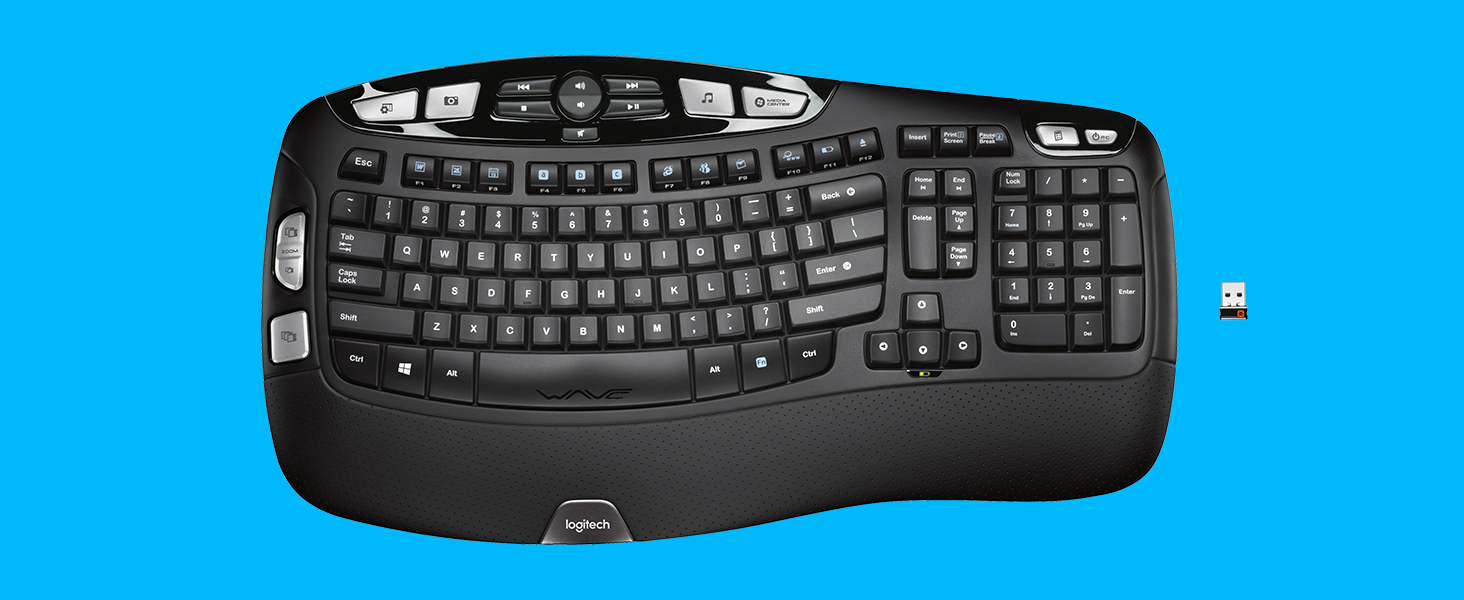
The Logitech K350 Wireless Wave Keyboard features a scientifically designed curved layout that promotes natural hand positioning and reduces wrist strain. Equipped with a cushioned palm rest and a robust 3-year battery life, it ensures comfort and reliability for heavy users. Its Unifying receiver allows seamless wireless connection to multiple devices via a single USB dongle, eliminating clutter and connection issues. Ideal for professionals seeking ergonomic excellence and long-lasting performance in a sleek black design.


| ASIN | B002MMY4WY |
| Antenna Location | Office |
| Best Sellers Rank | #1,988 in Computer Keyboards |
| Brand | Logitech |
| Built-In Media | Keyboard, 2 AA batteries (pre-installed), Logitech Unifying receiver, Receiver extender cable, User documentation |
| Color | Black |
| Compatible Devices | Laptop, Personal Computer |
| Connectivity Technology | EOL |
| Customer Reviews | 4.6 out of 5 stars 26,100 Reviews |
| Global Trade Identification Number | 00097855060877 |
| Hand Orientation | Ambidextrous |
| Item Type Name | Keyboard |
| Item Weight | 1 kg |
| Keyboard Backlighting Color Support | Single Color |
| Keyboard Description | Wireless, Wave-shaped keyframe, Cushioned palm rest, Programmable F-keys, Connects via Logitech Unifying receiver Keyboard Description Wireless, Wave-shaped keyframe, Cushioned palm rest, Programmable F-keys, Connects via Logitech Unifying receiver See more |
| Keyboard Layout | QWERTY |
| Manufacturer | Logitech |
| Mfr Part Number | 920-001996 |
| Model Number | 920-001996 |
| Number of Batteries | 1 AA batteries required. (included) |
| Number of Keys | 120 |
| Operating System | Windows XP |
| Other Special Features of the Product | EOL |
| Power Source | Battery Powered |
| Special Feature | EOL |
| UPC | 097855060877 |
| Unit Count | 1 Count |
| Warranty Description | EOL - No Manufacturer Warranty |
J**I
PERFECT for work from home!
We've been working from home since 3/16/20. While we all have office laptops, my particular position means I can use my home desktop for nearly all my work. However, since my home computer was for "fun", I was simply using the rectangular, simple keyboard that came with it. Very quickly, my wrists let me know this was NOT ideal. So away to Amazon! After reading reviews and researching through other sources, I decided to give this keyboard a try, deciding that a "split" keyboard might end up being a little too difficult to adapt to. I am SO glad I did! The wave-form of the keys makes it VERY comfortable for your fingers! The built in wrist-rest helps alleviate stress on the base of your hands. Being able to lay it flat while still having comfort for both wrists and fingers is quite comfortable. The action of the keys is fabulous - not too sensitive (although moreso than my prior keyboard) but you also don't have to bang on the keys. It feels very natural. I haven't had cause to use all the functions yet, but those I have used perform perfectly. Only one drawback for me is that the home, delete, end, pg up, pg down keys are laid out a bit differently than I'm used to, but that's simply something I'll have to adjust to. I HIGHLY recommend this keyboard!! UPDATE: While I still love this keyboard, after less than a year (and really, I noticed this in November but didn't update at the time), the frequently used keys have lost their "paint". While I am a touch-typer, so this isn't a huge issue for me, when I DO need to look at the keyboard for a random one-off letter entry, it is a drawback because I don't actually consciously always remember where the V key or M key is. If you are a "hunt-n-peck" typist, you may want to see if there's a clear keyboard protector that will extend the longevity of the paint. Also, the different layout of the aforementioned "home" etc keys will make it tricky for you when you do need to use a "traditional" layout keyboard.
A**N
I bought this keyboard again, after finally wearing the first one out.
I originally purchased the Logitech K350 keyboard as part of a combo set with a M510 mouse on sale for $100 when I built my desktop computer system six years ago. During the time I've had it, I have put both it and the mouse through very heavy use on both my desktop and laptop computers. In fact, I used the keyboard so heavily that 9 letters had rubbed off of the keys quite some time ago, but it continued working and I type by touch, so that wasn't a problem for me. (It did give everyone else in the house trouble when then needed to hop onto my system though. lol.) That said, just recently keys started to stick pretty consistently and cleaning out the keyboard was no longer useful, so I knew it was time to replace it. I was delighted to see that the exact same keyboard now sells on Amazon for under $32 new, so I placed an order and received it today with free two-day prime shipping. Getting the wireless Logitech dongle already attached to my Windows 10 laptop to recognize the new keyboard was effortless once I opened the Logitech Unifying Software already installed on the system. I swapped my rechargeable batteries from the old keyboard into the new one and it is working flawlessly. The keys are smooth and responsive, just as I expected. Since I already have a working dongle from the original set that is still working great on the laptop, I will set the new one that came with this keyboard aside for use on my desktop computer... after I rebuild it. You see, the previous keyboard actually outlasted the motherboard on my desktop, by more than a year and it was technically still functional when I decided to replace it. That is one of the main reasons I didn't hesitate to buy it again. I should also point out that the M510 mouse that came as a part of the set with this keyboard 6 years ago is still working perfectly, so I bought the keyboard only as a replacement. The batteries in both devices last a long time and I have never had any issues with either the keyboard or mouse. When the mouse finally wears out, I fully expect to buy another one just like it, assuming that it is still available for sale new at a reasonable price. For me, both the keyboard and mouse, whether purchased separately or together in the set, are well worth the now very affordable price. I can recommend either or both without hesitation. They've served me well for years.
B**N
Highly Functional Quality Product. Near perfect!
This keyboard is great. It is comfortable and the keys have nice tactile feedback. Overall I would highly recommend this keyboard to anyone. I will list a few pros and cons. Pro: Highly functional: There are 7 keys with icons for their default function (IE: webcam button, Calendar button) but these can be changed to whatever function you want. Additionally, there are 12 Function keys ( accessed with an Fn Key + F# key) These also can be reassigned to your desired function. This includes; open a web page, keystroke, open an app, open a file or a folder. ( 2 function keys are dedicated to the battery status and eject button and can not be overwritten) Gamers: Keyboard software permits you to disable a few keys, including the Windows key! (Disable: Caps Lock, Windows Key, Scroll lock, Num lock and Insert) Sleep Key. Need to step away from your work. There is a dedicated sleep key. One press. (does not wake it up) It's ergonomic! It is very comfortable to type on this keyboard. It did not however improve my typing speed. Plug and play. (Note: you must download Logitech's setpoint software for advanced settings) but if you like the keyboard's functions as they are there is no installation required. 1 USB port to rule them all! Logitech Unify USB software allows you to pair up to 6 wireless devices to the USB receiver. Meaning you only have to use 1 USB port if you have other Logitech devices such as a mouse. (Keyboard is also offered in a bundle) Included wristguard! (non-removable) Texture. The way things feel is very important to me. The wrist guard has a nice soft leather feel kin to a nice steering wheel cover. The keys have light texturing to them also. The various buttons are a smooth texture. The use of various textures on the keyboard really makes it look premium also. Media Controls: Play/Pause/Stop/Volume Cons: Key sound: The keys have a very plastic clack to them with no clicky. This is obviously not a mechanical keyboard but there is a noticeably hollow, loose, plastic cheap-sounding noise to this keyboard. This is not a deal-breaker. It is quiet enough that it is not disruptive to the office or sleeping partner. Size: This is not a compact keyboard by any means. The wristguard is not removable. (19x10 inches) Not backlit: This keyboard obviously is not RGB or backlit but it is worth mentioning. If your intended use is in low light or no light this is not ideal. Key spacing: As this is designed to be ergonomic and maximize comfort it is clearly designed with intent. However, transitioning from my work dell keyboard with very tight key spacing and the same with my laptop keyboard there is an adjustment required. Since it is designed so that each key is where your fingers naturally rest you will quickly adapt.
B**.
Itโs a good keyboard, but could be better.
First and foremost, you need to download the Logitech Setpoint software for all the features of this keyboard to work and to assign key functions. The Logitech Options software works for the mouses and to connect the keyboard and a mouse to the unifying connector. This keyboard is completely customizable and I love that. All of the gray buttons can be setup to your liking, for example, I set the power button up to lock my computer instead of shutting it down. You can set it up to perform any of the power options your computer has. You are also able to set the functions keys up to do the same. I set the email function key up to open up Outlook, but you will see all the different email clients you have downloaded as an option to use. The same with the internet function key. The A,B, & C function keys are fully customizable with whatever you want to use. I have one that opens up a specific excel document and the other two open up specific websites with the Chrome browser I need for work. Having 2 different height options is pretty great and I never considered that in a keyboard because all other keyboards only have the one option. I purchased this keyboard for my work laptop so I use it in an office with other people. The keys are not silent at all but itโs not as nosy as I anticipated reading other reviews on here. The keys are plastic so you hear the plastic on plastic clicking sounds. Iโm not a โhardโ typer so itโs not a issue with other people hearing how loud my keyboard is. The wrist cushion is good quality and feels good on my wrist while typing. Now for my cons of this keyboard. The edges of the wrist cushion arenโt flush against the keyboard so Iโm sure it will eventually lift up and start peeling. The letters on the keys donโt look to be of good quality. This keyboard is used for work so itโs going to be 5 days a week for 8 hours a day. Not sure the lettering will last long and start to wipe off. Honestly, this is a older keyboard and Logitech should create an updated version, even the Setpoint software is old. The keyboard is completely plastic and flimsy like even though it has some weight to it. I would be happy if they just changed the keys to a more rubbery material like the newer keyboards, that would at least make it quieter than it is. Itโs a great keyboard for the price and itโs cheaper than their other newer keyboards so take a chance and try it out, it does everything itโs described to do, itโs just an old model.
T**O
I've used Wave keyboards for over a decade. Pretty close to perfect!
I've owned a lot of keyboards, and once I got on these Wave keyboards about 10 years ago, I've never switched off of them. I like the play/feedback I get off of this new model of the Wave keyboard. Even better than the play/feedback with my older models, which I did like. There's a good feel of 'confirmation' in the keys when you strike them. But yet not over-bearing confirmation, like those old-school spring-loaded 1980's IBM keyboards threw off. That big padded perforated section perfectly places your heels to negate any strain on your wrists (that might lead to Carpal Tunnel Syndrome). Your hands always feel pretty close to "at rest." That section wipes clean very easily, too. The big silver buttons can be reprogrammed to do whatever you want. If you load up the Logitech SetPoint software that you download from their website. I use them to open specific folders that I often access. I reprogrammed the Sleep button to be a Restart button. And you don't HAVE to use the Logitech software unless you want that programming feature, basically. Otherwise it's a plug and play keyboard ... that functions perfectly even at the BIOS setting level. I also like that the audio/video controls at the center top don't require any set-up. When I strike up/down volume or mute, they work with any application I run. I have zero reception/distance/obstruction problems in keeping the USB receiver plugged directly to the back of my desktop, down on the floor, facing a wall, next to my desk. To be fair, the very first one I owned, again bought ten years ago, did have a bit of a problem in that regard. At that time the Wave keyboard shipped with an entirely different USB receiver, a larger one that looked a lot like a flash drive; I had to bring it closer to my desktop with a USB extension cable. Two ordinary AA batteries will keep this keyboard running for several years. And there's a little indicator that lights up when it's time to change them out. Too bad there aren't any indicator lights for CapsLock or NumLock, like old-school. (How many obscured passwords have I typed in incorrectly over the years not realizing I had accidentally turned on caps aiming for the tab key!) The one thing I REALLY don't like about them is that the white paint on the keys tends to wear off too easily. I've owned about four of these Wave keyboards over a decade and they all do it. This keyboard comes with a five-year warranty, so from now on I am sending in an email to Logitech asking for a new key whenever one wears off. Also I prefer the old-school Logitech logo. The font on this new logo looks, to me, sort of over-baked, so over-modern as to be a bit gaudy. Oh, well. I am sure Logitech paid some marketing firm millions of dollars to create it, so I guess it's my shortcoming. LOL. And it would be cool if it had a backlit option, like those gamer keyboards, since I work a lot late at night. I guess you can't have it all. This Wave keyboard has been one of the top-selling keyboards in the marketplace since its introduction so long ago. That kind of says it all.
S**S
Surprisingly excellent product
Surprisingly excellent product This keyboard, along with the Logitech Anywhere Mouse MX, replaced my years-old wireless Microsoft laser mouse and keyboard. I decided to part with those trusty components for three reasons: the wireless connection pod was taking up too much room on my desk and out of date with newer technology (occasionally loosing the connection and needing to be re-synced); the keyboard was worn and starting to break down; the old-style perfectly horizontal arrangement of keys was becoming uncomfortable. I am very particular about my mouse and keyboard. I use them for hours at a time each day and I am left-handed. Historically, I found Logitech mice and keyboards to be uncomfortable and very much built for right-handed users. The K350 and Anywhere Mouse are (for the most part) functional for right and left-handed people. I like many features of these two products and recommend them highly: 1.Very good build quality 2.USB connector is super small and very powerful. Mine is plugged into the back of my laptop dock in the bottom slot with zero line-of-sight to the mouse and keyboard.. yet they function perfectly. 3.Very responsive... no lag at all. 4.Unifying software works perfectly - two devices using one USB receiver. To use the USB receiver with more than one device, you will need to download the "Unifying" software driver from Logitech. It took less than 5 minutes to download and install. So far, I have not found that program to be bloated with unnecessary features and settings like so many other supposedly required hardware applications. 5.Simple simple simple installation. I have low expectations about how XP is going to accept new devices. Plug it in; turn it on and its ready to go. Installing the keyboard/mouse software is optional but useful for managing the voluminous hardware features (more on this below). 6.The keyboard shape and key arrangement is very comfortable and easy to adapt to in a short amount of time. 7.The feel of the keys is solid and the bounce-back is perfectly tuned. 8.Good documentation and online help. 9.The mouse is available in Amazon's Frustration Free packaging. Totally recyclable with marginal use of packing materials. Wish the keyboard was available this way too. Things I would change: 1.The keyboard is loaded with programmable convenience keys, resulting in a large footprint. I use 3 or 4 of these keys so the volume of them is overkill for me; maybe not the case for other users. With fewer convenience keys the footprint could be reduced. 2.Keyboard not available in Frustration Free packaging. 3.Price is a bit high... but not unreasonably so for hardware that gets used every day for several years. A couple of words on the Anywhere Mouse MX: This mouse is designed to work on any surface, including clear glass.. and sure enough it does. Like the keyboard, it has a snappy response with no lag. The mouse footprint is a bit small for my taste and has a couple of convenience keys on the left edge specifically for right-handed users. These keys don't really get in the way of my left hand, and the shape is comfortable.. however, Logitech just can't seem to get away from designing their mouse products assuming that everyone is right-handed. Overall though, it will be a satisfactory replacement for the totally design-neutral Microsoft mouse. I have shopped with Amazon for years and am a completely satisfied customer. Communication about orders is comprehensive; delivery is nearly always as promised; easy returns; phone support is usually quite responsive (though you may need to ask for a supervisor on the rare occasion when the Service Rep. is unable to provide a satisfactory solution). I highly recommend these two products - and Amazon as a vendor.
R**D
Super Easy to Set Up! No installation!
This is the first wireless keyboard I've had to set up. I was so worried that it was going to be too difficult for me to install a wireless keyboard. I was scowering for reviews on this and nothing really made me feel at ease. I took this to work yesterday and opened the box. There was a card that said, (with pictures) plug in provided USB to computer. Turn keyboard on. (switch is underneath keyboard) OK so I did that, now what? I didn't see any additional instructions about installation, so, I decided to click a key on my keyboard and ((PRAISE JESUS)) it worked! No installation required!! I was flabbergasted it was that EASY!!! Literally takes less than a minute! Recap: 1) plug in USB 2) turn on keyboard Done!!! I'm just shocked and thrilled and incredibly amused!!! I purchased this for work. I just moved to a new location and the keyboard provided was driving me crazy. I'm in sales full time and constantly typing. So, after the first day, I started searching for a new keyboard and decided to take a chance on this one. It is even *more* comfortable than I could have imagined!! I can't imagine a more ergonomic keyboard. My fingers are still adjusting to the keys, because they are not positioned the exact same way as my last keyboard, but that's always expected when using a new keyboard. The keys are louder than I expected, but I'm more use to a laptop, so it may be about average for a desktop keyboard. I cannot speak for the longevity of course, because I'm only one day in, but currently, the keys type smoothly, no sticking, no issues. I did purchase the 4 year extended warranty, just in case. Better safe than sorry! It really is a beautifully built keyboard and I'm so happy I chose this one!!
N**N
Wireless Keyboard that Works Real Well
I have had the keyboard for a few months now. I bought it to use with my 18.4" Vaio laptop because the laptop is a tad too big to be comfortable on the lap and its built in keyboard never felt quite right to me. I was somewhat concerned that a 'wave' keyboard would feel weird. It does not. The other reviewers have done a good job talking about all of the buttons and features. Two things stick out to me. First, it is really comfortable to use the keyboard with it on my lap. Second, to my surprise, after several months, it still shows fully charged batteries. I was cynical about the claimed battery life. I never turn the pc or keyboard off. Apparently Logitech's claim about long battery life is not an exaggeration. I also use the unified wireless mouse. The only down side I have encountered, and I am not sure where the fault lies (probably the laptop) is that on the rare occasions that I have had to power down the system, I had to remove and replace the unified receiver from the laptop USB port so the keyboard and mouse are recognized. That is no big deal. October 2011 update: The original batteries are still working fine - for about 18 months now. BUT The Logitech Performance MX mouse I bought at the same time is failing. July 2012 Update: Still love it. The original batteries are still working (since April 2010). I have dropped it numerous times, poured coffee all over it a couple of times - just keeps on working like new. And now it costs only half what I paid for it. December 3. 2014 Update: One of the folding feet broke and with my five year warranty, I got a brand new keyboard. You'd think they would send a replacement part that couldn't cost more than a couple of bucks, but no, a whole new keyboard! When the keyboard was replaced several months ago, the original batteries were still working. So yes, their claim of a three year battery life is no exaggeration. I'm coming up on the five year mark using this keyboard and still find no faults. I would definitely buy the same keyboard again - and they are much cheaper now. The customer service was great when the folding foot broke. I had a new keyboard in three days and a prepaid shipping label to send the old one back. The problem I mentioned in the first review about having to remove and replace the unifying receiver when restarting was cured a few years ago when I did a driver and firmware update.
R**D
My Favourite Keyboard
This is the sixth one I have had; others killed by spilling my coffee an other drinks on it.
L**E
Throw your mechanical keyboard aside, this is the best keyboard ever made
I've driven several of these for probably a decade at this point. I've tried a linear mechanical keyboard for a while but, in the end, I came back to my love: the Logitech K350. What makes the keyboard for me are two factors: the big delete button (and generally, the layout of these keys) and the media controls + calculator shortcut. The big delete button just makes it so much easier to reach for it and not fat-finger the Insert button (which can be catastrophic if you don't realize you pressed it). That said, it makes said "Insert" button out of the way, so, you really need to go out of the way yourself to hit. So, accidental writing over your text is rock bottom. This also make the "Home" and "End" buttons really conveniently placed and, not to forget, the Page Up and Page Down. I've always been a big fan of the media controls. I think that the volume rocker, previous track, next track, stop and play/pause combo works great and the placement at the top is great. They work out of the box with Foobar2000. I've never been able to grown a habit of using the other programmable keys except the handy Calculator button. Latency-wise, this is probably the lowest-latency wireless keyboard ever made. I remember a Linus Tech Tips video from a few years back that they calculated, by far, the lowest wireless latency out of something like 12 other cheap wireless keyboards. So, that makes this keyboard a great gaming keyboard that's not a mechanical keyboard. However, the only downside I have for the keyboard is its dongle: the Unifying Receiver. The problem is that there's a known issue with it and USB3 where it causes interference which then makes the keyboard drop inputs. I've seen this happen particularly when a lot of data is being trasnfered around the USB ports. An easy fix is to get a short USB extension cable or, if you have USB2 front USB only, to plug it there. So, it's 2024 and Logitech finally decided to drop this long-lived keyboard. If you see a warehouse deal or a sub-50$CAD / 35$USD used K350, go for it. Seriously. I've even snatched an extra keyboard in case any of my two others ones go kaput. It's just THAT good.
V**U
Best keyboard 2014
After 8 weeks of intense working with my new keyboard (Logitech K350) I am very satisfied by performances. Pro: ergonomic layout, "Calculator" key, multimedia keys, silent keys. Con: small "Enter" key, don't have a "=" key on the numpad, "Home / End" keys layout, no LED confirmation of pressed "Caps Lock" / "Num Lock"
U**R
Nice product
Very nice and works very good
S**M
My favouritekey board
Over the years, this is the third Logitech K350 Wave keyboard. Arrived quickly, works fine, pretty much the same as the previous version of this I had - with one important exception. Frustratingly, the photo listed showed the US keyboard layout, which is what I wanted, what arrived is the UK keyboard layout which I am not used to using. Had I known this, I would have been able to purchase the UK version elsewhere for significantly less!
Trustpilot
4 days ago
1 week ago