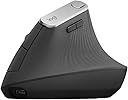
🖱️ Elevate your workflow, protect your hands, and never miss a click!
The Logitech MX Vertical Mouse combines cutting-edge ergonomic design with advanced 4000 DPI optical tracking and versatile wireless connectivity. Engineered to reduce wrist strain and boost productivity, it supports seamless multi-device switching and offers an impressive 4-month battery life, making it the ideal choice for professionals seeking comfort and precision across Mac and Windows platforms.
| ASIN | B07FNHV4MW |
| Batteries | 1 Lithium Polymer batteries required. (included) |
| Best Sellers Rank | #362 in Computer Mice |
| Brand | Logitech |
| Color | Black |
| Computer Memory Type | DIMM |
| Customer Reviews | 4.5 4.5 out of 5 stars (13,088) |
| Date First Available | August 22, 2018 |
| Is Discontinued By Manufacturer | No |
| Item Dimensions LxWxH | 4.72 x 3.11 x 3.09 inches |
| Item Weight | 4.6 ounces |
| Item model number | 910-005448 |
| Language | English |
| Manufacturer | Logitech |
| Operating System | Windows, macOS |
| Power Source | Battery Powered |
| Product Dimensions | 4.72 x 3.11 x 3.09 inches |
| Voltage | 1.5 Volts |
S**N
Surprisingly comfortable and natural-feeling.
I developed painful tendonitis from using a standard mouse. This vertical mouse actually works very well in my large hands. It is very intuitive to use--almost no learning curve for me since the buttons are logically laid out. I think it will be big help in my recovery and prevent future pain. The matte surface feels good and secure. I find the rather broad base provides good stability. It's also great that you can switch it between 3 devices with just the push of the button on the bottom. Another home run from Logitech.
L**0
Excellent Mouse!
I have had this mouse for a while now and I love it. It is so easy on my hands and I love the extra buttons that I can reprogram. I use this across my PC and my Mac and it works great. This mouse is very comfortable, high quality and definitly worth the money.
A**N
The only vertical mouse I love!
I now own three of these mice, and they've not only saved my arms from a lot of RSI, but they're also just generally great - three switchable bluetooth connections, very good battery life (I recharge them maybe once every few months), a good weight and size in the hand, and just generally pleasant to use. Only downside is that they eventually get some rubber degradation where your hand sits but that's been true of every mouse with similar soft-touch materials that I've owned, and that took at least two years of daily use to happen, so feels very reasonable.
A**T
Highly Recommended!
Without a doubt, my favorite mouse. It looks odd at first, but once you start using it any pain you’ve developed in your wrist from long hours computing is GONE. Battery life lasts a few months on a single charge, solid weight, obviously a quality product. I’ve had multiple people ask about it and chuckle only to come back later having purchased one themselves, nothing but glowing reviews.
R**E
Decent, but Not Good Enough
The ergonomics of this mouse did feel more comfortable to use than my previous mouse, but the lack of horizontal scroll and 1 less customizable button made it less functional than I expected. My previous mouse is a MX Master 3s, which I wanted to swap out for a new mouse to help improve wrist and arm pain from prolonged use. Overall this mouse does everything you’d expect from a high end mouse and I didn’t have any issues with the performance or connectivity. Just wished it had some functions to make daily tasks more efficient. I returned this mouse and got an MX Ergo S Plus instead, which I’ve been happy with.
T**.
Perfect
I’ve used this mouse for years, helps tremendously and no longer notice my carpal tunnel issues when working with my mouse
S**R
New main device found.
This works as intended. took a few days to acclimate to the difference but it was easier then I imagined. It replaced my default mouse easily. you can safety ignore any extra software if you don't like extra bloatware, but as all logi, there are perks locked behind their software. only downside is that Logitech never have had a real unified setup yet so it just adds another usb slot used.
B**N
I wish I had listened to the negative reviews.
I wrote off the negative reviews as personal preference but I find myself having the same experience. I came from the regular MX Master and I didn't think this would be that large of a jump to go vertical, but I am mistaken. Cons: - This mouse feels cheap, very cheap compared to the MX Master line. It's very light and easy to overshoot your mark, even after adjusting the DPI. - The wheel feels outdated and has no option for free scroll, so scrolling takes much longer now. That being said the wheel is comfortable. - There is only one light for battery power. Without going into the Logi app it's difficult to see how much battery is left. Not a dealbreaker but an annoyance. - The mouse is smaller than I imagined. I went to a store to see how the Lift felt and went with the MX Vertical knowing it was larger. That being said it's still just a little small for my hands (7.5" from wrist to middle finger-tip, 3.5" across fingers). - I find myself missing the horizontal scroll wheel of the MX Master, but that's preference. - Maybe it's the learning curve but I find my pinky finger dragging and uncomfortable. It doesn't naturally feel at place on the mouse and a little bump out may help instead of the side curving in. After using this for a week it's getting better but I have to focus on keeping my pinky higher on the mouse. - The thumb forward/backward buttons feel too far forward. The isn't very comfortable with my hand all the way on it so I find myself gripping it a little further back. I also bought a Keychron M5 Vertical to compare to this. Somehow that mouse is even lighter and the scroll wheel even worse. That has a smaller finger area because of equal size buttons that takes up finger space despite the bump out at the bottom. I ended up keeping the Logitech and returning the Keychron, but I'm not happy with it and would not recommend.
A**O
Excelente para no forzar mi mano. Tengo tres equipos y solo un mouse
P**E
Très agréable pour travailler . Bonne qualité.
A**O
En resumen, si pasas muchas horas en frente del ordenador por trabajo ( o por otro motivo) y notas alguna molestia en la mano, este ratón es tu solución. Yo trabajo en oficina y me paso 8 horas al día en frente del ordenador, y con el tiempo, el uso de ratones "clásicos" me estaba produciendo una ligera molestia en la parte de la muñeca. Con las rebajas del black friday, decidí comprar este ratón del que había leído muy buenas opiniones, tanto de este ratón en concreto como de este tipo de ratones. Era bastante escéptico de que un ratón con esta forma fuera cómodo. Tengo que decir, que la primera vez que lo pruebas es bastante raro, el primer rato con el no te acaba de convencer del todo esta forma, pero en la misma jornada de trabajo, te acabas haciendo y con el paso de un par de días observas la comodidad de este tipo de agarre, haciendo que para trabajar, como es mi caso, no quiera volver mas a un ratón tradicional. En cuanto a este modelo en concreto, su ergonomía es muy buena, el tacto se nota de calidad. El único pero es que al final del día ves las huellas (por el sudor, etc.) en el ratón, pero lo limpias con un paño y listo, haciendo este único mantenimiento. Esta hecho para una mano relativamente grande, si no es así, igual es mejor decantarse por su hermano pequeño el lift. En cuanto a la batería, dura muchísimo, yo solo lo he cargado una vez en dos meses, usándolo 5 días a la semana 8 horas. Parece un ratón para durar mucho mucho tiempo. En definitiva, si te lo estas pensando, no lo dudes puesto que no te vas a arrepentir, es una inversión muy pequeña para la cantidad de beneficios que te puede dar.
P**.
j'aime beaucoup cette souri vertical. ça enlève mon inconfort pour le tunelle carpien.
S**N
Ürün elime tam oturuyor ve kullanması gerçekten çok rahat. İlk elime aldığımda garipsedim ancak ilk dakikadan alıştım. usb girişini laptopa takıp anında kullanmaya başlayabiliyorsunuz. aynı zamanda altında küçük bir düğme var, o düğmeye basarak iki farklı cihaza daha bluetooth ile bağlayabiliyorsunuz. ve yine o düğmeyle geçiş yaparak saniyeler içinde üç farklı cihazda tek mouse kullanabiliyorsunuz.
Trustpilot
5 days ago
2 days ago