⚡ Power, Ports & Performance — Dock Like a Pro!
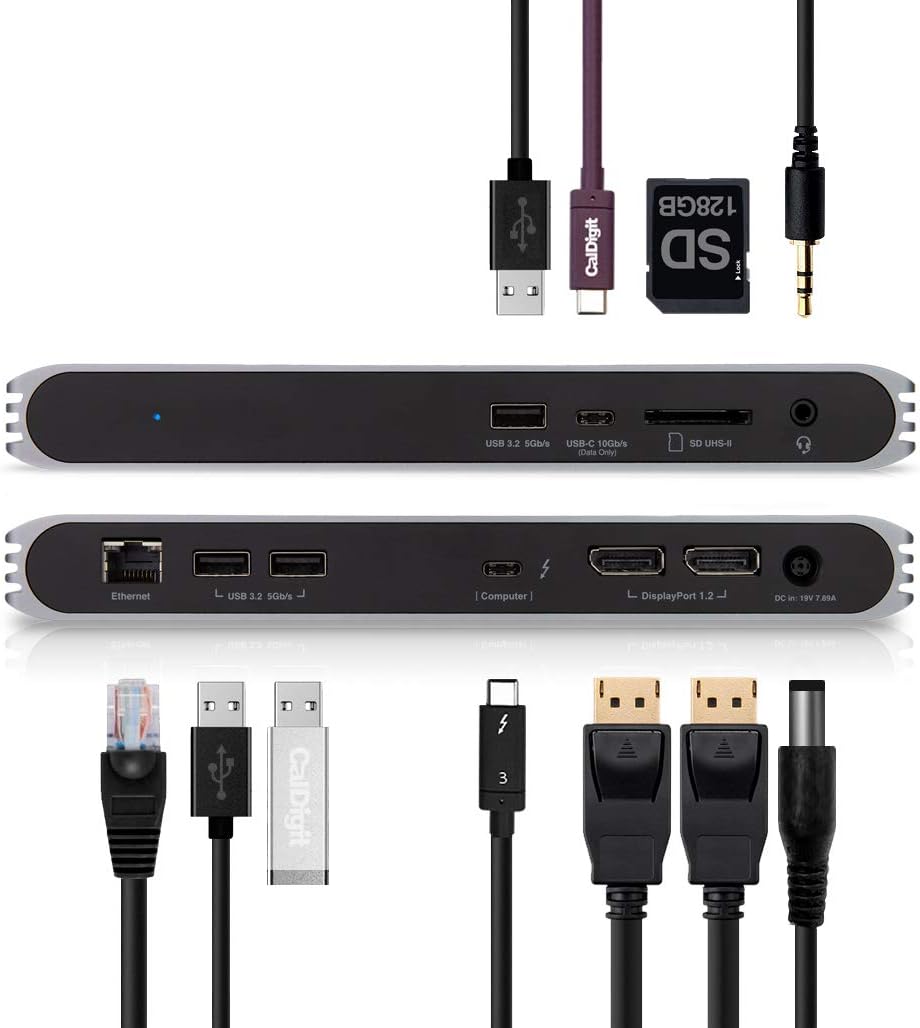
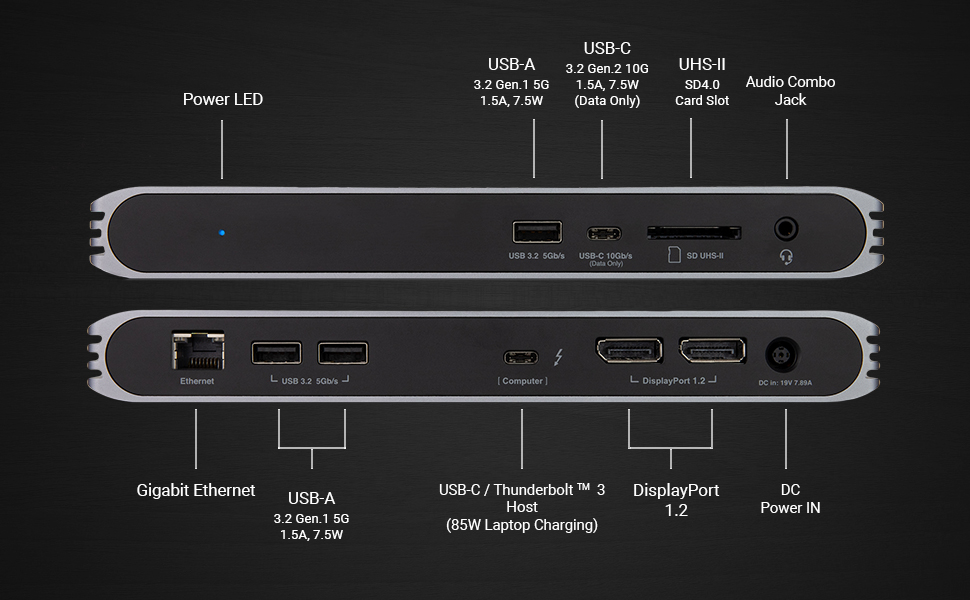
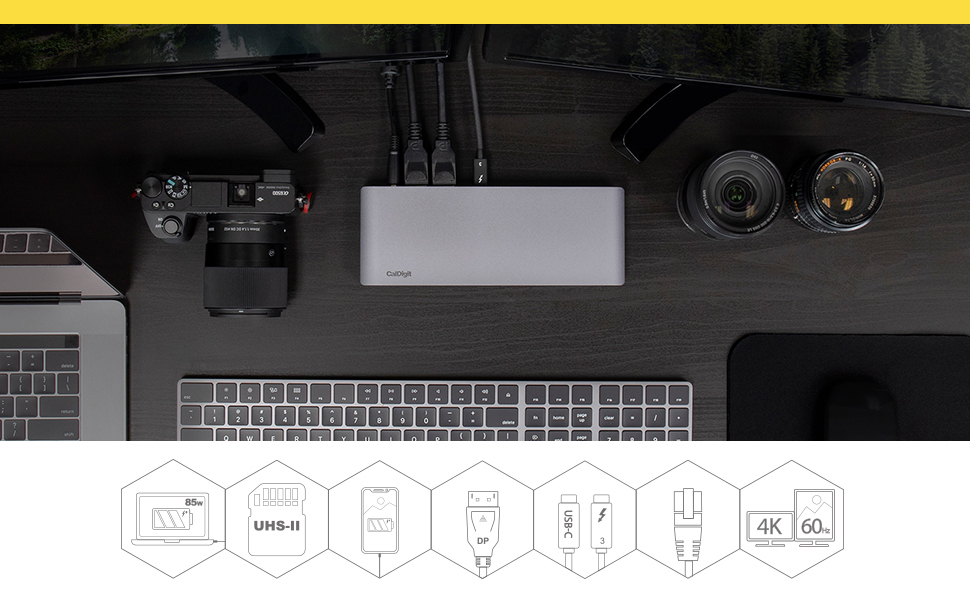
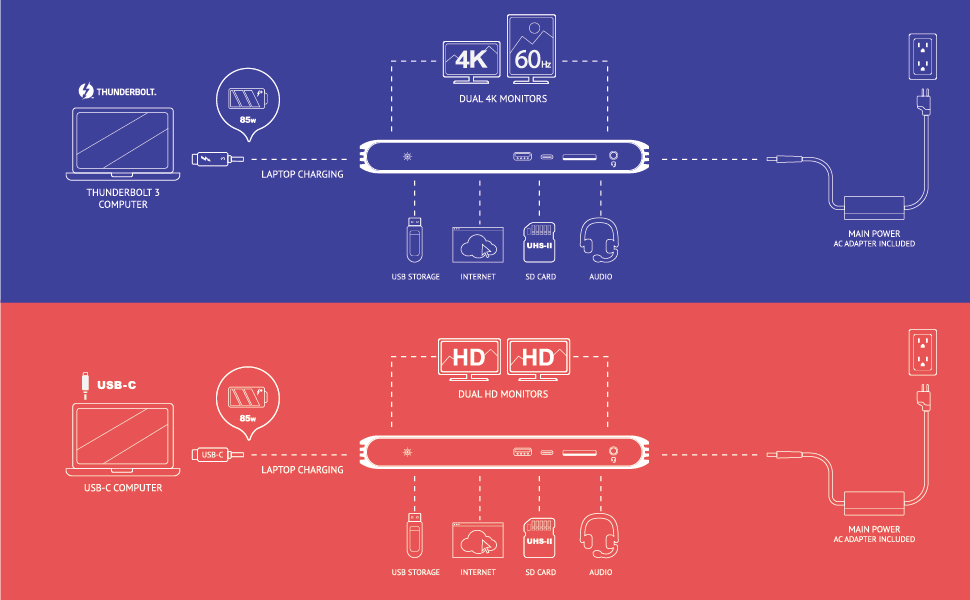
The CalDigit USB-C Pro Dock is a powerhouse docking station designed for professionals who demand seamless connectivity and high performance. Featuring dual 4K DisplayPort outputs, 85W laptop charging, and a comprehensive suite of 10 ports—including Thunderbolt 3, USB 3.2 Gen 2, UHS-II SD card slot, and Gigabit Ethernet—this dock effortlessly bridges Mac and Windows devices. Its plug-and-play design eliminates clutter and maximizes productivity, making it the ultimate hub for modern hybrid workspaces.

| ASIN | B07VL675DT |
| Best Sellers Rank | #139,786 in Computers & Accessories ( See Top 100 in Computers & Accessories ) #3,367 in Laptop Docking Stations |
| Brand | CalDigit |
| Color | gray |
| Compatible Devices | MacBook Pro, iPad Pro |
| Customer Reviews | 3.9 3.9 out of 5 stars (673) |
| Hardware Interface | USB 1.0, USB 1.1, USB 2.0, USB 3.0 |
| Item Dimensions L x W x H | 8.43"L x 3.15"W x 0.98"H |
| Item Weight | 2.3 Pounds |
| Manufacturer | CalDigit |
| Mfr Part Number | USBCProDock-US07-SG |
| Model Number | USBCProDock-US07-SG |
| Number of Ports | 2 |
| Total Number of HDMI Ports | 1 |
| Total Usb Ports | 3 |
| Wattage | 85 watts |
J**M
Works great with a variety of computers
I bought this to use under a conference table to connect HDMI, Ethernet, and a USB webcam to a slightly older MacBook Pro with Thunderbolt-2. This might be the only dock that can do that (via Apple's Thunderbolt-2-to-3 adapter) while also supporting USB-3-over-USB-C laptops such as the 12" MacBook; and newer Thunderbolt-3-over-USB-C laptops (like the latest MacBook Pros) with full speed and Thunderbolt-3's better video capabilities. Since this laptop won't last forever, and I also want to support guest laptops. With Thunderbolt-3 or USB-3-over-USB-C, the hub also powers the laptop from the one single cable (Thunderbolt-2 doesn't support this). Everything works flawlessly. No issues with wake from sleep, no issues with HDMI (via an active DisplayPort adapter which is required). Audio is properly sent over HDMI. It would be nice if the hub had its own HDMI, but the adapter is inexpensive, small, and lossless, and maybe DisplayPort is better for some people. I also like that the hub has no power button since it's under the table. It just does the right thing. The documentation, and the labels on the port themselves, are quite clear, straightforward, and specific on most points. Some tips: For a single cable to support both older USB-3-over-USB-C laptops as well as newer Thunderbolt-3-over-USB-C laptops at full speed, you need a passive Thunderbolt-3-over-USB-C cable, which by definition can't be longer than 0.5 meters. Such a cable is included with the dock, and this is described in the docs. A longer passive USB-3-over-USB-C cable will work with all laptops but won't support Thunderbolt-3 bandwidth (and the improved video capabilities), and a longer active Thunderbolt-3 cable will work with Thunderbolt-3 laptops but won't support USB-3-only laptops at all. For Thunderbolt-2, you plug an Apple Thunderbolt-2-to-3 adapter into the dock, and then I think any proper Thunderbolt-2 cable will work. Unfortunately, only adapters with female Thunderbolt-2 exist, meaning the adapter must be plugged into the dock not the laptop, and the cable you use is Thunderbolt-2 not Thunderbolt-3 (these have different connectors). This makes it less convenient to swap in a Thunderbolt-3/USB-C laptop if the hub is under the table like mine. The manual mentions the hub actually supports even older USB-A laptops to provide Ethernet and audio, but not video, via a USB-C-to-A cable from the "computer" port on the hub. So I was curious if it would provide Ethernet to my iPad via a USB-C-to-Lightning cable from the "computer" port. It didn't. It did fast charge the iPad though (or something close to that). I'm not sure why Ethernet didn't work since combining a Lightning-to-USB dongle with a USB-to-Ethernet dongle is generally a way to get Ethernet to an iPad. In any case the docs don't claim this will work, but it would be a neat little improvement to a hub that already has a bunch of neat little abilities. The docs do say Ethernet and video will work with a USB-C flavor iPad Pro. The hub also has one USB-C (USB-3.2-Gen.2) "data" port for things like hard drives. Unfortunately (consistent with the documentation), this port doesn't provide power to charge a phone or tablet. This would be a useful improvement to fast-charge a device via USB-C while a computer is plugged into the "computer" port – or to support bus-powered USB-C peripherals. I also don't think this port supports Thunderbolt-3 hard drives or peripherals at all. It also has three USB-A (USB-3.2-Gen.1) "data" ports. The one of these on the front is able to charge an iPhone relatively quickly (I believe the others have less or no power for charging).
T**.
Much better than the Dell docking station it replaced
I have been looking for a long time for a docking station that has the following: 1) Thunderbolt connection 2) USB 3 Gen 2 support for 10Gbps to allow my backups to go at full speed to external 10 Gbps supported NVME drive 3) Support two displays 4) Many USB ports - all USB 3 5) Ability to charge my Dell laptop that requires > 65 watts to charge Before this, I had a Dell Docking TB16 station with a 240 Watt adapter as the 180 could barely charge the laptop. Furthermore, went through two of them as one did damage to my equipment and the replacement started to come close to the behavior of the first so was worried over equipment damage. Sure signs if impending doom are disconnecting of peripherals and a flicking monitor. What did I get? ALL of that and more! It is driving a 2K 34" LG monitor and a 4K LG monitor off displayport with NO flickering. Has extra NIC port that I can set up for teaming Has support for Microsd and SD slot (still have to test) None of the other 65 watt docking stations could charge the laptop and this one does it with ease! CONS: You can be nit picky but the device DOES get warm. Wish it had a way to turn on and off the laptop like the Dell did. If you have similar needs - the Dell is a latitude 7490 and it works flawless with this docking station.
D**K
UN-reliable dual external monitors on Macbook Pro & Lenovo Linux laptops
------------------- UPDATED: 2024 ------------------ I got tired of undependable monitor connections, AND using monitors through the doc wasn't working reliably with Ubuntu linux for the last couple of years. I gave up trying to use it with monitors and just plug the monitors in directly to whatever laptop i'm using. (Lenovo Linux for work, Macbook Pro for personal). So for the last 2-3 years this doc has been a glorified power supply for my laptop, and USB hub for my keyboard, mouse, and occasional thumb drive. Now the blue LED is blinking blue whenever i connect it to my laptop, and i have no idea what that means, but it's no longer powering my laptop anymore, and the external keyboard and mouse are also not connecting? So...... i guess blinking blue LED means it's... dead? I can't find any information in the manual about this led state so..........????? Now what? Downgraded from 4 star to 1 star. ---------------------- ORIGINAL REVIEW: ---------------------- I use this dock 8 hours a day for my job, supports two external monitors in addition to my macbook pro display, all with independent resolutions and desktops (not just mirroring). Haven't had any issues with flickering or monitors deactivating as long as you don't move anything (like any digital cable in my experience). Power to the macbook pro is fine, other than the lack of powering the dock via USB C (requires the use of the included power brick which plugs into a dedicated circular power port on the dock). The ports available are adequate when you have the right cables, but I wish this dock used USB C or HDMI ports for the displays instead of Display port, not many people have display port cables so i'd have to take my cables along with my dock to use it somewhere else, and combined with needing it's own power brick, it's certainly not a portable-friendly setup. The included CalDigit branded USB-C / Thunderbolt 3 dock cable is fairly short, so i ordered an actual apple brand thunderbolt 3 cable to connect the dock to my macbook pro which ended up being just a bit longer and just what i needed for my desk setup. The only real issue i've had is sometimes one of my external monitors (always the same one) doesn't get detected when i reconnect the dock to my macbook pro. The solution is fairly simple, either a) unplug the dock from my macbook pro and try again b) unplug both monitor cables from the dock, and then plug them back in, all while the macbook pro stays connected to the dock A stand to hold the dock vertical would have been nice to see for this price point. Having two monitor cables, the dock cable, speakers, and one or two peripherals / wireless adapters connected makes it almost impossible to balance on one side without a stand. I couldn't really justify paying almost $100 more for the CalDigit's TS3 Plus which seemed more like it was designed to sit vertically on your desk.
L**N
M1 MBA ile 3440x1440P UW monitoru 144hz de sorunsuz calistiriyor. Guc adaptorunun duvar soketi amerikan tipi ve adaptor ile geliyor. Fakat bu adaptorler her zaman vasat oluyorlar. Elinizde E/F tipip C14 kablo yoksa "PSU kablosu" diye aratip almanizi oneririm.
A**R
Since getting a MBP in 2016 I've been searching for a good hub. They've all had their issues, until I got the Caldigit one. It does everything they claim it does and works flawlessly on my MBP, my Surface Pro 7 and my iPad Pro. External display, USB-A ports, USB-C port, SD Card slot, audio output and power delivery - all excellent. The *only* issue I've had is that when plugged into this hub, the iPad Pro redirects its audio to the hub, thereby disabling the iPad speakers. And if you aren't wearing headphones.... well, there's no audio. However - this is an iPadOS problem and not a Hub problem. There is no ability on iPad OS to choose "iPad Speakers" when an external audio device is plugged in. Apple had no solution for me.
P**C
Works well with Linux (Ubuntu 20.04.1) on Dell XPS-15 and my new XPS-17, as well as with MacBook Pro 15. Have not tried WINDOWS, but it should work too, I am sure. It does actually charge even XPS-17 but not when it's under a heavy load, like video rendering. Other than that it works as expected powering my 2 x 4k LG monitors at 60Hz. Thank you!
T**O
M2 Pro Macbook Pro ile kullanıyorum, aynı anda bilgisayarı şarj edip ekstradan 2 ekran, Mouse, Klavye, Ethernet, SD Card, SSD vb. eklentileri tek bir thunderbolt kabloyla takabilmek çok büyük bir lüks. Masadaki kablo düzenini sağlamak için mükemmel bir cihaz. Bilgisayar şarj olurken biraz ısınıyor o da gayet normal bir ısı, cihaza zarar verecek kadar değil. Cihazın dışı alüminyum olduğu için daha uzun ömürlü ve soğutma açısından artı. 10 aydır kullanıyorum herhangi bir gecikme takılma vs yaşamadım. Kesinlikle öneriyorum
V**A
Bende yeni aldım Monster Laptop için ama 2 monitöre ekran görüntüsü almadım
Trustpilot
1 month ago
5 days ago