Buy anything from 5,000+ international stores. One checkout price. No surprise fees. Join 2M+ shoppers on Desertcart.
Desertcart purchases this item on your behalf and handles shipping, customs, and support to South Korea.
๐ฎ Elevate Your Game with ROCCAT's Ultimate Keyboard Experience!
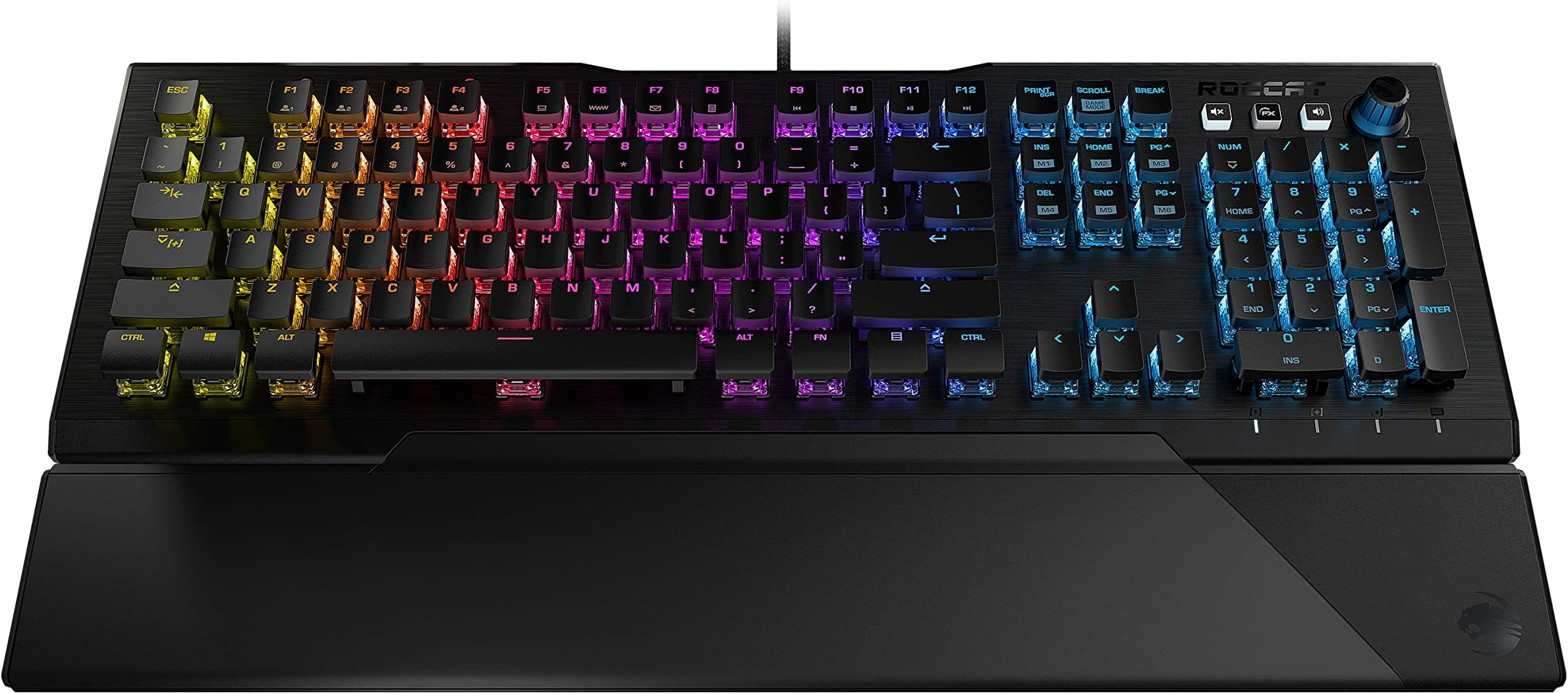
The ROCCAT Vulcan 121 AIMO is a full-size mechanical gaming keyboard featuring Titan Switch technology for smooth actuation, advanced anti-ghosting for reliable performance, and customizable AIMO RGB lighting with 16.8 million colors. Its durable anodized aluminum top plate and detachable palm rest ensure comfort and longevity, making it the perfect choice for gamers seeking both style and functionality.


| ASIN | B07YNHBVGQ |
| Additional Features | Lighting |
| Antenna Location | Gaming |
| Best Sellers Rank | #6,737 in Video Games ( See Top 100 in Video Games ) #513 in PC Gaming Keyboards #735 in Computer Keyboards |
| Brand | ROCCAT |
| Button Quantity | 104 |
| Color | Black |
| Compatible Devices | Gaming Console |
| Compatible Operating System Family | Windows |
| Customer Reviews | 4.6 out of 5 stars 836 Reviews |
| Enclosure Material | Aluminum |
| Global Trade Identification Number | 04250288113251 |
| Hand Orientation | Ambidextrous |
| Item Dimensions L x W x H | 19.69"L x 7.87"W x 2.36"H |
| Item Weight | 2.53 Pounds |
| Keyboard Backlighting Color Support | RGB |
| Keyboard Description | Gaming |
| Keyboard Layout | QWERTY |
| Language | English |
| Manufacturer | ROCCAT |
| Mfr Part Number | ROC-12-671-RD-AM |
| Model Number | ROC-12-671-RD |
| Number of Keys | 109 |
| Number of Sections | 1 |
| Power Source | DC power supply (Micro USB) |
| Recommended Uses For Product | Gaming |
| Series Number | 12 |
| Special Feature | Lighting |
| Style Name | Vulcan 121 |
| Switch Type | Linear |
| Unit Count | 1.0 Count |
| Warranty Description | 2 year manufacturer |
V**D
It's a luxurious work of art at a reasonable price point.
I needed a high quality and "all around" keyboard both for productivity as well as gaming. I believe that you can have both but it's very hard to find something that can do both well especially at an affordable price point. Some of these keyboards can easily hit $250+ and by that point, are you sure you wanna waste your hard earned money on something you could easily spill a drink on and ruin in the blink of an eye? When it comes to keyboards, there are so many options to pick from - membrane vs mechanical keyboards, normal vs low profile, and of course the various cherry mx switches (brown, red, silver, blue, black, etc). I think it took me around 2 days before I finally came up with personal preferences (you should probably do the same). I went to microcenter and tried out the various keyboards they had on display (Corsair K70 / K95, Razer Huntsman Elite / Chroma, Logitech G915 / Pro X). I also took hours out of my day and listened to various YouTube videos on the differences between all of the cherry mx switches. I wanted something right in the middle - clicks not too quiet but not too loud, design not too aggressive looking but not too basic either, font something professional but also relaxing to look at, and something practical to use without running into too many gimmicks. I always preferred low profile keyboards because for me, the normal profile keyboards are too big, bulky, and in my opinion, a remnant of the 90s. After hours of typing and gaming, your fingers get tired of wrestling around with the keys. At the same time, you don't want a super sensitive keyboard either that registers a hit just as soon as you breathe in its general direction. For this reason I decided to go with the cherry red & brown switches (the best "all around" switches for typing AND gaming). Both of them have the same activation force (45cn) and are fairly quiet but audible enough, the only difference being, the brown switches have a tactile feedback whereas the red switches are linear. Think of this tactile feedback as a minor "bump" in the road to let you know the conditions of the road without actually seeing the potholes. Being a fairly confident typist, I decided to go with the cherry reds since the tactile feedback could in theory become tiresome over long periods of time. Keep in mind even with linear keys, you can still feel the key so it's not like you are typing on nothing. It comes down to more or less "clicky" feeling. Finally, the RGB lights. I had no real preference on them. They look cool but at the end of the day, they are just fancy lights you don't really need for gaming or typing. My research was complete so I dropped by microcenter. Keyboards everywhere, most of them the same generic 90s keyboards I dreaded using but with a price tag of $150 and above. One keyboard definitely stuck out above all others - the Roccat Vulcan. A sturdy aluminum plate, low profile keys with the switches visually exposed, and an overall sleek design with multimedia controls, I immediately knew I had to touch it. I hopped on, opened a word document, and started typing. It didn't disappoint one bit. It performed just as well as it looked. I powered through sentences as fast as I could type them (last I checked, my wpm was around 50-60). Minimal mistakes were made and that's solely because I didn't have a chair to sit on. Only one final test remained - gaming. Seeing as microcenter didn't have any available games (or chairs for that matter), I decided to pull the trigger. 3 days later my keyboard came in and once again it didn't disappoint. This keyboard, personally for me, is built as close to perfection as possible. Hitting the keys are now so incredibly satisfying now and they feel incredible. I love everything about the keyboard. It's great for long term typing and gaming - going on 5 hours now no problem. It's visually pleasing to look at, even without the RGB lights but the lights do make it even more of a pleasure to look at. I didn't fool around with the lights too much yet but there is a program (Swarm) that lets you customize the light patterns as well as setup multiple profiles and macros. The keyboard also comes with a magnetic wrist rest and braided cable to let you know it's of high quality design. Most importantly, the $120 price tag is extremely reasonable for a keyboard of this quality (I believe it's $150 at microcenter). Most of its best selling competitors are $150 and up and they don't even look half as good. The K70 low profile starts at $160 as well as the Razer Huntsman Elite. I'm a huge fan of the DeathAdder (my current mouse) but Razer Huntmans Elite keyboard clicks were EXTREMELY audible and I hear their build quality has fallen off in the past few years. Roccat is a German manufacturer so when they advertise that they take pride in their builds, I can believe it. I haven't run into any cons yet, at least nothing noticeable. As for improvements to future models, I know Corsair includes a USB port on their keyboard as well as a giant X underneath the keyboard through which cables can be run and held in place - both of which this keyboard lacks. Not a complaint from my end as I have more USB ports on my rig than I know what to do with and the cable's length is long enough - around 5-6ft I believe. The final test for this keyboard is the reliability test. I'm hoping it lasts for at least 3 years. I will report back if I run into any issues with soft or hardware. Final verdict: 10/10 - I highly recommend it.
R**R
Can a keyboard be a beast?
Bought this to replace another, more expensive gaming keyboard that was wearing out after a year. To be clear, I'm not much of a gamer, I am a programmer, and I spend about 12 to 16 hours a day hammering my keyboards for one thing or another. This keyboard feels like nothing else I've ever used. Keys are smooth with a slick texture and concave design that makes it easy to fly when typing. The key faces ride on top of the switches which are exposed below and illuminated. The software offers a variety of flexible lighting modes and is pretty bright when turned up. Overall build feels extremely solid, like those old IBM mechanicals on AS/400 terminals. Satisfying response and solid mechanical clack makes me feel like it's 1994 in the computer lab. Sitting on my XL gamer mat, it doesn't even slide around without decent effort; it's quite heavy with oversized legs that keep it in place. I wouldn't usually write a review for a peripheral. Who cares? They are disposable, especially below the $100 "pro gamer" mark. But after returning a couple of duds in the sub-$40 price range, this one really is special -- you know, if the computer keyboard is a tool of your trade and you believe good tools improve performance. If not? Get your $10 black label, soft membrane crap, my friend. You'll never know the difference. If you stare into a monitor more than 8 hours a day? This is a good price on what feels like a great professional device.
M**A
Awesome entry level gaming keyboard
I have an original PS2 connection IBM keyboard that I used for work, and a Corsair Brown switch at home, but decided to shelve the IBM to have a more modern experience at work with volume controls and a Windows key. I wanted something quieter than the IBM and a little more tactile than the Brown switch. For the price, this was worth the money and achieved all of the goals. Volume dial works for team meetings very well, the keys appear raised but its just the shape of the caps. The LED colors smoothly change in the default setting. The tactical feel is better than similarly priced membrane models and less noisy than old IBM models, but still provide just a limited amount of click and feedback. This model fit my needs and allows a more modern workflow for my use. It's for sure, more like my brown switch K70 than the louder more tactile switches, and I enjoy typing on this keyboard due to its smooth and relaxed feel. I used my own gel wrist pad instead of the plastic wrist "ramp" that's included. I would recommend this keyboard for someone wanting to upgrade from a membrane, but didn't want the full experience of a loud 1980's typewriter, and on a tight budget.
W**E
Why didn't I try this brand sooner?!
For whatever reason, I never really paid much attention to Roccat. I knew they made decent mice and lots of people liked them, but I've always been a fan of SteelSeries, Corsair and Logitech for various mice and keyboards. Also, I never really had what I'd consider a 'gaming' keyboard or other semi high end keyboard. I always used a gaming keypad + gaming mouse and just a more generic keyboard for daily use. Big mistake! It's been a real eye opener as to what has been the apparently terrible keyboards I've been using for all of these years. I tried one of these Vulcan 121 keyboards at a friends house briefly and instantly loved it. I had never tried either genuine 'Red' or 'Brown' switches and I didn't know what to expect, so I ordered the red style model like he had. Apparently, I'm a big fan of the linear red style, because I love the feel overall and have had very little adjustment to using it. In fact, I liked it so much, after using it over a weekend I ordered a 2nd one to take to work as well. The overall build quality is excellent and neither had any quality control issues. Packaging was excellent and the software was easy to download and setup. The Swarm software is pretty decent and doesn't seem to use a lot of resources. So far, I'm primarily using it more for work efficiency and less for gaming. I just really enjoy typing on a nice feeling keyboard where I can create custom mappings and control the lighting. Speaking of lighting, it's pretty great! I've created several custom modes that I used depending on activity or time of day. Another nice bonus is that the key cap size and spacing makes this keyboard so easy to clean and blow all of the dust/dirt out. I'm sort of question why there's such a big price difference between the red and brown models right now, so I'm guessing either Roccat has new models coming out or people simply buy the brown model a lot more, so they're heavily discounting the red. At $95 I can't complain about the price at all and have no issues with the key feel. No hesitation what so ever recommending one and will definitely buy other Roccat products in the future.
S**A
REALLY good for the price point.
Just got this a few hours ago, so just an initial review. Almost awesome, but not quite for two reasons: Am I unhappy with the keyboard? Absolutely not. Would I recommend it to others? Absolutely. I am a seasoned electronics design engineer, and what you get for this price point ($30) is REALLY nice. What I like: 1) LOW PRICE POINT. Most of the big brand name gaming keyboards cost $100-$200+. 2) Great, sturdy, quiet key feel. 3) Great software configurability. I love all of the different effects. 4) The software allows you to create 4 different lighting profiles. I like being able to have a static, zone-colored setup for gaming, a fun varying setup for surfing, and a monochrome, static setup for typing. I really like the AI mode that continuously changes the key colors AND uses a momentary highlight color on any key you press. 5) It has a nice weight to it that keeps it stationary on your desk (especially nice when vigorously gaming). 6) The optional wrist support is attached via magnets. What I don't like: 1) The website that the instructions tell you to go to to download the software doesn't work. After finding that the current company is Turtle Beach, not ROCCAT, I still had issues navigating their website trying to find this model keyboard. If you start from products, you will find every other variant of Vulcan keyboard, but not this one. Only thru a bunch of Google searches did I actually find the correct model and the associated software. Once found, the SW was easy to install and use. 2) The space between the keys is much larger than any other computer keyboard I have used since 1978, and I find myself having to make a LOT of corrections at this point. I think they are spaced thusly in order to maximize the lighting effects. This is not necessarily a bad thing, just very different from the keyboards I am used to, and will just take some time to get used to. 3) The special "shift" characters are NOT backlit, and are very hard to read. (Luckily I am old and have their locations memorized). 4) The key sounds available in the SWARM software are REALLY BAD. I can't see anybody leaving those on even at a low volume level. 5) The wrist support is thin. As the keys are very high off the keyboard, I find myself wanting a bit more height on the wrist support. (Granted, this is just MY personal opinion). 6) The keyboard lights don't turn off when I put my computer to sleep. This is likely because the only USB-A jack I have is always powered. Would be nice if the keyboard software would direct the keyboard to kill the lights on sleep, hibernate, or power off.
J**S
Fast response, great for people who type fast and have hands pain
I bought this keyboard on 2024 and I stopped using it because my hands were hurting. Well ever since its been hard to find a great key board that suffices my fast typing and soft keystrokes with fast response. Well I used it again ans decided to apply a higher keyboard stand to lift it up closer to my fingers. This helped tremendously!!!! As my hands are short. Typing: the keys are so soft and has a quiet clacking, very satisfying. My hands no longer hurt when typing at my speed (75wpm) Look: look is sleep and fun, you can play with the color scheme Ergonomic: I found this to be Ergonomic great for people with hands pain (not specifically for carpal tunnel, you have to make your own assessment). Overall this is great!!!! Here is a picture of the stand i added.
C**S
After 9 years of having the K70, I made a switch.
I had the K70 since the most of my upper teenage years and lasted many years. As of recent years it has became crusty/dirty to a point where no can air or Clorox wipes would do the trick to clean it. The K70 I owned was heavily used for 10+ hr gaming sessions on CSGO, Call of Duty, Battlefield & TF2, Homework, and even studying & test taking. As of recent years I have been looking into buying a new keyboard, however I noticed Corsairs Quality Control went horrible, alongside razer products are just cheap plastic & speed soldering to just get products into consumer hands then they end up defective. I decided to try ROCCAT and im actually truely impressed. Cherry MX Switchs in my Vulcan Keyboard, Feels nice to the touch, and does not feel cheap one bit. Its Aluminum plated from really adds durability to the product, the keyboard sits nicely on my desk and even comes with a wrist rest. The only one complaint I have about the keyboard is the wrist rest does not really have a lock or something to really hold it down. Sometimes it may move off the keyboard itself as it just sits in a notch and can be taken out easily. Besides that I mean my corsair wrist rest was damaged and never clicked in to the keyboard anyways so this is still a improvement! I noticed when I bought the keyboard ROCCAT on there website was giving away free mouse pads if I bought it from them directly (At the time) I wish I did as I do need a new mousepad now! But it is what it is! I truly recommend this keyboard, you wont be let down. I now work in the iT Field where im on the computer pretty much 12 hrs a day or even longer sadly. This keyboard is a thumbs up.
P**N
Stellat KB. Great for gaming.
I bought this KB as a stand in while I decide what I want to upgrade my gaming PC to (was gonna move it to my work PC after). Honestly, this may be the one I keep. It's super responsive and smooth. I like how easy it is to clean. The functionality is top notch and the price is definitely a plus. The LEDs are bright and don't seem muted like most cheaper LED capable KBs. The KB has some weight to it, which I like- keeps it from sliding all over the place. In conclusion, buy this KB.
R**F
A good buy but not for hardcore gamer
A very nice linear switch and skeletonised LED design on every keycap makes it looks brighter than razer rgb keyboard. Although in term of RGB customisation Razer Chroma offers a much better flexibility compared to Roccat Swarm.
E**S
After using it for almost 1 year, L key doesnt work anymore properly
After using it for almost 1 year, L key doesn't work anymore and I guess I cant return it anymore. Or can I?! Everything was great and is with other keys, but for some reason L key doesn't work anymore. I have to reaaaally smash it and push hard and sometimes keyboard does record it.
A**.
Great quality keyboard
Great keyboard. It matches the feel of my old keyboard (Redragon K512 Shiva) which is what I was going for. This one is better quality. Has a nice metallic finish, RGB is great, and the detachable hand rest feels good as well. Just a good quality keyboard. If you're willing to spend a bit I recommend it.
ุน**ู
ู ู ุชุงุฒ
ุฌูุฏุฉ
H**D
op keyboard
Beautiful. Great red switches and nice clicks.
Trustpilot
1 month ago
3 weeks ago