Buy anything from 5,000+ international stores. One checkout price. No surprise fees. Join 2M+ shoppers on Desertcart.
Desertcart purchases this item on your behalf and handles shipping, customs, and support to South Korea.
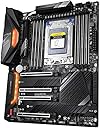
🚀 Power, Speed & Cool — The Ultimate Threadripper Command Center
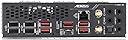
The GIGABYTE TRX40 AORUS PRO WIFI motherboard is engineered for 3rd Gen AMD Ryzen Threadripper processors, featuring a robust 12+2 phase 70A Infineon digital VRM, advanced Fins-Array heatsink for superior cooling, quad-channel DDR4 memory support up to 4400 MHz, and cutting-edge Intel WiFi 6 plus GbE LAN connectivity. Designed for professionals and enthusiasts demanding uncompromised performance and reliability.


| ASIN | B081JCCGQR |
| Best Sellers Rank | #950 in Computer Motherboards |
| Brand | GIGABYTE |
| CPU Socket | Socket TR4 |
| Chipset Type | AMD TRX40 |
| Compatible Devices | Personal Computer |
| Compatible Processors | AMD 3rd Generation Ryzen |
| Customer Reviews | 3.9 out of 5 stars 56 Reviews |
| Global Trade Identification Number | 00889523020203 |
| Graphics Card Interface | PCI Express |
| Main Power Connector Type | ATX |
| Manufacturer | GIGABYTE |
| Memory Clock Speed | 4400 MHz |
| Memory Slots Available | 8 |
| Memory Storage Capacity | 1000 TB |
| Mfr Part Number | TRX40 AORUS PRO WIFI |
| Model Name | TRX40 AORUS PRO WIFI |
| Model Number | 889523020203 |
| Number of Ethernet Ports | 1 |
| Number of Ports | 4 |
| Platform | Windows 10 |
| Processor Socket | Socket TR4 |
| RAM Memory Technology | DDR4 |
| Ram Memory Maximum Size | 256 GB |
| S/PDIF Connector Type | Optical |
| System Bus Standard Supported | SATA 3 |
| Total Number of HDMI Ports | 1 |
| Total PCIe Ports | 8 |
| Total SATA Ports | 10 |
| Total Usb Ports | 2 |
| UPC | 889523020203 |
| USB 2.0 | 4 |
| Warranty Description | 3 |
J**H
They had what I needed in stock
I have 4 machines built around this mother board. I had a machine failure and not able to get help from Gigabyte support. I was desperate to get this PC back online so I searched for a TRX40 Pro Wifi motherboard hoping I could find an exact replacement. OHAHO had one so I ordered it. I received the new board quickly and was able to continue to troubleshoot my PC. I don't know what else to say. I got what I needed. Thanks!
D**.
2.5 years of Rendering and still going Strong!
I build my 24-Core Threadripper PC about 2.5 years ago with this Mobo and have had zero problems. I have been building PC's since 1994 and can tell you this is one Rock Solid Mobo if you get a quality PSU, CPU cooler, and RAM. I'm using the EVGA Supernova 1000 P2 80+ Platinum, 1000W, along with the EVGA CLC 360mm All-in-one RGB LED CPU Liquid Cooler, and Corsair VENGEANCE LPX 128GB (8x16GB) DDR4 3200 (PC4-25600) PC Memory Black (CMK128GX4M8X3200C16). Happy Building!
J**T
Defective on arrival
I received a defective system on arrival which wasn't apparent in enough time to send it back with in the allotted time. The system constantly reboots and purges its bios settings at random times. This means I have to constantly go through the bios to setup my machine, which can take a good 10 mins to boot up since it think its a new machine, and has to reset the bios. Another disappointment is that if I put the computer to sleep or hibernation mode, it will also reboot itself. Hence, if I want to keep my work, I have to shut my computer down every time I'm done using it. The ire! I've asked that I be given an opportunity to trade it in for another device, where they would send me the a replacement part and I would send them back the defective part (where I offered to give them the money for the part until they physically received the defective part) but they insist that I have to send it to them to get it fixed, which will take up to 3 to 4, or even more weeks. It is impossible to be with out the computer for a week, let alone 4+ weeks. I'm now looking to come out of pocket to purchasing another motherboard, or suffer the never ending irritation of using that motherboard.
S**I
Perfectly balanced MB
Perfectly done much like the taichi boards were for 1rst gen threadrippers.
M**E
Works fine, few odd things though
For the most part this motherboard is fine. It works fine for games and high throughput computations (its not bottle necking). Overall, it is great for the price (considering this is $2-300 less than the other MOBO's out there). More worth it than ASUS ROG Zenith II Extreme MOBO A few things to bear in mind: -There is fan on the motherboards chipset, which has a housing. This housing protrudes a little far from PCB. When installing the GPU's, I had to force it a bit because the the housing was stopping it from going all the way in. This was mildly concerning, but nothing went wrong. - If you were to put single slot GPU's on the first x8 PCIE and second x16 PCIE slot, you would almost completely choke the airflow for the motherboards chipset. - I installed 3 GPU's (x16 x16 x8). The second x8 would not fit a full sized GPU because of the motherboard's cabinet pins would have been blocked. I had to purchase a PCIE riser and use mount the GPU as a display card. Please note, this is not unique to this motherboard, many motherboards have this problem. - As some one else mentioned, one DIMM does touch the heat sink. This is only if the heat spreader is large. I installed ECC RAM, which has no heat spreader. The distance was not a problem and it does not effect the thermals. Additionally, the height profile is slightly lower than my RAM, it should not be a problem to put an air cooler on this. - Some say they cant fit their water blocks. I purchased a Bitspower Summit EL-X. It fits fine. Please be aware, Threadrippers are large chips, it is common sense that there will be less 'space' on the motherboard. - The 12V rgb 4pin didnt work? Or I coudnt figure it out? not important enough to care - The I/O Shield is connected to the MOBO. Unusual. - Wifi was not plug and play. At least on Linux. Of course, Ethernet > Wifi... - Overclocking in BIOS is weird. You have to scroll through a list that always starts at the lowest values (like 8x multiplier on 100mhz base = 8mhz... who runs a CPU at that now a days). - Using Linux, I had problems detecting the CPU temps. Eventually found ocerman's zenpower github. Worked great from there. - Performance was great. Testing on Cinebench R20, scores were above average from base clock to 4.5 GHz. Of course there are more factors involved. Point is, it performs fine.
E**O
Make sure your know what you're buying it for and makes a difference do research
It's great for gaming and for the work I have to do on my computer good motherboard I recommend this to anyone
S**N
«:::F:::» «:::A:::» «:::I:::» «:::R:::»
Had alot of issues........
I**S
Stable motherboard for workstations.
Great motherboard for a Linux workstation (OpenSuse) with AMD 3970, 128GB memory (Corsair 3600Mhz), 3 HDs and 4 SDDs (legacy), air-cooled (Nokua NH-U14S) and a low videocard (GeoForce GT 710) to power a 4k monitor at 60Hz. I use the system for code-development (MPI and openmp) and some production runs. The motherboard is stable at full load running 64Threads for days. Dynamical overclocking get's 3.9 to 4GHz on all cores. The core-temperatures peak at 83C with some 48C idle in my home-office at 80F (Florida). The setup was smooth, and the system runs without problems for many month other than the initial lack of sound chip support under Linux.
M**L
todo bien, corresponde a lo publicado
llego en tiempo y forma y funcionando
K**K
Board DAO, Bad Customer Service
Did not work with two different PSUs straight out of the box. Returned to seller who sent it back saying pins were bent, so no refund was issued and board doesn’t work. I would avoid this particular seller. I purchased a different from a different seller and had no issue with either PSU that was used in the original test with the first board.
A**R
Pesimo producto
He comprado este producto 3 veces y las 3 veces me ha fallado.
Trustpilot
2 weeks ago
3 weeks ago