Desertcart purchases this item on your behalf and handles shipping, customs, and support to South Korea.
🎶 Command your beats, wherever creativity strikes!
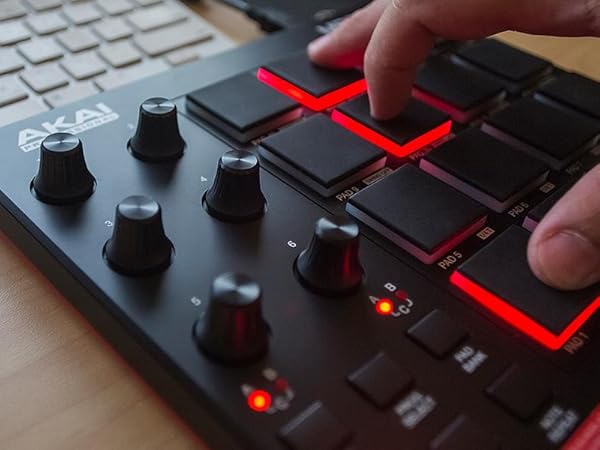
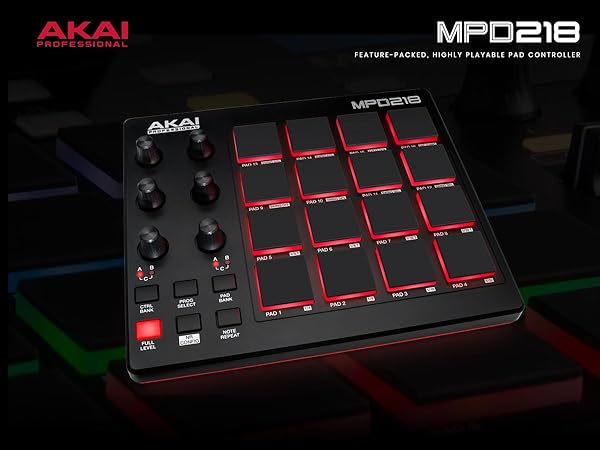
The Akai Professional MPD218 is a compact, USB-powered MIDI pad controller featuring 16 velocity-sensitive, backlit MPC pads and 18 assignable 360-degree knobs. With three pad banks, it offers up to 48 assignable triggers, perfect for producers and performers seeking expressive control. It includes MPC note repeat, full level controls, and a comprehensive software bundle including Ableton Live Lite and MPC Beats, making it an ideal portable production powerhouse for PC, Mac, and iOS users.


| ASIN | B0116X17JW |
| Additional Features | Backlit Drum Pad, Compact, Portable, Programmable, Touch Sensitive Pad |
| Best Sellers Rank | #2,031 in Musical Instruments ( See Top 100 in Musical Instruments ) #7 in Computer Recording MIDI Controllers |
| Brand | Akai Professional |
| Brand Name | Akai Professional |
| Color | Red LED Pads |
| Compatible Devices | Akai Professional’s MPD218 is a MIDI-over-USB pad controller perfect for producers, programmers, musicians and DJs alike. |
| Connectivity Technology | USB |
| Connector Type | USB |
| Control Method | Touch |
| Control Type | Pad Controller |
| Customer Reviews | 4.4 out of 5 stars 5,855 Reviews |
| Global Trade Identification Number | 00694318016930 |
| Hardware Interface | USB |
| Hardware Platform | PC/Mac/iOS |
| Human Interface Input | Buttons |
| Included Components | MPD218^USB Cable^Software Download Cards^User Guide^Safety & Warranty Manual |
| Instrument | Multiple Instruments |
| Instrument Key | Any |
| Item Dimensions D x W x H | 8"D x 18"W x 2"H |
| Item Type Name | AKAI Professional MPD218 - USB MIDI Controller with 16 MPC Drum Pads, 6 Assignable Knobs, Note Repeat & Full Level Buttons and Production Software |
| Item Weight | 2 pounds |
| Manufacturer | inMusic Brands Inc. |
| Manufacturer Part Number | MPD218 |
| Material Type | Plastic |
| Model Name | MPD218 |
| Model Number | MPD218 |
| Noise Control | None |
| Number of Items | 1 |
| Number of Keys | 16 |
| Platform | Windows, iOS |
| Product Dimensions | 8"D x 18"W x 2"H |
| Product Style | MPD218 |
| Size | MPD218 |
| Special Feature | Backlit Drum Pad, Compact, Portable, Programmable, Touch Sensitive Pad |
| Supported Software | Ableton Live |
| Total USB Ports | 1 |
| UPC | 694318016930 |
| Unit Count | 1 Count |
| Warranty Description | 1 year manufacturer. |
M**T
Electrical Tape is Your Friend
EDIT 7/14/2019: *There is 3/8" black cloth "pickup coil tape" on Stewmac.com. I use this for guitar work, so I had some on hand, but it just so happens it's the perfect width for this job. I also recommend the Double Stick tape, also available on Stewmac, and using this on the bottom of the black cloth tape. This ensures good adhesion to your rubber MPC pads. The black cloth tape seems to be more consistent than traditional electrical tape, and is easier to work with. Simply cut it into one inch strips and layer them together as needed, with double stick tape on the bottom. *I'm using 2 strips for most pads. Add more and see if you like the feel or not. Adjust accordingly. *I've found that setting these up is a balancing act. Every single screw makes a difference: installed/not installed, and how tightly installed, both on the circuit board itself and the red shell/cover that fits over the device. As for the tape: more tape can actually reduce the velocity range/sensitivity, which can be a good thing. Hyper-active pads that are triggering with too much velocity compared to the others may benefit from extra tape, not less. Balancing act. *Currently I'm using no screws on the circuit board at all. On the hard red plastic cover, I'm using only the 4 outside screws, and have them slightly backed off, about 1/4 turn. This seems to be enough to hold everything in place, and gives great sensitivity response with the least amount of accidental triggering. *I still get double triggering if I use the "Full Level" button, and I still get some accidental triggering of other pads, though they're usually at such a low velocity you can't hear it. My main problem was the Snare triggering the Closed Hi Hat pad(s), so when I'd do Snare and Open Hi Hat together, often the Open Hi Hat would be completely cancelled out by the Closed Hi Hat pad triggering. Setting up the pad as I've explained here fixed that. It may be that a lot of these pads are defective. But defective doesn't mean "not salvageable." It's a ton of work, and a major pain, yes -- but salvageable, and beyond that, transformable into a great pad controller. Now, back to my original review: I carefully disassembled the MPD218 and cut electrical tape to fit over the pads. This is a well-known trick online, and the simple idea is this: it reduces the force you need to strike the pads with in order to trigger them, and especially to trigger them fully. As others have mentioned, the other setup option is to very slightly back off on the screws that hold the circuit board down. You can even leave only the 4 outer screws attached and remove the 4 inner screws. Or remove all the screws on the circuit board completely. I've had the best luck so far by removing all of them completely, and only using the 4 outer screws on the hard red plastic back cover. Tape method: Step 1: Remove the screws holding the cover on. You're gonna want a magnetic holder or well-sealed plastic bag to keep the screws in as you remove them...trust me. Now take the cover off. Step 2: Now remove the smaller screws that are holding the circuit board in place. Then carefully lift the circuit board and place it out of harm's way. You'll see a thin plastic sheet underneath with squares on it. Remove the conductive plastic sheet once you get to it. Remember: it needs to go back on the right way, i.e. the conductive side facing the circuit board, or else it won't work when you plug it back in. Shiny side = insulated side. That goes down on top of the rubber pad. Make sure the conductive Matte finish side is facing up when you're all done. Step 3: Now you can easily remove the pads. It's literally just a floppy mass of rubber, all one piece, that you can just lift out. Take it out, and get some electrical tape and some scissors or an Xacto knife ready. Step 4: Cut the tape, similar to how I did it in the picture. On the MPD218, the LEDs are dead center. So if you cover them with tape, the LEDs will be obscured and your pads won't light up. You can customize it however you want. I'm using two layers of tape. You may like more. You may like less. Step 5: Reassemble. And you're done! Good job. Now test your MPD218 for responsiveness. Now I'm enjoying my newly set up MPD218 much more than before. Very, very light touches also seemed to trigger nothing before, whereas now they trigger exactly what I want: very light, soft sounds. Just be careful with the screws and the circuit board when dismantling and reassembling this thing, and you'll be fine. It's a very easy fix. Just a bit time consuming when it comes to dialing it in perfectly. Overall I'm very happy with this unit. It looks good, was very easy to work on, and with a couple tweaks, it's performing extremely well. It needs to be set up properly just like any other instrument. Which is always a pain. But it's to be expected. The only major issue is the "Full Level" button, which I simply don't use. Akai really needs to address whatever is going on with that.
D**Y
In the right hands, this is a great MIDI controler!
I'll start off by saying that I'm a performing musician (woodwind and brass instruments) as well as a composer and arranger who works with music notation software. I bought this hoping it would help me in writing percussion parts. I have returned it. Having said that, however, I am very impressed with what it can do and recommend it for people who work mainly with Digital Audio Workstation (DAW) software. As a MIDI controller it has amazing capabilities and can work to control other MIDI devices such as synthesizers, modules, lighting and much much more. All of which make it a great tool for performers who work mainly in the rock/pop/rap/hip-hop/ska fields. It's compact, it responds nicely. The sensitivity of the pads can be adjusted only on a global scale, so either all the pads are very sensitive or not very sensitive according to how it's adjusted. I didn't use it enough to see how accurate the reviews which mention accidental double-strikes or accidentally triggering pads which aren't the ones being struck are, but I can imagine that if the sensitivity is set so that very little pressure is needed it would be possible to get responses from pads which aren't the ones being struck. The user should (as with all musical gear) spend a lot of time practicing with this device before trying to perform live with it. The price is a lot lower than many other drum pads so this is ideal for people just beginning to investigate the use of this sort of device. The sounds which come with it and the software that can be installed with it will be great for some but they left me less than impressed. But that didn't bother me and shouldn't bother anybody else because most people who will be using this will have their own preferred sound libraries to be working with. What this is NOT -- this is NOT a replacement for an electronic drum set. This is NOT an inexpensive device for learning to play the drums. What this IS -- it is a MIDI controller with which a person can create beats, with which a person can control other devices.
P**0
Very responsive, light touch, so fun
I bought the LPD8 model recently to save a little money but this MPD218 is night and day different. Same physical pads by the MPD218 support single finger light taps. You have to beat the LPD8 with two finger very intently to activate. Don't waste your money on the LPD8 unless you know what you're getting into. If you're finger drumming you'll majorly regret it. I can finger drum on the MPD218 all night.
A**I
Plug it in and go!
It arrived yesterday, and setting it up was extremely simple. Just plug it in, and it's on. No hassle or ridiculous, messy cords to deal with. I started playing around in Acoustica Mixcraft, just to get a feel for this pad. It got along with Acoustica quite nicely. I did some very basic beats in that program as well, which was a lot of fun. Setting up MPC Essentials was a bit of a pain for some reason. Not exactly sure why, because I rarely struggle with installing software. Ableton Live was much easier to setup, and is a blast to use with this pad. It's amazing how easily this pad gets along perfectly with two very different kinds of software. One thing I will say is that there's a learning curve with how hard you have to hit the pads. This is my first pad, so it could just be me, but I've got pretty strong hands from a life of painting and sculpting, so it surprised me how hard I had to hit the pads. It does annoy me a little that I can hear a loud thunk noise each time I hit a pad, in addition to the beats I'm making. Throws me off a little, and it can be distracting. Maybe I'll get used to it over time. I wouldn't say this makes this MPC bad, it's just something I noticed.
C**N
Took a little time to get set up
Honestly,it comes with the territory of midi controllers, it takes some time to set them up correctly. The pads are pretty responsive to how hard you hit and the size is great for a small studio set up. It does feel cheap compared to what you could probably get,but thats not stopped it from working well for me this past year. Its definitely good if your using daws of any kind,and has a nice software for customizing the pads and even has 16 presets to adjust and swap through.
B**Z
Love it
Great midi controller works with any DAW.
I**K
I really want to like this controller
But it's so friggin annoying! I don't want to drop another $50 just to make the pads work as expected. And it's not even guaranteed. The pads aren't very sensitive and double trigger pretty often - guess reviews were right and I should've listened. :| Pressure sensitivity is a gimmick, imo. If the sensitivity of the pads was good, I can see it being a benefit. But because you never know how hard you have to hit the pad, you never know what % of pressure you are applying to play a sound. So you end up with FULL always on to avoid half-@ssed notes. Having multiple banks is nice though! Easily switch between 3x16 banks of pads. Integration with Ableton is nice - drum rack works great. Knobs aren't automatically configured though and there really isn't an easy tutorial out there. You have to manually assign them, but to which plugin?! It can be a frustrating experience for a beginner. I'm going to keep messing around with it as I don't feel like spending more cash on another controller, but I get a feeling this thing is going to annoy me enough to eventually ditch it. Music creativity is likely to be better when you don't have to fight the controller.
R**N
Excelente producto
Hola soy productor musical y beat making de verdad recomiendo este producto. Tuve un poco de dudas de entre el arturia beat o este sin embargo y no dudando si arturia sea buena marca (que se que si) me decidĂ por este ya que tienen grandes pads ultra sensibles que da una respuesta muy cercana al 0 y por ende la más elevada al 127 como parametro de velocidad midi. Creo que no todos los daws vienen con troubleshooting para usar con estos ya que si algo me ha costado es leer los Knobs en addictive drums sin embargo y no he encontrado hasta ahora los preset para cada daw, se que al menos funcionan perfecto. De verdad me parece un buen producto al costo de no más de 120 USD. Lo recomiendo y se gana las 5 estrellas. Pads suaves, lo suficiente elegante, quizás pudo ser más robusto y no plástico pero bien. Muy cĂłmodo y personalizable. Lo Ăşnico que no me gustĂł: hay un pequeño mensaje y no especĂfica cuál de las partes en la que se hizo es el causante: En un pequeño mensaje en la caja y en resumidas letras dice que algĂşn componente que puede contener DIISONONYL PHTALATE (componente cancerĂgeno) está incluĂdo o dentro de la fabricaciĂłn. No soy quĂmico ni nada pero asumo que sean los pads y algo relacionado con el petrĂłleo. DeberĂan ser más especĂficos en quĂ© manera puedo uno maniobrar este tema. De resto, cumple con todo lo que necesito muy estĂ©tico y suave.
G**A
Feliz con la compra.
Excelente controlador de Pads. Es AKAI, un estándar. Incluye mucho software!
J**O
J'adore!
Le gros kiffe , je fait du djembé avec , ça parait fou mais avec les bons logiciels , c'est plus que faisable et hyper réaliste . Sinon , ce controleur laisse une impression de robustesse , ce qui est rassurant puisque l'on va tapoter dessus . Les pads sont biens sensibles et réactifs , j'ai eté vraiment étonné de leur jouabilité compte tenu du prix raisonnable . Ils sont bien gros et c'est vraiment appréciable lorsque l'on a des gros doigts comme moi . Les potars sont fermes , ils tournent a l infini , ça on aime ou on aime pas , perso ça ne me derange pas . Un bundle complet de logiciels est fourni ( ableton version lite, MPC essentials et 2 versions de big band drum , il y a de quoi faire ) et l'editeur de banques des commandes du controleur qui est très bien fait et simple à utiliser. Le cable USB est fourni , merci , ce n'est pas toujours le cas . Pour ce qui est du "problème" de doublage des frappes lorsque l'on appuie une fois sur un pad mais que deux frappes sont induites (c'est un petit problème récurrent sur les drums pads), il s'observe en fait lorsque l'on veut réaliser des touchers à très très faible vélocité. En effet , dans ce cas, les frappes sont souvent doublées mais ce n'est pas un problème je pense dans la mesure où ces frappes produisent tellement peu de son qu'on ne les utilise pas et on frappera toujours à une vélocité supérieure. Pour être plus claire, on frappera toujours machinalement plus fort sur les pads et avec une vélocité telle qu'on ne gênérera jamais de doubles frappes. C'est ce que j'ai pu observer pour ma part . Le seul reproche que je lui ferai c'est sur le système de gestion des banques avec un seul bouton pour passer d'une banque a l'autre , pas très pratique et surtout pas assez rapide lorsque l'on veut changer de banque en jeux live . Un potar aurait reglé le problème et n'aurait , je pense , pas couté plus cher ; c 'est un peu dommage . Aussi , des sorties MIDI auraient été les bienvenues mais bon , on se doute bien qu'à ce prix , des choix ont dus être faits pour tenir le budget ; et il faut bien reconnaître que privilégier la fiabilité des pads et leur jouabilité était le bon choix . Bref , j'adore cet "instrument"!
S**N
Good product.
works fine.
E**E
Recomendable
MagnĂfico. Funcionamiento impecable y muy Ăştil para trabajar con cualquier DAW
A**G
Tolles Gerät, Download-Service mit Optimierungspotenzial
Warnung: Diese Rezension ist lang! Lieferung und Verpackung: Ich habe das MPD218 per Morning Express bestellt, pünktlich um 11:45 Uhr am Folgetag kam es im üblichen Amazon-Versandkarton. Alles bestens. Der Produktkarton war nicht mit den üblichen Klebepunkten verklebt, so dass ich in Sorge war, einen Rückläufer erhalten zu haben. Das MPD war in eine wattierte Folie verpackt, das USB-Kabel in einer verschweißten Plastiktüte – beide völlig unbeschädigt und am Gerät auch keinerlei Spuren, die auf einen vorherigen Gebrauch schließen ließen. Meine Sorge war also augenscheinlich unbegründet. Die Folie, in der das MPD eingepackt war, ist ziemlich stabil und lässt sich als behelfsmäßige Aufbewahrungshülle weiter benutzen. Lieferumfang: MPD218 Kurzanleitung in mehreren Sprachen, Format DIN A5 Garantieinformationen und Sicherheitshinweise USB-Kabel Software-Download-Karte mit Verweis auf die Akai-Downloadseite (komplett in Englisch) Software-Download-Karte mit Verweis auf die Ableton-Downloadseite inkl. Freischaltcode (komplett in Englisch) Kommen wir nun zu den einzelnen Komponenten (das MPD bewerte ich zum Schluss): Die Kurzanleitung Auf 3 Seiten pro Sprache wird jeweils mit knappen Sätzen beschrieben, was man wo am MPD218 findet und welche Funktion sich wie auslösen lässt. Für Anfänger ist das mit Sicherheit zunächst etwas zu knapp und verwirrend, in der Regel wird aber ein „learning-by-doing“ mit einem entsprechenden Programm schnell alle Funktionen begreifbar machen. Betrifft „learning by doing“: die AKAI-Webseite ist nicht in Deutsch verfügbar, Englischgrundkenntnisse sollten also vorhanden sein – siehe auch die beiden Downloadkarten. Die Kurzhinweise sind grundsätzlich nicht schlecht formuliert (also keine miese China-Übersetzung, wie man sie häufig findet), aber etwas mehr Tiefe wäre an einigen Stellen wünschenswert. Daher vergebe ich 4/5 Sternen. Garantieinformation und Sicherheitshinweise Hierzu ist nicht viel zu sagen, die Sicherheitshinweise sind das Übliche und diensen eher der Absicherung des Herstellers gegenüber Haftungsansprüchen (jeder US- Amerikaner kennt den Hinweis, dass man Haustiere und Geldscheine nicht in der Mikrowelle trocknen soll …). Bei der Garantie handelt es sich um eine eingeschränkte 1-jährige Herstellergarantie, da greift in Deutschland also statt dessen die 2-jährige Gewährleistung beim Händler. Für dieses eher aus juristischen Gründen beiliegende Heftchen gebe ich daher keine Bewertung ab. USB-Kabel Das Kabel ist (von mir gemessene) ca. 100 cm lang (von Steckerende zu Steckerende) und hat die Stecker Typ A (PC) und Typ B (MPD218). Typ B ist der Steckertyp, der auch an den meisten Druckern genutzt wird. Ein längeres USB-Kabel ist daher wahrscheinlich in der Regel schon vorhanden oder lässt sich für kleines Geld beschaffen. Dass AKAI hier – im Gegensatz zu einigen anderen Geräten – auf USB B anstatt Micro-USB setzt, finde ich sehr positiv: USB-B-Anschlüsse sind in der Regel sehr viel stabiler, das Einstecken ist nicht so fummelig und beim MPD218 hält der Stecker auch wirklich bombenfest im Gerät. Die Kabellänge ist o.k., wenn man bedenkt, dass das MPD218 ja eher als portables Gerät beworben wird. Im Homestudio mit einem Rechner unter dem Schreibtisch statt einem Notebook wird das Kabel in der Regel zu kurz sein. Allerdings gibt es auch Anbieter, deren Kabel sind noch erheblich kürzer. Da es sich um ein hochwertiges Modell zu handeln scheint, gebe ich daher 5/5 Sternen. Software-Downloads von der AKAI-Webseite Jetzt wird es erstmals spannend bzw. für den ein oder anderen auch frustrierend. Aber der Reihe nach: Gibt man den Link von der AKAI-Downloadkarte ein, landet man nicht, wie erwartet, in einem Downloadbereich. Vor dem Download muss man nämlich zunächst ein AKAI-Konto anlegen oder sich in das bereits vorhandene Konto einloggen und das Produkt registrieren. Um das Konto anzulegen, benötigt man nicht mehr als eine Mailadresse, das ist also rasch erledigt. Wie üblich bekommt man eine Bestätigungsmail. Zugriff aufs Mailpostfach sollte also vorhanden sein. Das MPD218 lässt sich dann – nachdem man sich erstmals in sein Konto eingeloggt hat - ebenfalls einfach registrieren, dazu gibt man die Seriennummer ein, die man auf einem Aufkleber auf der Unterseite des Gerätes findet. Nun stehen die folgenden Pakete (jeweils für WIN & MAC) zur Verfügung: MPC Essentials (abgespeckte DAW von AKAI) – 130 MB (alle Angaben für WIN) MPC Essentials Sound Content - Elements Of UK Dance (wie der Name schon sagt: Sounds) – 423 MB MPC Essentials Sound Content - Elements Of House (ebenfalls Sounds) – 364 MB MPC Essentials Sound Content - Elements Of Dystopia (nochmal Sounds) – 370 MB SONiVOX Big Bang Cinematic Percussion 2.5 (Ein virtuelles Instrument mit zig Samples) – 5,4 GB (!!) SONiVOX Big Bang Drums 2.3 (noch ein virtuelles Instrument mit zig Samples) – 6,7 GB (!!) Teilweise wird ein Authorisationscode eingeblendet, diesen sollte man sich notieren oder per Copy & Paste in einen Texteditor kopieren, da man diese Codes später zum Freischalten braucht. Darunter findet man dann noch einen Promotioncode für ein Sonivox-Produkt zum vergünstigten Preis. Auf die einzelnen Softwarepakete möchte ich nicht näher eingehen, dies würde den Rahmen dieser Rezension komplett sprengen. Aber ich möchte folgende wichtige Hinweise geben: Die einzelnen Pakete sind ja teilweise sehr groß. Der Download kann also je nach Geschwindigkeit sehr lange dauern. Daher empfehle ich, vorher einen (kostenlosen) Downloadmanager zu installieren. Das beschleunigt den Download durch paralleles Herunterladen immens und ermöglicht es auch, einen abgebrochenen Download fortzusetzen. Die beiden Sonivox-Pakete installieren sich standardmäßig komplett auf Laufwerk C: und sind entpackt jeweils ca. 13 GB groß. Wer, wie ich, eine relativ kleine SSD als Systemlaufwerk nutzt, bekommt da rasch Platzprobleme und sollte den Installationspfad ändern. Wer glaubt, nach diesem Downloadmarathon fertig zu sein, irrt: Einen Teil der Programme für das MPD218 findet man nämlich nicht im Bereich „My products“, sondern ausschließlich bei der allgemein zugänglichen Produktbeschreibung des MPD218 auf der AKAI-Webseite. Um diese zu finden, muss man also in der oberen Navigation zurück zu Products/Controllers/Padcontrollers, dann dort das MPD218 anklicken und dann nochmal auf der Produktseite rechts außen auf Downloads. Umständlicher geht es wirklich nicht. Dort findet man dann zum einen die Kurzanleitung als PDF (Zumindest können sich Kaufinteressenten die so vor einem Kauf in Ruhe anschauen), den MPD218 Editor für WIN & MAC (schlanke 4 MB) sowie eine Settingdatei für die DAW Bitwig (also nur für Bitwig-Benutzer interessant). Warum ausgerechnet der Editor nicht im Kundenbereich, sondern auf der allgemein zugänglichen Produktseite zu finden ist, weiß nur AKAI. Und nun meine Bewertung dieses AKAI-Downloadservices, nicht der enthaltenen Programme (!!): Insgesamt ca. 14 GB Daten (plus nochmal ca. 1 GB Ableton Live Lite) sollten meiner Meinung nach mindestens mit einem eigenen Downloadmanager angeboten oder besser noch auf DVDs beigelegt werden. Meinetwegen auch gegen Aufpreis zusätzlich bestellbar (andere können so etwas auch). Und wenn das alles nicht machbar ist, sollte der Hinweis auf die Datenmenge zumindest in der Produktbeschreibung erfolgen. Ein absolutes Unding ist für mich, dass der Editor, mit dem man den MPD218 programmieren kann, nicht im Kundencenter zu finden ist, sondern nur bei der Produktvorstellung, also im Grunde im „Werbebereich“ – da muss man ihn erstmal finden. Daher vergebe ich für diesen „Service“ 1/5 Sternen. Ableton Live Lite Download Zusätzlich gibt es ja noch die zweite downloadkarte für Ableton Live Lite, eine abgespeckte Version der bekannten DAW. Hier ist die gesamte Webseite in Deutsch, der download (WIN 64) ca. 1 GB groß und man findet auf der Seite auch sofort viele nützliche Hinweise und weiterführende Links. Vorbildlich! Da dies aber keine Leistung von AKAI ist, vergebe ich hierfür in dieser Rezension keine Wertung, auch eine Bewertung des Programms gehört hier nicht hin. Das MPD218 Wenn Sie tatsächlich bis hier hin gelesen haben, nun meine Eindrücke zum Gerät selbst: Pads Die anschlagdynamischen, gummierten Pads sind meiner Meinung nach sehr gut bespielbar, haben genau die richtige Größe und auch mit der Empfindlichkeit der Anschlagdynamik habe ich keine Probleme. Mir erscheint das genau richtig für mich eingestellt, im Gegensatz zu den Pads des MPC Mini MKII, welches mir zu unempfindlich erschien und das ich zurückgesendet habe. Für manche Beats und Basslines nutze ich auch den „Full Level“ Schalter, dann ist die Anschlagdynamik abgeschaltet. Zur Beleuchtung, die in einigen Rezensionen mal positiv mal negativ bewertet wird, kann ich nicht viel sagen, sie ist mir schlichtweg egal, da ich keinen Nutzen daraus ziehe. Das hier einige Male angesprochene „Doppeltriggern“ passiert ab und zu, wobei ich bisher jedes Mal mich als Verursacher ausgemacht habe: entweder haben meine Finger das Pad tatsächlich 2x berührt oder ich habe schlicht und ergreifend daneben getippt. Eine Fingerkuppe gibt nun einmal im Gegensatz zu einem Stick nach. Je nachdem wie ich ein Pad antippe und wo sich danach mein Finder befindet, „tippt“ der Finger durch das Nachgeben und sich wieder Ausdehnen der Haut tatsächlich 2x aufs Pad. Was natürlich typisch für die Gummierung ist: Hautpartikel und Staub kleben förmlich daran. Hierzu ein Tipp: Eine handelsübliche Fuselrolle lässt die Pads im Nu wieder wie fabrikneu aussehen. Drehregler (Knobs) Die 6 Knobs sind „unendlich“, haben also keinen Endpunkt. Sie sind meiner Meinung nach „normal groß“ (wie die an meiner Stereoanlage), weit genug auseinander, so dass man auch keinen zweiten Knob versehentlich mit dreht und bombenfast im Gehäuse verankert. Da wackelt nichts und ich habe auch keine Angst, dass die abbrechen könnten. Ich finde auch, dass sie sehr leichtgängig sind und sich daher gut bedienen lassen. Der ein oder andere wird eine Skalierung als Aufdruck vermissen, ich erachte das jedoch als unnötig, da die eigentliche Skalierung ja über den jeweils angesteuerten Parameter in der DAW ersichtlich ist und es sich ja um Endlos-Knobs handelt. Knöpfe Die sechs Schaltknöpfe im unteren Bereich haben einen spürbaren (und auch laut hörbaren) Druckpunkt. Da würde ich mir etwas mehr Leichtgängigkeit wünschen, damit es da „Klick“ macht, muss ich schon kräftig und gefühlt tief drücken. Gerade bei „Note Repeat“ führt das manchmal dazu, dass der Druck meines Fingers nach einer Weile nachlässt und der Effekt damit gestoppt ist. Zumindest für diesen einen Button würde ich mir daher wünschen, dass man ihn mit einem Druck einrasten und mit einem weiteren wieder lösen kann (wie beim MPC Mini MKII Arpeggio). Aber das ist Kritik auf hohem Niveau. Die zwei Anzeigen A-B-C für die Control und Pad Bänke sind mit je 2 LEDS sparsam aber intuitiv erfassbar gelöst: entweder leuchtet die linke (Bank A), die rechte (Bank B) oder beide (Bank C). Das ist ok, 3 LEDs wären halt einen Hauch übersichtlicher gewesen. Die gesamte Verarbeitung erscheint mir (insbesondere in Anbetracht des Preises und des Werkstoffs Kunststoff) sehr gut. Alles scheint stabil an seinem Platz zu sitzen, das Gerät lässt sich auch nicht mal eben in sich verbiegen und die vier Gummifüße sorgen für ausreichenden Halt auf dem Schreibtisch. Da verrutscht auch bei kräftigerem „Getrommel“ zumindest bei mir nichts. Ob das MPD218 nun edel, professionell oder wie auch immer aussieht, mag jeder für sich entscheiden, ich finde, es sieht einfach klasse aus. Zur Programmierung mit dem Editor kann ich bisher nur soviel sagen: im Gegensatz zur Software des MPC Mini MKII ist sie mir noch kein einziges Mal abgestürzt und das die Datenübertragung zwischen PC und Gerät funktioniert problemlos. Alleine das war es wert, das Mini zurückzusenden und nun das MPD zu nutzen. Abschließend noch das berühmte Haar in der Suppe: Der von anderen Rezensenten schon erwähnte rote Aufkleber links unten auf der Vorderseite. Warum um alles in der Welt muss man da einen kaum rückstandsfrei zu entfernenden Hinweisaufkleber für IOS-Nutzer hinklatschen, der zu allem Übel auch noch schief aufgeklebt ist? Ich lasse den jetzt erstmal wo er ist und bin gespannt, wann er an irgendeiner Ecke beginnt, sich von alleine abzulösen – das wird mit Sicherheit nicht schön aussehen. Nichtsdestotrotz vergebe ich für das MPD218 als Gerät 5/5 Sternen. Fazit Mit dem MPD218 hat AKAI meiner Meinung nach zu 99% alles richtig gemacht. Sowohl für Einsteiger als auch Fortgeschrittene ein gutes Produkt zu einem günstigen Preis, um Basslines oder Beats zu programmieren, die DAW anzusteuern u.v.m. Vom Downloadservice kann man das allerdings nicht sagen, insbesondere die Tatsache, dass man den MPD-Editor nicht im eigenen Kundenbereich findet, zeigt, dass AKAI da deutlich nachbessern kann. Ableton Live Lite bringt jedem Einsteiger eine sehr gut nutzbare und m.E. auch intuitive DAW kostenlos ins Haus. Ob jeder mit den sehr großen Sonivox-Downloads glücklich wird, kann ich nicht beurteilen, mein Fall waren sie nicht. Die MPC Essentials nutze ich ebenfalls nicht, da mir Ableton mehr zusagt und es auch viel einfacher ist, bei Fragen im Web Antworten zu finden. Da es bei den Amazon-Sternen ja vorrangig ums Produkt und weniger ums „Beiwerk“ geht, habe ich mich entschieden, als Abschlussnote 5/5 Sternen zu geben, denn das MPD218 ist wirklich sein Geld wert und ich würde es jederzeit wieder kaufen. Wenn Ihnen diese (zugegeben ellenlange) Rezension bei Ihrer Kaufentscheidung eine Hilfe war, würde ich mich über einen entsprechenden „Klick“ freuen. Fragen beantworte ich gerne über die Kommentarfunktion.
Trustpilot
2 days ago
1 week ago