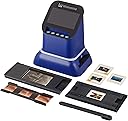
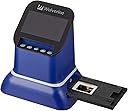
📼 Capture the Past, Share the Future!
The Wolverine F2D Saturn Digital Film & Slide Scanner is a powerful 20MP device designed to convert various film formats, including 35mm, 127, and 120 negatives, as well as microfiche, into high-quality JPEG digital files. Featuring a large 4.3” LCD screen for easy viewing and an HDMI output for high-definition display, this scanner makes preserving your memories both quick and effortless.


| ASIN | B083M7YVCL |
| Best Sellers Rank | #441,062 in Office Products ( See Top 100 in Office Products ) #169 in Slide & Negative Scanners |
| Brand | Wolverine |
| Color Depth | 24 Bits |
| Connection Type | HDMI |
| Connectivity Technology | HDMI |
| Customer Reviews | 3.9 out of 5 stars 368 Reviews |
| Item Weight | 1 Pounds |
| Light Source Type | LED |
| Manufacturer | Wolverine Data |
| Media Type | Negatives, Slide |
| Minimum System Requirements | Windows 7 |
| Model Name | Saturn Blue |
| Resolution | 20 Megapixels |
| Scanner Type | Film |
| Standard Sheet Capacity | 10 |
| UPC | 852652008084 |
| Wattage | 5 watts |
M**Y
Great way to scan old slides
Hello This does a great job of scanning old slides. I am not a professional photographer, but the image quality in the scanned picture is great for displaying on the web/shared photo albums. Haven't tried printing, but based on file size and resolution, I think you should easily be able to print a 4*6 in good quality. The best part is how easy/quickly you can scan. The hard part is just getting organized beforehand. But once you have all your slides in a logical order, you just start hand feeding them through. Press two buttons to take the image and you are done. Can get through 30 slides in just a few minutes. I have done around 1000 slides in 2-3 days. Highly recommend.
C**G
Film scanner not quite up to par.
I saw this online and thought that it was a great deal for the money. Maybe I didn't understand the description on the resolution but its not what I wanted. I wanted to save my images digitally in case the negatives got damaged. The resolution was not enough. Definitely was not saved at the higher resolution that it claimed. Was very quick at scanning. May have to see if I am using it correctly??
J**N
Easy to use, fast
Works great converts negatives to positives instantly before you even scan. Does 120 negatives and 135 slides Make sure you wipe the scanner with the included brush so there's no dust in your scans, easy to use and fast, you manually feed slides in one side and they push thru to the other side. You can adjust ev and color if you want before you scan. Scans as fast as you can insert slides or negatives. Scans to full size SD card.
T**R
A Clever Concept Ruined By Ignorant Firmware Design
Let's start with a reality check: For less than $200, one can't expect a truly high quality film scanner, but it did seem reasonable to expect better quality than one might have found in 2001. Unfortunately, that wasn't the case for the Wolverine F2D Saturn digital film & slide scanner that can convert 35mm negatives and slides, 120 medium format and 127 format film, and microfiche to digital JPEG images. I own a Plustek OpticFilm 35mm scanner, but it can't handle medium format film. I had hoped that, even with the anticipated low quality of the Wolverine scanner, it might produce acceptable images from the much larger negatives. The quality of the images reminds me of what we were able to get from the Sony Mavica. This was the early digital camera that recorded low-resolution, low-quality photos with a great deal of artifacting. The quality was barely acceptable back then. Now it's unforgivable. So is the Wolverine FD2 Saturn good for anything? Maybe, if you understand and are willing to accept the shortcomings. It is a clever device because it's really not a traditional film scanner. Instead, it has what's probably the equivalent of a smart-phone digital sensor. Instead of waiting 30 to 90 seconds for a traditional scanner to process the image, the Wolverine captures the image instantly and displays it on a small screen. Pressing one more button writes the image file to the device's internal memory or to a secure digital card. (1) That's where the process falls apart. Instead of processing the image as a lossless TIFF or even writing it as a high-quality JPEG image, the scanner writes and incredibly small file. When I scanned a 645-format image, the resulting file was just 2MB. The manufacturer claims the maximum scanning resolution is 4600 samples per inch, so the image should have been approximately 11,500 pixels by 8300 pixels and the expected file size would be more than 20MB and the dimensions were 5164 x 3876. (2) The smaller physical file size would still have created a highly usable image if the manufacturer had chosen not to use such extreme downsampling that creates horrid artifacting. A 10MB JPEG would have virtually no visible artifacting. As a result of poor design choices, the images are fuzzy. (3) Most people who purchase a device such as this will want it for 35mm negatives and slides. How well does it work there? It's even worse. The scanned image was 5480 pixels by 3652 pixels. That's about 2600 samples per inch, which is higher than the setting I generally use on the Plustek scanner. That device can scan at 7200 SPI, but doing so takes more than one minute per slide. I usually use the 1800 SPI setting on the Plustek because that drops the scan time to about 30 seconds. (4) The Plustek can also save files in lossless TIFF format, which is what I use. At 1800 SPI, the quality of an image saved as a TIFF far exceeds that of the Wolverine's higher resolution coupled with the extremely lossy JPEG format. (5) The Wolverine's artifacting loses all fine detail.
S**P
Great 120 negative scanner
This was the only scanner that I could find that would fit the large 120 negatives. I'm able to look at photos that I have never seen before. This scanner is really easy to operate.
B**R
Too expensive for a cheap device, not usable for 120 framed slides
If you want to scan your mixed collection of 135 or 120 film or slides, you are stuck with few affordable options. I just went through scanning almost 1000 photos in different formats and the experience with the Wolverine was not ideal. - Manual: useable - Software: feels old and outdated, date settings automatically start each session with Jan 1, 2021. Limited options to adjust image quality. - Display: same size as scanned image. No option to check focus, especially when your film is slightly warped due to temperature changes or the way it was stored. - Top tray, for 135 and 126 film/slides: After inserting the tray into the scanner, you need to feed your film into the corresponding slot. This would be easy if there were any guides and if the edges of the film holder were smooth enough to guide your film smoothly. Unfortunately, I spent more time trying to aim for the opening, pushing, pulling, wiggling, until the film finally finds the opening. And the trouble is not over at that point, because it needs to find the exit as well, and without guides it tends to get stuck again, and some more wriggling is needed. Picture quality is ok as long as your film is flat. - Bottom tray, for 120/127 film: same manufacturing problem with inaccurate guides. To find the guides, you need to push the film about one inch into the tray before it catches the guide. And even then the film is not guided very accurately and can still 'get off the rails' and end up being stuck. - My biggest issue is that it is NOT possible to scan framed 120 slides. The tray is not wide enough. To scan slides, you need to remove each photo from the frame and manually place it into the tray. This would be ok if there were an adapter, but in its current configuration it is just not feasible to use it to scan slides. - Overall observation: too expensive for such a cheap device.
B**M
Medium format positive slide
I couldn't fit medium format slides (all in cardboard carriers) in the adapter, which is designed for film or negative, but managed to scan them anyway by making a cardboard adapter with a cut-out to fit the carriers. Since they were all over 60 years old, I wasn't worried about getting cardboard specks in the images. I just wanted to digitize these while they were still in good shape (too late for some; colors had gone way red.) I didn't know at the time I was looking at scanners that half of my in-laws slide collection were the medium format size, but by sheer luck I decided to get this one because it said "120 professional film" or something, and knew my father-in-law was a photography nut. Little did I know, but old Brownie cameras used that size, too. I am very pleased with the product, which I think saved me a ton of time trying to rig up something to handle those bigger slides.
B**N
Super easy to use, but poor/disappointing image quality
I've been going back & forth for a week now, trying to decide whether to keep this scanner or not. I'm very frustrated, because the hardware seems like it has a lot of potential for scanning my old 120 negatives & 127 slides, and it's the only device out there like it, capable of scanning such media. But the negative holder has no method of holding 120 negatives flat, and the image processing firmware in the device is just *AWFUL*. When you scan, don't use any of the built-in color manipulation settings. If you try and adjust colors or brightness in the device, all it does is chop bits off the existing 8-bit color space, leaving you with a degraded ability to fix the white balance or do other color post-processing once you get hold of the image. So it's best to just accept the defaults, and try to fix white balance afterward in post-processing. Second, the default settings invoke some kind of horrendously bad JPEG compression, which leaves ugly, obvious compression artifacts in the output image, and there's no way to turn it off or adjust it. It looks like the hardware is capturing a pretty nice raw image, which then gets destroyed by the awful firmware processing before saving the image where you can access it. I've attached a comparison image to this review. The image on the left side is the result of a wolverine scan at default settings, then imported into gimp, and auto white balance run. It's zoomed in 200%, so the compression artifacts are really obvious. The image on the right side is the same negative, placed on a light table, and shot with a Canon T8i, then run through the same auto white balance filter in gimp, followed by an invert. The Canon capture is slightly lower resolution, so it's not exactly the same size, but it's also zoomed to 200%, so you can compare the difference in processing and compression. Both came out of the camera/scanner as JPEG. There is detail there in the wolverine scan, which doesn't exist in the Canon snapshot due to its lower resolution, so I know the Wolverine hardware captured a much better image, but it's been ruined by the awful processing/compression in its firmware. I think this could be an incredible device with only a little more effort on Wolverine's part. For example, if the firmware would simply give the option to bypass all processing, and output a RAW image, I would be thrilled with it. Or even if it had a JPEG quality setting, so I could choose less compression, it would be a huge improvement. I'm hoping they will update the firmware, and provide a new version with some fixes. With fixed firmware, I think I would give this device 5 stars. The negative holder is still a problem, but one I can work around, especially in this price range.
W**E
Excellent way to convert my 45 year old negative to a digital format I can send by e-mail when
I have finished converting 800 negatives and positive black and white and colour film to a digital format with this device ( Wolverine F2D Saturn Film to Digital Converter) The process went of smoothly and I download the files to 2 32 G SDHC cards I purchased on line to store the images. Keep up the good work,excellent product.
A**K
Works Well
Dead simple to use, and does the job for the larger format film which is not usually catered for with other scanners.
C**N
Ótimo scaner de negativos
Permite ajustar exposição e balanceamento de cores, já mostra a foto em positivo e é bem fácil de operar
A**R
Doesn't give constant results
Build quality is good and easy to use. However 35mm negatives came out low quality and not as expected. 120 - 6x6 - 21/4" square colour and b/w negatives did not scan well at all. The results were at best soft and inconsistent colour reproduction while b/w were soft and lacked detail. I would not really this item at all. It's a shame as the videos show great results but aren't. I do not leave this negative review easily. Just an honest opinion.
J**T
Almost the only scanner that takes larger size negatives and slides
Update at the end after further testing. Had to buy this one because all the other models I have are only for 35mm rectangular size slides or negs. You can put in the 35mm square slides that get cropped with the smaller units and it does not crop the pictures. I had hundreds of BW 120 full size negatives and a few even larger. This should work well but there was no tray included that fit the 120 height. It only fit in the horizontal direction. So I had to modify one of the trays and cut the opening wider on both sides. Then it would fit my 120 negatives. it still required cropping to remove a large scanned area around each picture. Cropping. Every picture scanned required massive cropping during editing. The scanner has a large number of scanned pixels, 5480x3652. So there is plenty to crop. There are some color and brightness adjustments available during scanning. After a while you get kind of used to the two-handed clicking for every picture. However when comparing color balance to my two other scanners I find that even though the pictures have color and high resolution, I often found the color tints unacceptable. Generally I would say it has good high contrasts but a bit weak for a smooth gradiation in the midtones. This scanner has a counter that numbers each scan. It never resets back to zero and this is good. No duplicate numbers in case you are moving photos to the same directory later. I always scanned to SD cards and never tried the internal memory that uploads to the computer. I did try using the built in screen, and I also tried using the HDMI link to a HD TV. The external link would be nice if you had to show several people the photos. Eventually I got used to looking at the small monitor because the controls were nearby in the same view and I did not have to move my head to look at two different things. Am I happy with the purchase? A bit expensive, but at least this box of negs is digitized and the plastics are now in the garbage. Satisfied yes. UPDATE a few weeks later... I decided to go back and rescan some 35 mm negatives I had scanned years ago on a cheap $80 scanner. After scanning about a hundred negs I compared the scans from the two units. Not even one scan done on this expensive model came close to matching the quality of scan I already had. Contrast was observed to be either too much blacks and too much lights or just missing the midtones altogether. I have no reason why a scanner should produce the blacks heavily and also the whites but not much gradience in between. So I am upgrading my review and saying that if you can use the smaller but cheaper units available you should do that as this unit is only for the desperate people who need larger format scans. But don't expect great results. I had to remove one star from my previous rating after the most recent tests.
Trustpilot
3 weeks ago
3 days ago