Buy anything from 5,000+ international stores. One checkout price. No surprise fees. Join 2M+ shoppers on Desertcart.
Desertcart purchases this item on your behalf and handles shipping, customs, and support to South Korea.
🎮 Power Up Your Play: Charge Fast, Game Hard, Stay Ready!
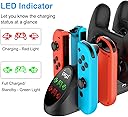
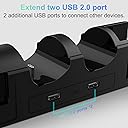
The FastSnail Charging Dock is a professional-grade accessory designed to charge up to four Nintendo Switch controllers simultaneously, including Pro Controllers and Joy-Cons (OLED compatible). It features dual USB 2.0 ports for additional device connectivity, built-in intelligent circuitry for overcharge and short circuit protection, and bright LED indicators to monitor charging status. This dock seamlessly integrates with the original Nintendo Switch dock, offering a compact, organized solution to keep your controllers powered and ready without extra cables or clutter.


| ASIN | B082SJQZ8G |
| Additional Features | Charging Indicator, Fast Charging, Multi Device Charging, Short Circuit Protection |
| Best Sellers Rank | #5,216 in Video Games ( See Top 100 in Video Games ) #39 in Nintendo 3DS & 2DS Accessory Kits |
| Brand | FASTSNAIL |
| Built-In Media | 1 X Charging Dock for switch, User Manual |
| Color | Black |
| Compatible Devices | Nintendo 3DS, Nintendo 64, Nintendo Switch, Nintendo Switch 2, Wii U |
| Compatible Phone Models | Nintendo Switch/Nintendo 64/Nintendo DS/3DS/Wii U/Wii |
| Compatible Power Plug Type | Type C |
| Connectivity Technology | USB |
| Connector Type | USB Type C |
| Current | DC |
| Current Rating | 2 Amps |
| Customer Package Type | Reinforced Packaging" or "Shock-Resistant Packaging |
| Customer Reviews | 4.2 out of 5 stars 2,342 Reviews |
| Enclosure Material | Metal, Plastic |
| External Testing Certification | Não Aplicável |
| Form Factor | Stand |
| Included Components | 1 X Charging Dock for switch, User Manual |
| Input Voltage | 5 Volts |
| Item Weight | 0.18 Kilograms |
| Main Power Connector Type | 2 Pin |
| Manufacturer | FASTSNAIL |
| Mfr Part Number | NT167 |
| Model Name | NT167 |
| Model Number | NT167 |
| Mounting Type | Stand |
| Number of Items | 1 |
| Output Current | 1 Amps |
| Output Voltage | 5 Volts |
| Portable | No |
| Power Plug | Type C |
| Power Source | Corded Electric |
| Special Feature | Charging Indicator, Fast Charging, Multi Device Charging, Short Circuit Protection |
| Total USB 2.0 Ports | 2 |
| Total Usb Ports | 2 |
| Unit Count | 1.0 Count |
| Warranty Description | 1 Year Manufacture |
| Wattage | 10 watts |
| Wired Charging Connector Type | USB Type A |
B**E
Works well - A great take on the Switch charging dock, with some things to consider.
First, I'd like you to consider that this is a charging dock that works and works well. But there are some quirks, that some people may call features, which would be helpful to know about, for a person thinking about buying this thing. Let's go over the good stuff. you're wanting to buy this to charge your pro controllers and your joy-cons, and this device is totally going to do the heck out of that. There is a handy charging indicator on the very front of the thing, which will tell you exactly which controllers are charged and which ones are not. You are able to charge up to two official Nintendo Pro controllers, and up to two sets of joycons, which can be mixed or matched. I have a third party joy-con set, which this charger has been able to successfully charge very dependably. This doc attaches to the end of your Nintendo switch dock where the two USB ports are. cosmetically it appears to be just about a perfect match. The two ports protruding from the end of this charging dock exactly match up with the two ports on the end of the Nintendo switch dock. This charging dock has no power of its own, only the power provided from the USB ports of the Nintendo switch dock, and that is only when the Nintendo switch is actually docked in the dock. So here are the quirky things. First if you are the type of person who takes your switch on the go or in handheld mode whenever your Pro Controller runs out of power, you might be disappointed to find out that the charging dock is not charging your Pro Controller when your switch is not docked. This is not an issue for me, as I almost exclusively play my switch docked. Secondly, while the USB plugs which protrude from the end of this doc match exactly with the ports on the Nintendo switch dock, they slide out with incredible ease, whether you want them to or not. There are some ways to work around this, and I'll discuss those in just a moment. The charging indicator lights on the end of this dock are super bright. And I don't mean like regular super bright. I mean like, you're going to have trouble playing video games if this thing is anywhere where you can see the super bright lights while you're looking at the screen. They are bright to the point where it is really distracting. So now let's talk about my workarounds. For the bright lights that I just mentioned, I fashioned a little flap from gaffers tape, which is matte black, which I simply flipped down over the lights, and flip back up whenever I want to look at the lights to see which controllers are charged. For the USB ports coming unplugged all the time, which they do because it takes a certain amount of force to plug a controller into this dock - not a bad thing, you want these things to stay put when they're charging - at first I used my gaff tape to hold the switch dock and this charging dock together at the point where the USB connectors meet, just a strip on each side seemed to do the trick. but the more I use this, the more I realized that the tape was not going to be a long-term solution. Being the type of person who is always looking for the opportunity to void a warranty, I opened up the case and drilled a few small holes into the sides of the dock, so that I could attach some zip ties through the dock, and then wrap them around the bottom of the Switch dock. Someone could probably pull off the same thing with velcro cable ties, but I went with this approach for now. It's actually more permanent than I'm comfortable with, but my switch stock is actually fastened to my shelf, so it doesn't really go anywhere anyway. The solutions will not be for everyone, and as such I really think that for some people, this is not a good option for a charging dock. But, being the hardware tinkerer that I am, I feel comfortable suggesting that this is a great option for someone who wants a little something unique and isn't afraid to hack on it a little to make it their own. You might could use some double sticky tape or command strips to keep both your switch dock and this charging dock from sliding apart, but again, I feel pretty confident in saying, that doesn't seem like a long-term solution for this issue. Overall I am super happy with my purchase, because I had a pretty good idea what I was going to be doing with this when I bought it in the first place.
D**G
Functionality is key
Fantastic product and worth the price! This review is for the newer Switch 2/1 compatible charging dock with cable. The listing, as described by the manufacturer, states the pro controller dock is not compatible with PDP pro controllers, but as you can see in the picture I shared, it clearly is charging the PDP Afterglow wireless switch 1 pro controller. The pro dock connectors do take a little finessing and a firm push with a clicking sound to ensure connection is fully made and charging begins, but that also goes the same for a licensed Nintendo Switch 1 pro controller. No complaints here. It does charge joy-con 1 and joy-con 2 controllers without issue. How practical and convenient! I could see where with joy-con 1 controllers the small connector on the dock where the controller contacts the dock connection point could get bent and damaged if not properly handled with care when inserting and removing a joy-con 1 controller, but just be careful with your expensive Nintendo controllers and there shouldn't be any issue. The real genius in the engineering of this product are the button controls on the unit that allow you to not only change the color of the light display, which you can turn off, but also the button control to turn on and off the actual charging function. This allows the front display lights to completely turn off if you are watching a movie or want the room dark and not have any distracting lights. I will say the dock on the back does have a warning label that the cable provided with the product must be the only cable used and it must be used with the Nintendo Switch 2 dock. That being said, if you don't have both USB ports open on the side of your Switch 2 dock, you may be out of luck. I did not test the included Y cable with an alternative power source such as a 2 USB port wall plug.
D**R
Great product works good
Great Seller, Great Shipping, Great Product. Really pleased with purchase.
M**Y
Functions but a little flimsy
It functions as expected. However, it is difficult to pull the joy cons off. Contrarily, the controllers easily come off and they easily wiggle while on the charger. The connection to the dock is flimsy and easily wiggles as well. There is no clicking sound to indicate you have the joy cons positioned properly, you just have to look at the charging indicator lights. The manufacturer really should have made the indicator lights a different color when not in use rather than green which indicates charging. The indicator lights are very bright.
S**H
it's reliable
It's a reliable charger got mine back in 22 it still holds up also this thing is compatible with third party controllers just wanted to clarify that just be aware I might have gotten lucky and found a compatible one otherwise it's a really solid charging dock the only problem is that you have to unplug it if you want to pair a new controller to the switch so for me it was a good investment especially with how long some of my gaming sessions can get.
D**D
Bad quality
it's really flimsy, nothing stays connected. if you have a fan going in the room, it'll blow the controllers off connection. plus the original controllers that came with the Switch were not getting recognized, only some of the extra ones we bought were able to get charged and got recognized by the system.
D**Y
Much better than I expected
With this not being a big brand (or even a name I recognized), I was not expecting this to be a super-awesome addition. I was pleasantly surprised that it connects very easily to the front of the console and allows me to charge all of our controllers at the same time. The charge indicator is awesome and I really like the fact that I can plug in the system to the dock with both of the joycons still attached. I would totally recommend this product for switch users looking for an inexpensive dock extension and charger.
T**E
Loose connections
Package was heavily damaged upon delivery but product still works. Made it look bad for Christmas and there wasn’t enough time to replace. Connection is a bit loose so make sure that indicator is glowing red to show charging.
S**R
Amazing product
I love this charging station! It just plugs in to the end of your switch doc, dose not require any additional cords. works amazing!
L**E
Facile et tellement pratique!
Je suis ravis de cette achat, nos manettes sont toujours prête à l’emploi, facile à installer. Il y a de nombreuses place. Il est vrai que la lumière verte des manettes est un peu lumineuse mais chez nous la console est dans le salon et donc la lumière n’est pas un problème. Les mène très chargé rapidement, au moins aussi vite que sur la console. Les manettes sont facile à mettre en charge et facile à prendre même pour les enfants.
H**U
super gut !! 👍
Super alles passt und funktioniert 👍! Anstecken einstecken und gut ! Sie leuchtet bei den dementsprechenden Controller solange rot bis er fertig geladen ist rot . Wenn er fertig geladen ist und leuchtet dan grün!
M**T
A Great Addition for your console
This add on which I purchased for my switch 2 is a great piece of kit that allows for extra handsets to be stored and charged and at a great price
P**X
Un tout en un
Fonctionne parfaitement bien, le support permet de mettre la console avec ou sans les joycon attachés. Seuls petits points négatifs, la console bouge un peu sur le port usb-c de gauche à droite elle n'est pas 100% stable et fixe mais ce n'est pas un gros problème. Les manettes pro sont un peu difficiles à emboîter sur les ports usb-c, comme il n'y a pas de guide il faut bien viser pour les placer. Dans l'ensemble un très bon produit qui fonctionne parfaitement.
Trustpilot
1 month ago
2 days ago