
Desertcart purchases this item on your behalf and handles shipping, customs, and support to South Korea.
🎨 Elevate your creativity—never miss a stroke with Wacom One Pen.
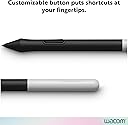
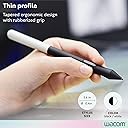
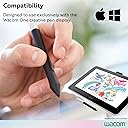
The Wacom One Pen CP91300B2Z is a lightweight, battery-free stylus designed exclusively for the Wacom One creative pen display. Featuring 8192 levels of pressure sensitivity, natural tilt recognition, and a programmable shortcut button, it offers professional-grade precision and convenience. Its EMR technology ensures uninterrupted use without charging, while included replacement nibs keep your workflow smooth and efficient.


| Are Batteries Included | No |
| Are Batteries Required | No |
| Asin | B084DVTSC9 |
| Battery Description | Battery-free |
| Best Sellers Rank | 27,860 in Computers & Accessories (See Top 100 in Computers & Accessories) 17 in Digital Pens |
| Brand Name | Wacom |
| Colour | black |
| Compatible Devices | Wacom One (DTC133W0A) |
| Customer Reviews | 4.6 4.6 out of 5 stars (1,689) 4.6 out of 5 stars |
| Enclosure Material | magnetic |
| Global Trade Identification Number | 00753218985675 |
| Item Dimensions | 14.7 x 1.1 x 1.1 centimetres |
| Item Weight | 45 g |
| Manufacturer | WACOM |
| Manufacturer Part Number | CP91300B2Z |
| Model Number | CP91300B2Z |
| Number Of Packs | 1 |
| Upc | 753218985675 |
User
Perfect
Use this with my Samsung Tab S10 Ultra, and it works like a dream. No hassle or complicated setting up, it just works.
User
Smoother feeling while drawing
I bought this to use on my Galaxy Tab S9 Ultra that has a screen protector installed. Compared to the S-Pen, it moves across the screen more smoothly and that helps me draw more efficiently while being less distracted with the slight resistance that occurred with the S-Pen. I know some people prefer that resistance but I do not, so this stylus pen was a necessary purchase for me.
User
Competes really well with the more expensive pens
I purchased this as a temporary replacement, while I figured out what high end pen I wanted to buy. But I think I’m sticking with this. It’s comfortable, the weight is good, I can swap out different nibs easily and it has a function button I use as an eraser. What more do you need really.
User
Favourite Pen
Brilliant pen, particularly the nib which just isn't running out. Now my main pen for all purposes on the Boox NoteAir4C.
User
Works fine but not for me
Just not as nice to draw with as the original Samsung I lost for me. Maybe would be better with a screen protector, it feels too smooth, pen skates across the screen. Some might prefer that though. Might still use it for sketching but I'm going to get a Samsung original also to replace the lost one.
User
Compared to the S Pen
Compared to the S Pen this Is way better, I was sceptical due to it being cheaper but the design, the feel, excellent. You don't catch the button all the time like on the S Pen because you have to grasp it so hard as it's tiny. Also no irritating ridge. Mostly the pressure sensor is way way better than the S Pen even though it's also supposed to have the same it does not. Side by side on same tablet this wins every time
User
Very Worthwhile Upgrade to the S-Pen
OK, this costs more than the S Pen and it definitely won't fit in the slot in your case but the downside ends there.This is a serious, professional pen which is both easy and extremely comfortable to use (on my Galaxy Tab S6 Lite) which makes the S Pen look, and feel, like a toy. Importantly, the increased diameter enables a larger, slightly protruding button which is easy to operate - unlike the smaller, recessed button on the (too slim) S Pen which I had difficulty finding quickly followed by difficulty pushing.Furthermore the Wacom comes with 3 spare nibs.Treat yourself, you won't regret it!
User
Prefer this for the Scribe over the Amazon pen - plus half the price
Not magnetic but if you get a case that is flexible on pen size (see https://www.amazon.co.uk/dp/B0BL2Z2D9H HoYiXi Universal Case) this pen is smoother than Amazon - not much in it but worth it for the cheaper price as well!
User
Just as Described
I liked it while I was using it, great substitute for the S-pen -works on the Tab S8-, the pen tip is a type of plastic so it's a bit slick on the screen, but it was not that bad... You can easily lose it though so take care of it.I took off a star because I lost mine, and I hate it.
User
Great Pen Wacom One Pen Cp91300B2Z
Great pen, got a discount on it, usually it is expensive. Works great on my tab
User
Exelente
Es lo q buscábamos
User
Parfait !
Fait le job !Un stylet simple et efficace pour écrire sur tablette. Je l’utilise à la place du stylet Samsung pour améliorer l’ergonomie, et franchement, c’est au top pour le prix !
User
Made the Tab S7 worth it for drawing
My complaint with the Tab S7 tablet for drawing is that the activation force is a bit high, it has a rubber tip which does wear down, and the pen isn't all that comfortable.The issue with the activation force being a bit high is that I can't get the same super small fine lines I could with my previous dedicated drawing tablet. The rubber tip works great if you have no screen protector but with a mate screen protector it wears down as if were being sanded down. And lastly it's too thin.This pen solves all of that. It's comfortable to use. It has a plastic tip which doesn't wear down, add a paperlike screen protector to it and you have good resistance on your tablet!But my favorite thing about it and what made my new tablet worth it was the activation force, as soon as you lay the tip of the pen on the screen and apply a tiny bit of force, it starts drawing and a super fine line at that. Meaning I can use the pressure sensitivity to make lines anywhere from 1px thick to 50px without having to change the pen used in the tool, which is also great when doing things like drawing hairs or lashes.
Trustpilot
3 weeks ago
3 weeks ago