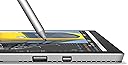
🚀 Elevate your workflow with the Surface Pro 4 — where power meets sleek versatility!
The Microsoft Surface Pro 4 combines a powerful 6th Gen Intel Core i5 processor with 8GB RAM and a 256GB SSD in a sleek, ultra-portable 1.7-pound frame. Its 12.3-inch PixelSense touchscreen delivers stunning 2736x1824 resolution with low glare, perfect for professionals and creatives who need a device that transitions effortlessly from laptop to tablet. Featuring multi-position Kickstand, Surface Pen support, and advanced wireless connectivity, it’s designed to keep you productive and inspired anywhere.


| ASIN | B01606IDL0 |
| Battery Cell Type | Lithium Ion |
| Battery Life | 10 Hours |
| Best Sellers Rank | #345,011 in Electronics ( See Top 100 in Electronics ) #4,741 in Computer Tablets |
| Bluetooth support? | Yes |
| Brand | Microsoft |
| Built-In Media | Surface Pen |
| CPU Model | Core i5 |
| CPU Model Number | Core i5 |
| CPU Model Speed Maximum | 3 GHz |
| Camera Description | Front, Rear |
| Cellular Technology | 4G |
| Color | Silver |
| Compatible Devices | Keyboard, Stylus Pen |
| Connectivity Technology | Wireless |
| Control Method | Touch |
| Customer Reviews | 3.9 out of 5 stars 1,038 Reviews |
| Display Resolution Maximum | 2736x1824 pixels |
| Display Technology | LCD |
| Display Type | LCD |
| Global Trade Identification Number | 00889842014389 |
| Graphics Description | Integrated |
| Hard Disk Description | SSD |
| Hard Disk Interface | Unknown |
| Hard Disk Size | 256 GB |
| Hard-Drive Size | 256 GB |
| Hardware Interface | 3.5mm Audio, Bluetooth, Ethernet, Headphone, USB 3.0 |
| Has Color Screen | No |
| Human-Interface Input | Touchscreen with Stylus Support |
| Item Dimensions L x W x Thickness | 15.17"L x 9.21"W x 1.58"Th |
| Item Weight | 1.7 Pounds |
| Lithium-Battery Energy Content | 42.2 Watt Hours |
| Manufacturer | Microsoft PC |
| Memory Slots Available | 1 |
| Model Name | Surface Pro 4 |
| Model Number | CR3-00001 |
| Model Year | 2015 |
| Native Resolution | 2736 x 1824 pixels |
| Number of Ports | 1 |
| Operating System | Windows 10 Pro |
| Other Special Features of the Product | Lightweight |
| Processor Brand | Intel |
| Processor Count | 1 |
| Processor Series | Core i5 |
| Processor Speed | 3 GHz |
| RAM Memory Installed | 8 GB |
| RAM Type | Unknown |
| Ram Memory Maximum Size | 8 GB |
| Screen Size | 12.3 Inches |
| Specific Uses For Product | personal |
| Total Usb Ports | 1 |
| UPC | 889842014389 783629335950 |
| Video Processor | Intel |
| Warranty Type | Limited |
| Webcam Capability | Yes |
| Wireless Compability | 802.11abg |
| Wireless Technology | Bluetooth, Wi-Fi |
G**T
My favorite computing device!
This is, by far, the best computer I've purchased in recent years. It's fast, light, beautiful, and it always garners wow's from onlookers. If you find yourself enjoying the Tablet profile, and touch interface, but wish you could do more with it... the Surface is here to deliver. It has become my primary device, for 90% of all my computing, and I have been thrilled with it. Pros: - Jaw dropping display. Among the most beautifully sharp and vibrant available. The touch is responsive and feels great. Honestly, it's a luxury experience. - Compact, light, and attractive. From the magnetic pen, to the perfect "kick-stand", to the smart cover, to the logo on the back, everything about this design looks and feels modern, convenient, and impressive. - Amazing pen. I have owned multiple Wacom tablets and I am an avid artist. The pen that comes with the Surface Pro is my favorite, by far. It took a little time to set it up with Krita and Photoshop... but now I'm cooking with gas, and the experience is second to none. The pen is just as amazing for writing and note taking as it is for painting or sketching. And with multiple tips available, you can get the exact feel you are after. Be that a #2 pencil, a ball-point pen, or a felt ink pen! - Convenient and powerful. I get at least 3-4 hours on the battery (beware power sucking apps), can use it in portrait (touch), widescreen (touch), or laptop (with cover and mouse), and switch seamlessly throughout the day. The Surface is always ready to be used the way I need it at the moment. My iPad has been almost completely shelved since I purchased this (and I did not purchase it to replace my current gen iPad!) While it's no gaming rig, I have yet to encounter and application that I would typically use (Photoshop, browsers, painting apps, video editing, and some indie games) that don't run fabulously. As an added bonus, I discovered that I can stream my Steam catalog from my gaming PC, when I'm on the same network, so I can play my high-end games in bed! How terrible for my health :). - Cortana, Windows 10, Gestures, oh my! If you take the time to learn and use all the conveniences in the Surface Pro, it is just astonishingly fun and efficient to use. From setting reminders with Cortana, having calls sent to your phone based on internet searches (on Edge), to making hand written notes on a website and sending it to a friend through chat or email, or having the computer unlock upon recognizing your face... there is so much here... reviewing the software would be a whole other article! Cons: - Occasionally, the screen will lock up. I thought this was the machine freezing at first, but it turns out it is the graphics driver failing to behave properly. There may be a permanent fix to this, but the workaround is just to turn off the screen and turn it back on again... so it's not really that inconvenient. This happens maybe once every couple of days for me (and I use this about 10 hours a day, I'd wager... since it's my primary work machine as well as personal.) - The smart cover does not work well in your lap. You're better off using the touch interface if you're going to lounge in bed, or on the couch. I know this review isn't for the cover, but I would guess MOST people plan to get the smart cover. - It would be great if the battery was a bit longer lasting. But when you realize how much of a complete system experience you are getting, the fact that it lasts as long as it does is honestly pretty impressive. - Browsers other than Microsoft Edge just aren't that great on the Surface. I use Google Chrome and MS Edge regularly. But I have tested Firefox, Vivaldi, Opera, and IE. MS Edge performs substantially faster (while it's a fast browsers to be sure, the disparity is not this grand on my other computers) and more importantly, it is the ONLY browser that capably handles Touch and Tablet-mode on the Surface. The others all have various problems, instability, or other inconveniences while dealing with the Surface's changing modes of display and input. - There's not a lot of space on this device. So be sure to lean on cloud storage, network storage, or a usb/Bluetooth storage device. Personally, I use the 1TB of storage provided my Microsoft's Office 365 (which is also amazing.) Conclusion: If you want a device that can fill many roles, capably, and conveniently... this is it. There's nothing else quite like it, and imho, it is the idea computing device for this particular consumer era. Taking me off my desktop and my iPad, and being the perfect companion for my Phone and cloud services, I've honestly never felt this close to zen with my computing situation! I would recommend this machine, especially, to artists, developers, and tablet enthusiasts. I'm an IT administrator, and I have not found this machine lacking in any aspect of my job (beware, network Admins: There is no Ethernet port.)
J**.
Great Laptop/Tablet for Photo Editing On the Go
I was very hesitant to buy this. I have read a lot of reviews stating horrific issues with the Surface Pro 4. I have also been a long time apple fan and have become very accustomed to the apple methodology. For those of you worried about the bad reviews of glitches, I can report that I have had 0 issues with mine since purchasing. For those of you who are hesitant to switch from Apple to Windows, I would say it's worth it with a few caveats. First, I purchased this because I am an amateur photographer and like to do my edits wherever I am (I don't like having to sit in my office and work on my desktop). This device is incredibly portable and the touch screen is incredible for performing edits. I was torn between this, an iPad Pro, or a MacBook. After using the stylus on a photo edit, I found it along with touch interface to be a huge sell for me which the Surface performs perfectly. My only complaint is that it is VERY reflective and difficult to see in daylight. However, if you're buying this as a pure Laptop, to be honest, there are probably better deals out there for less money that aren't detachable. To be honest, if Apple made a detachable I probably would have bought it. OSX is just what I'm familiar with. However, I will say that Windows 10 is INCREDIBLE compared to the windows 7 machines I've used. The tiles are awesome (especially in tablet mode), and the start menu is vastly improved. However, this is a Windows machine, so it is glitchy compared to OSX. I'm not trying to make an "Apple is better than WIndows" statement here, just saying that my OSX desktop is far more stable. However, this is still a great machine with a great OS even with the occasional hiccup. Last, I would say that the marketing for this device is a little "off" in my opinion. This is not a "tablet" that can replace your laptop. Its a laptop that functions pretty well as a tablet. In tablet mode this does most things my iPad could and then some (Like still run full desktop apps, which is amazing). However, there are things a tablet does that this cannot. For instance, iPad's (and similar) can start playing music and then turn off while still playing music. There are ways to do this on a Surface as well, but its not as easy as just clicking the power button. If you're looking for a device that is an exact replacement for a tablet in all ways while still running desktop software, this isn't it (and frankly I'm not sure there is a solution to that currently). If, like me, you wanted to take your desktop software on the go and be able to use touch interface while also being able to utilize it as a tablet in a pinch, you'll be very happy with a Surface Pro 4. Since purchasing this I've gotten rid of my iPad all together (I was a HUGE iPad user at home). My only regret is losing the interconnectivity that Apple does so well with handoff. However, if you're an android user and have Pushbullet you wont miss a thing. Regardless of the occasional hiccup, this is a great machine and I would highly recommend it!
J**N
Only lasted 2 days before breaking - NO TECH SUPPORT
Worked great at first but after two days it ceased to function in almost every way. I really liked the thing although Windows 10 was not very intuitive for me, having come from Windows XP. The problem began on the third day when the touch screen failed to respond to any input, whether by finger or by stylus pen. I couldn't bring up the Windows screen at all and the Explorer icon was also dead. Oddly, I had installed Google Chrome and I could connect to the internet that way but I couldn't get any of the stock Windows icons to respond. The stylus pen had worked fine the day before but now seemed as dead as a wooden pencil. Also I don't think I was ever able to shut it off as the shutoff required me to slide it downward on the screen and it never would respond to my input so the battery was probably being drained even when it was not being used. Also, I was unable to complete the upgrade for Windows 10 after a half dozen attempts. None of the attempts ever resulted in a successful installation. The fact that it couldn't perform the very first task asked of it should have been a red flag. OK, any company can have an occasional lemon. However when I tried to get some kind of tech support or help line to solve my problem, Microsoft failed entirely. My call in requests for help, as suggested on their website, ended in in a dead end. I gave the robots all the pertinent data, serial #, etc. and then the robot said they couldn't do anything and to try again some other day. I also tried a tech chat line that they suggested but nothing ever happened with that as the link seemed to be dead. Then the help page suggested taking the useless hardware to a Microsoft Store that is near my home and someone could tell me what was wrong with my BRAND NEW COMPUTER. They listed a phone number to make an appointment with the store personnel to take a look at it. Turns out that number was not for the store at all but sent me back to robot hell where the same robots informed me they were useless and to try again sometime in the future and perhaps then they would be functional. Microsoft likely spent a lot of money on this merry-go-round of misinformation of a website which actually leads to NOWHERE. So at this point I have no choice but to send the broken tablet back to the factory and maybe they can decide if its really worth making computers that don't work when they have a total lack of tech support in place. IN BRIEF: Surface Pro 4 broke after 2 days Company provides zero tech support
J**H
I love it, but you might not.
It seems like the big question right now is, "Do I get the Surface Pro 4 or the Surface Book?" I'll explain why I chose the Surface Pro 4, but first, a quick about me. I am a college student majoring in EECS and I commute 4 hours a day by bus so having a light backpack is important to me. The S.Book is almost two times heavier than the SP4. It packs much more computing power than the SP4, but as an EECS major, I don't need the extra power that the S.Book has. I don't plan to play any intensive games or render/animate things so the SP4 fits my needs better. The S.Book also has a $400 higher price tag ($270 if you get the Type Cover for the SP4) that I'm not willing to pay for unneeded performance. I haven't tried the S.Book's keyboard, but the SP4's keyboard feels great to type on and other reviewers have said both keyboards are amazing. Reading textbooks or other PDF's feels much more natural with the SP4's tablet form. The S.Book without the keyboard only has a battery life of 3 hours, and although it can be used with the keyboard 'wrapped' around the back, I think that it'll only be a hassle for me to deal with. I'd rather not deal with having to detach the S.Book every time I want to use it in tablet mode. If you plan to render/animate things you should probably consider going with the Surface Book. Otherwise, I highly recommend the Surface Pro 4 for doing everyday/light to medium tasks. Now onto the actual Surface Pro 4 Review. I love the SP4. In the past year, I've owned an iPad Air, MacBook Pro, and the Razer Blade 2015. The SP4 fits my needs the best by far. The SP4 replaces both my textbooks and notebooks. For me, this is a big deal because I no longer have to carry around my notebooks, textbooks, and supplemental writing materials (highlighters, etc). The Surface Pen tips can be replaced with other pen tips to change the writing "feedback" feeling but the stock pen tip feels great. OneNote keeps all my notes organized and being able to access them from any device is incredibly convenient. Using the Surface Pen for writing on textbooks and PDF's is also very useful. I've been getting ~7-9 hours of battery life on the SP4 which is more than enough to get me through a school day. The screen is not too small like the iPad, neither is it bulky like a laptop. The screen resolution is high and text/videos are crisp and easy to read/watch. The magnet on the left side of the SP4 is surprising strong and holds the Surface Pen well. The magnet on the right side is significantly weaker (maybe because all the I/O ports are on this side) but it can hold the pen well. The kickstand works perfectly and stays in the position I set it to. The SP4 Type Cover feels great and protects your screen when you aren't using it. Gaming shouldn't be the main reason you buy the SP4, but it could run some games if you decide to do so. I did try running StarCraft II and Heroes of the Storm and the SP4 handled it pretty well. I wouldn't even bother trying to run more demanding games such as GTAV on the SP4. That being said, the gaming experience was rather unpleasant. You should consider the Surface Book if you plan to game on-the-go frequently. Software-wise, I don't have much to comment on. It looks and performs exactly like Windows 10 should on a normal desktop or laptop. I've never used the Microsoft Store and don't intend to so I don't know much about the apps that are available on the SP4. The only con I found with this device is the fact that it only has a single USB port. It's inconvenient when I'm using the SP4 with a mouse and I need to use my flash drive. I haven't had any overheating issues and I can't find any issues with the build quality. In closing, I don't think anyone else offers the performance and quality that the Surface Pro 4 has in the same lightweight and thin chassis. It is incredibly versatile and it has replaced many heavy and cumbersome objects in my bag. I'll update this review as I continue to use the SP4. Feel free to leave questions/comments and I will try my best to answer them.
B**R
Ultimate Note Taking Machine!
UPDATE: After 4-5 months of use I have finally gotten to use this computer for what I intended and I am fully satisfied! I am in love with my surface. I am still occasionally having issues with the sleep/wake function but it seems to be getting a little better. In the grand scheme of things I can handle this minor yet annoying issue. Otherwise this is a 5 star machine at least if you are using it for note taking and studying. I love that I can send all my documents to One Note and annotate away. I have also started using Microsoft Edge to do my online physics problems so that I can write right in the web browser which is super convenient. I'm glad I waited a month before reviewing this because when I first got this it was a definite 5 stars and I was in love. Now not so much. First I am going to address the problems that a lot of people seem to be having: 1. Screen Bleed: There is a slight bleed on my screen but I find I don't really notice it all that much for it to be a problem. It seems to only be noticeable at the initial start up of the computer 2. Overheating: One of the very first issue I noticed with this computer is that it gets hot quickly and if you have multiple apps open or if you are streaming video the fan is on and it can get pretty loud 3. Wake/Sleep feature: One thing that has been happening more frequently and has to be the most frustrating thing is that once the computer goes to sleep it will not wake up without a hard reset. It seemed to happen randomly at first and I got over it but now it is more frequent and makes me nervous turning the screen off when I walk away from my desk and not being sure it's going to turn back on when I get back. 4. Battery life: I actually find that my battery last pretty long. I use it to study at work and it last me for most of the day with light use. If you are streaming or video editing though the battery goes much quicker. Now for the reason that I am giving this one star... the pen. The whole reason I got this computer was for the surface pen which is now completely useless. After less than a month of use the pen just completely died out of the blue literally in the middle of me using it. I thought it may be a battery issue so I went to change the battery and getting the pen to open was such a struggle. After a good 30 minutes I finally figured out how to get it open and with fresh batteries in it.... I still got nothing. So for that I have to give this one star. The pen was the selling feature for me and when it worked it was great but having it die after one month is a huge disappointment. Have yet to talk to Microsoft about a replacement. Without this issue I would give this a solid 3 stars but with all the issues that have arisen in the past couple of days I am not too far off from returning this. UPDATE: My replacement pen came in the mail and is working. I am disappointed though because it seems like it is a used pen. It didn't come in a box and it has a few scratches on it. Not cool. Secondly over the past few days the wake/sleep problem has been getting even worse despite an update that was supposed to fix the problem. It's really frustrating to have to restart every time I walk away from the computer. If you are working on an important project this could be detrimental. Also the time I'm wasting is taking away valuable and much needed study time. BUT I have found that if you go to the start menu and put the computer on sleep from there and use the power button to wake it that it seems to work better than putting it to sleep using the power button. Since I have a working pen I will upgrade to 2 stars. When they finally fix the sleep/wake problem then I might even up it to 4.
D**E
Price is way to high for what you get
At the time I bought this (Sept '16) It was the only option I could find with a full power i5 prcessor. I needed that for the graphics/drawing programs I use. That part works great, but the devil is in the details and Microsoft still needs to work on those. Bringing up the onscreen keyboard is a crap shoot that usually comes up snake-eyes. It rarely pops up automatically when it should, and after clicking the icon to bring it up it disappears again as soon as I touch the first key. Clicking the icon again brings it back up and it continues to work from that point. This is Basic tablet usage that should work flawlessly! It also developed a crackle in the speaker that seems to happen as it gets hotter. It stopped after one of the updates, but its back since the last update. Some setting disappear for no reason (screen rotation lock comes to mind) and its a pain to have to search the webs for answers.This is the fourth iteration...basic problems should have been worked out long ago. I'm not a fan of the magnetic stylus. It falls off too easily and seems to always land on the tip, which flattened and stopped working so I had to replace it. It IS a powerful computer with a beautiful screen, can run full apps with no problem or stutter, but I'm put off by the continuing usability problems. Microsoft positions the surface as top-of-the-line, but the price is way too high to have to put up with all the annoyances. As far as I'm concerned, this is a middle-of-the-pack machine priced at the top. When I need a replacement I'll look for a different brand.
G**S
Lightweight and reliable
I wasn't sure about ordering it with the issues it had early on, but as soon as I heard in February that a software update was able to fix the battery life issues and the graphics issues were fixed, I got it. I've had no issues at all with it in the 4 months I've owned it, except that the cursor disappears in Google Chrome for some reason, so I have to use the stylus instead. Also, the cursor is still there(but invisible if not using trackpad), so if the last place you tapped is over a mouse-over item(like many menus on websites), it'll activate those menus, especially if you tapped on the menu before. This is likely the case with all Windows touchscreen devices, and maybe there's a setting or program I'm unaware of that'll fix that. If you know of a fix, let me know. I've left the tablet in my bag for days before, and still had loads of battery life(earlier users weren't so lucky). I haven't measured the battery life, but I've definitely gotten over 3 hours of use on one charge, maybe even 4. Photoshop opens in just a few seconds, thanks to the solid state drive. I don't consider Photoshop very touch-friendly, but a wireless keyboard fixes that issue. You could use Microsoft's snap-on keyboard, but the keyboard's not very handy if you want to use it as a tablet. In fact, if you prefer to use it as a laptop, I'd recommend the Surface Book if you can afford it. The kickstand on this model simply doesn't work well on a lap. It's okay, but not as comfortable as an actual laptop. If you plan on using a program that requires a middle mouse button, such as Blender(3D modeling program), you'll need a separate mouse. Microsoft's keyboard simply doesn't have a middle-click option. This tablet is great for drawing, although there's a tiny bit of lag in Photoshop(haven't tried other programs yet), and diagonal lines are a little jagged, even if you put a ruler against the screen. I'd still take it over a Cintiq, as the portability is definitely worth it for me. I've heard that some programs have line smoothing that can fix the jagged diagonal lines. The lag is very likely just from Photoshop. I definitely need to try other drawing programs to be sure. This tablet is also very lightweight. It's comfortable to hold while drawing. It's thicker than any Apple or Android tablet, but the thickness tradeoff is negligible for the power you get. It's also small enough that my laptop bag actually held this and a 17" laptop at the same time. I always put this in the inner pocket because it's so small. It's thinner than a Macbook Air's thickest side, and is lighter. Yet, it's also more powerful than a Macbook Air(as of June 2016, might be different in September or October).
C**N
Great computer, great customer service.
i originally had great experience with this, nothing wrong, other then a little speck that i believe is a piece of dust trapped behind the screen and lcds which wouldve happened when it was factory made, so it wasnt kanga supplys fault on that one. About a week into using this the pen broke on me, the back eraser button would no longer work, so i couldnt pair it or anything. I called them and a lady picked up, she sent me a knock off pen that wasnt magnetic, and didnt have a back button eraser feature, so i emailed them. Joel responded and helped me work through all this, i shipped the knockoff pen back and he sent me a brand new (newer model) pen with 2 day shipping, and it works amazingly, very happy with this product although it had some troubles at first, the customer service is fantastic, very quick responses with emails, and thanks to joel i can do my homework and work on my business flawlessly. I love this surface pro it works great, runs very smoothly, gets a bit warm but thats okay, and i love the face recognition. Great buy.
Trustpilot
3 weeks ago
2 weeks ago