Desertcart purchases this item on your behalf and handles shipping, customs, and support to South Korea.
🖨️ Print smarter, save bigger, and stand out in every meeting.
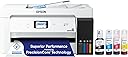
The Epson EcoTank ET-15000 is a wireless all-in-one inkjet printer designed for high-volume, cost-efficient printing with ultra-high 4800 x 2400 dpi resolution. It supports large-format prints up to 13 x 19 inches, offers versatile connectivity (Wi-Fi, Ethernet, USB), and features refillable supersized ink tanks that reduce ink costs by up to 90%. With a 2.7” touchscreen, voice-activated printing, and multifunction capabilities including scanning, copying, and faxing, it’s tailored for professionals seeking premium quality and productivity in one sleek device.


| ASIN | B084TV6NTZ |
| Additional Printer Functions | All In One |
| B&W Pages per Minute | 17 pages_per_minute |
| Best Sellers Rank | #11,591 in Office Products ( See Top 100 in Office Products ) #20 in Ink Tank Printers |
| Brand | Epson |
| Built-In Media | EcoTank ET-15000 all-in-one, power cord, 1 bottle of Black ink (127 mL) and 1 bottle each of 502 Cyan, Magenta, Yellow (70 mL), CD-ROM for product setup |
| Color | White |
| Color Depth | 24 bpp |
| Color Pages per Minute | 9 pages_per_minute |
| Compatible Cartridge | [Epson Genuine Ink and EcoFit ink bottles] |
| Compatible Devices | Laptops, PC |
| Connectivity Technology | Wi-Fi |
| Control Method | Touch |
| Controller Type | Android |
| Customer Reviews | 4.2 out of 5 stars 2,509 Reviews |
| Duplex | auto |
| Hardware Interface | Ethernet |
| Ink Color | White |
| Item Dimensions D x W x H | 29.6"D x 19.6"W x 14.3"H |
| Item Type Name | Printer |
| Item Weight | 21.4 pounds |
| Manufacturer | Epson |
| Maximum Copy Resolution Black and White | 8.5 x 14 dpi |
| Maximum Copy Resolution Color | 600 dpi |
| Maximum Copy Speed Black and White | 17 pages_per_minute |
| Maximum Media Size | 11 x 17 inch |
| Maximum Print Resolution Black and White | 600 dpi |
| Maximum Sheet Capacity | 250 |
| Maximum print Resolution Color | 4800 x 1200 |
| Model Name | ET(EcoTank) ET-15000 |
| Model Number | ET-15000 |
| Model Series | EcoTank |
| Number of Trays | 2 |
| Other Special Features of the Product | Auto Document Feeder, Auto-Duplex, Energy Star, Refillable Ink Tank |
| Paper Size | 11 x 17 |
| Print media | Paper (plain) |
| Printer Connectivity Type | Wi-Fi |
| Printer Output Type | Color |
| Printer Type | Inkjet |
| Printing Technology | Inkjet |
| Processor Count | 1 |
| Resolution | 4800 x 2400 |
| Scanner Type | Sheetfed |
| Series Number | 15000 |
| Special Feature | Auto Document Feeder , Auto-Duplex , Energy Star, Refillable Ink Tank |
| Specific Uses For Product | Standard or Sublimation Ink |
| Total Usb Ports | 1 |
| UPC | 010343950900 |
| Unit Count | 1 Count |
| Warranty Description | 1-year limited warranty |
| Warranty Type | limited warranty |
| Wattage | 20 watts |
T**B
Inkjets have come a long way
Just a lot to like about this printer and nothing I don't like. Very capable for the price. I do mostly black and white printing, rarely print photos. (This will supposedly do a credible job of photo printing too but I haven't tried it). If you want professional caliber photo printing, you probably want the Epson 8550 which is similar to this, a bit more expensive, but does 6 color printing. If you are doing more like every day business printing the 15000 might be a better choice because it's built more for speed. The tank system means I can just replace the black because I use it a lot. The black ink tank is double size of the others and based on my experience so far, I think I'll easily get over a thousand pages on the standard-vivid setting which is very strong black but still relatively high speed printing. Given that the black ink bottles are under $30 I think the cost per page will be comparable to laser. The booklet/pamphlet printing can be complicated to work out with layers of PDF software and the Epson printer driver. But once you work it through, it's super capable. I've printed a lot of 12 x 18 double-sided for booklets and the paper handling has been flawless. (It can duplex automatically for 8 1/2 x 11 but for other sizes you have to manually duplex, which you can do by printing back/front or even/odd.) It's not as fast as a laser printer but it's pretty fast -- inkjets have improved so much.
E**N
Love the large print and thicker paper capabilities
Love this printer! I did not covert it to a sublimation printer as so many others have done. The print quality is very good. It doesn’t use that much ink. The setup was really easy. I had to use WiFi setup though. This works well for me. Had no problems so far. I think I’ve had it over a year now. I have used it for stickers, 13x19 photos, printed on cardstock, printed on printable iron on for dark fabrics, used the scanner and copier. I haven’t used it to fax anything yet. No maintenance problems to this day. The speed is ok depending on what you’re printing. Love it so far.
C**E
This is a great printer. I love it.
I’ve been using the Epson ET‑15000 for custom chip bags and ran into a huge issue with my original paper choice. The printer itself is great, but the Koala 30 lb glossy paper did not play well with the black ink at all. Even after letting my prints sit for a full two days, the black areas would still smear and come off on my fingers as soon as I started folding and assembling the bags. It was super frustrating and made it hard to trust my prints for orders. I decided to try Eshang high gloss paper instead, and the difference has been night and day. With the same Epson ET‑15000 and the same designs, the Eshang paper works like a charm. The black ink dries quickly, doesn’t rub off when handled, and holds up beautifully while I’m folding and sealing my chip bags. Colors look vibrant, the finish is nice and glossy, and I don’t have to worry about smudging anymore. If you’re using an Epson EcoTank like the ET‑15000 and struggling with black ink smearing on Koala glossy, I highly recommend switching to Eshang high gloss. It completely solved the problem for me and made my chip bag printing so much easier and more professional.
J**L
❌ DO NOT BUY - Defective Out of the Box, Massive Waste of Money
Paid 5x more than my old printer for an expensive paperweight. I purchased the Epson EcoTank ET-15000 expecting a premium, high-quality machine, especially considering it costs four times as much as the standard HP printer it was meant to replace. Instead, it has been an incredibly frustrating experience. This printer has never printed a single decent document. It was completely defective right out of the box. The internal ink-delivery plumbing system failed to initialize or prime during setup, leaving the internal ink lines starved and completely bone-dry. I followed every troubleshooting step in the manual: Ran multiple standard Print Head Cleanings. Ran a Power Cleaning ink flush cycle. Left the machine off for 12+ hours to let air bubbles escape and allow the ink to settle. Despite all of this, the nozzle check patterns remain completely blank or broken. The tanks are completely full of ink, but the physical hardware is incapable of drawing it to the page. EcoTank printers are marketed as a premium investment to save money on ink over time, but Epson’s factory quality control on this expensive model is clearly lacking. If you do risk buying this machine, test it immediately upon delivery. Do not waste your time trying to fix a faulty vacuum pump system—return it to the retailer immediately before your 30-day return window slams shut. Avoid this model and look elsewhere.
W**E
Nice large format printer which is what I needed
I make stained glass panels and needed a printer that I could make larger copies with. I also wanted one that I could manipulate my images with. This was my best option and I love the Eco-Tank printers. After reading the reviews I made sure to add a couple years of additional warranty for my peace of mind. Finding 13 x 19 paper that was affordable was a tough challenge. I found a bunch on FB marketplace and bought everything they had to offer. This printer was very easy to set-up. I just followed the instructions and then followed what was on my computer screen. At first I thought I would have an issue connecting to Wi-Fi but when it failed on the computer, I was able to go to the printer and do it from the control panel - Easy peesey. I have used it several times since filling, charging, and installing and everything works as it should. My husband has an Eco-Tank printer and I've wanted one since he got his. I love that the ink will last a very long time and that it will be cost efficient. I am not overly interested in photo printing so this was the perfect choice for my needs. The print quality is fairly good when comparing it to my old Canon and e that there are several paper trays and ways to make copies, especially the automatic feed and the larger scanner bed.
P**G
Ok so far, good printer
Working great so far. Had to setup via wifi because it wasn't accepting my USB cable. Probably need to try another cable. Print is good.
N**N
Need scan button to work!
Love (almost) everything about this except the scan button. The scan button on the Epson screen does not work. I called Microsoft who tried to fix it through the connection but still didn't work. Sent an e-mail to Epson and no response. Really need this scan button to work so that I can scan to desktop.
F**L
Best printer for sublimation and wide format! ⭐⭐⭐⭐⭐
Prints up to 13x19 sizes effortlessly with crisp details and vibrant colors. The EcoTank ink system saves so much money. Highly recommend!
V**S
Top Sublimation Printer!
What I Like - I’m using this for sublimation to make custom shirts, towels and other items. It prints really good quality images. Wifi works really well, even down in the basement while modem is on the main floor. Settings are easy to go through and change. This printer holds bigger paper for those larger projects. It doesn’t take up too much space, but it definitely makes a statement. A really good value for a Eco Tank. It’s really nice to be able to just dump ink into a printer instead of worrying about cartridges and mixed cartridges, the cost difference will pay for itself if you do a moderate amount of printing. What I Don’t Like - It does take a bit of time to set up for sublimation, so just be prepared to really educate yourself and also have a few trial by error situations.
A**O
Absolute Workhorse with ASTOUNDING Color! (EcoTank ET-15000)
I honestly can't say enough good things about the Epson EcoTank ET-15000. It's been an absolute game-changer for my printing needs, especially for vibrant, high-quality color prints! Setup & Ink Experience: Yes, I used non-Epson dye-based inks right from the initial setup—and I kept the original ink bottles as backups—and the results are simply phenomenal. I was slightly nervous about using third-party inks, but the machine handled the process perfectly, and the colors I'm getting are just wonderful! Seriously, the depth and vibrance of the color output truly exceeded all my expectations. Key Features I Love: Color Quality: The prints are gorgeous. Rich, saturated, and incredibly detailed. This machine is a color beast. EcoTank System: The days of worrying about expensive, tiny cartridges are over. The tanks are easy to fill, easy to monitor, and the ink lasts forever. The ink cost savings alone make this printer worth the price. Wide Format Capability: Being able to print up to 13x19 inches is invaluable for posters, wide art prints, and professional-looking reports. Reliability: The machine consistently performs, whether I'm running simple documents or complex, full-coverage photo prints. If you are looking for a reliable, wide-format EcoTank printer that delivers professional-grade color, look no further. This printer has earned its five stars and my highest recommendation!
J**E
Great printer for printing on canvas
I use this printer to print my paint-by-numbers creations that I have done online onto canvas. I chose a 12 x 16" image and printed it on a 13x19" canvas sheet that I had trimmed down from a 16x20" canvas pad sheet. Put the canvas in the rear feeder, set the paper size to A3+/plain white, and hit <print>. Perfect feed, absolutely no problem. I had a small hiccup with setup and called the techie department. They were immediately available and knew exactly what I had done wrong (didn't read the instructions properly). Yes, I bought it mainly to print on canvas sheets, but it will replace the smaller Epson I have been using for some years. It is light enough to move around easily, compact enough to fit in a reasonable space, and prints like a dream. Connecting to the wifi was easy. The eco tanks made it a no-brainer for me. I highly recommend this printer.
E**G
NO Support Available
I am a long-time Epson user and have had a number of their printers. This one has been problematical from the start. Many paper jams, and lack of clarity on paper selection. While it does print 11 x 17, those sheets must be loaded into a rear paper holder - there is no dedicated paper tray. All this is manageable, but I now have a serious problem with being unable to print anything - and there is ZERO support from Epson. I have tried to register the device, but Epson will not accept my country selection (Canada) - this appears to be a European model supplied by Amazon Canada with no OEM support available this side of the Atlantic.
K**I
Great product, love it
Bought this printer because I saw Shaq advertising it. I want to personally thank my goat shaq. It's a great product. Has some connectivity issues sometimes. But print quality is great and it doesn't cost as much as refilling a cartridge printer. 12/10 recommend
Trustpilot
4 days ago
2 weeks ago