


Desertcart purchases this item on your behalf and handles shipping, customs, and support to South Korea.
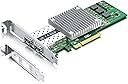
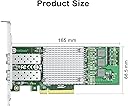
BCM 57810 2S based on Broadcom BCM57810S, is the solution of choice for workload intensive computing environments, providing a reliable, high performance 10GbE connectivity solution. Features: Dual port 10GbE connectivity for rack and tower servers x8 PCI Express reg; (PCIe 8482;) V2.0 (5 GT/s) support Full line rate performance across all ports Broad OS and hypervisor support Full iSCSI and FCoE hardware offload Full TCP/IP hardware offload โMicrosoft reg; Chimney compliant Network boot support: โiSCSI remote boot โFCoE boot from SAN โPreboot eXecution Environment (PXE) 2.0 Specifications: Form factor: PCI Express short, low profile card 167.64 mm x 68.91 mm (6.60 quot; x 2.71 quot;) Data rate:10 Gbps per port, per direction Bus type:x8 PCI Express 2.0 (5.0GT/s) MAC controller: Broadcom BCM57810S of Ports: Dual Connector: SFP+ Review: Good card , works on Windows 11 - Good card , works on Windows 11 but you REALLY have to install the driver from the link in QR code (for Windows 11 use setup.exe , not Asus thing or other) because the default driver installed by Windows works, but create a world of problems starting from taking about 10 minutes to apply any change to card setting up to connection disappear sometimes for a minute or two. Also in my case the connection for some reason 1400 on both ports (even the one that have no SFP+ module in it) instead of expected 10G , but since currently this is my only 10G device on the network besides the switch , all others 1GB I do not really care. But it strange. Review: Great Value - I must say, that thise netcard are pretty good and are just working right out of the box. CachyOS (Arch Linux) found the card right away, no driver install needed. I got two of them, and have bought a pair of DAC Cables and have made direct connection between my PC. All I needed was to setup local ip adresse and up and running in no time. I used 10.0.0.1 for port 1, 10.0.0.2 for port 2, Gateway 10.0.0.10 and DNS 10.0.0.10, on the other card, I used 10.0.0.3 and 10.0.0.4 and again 10.0.0.10 for DNS and Gateway. If you want, you can either use bridge or bond to combine both ports on one of the netcard, so you instead of 10GbE get 20GbE out of the cards! Use arch wiki for how to or even just ask ChatGPT. Just remember, if you want to bind two ports to become 1, that this shall ONLY be done for 1 of the cards. I really recommend this under rated cards. Buy them and enjoy the fun with either 10GbE or 20GbE networking the EASY WAY.

| ASIN | B06X9T683K |
| Brand | H!Fiber.com |
| Brand Name | H!Fiber.com |
| Color | Red |
| Colour | Red |
| Compatible Devices | Desktop, Laptop |
| Compatible Operating System Family | Windows |
| Customer Reviews | 4.5 out of 5 stars 219 Reviews |
| Data Link Protocol | Ethernet |
| Data Transfer Rate | 10 Gigabits Per Second |
| Hardware Interface | PCI Express x8 |
| Item Weight Unit of Measure | 0.21 Kilograms |
| Manufacturer Part Number | BCM-57810-2S-HF(EU) |
| Minimum Required Operating System Version | Windows 7 |
| Model Number | BCM-57810-2S-1pc |
| Number of Items | 1 |
| Number of Packs | 1 |
| UPC | 602693070041 |
| Unit Count | 1 Count |
L**R
Good card , works on Windows 11
Good card , works on Windows 11 but you REALLY have to install the driver from the link in QR code (for Windows 11 use setup.exe , not Asus thing or other) because the default driver installed by Windows works, but create a world of problems starting from taking about 10 minutes to apply any change to card setting up to connection disappear sometimes for a minute or two. Also in my case the connection for some reason 1400 on both ports (even the one that have no SFP+ module in it) instead of expected 10G , but since currently this is my only 10G device on the network besides the switch , all others 1GB I do not really care. But it strange.
P**E
Great Value
I must say, that thise netcard are pretty good and are just working right out of the box. CachyOS (Arch Linux) found the card right away, no driver install needed. I got two of them, and have bought a pair of DAC Cables and have made direct connection between my PC. All I needed was to setup local ip adresse and up and running in no time. I used 10.0.0.1 for port 1, 10.0.0.2 for port 2, Gateway 10.0.0.10 and DNS 10.0.0.10, on the other card, I used 10.0.0.3 and 10.0.0.4 and again 10.0.0.10 for DNS and Gateway. If you want, you can either use bridge or bond to combine both ports on one of the netcard, so you instead of 10GbE get 20GbE out of the cards! Use arch wiki for how to or even just ask ChatGPT. Just remember, if you want to bind two ports to become 1, that this shall ONLY be done for 1 of the cards. I really recommend this under rated cards. Buy them and enjoy the fun with either 10GbE or 20GbE networking the EASY WAY.
M**G
Not able to get over 3gbps
Regardless of which combination of PCI-e slots and settings I used, I wasn't able to get this above 3gbps even using fibre cables and transceivers. Returned it and gave up.
A**H
Works as expected and Very happy
G**H
Excellent NIC card
It's good and working as expected, it's Broadcom chipset's only
Trustpilot
2 months ago
3 days ago