Buy anything from 5,000+ international stores. One checkout price. No surprise fees. Join 2M+ shoppers on Desertcart.
Desertcart purchases this item on your behalf and handles shipping, customs, and support to South Korea.
🚀 Elevate your headless PC game with 4K clarity and zero hassle!
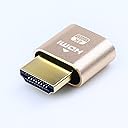
The DTECH HDMI Dummy Plug 4K Display Emulator is a compact, gold-plated adapter that simulates a 4K monitor (up to 4096x2160) to keep your discrete GPU active on headless PCs. Compatible with Windows, Mac OSX, and Linux, it requires no drivers or external power, making it ideal for remote desktop, cryptocurrency mining, game streaming, VR, and server environments. Sold in a convenient 3-pack, it’s a must-have for professionals managing multiple headless systems.
| ASIN | B07C4TWZRM |
| Best Sellers Rank | 6,541 in Computers & Accessories ( See Top 100 in Computers & Accessories ) 5,623 in Accessories (Computers & Accessories) |
| Brand Name | DTECH |
| Colour | Gold |
| Compatible Devices | Desktop, Keyboard, Laptop, Monitor, Mouse, Television |
| Connector Type | HDMI Dummy Plug |
| Country of Origin | China |
| Current Rating | 0.5 Amps |
| Customer Reviews | 4.5 4.5 out of 5 stars (944) |
| Item Weight | 0.04 Pounds |
| Manufacturer | DTech |
| Manufacturer Part Number | 43237-2 |
| Model Number | T0667-3 |
| Number of Items | 3 |
| Number of Ports | 1 |
| Package Quantity | 1 |
| Power Plug Type | No Plug |
| Product Finish Type | Gold |
| Specific Uses For Product | Computer, Laptop |
| UPC | 714131650149 714131650118 |
| Unit Count | 3 count |
| Warranty Type | 1 year warranty |
N**H
Worked as expected
Perfect for what I needed, which was to act as a display emulator plug on a server, for the HDMI port. Decent quality and worked as expected.
J**L
Spot On
all good
B**T
Works with Raspberry Pi 4 and 5 with suitable micro to hdmi adapter.
I'm using it with Nomachine to get a fully working remote desktop for free apart for hardware cost. If you do this with the most recent Nomachine remember to turn of Wayland on the RPi (nothing to do with this adapter, just how the software works).
M**E
Does what it says on the box
Great quality, it feels durable and it does the job.
A**R
Perfect for headless applications where a monitor is expected.
Smart, well made HDMI plugs that produce an EDID of several formats upto and including standard 4K. Ideal for HDMI splitters and remote access to a computer (such as a Raspberry Pi) where VNC or some other remote access client produces a desktop of a pre-determined, low resolution. These were very good value having been purchased in a pack of 3 for £7. Note: You can edit the config.txt file on a Raspberry Pi to force the HDMI output resolution but if that's not convenient, these and a micro HDMI to HDMI cable / adapter are the way to go.
D**H
Works just as expected.
S**E
Great quality HDMI dummy dongles
used for remote connections that require a monitor to be plugged in. these work great and a 4k display is possible on headless machines
S**S
Spot on
spot on for purpose and allows you to connect to PC's and devices remotely whilst maintaining a sensible 1080P or higher resolution, so during remote RDP or such like sessions - you can maintain a familiar screen layout on the remote device
S**.
After setting up my first mini PC with an Intel iGPU as a headless server, I ran into what is apparently a common issue: the PC would not boot into the GUI without a connected monitor. In addition to that, the Intel video driver would not load properly, meaning I couldn't use the GPU for Plex hardware transcoding. And finally, I couldn't RDP/VNC into the machine. It seems like this little dummy plug fixed all of my issues. Linux recognized it as a connected monitor, and now the machine boots properly, the Intel video driver loads as expected and I can remotely connect to the PC. An interesting solution to an interesting problem.
F**0
لايعمل
A**R
DTECH HDMI Dummy Plug 4K Display Emulator works well. I use one on a headless server with very old and flaky on-board video that doesn't output anything unless a monitor is attached before booting. Using the HDMI dummy plug allows me to boot the server without a monitor attached, and attach a monitor later if needed. Output of 'monitor-edid -v' follows: parsing EDID from /sys/class/drm/card1-HDMI-A-2/edid parse_edid: unhandled CEA mode 97 parse_edid: unhandled CEA mode 96 parse_edid: unhandled CEA mode 101 parse_edid: unhandled CEA mode 102 parse_edid: unhandled CEA mode 93 parse_edid: unhandled CEA mode 94 parse_edid: unhandled CEA mode 95 parse_edid: unhandled CEA mode 98 Name: AOC28E850.HDR EISA ID: IDVed11 EDID version: 1.3 EDID extension blocks: 1 Screen size: 62.0 cm x 34.0 cm (27.84 inches, aspect ratio 16/9 = 1.82) Gamma: 2.2 Digital signal Standard resolution: 640x480 @ 60 Hz (established timing) Standard resolution: 640x480 @ 75 Hz (established timing) Standard resolution: 800x600 @ 56 Hz (established timing) Standard resolution: 800x600 @ 60 Hz (established timing) Standard resolution: 800x600 @ 72 Hz (established timing) Standard resolution: 800x600 @ 75 Hz (established timing) Standard resolution: 1024x768 @ 60 Hz (established timing) Standard resolution: 1024x768 @ 70 Hz (established timing) Standard resolution: 1024x768 @ 75 Hz (established timing) Standard resolution: 1280x1024 @ 75 Hz (established timing) Standard resolution: 1920x1080 @ 75 Hz, ratio 16/9 Standard resolution: 1680x1050 @ 60 Hz, ratio 16/10 (!) Standard resolution: 1600x900 @ 60 Hz, ratio 16/9 Standard resolution: 1440x900 @ 60 Hz, ratio 16/10 (!) Standard resolution: 1280x1024 @ 61 Hz, ratio 5/4 (!) Standard resolution: 1280x800 @ 60 Hz, ratio 16/10 (!) Standard resolution: 1280x720 @ 60 Hz, ratio 16/9 Standard resolution: 1920x1200 @ 60 Hz, ratio 16/10 (!) # Monitor preferred modeline (60.0 Hz vsync, 67.5 kHz hsync, ratio 16/9, 78 dpi) [6/42] ModeLine "1920x1080" 148.5 1920 2008 2052 2200 1080 1083 1088 1125 -hsync +vsync # Monitor supported modeline (60.0 Hz vsync, 98.7 kHz hsync, ratio 16/10, 104x119 dpi) (bad ratio) ModeLine "2560x1600" 268.5 2560 2608 2640 2720 1600 1603 1609 1646 -hsync +vsync # Monitor supported modeline (60.0 Hz vsync, 88.8 kHz hsync, ratio 16/9, 104 dpi) ModeLine "2560x1440" 241.5 2560 2608 2640 2720 1440 1443 1449 1481 -hsync +vsync # Monitor supported CEA modeline (120.0 Hz vsync, 135.0 kHz hsync, ratio 16/9, 78 dpi) ModeLine "1920x1080" 297 1920 2008 2052 2200 1080 1084 1089 1125 +hsync +vsync # Monitor supported CEA modeline (60.0 Hz vsync, 33.8 kHz hsync, interlaced, ratio 16/9, 78 dpi) ModeLine "1920x1080" 74.25 1920 2008 2052 2200 1080 1084 1094 1125 +hsync +vsync Interlace # Monitor supported CEA modeline (60.0 Hz vsync, 45.0 kHz hsync, ratio 16/9, 52 dpi) ModeLine "1280x720" 74.25 1280 1390 1430 1650 720 725 730 750 +hsync +vsync # Monitor supported CEA modeline (59.9 Hz vsync, 31.5 kHz hsync, ratio 3/2, 29x35 dpi) (bad ratio) ModeLine "720x480" 27 720 736 798 858 480 489 495 525 -hsync -vsync # Monitor supported CEA modeline (59.9 Hz vsync, 31.5 kHz hsync, ratio 4/3, 26x35 dpi) (bad ratio) ModeLine "640x480" 25.175 640 656 752 800 480 490 492 525 -hsync -vsync # Monitor supported CEA modeline (50.0 Hz vsync, 56.2 kHz hsync, ratio 16/9, 78 dpi) ModeLine "1920x1080" 148.5 1920 2448 2492 2640 1080 1084 1089 1125 +hsync +vsync # Monitor supported CEA modeline (50.0 Hz vsync, 31.2 kHz hsync, ratio 5/4, 29x43 dpi) (bad ratio) ModeLine "720x576" 27 720 732 796 864 576 581 586 625 -hsync -vsync # Monitor supported CEA modeline (50.0 Hz vsync, 37.5 kHz hsync, ratio 16/9, 52 dpi) ModeLine "1280x720" 74.25 1280 1720 1760 1980 720 725 730 750 +hsync +vsync # Monitor supported CEA modeline (50.0 Hz vsync, 28.1 kHz hsync, interlaced, ratio 16/9, 78 dpi) ModeLine "1920x1080" 74.25 1920 2448 2492 2640 1080 1084 1094 1125 +hsync +vsync Interlace # Monitor supported CEA modeline (24.0 Hz vsync, 27.0 kHz hsync, ratio 16/9, 78 dpi) ModeLine "1920x1080" 74.25 1920 2558 2602 2750 1080 1084 1089 1125 +hsync +vsync # Monitor supported modeline (60.0 Hz vsync, 110.8 kHz hsync, ratio 16/10, 117x134 dpi) (bad ratio) ModeLine "2880x1800" 336.72 2880 2928 2960 3040 1800 1803 1809 1846 -hsync +vsync # Monitor supported modeline (30.0 Hz vsync, 67.5 kHz hsync, ratio 16/9, 157 dpi) ModeLine "3840x2160" 297 3840 3888 3920 4400 2160 2164 2170 2250 -hsync +vsync # Monitor supported modeline (60.0 Hz vsync, 135.0 kHz hsync, ratio 16/9, 157 dpi) ModeLine "3840x2160" 594 3840 4016 4104 4400 2160 2162 2172 2250 +hsync +vsync
N**.
I host a couple servers that are sitting in a utility closet. I mostly RDP into them, and I was annoyed that the RDP session would mimick the resolution of the cheap, old monitor I had hooked into the servers in that closet, and that they had to have a display connected into them to get any kind of visual out, even through RDP. I bought these so I could have the full 4k that my home office computer uses, and without having to have a physical display connected into them all the time. and for that it works great. If I put the RDP in full screen, it looks and behaves like my monitor is connected directly to the target machine. I understand a lot of people use these for Crypto Mining, and to those people I wish your profit margin tanks and you lose everything you've invested. You deserve it. Sincerely, everyone who actually cares about computers and can't afford parts anymore.
A**I
Allows the headless operation of a MacMini. Not much else to say, does what it says.
Trustpilot
5 days ago
2 months ago