
Desertcart purchases this item on your behalf and handles shipping, customs, and support to South Korea.
✨ Light up your life, your way 🌟
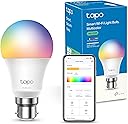
The Tapo L530B B22 Smart Bulb is a versatile, energy-efficient LED light offering 16 million colors and smooth dimming from 1 to 100%. Compatible with Alexa and Google Assistant, it supports voice and remote app control, scheduling, and away modes for enhanced convenience and security. With a bright 806 lumens output at just 8.7W, it’s designed for modern smart homes seeking customizable ambiance and effortless control.


| ASIN | B08JZHXQC4 |
| Accepted Voltage Frequency | 220 to 240 Volts and 50 Hertz |
| Average Life Span | 25000 Hours |
| Best Sellers Rank | 15 in Lighting ( See Top 100 in Lighting ) 1 in Wi-Fi Bulbs |
| Brand | Tapo |
| Brand Name | Tapo |
| Bulb Base | B22 |
| Bulb Diameter | 60 Millimetres |
| Bulb Shape Size | A19 |
| Bulb base | B22 |
| Bulb shape size | A19 |
| Color Rendering Index (CRI) | 80 |
| Color Temperature | 2500 Kelvin |
| Colour | Changeable B22|1-pack |
| Connectivity Protocol | Wi-Fi |
| Connectivity Technology | Wi-Fi |
| Control Method | Voice |
| Controller Type | Amazon Alexa, Google Assistant, Remote Control, Voice Control |
| Country Of Origin | China |
| Customer Reviews | 4.4 out of 5 stars 9,492 Reviews |
| EU Energy Efficiency Label | F |
| Incandescent Equivalent | 60 Watts |
| Included Components | Smart Wi-Fi LED Bulb (Tapo L530B), User Manual |
| Indoor Outdoor Usage | Indoor |
| Item Dimensions W x H | 6W x 11.5H centimetres |
| Item Shape | pear |
| Item Type Name | Smart Bulb |
| Item Weight | 0.07 Kilograms |
| Light Color | Multicolor |
| Light Source Wattage | 9 Watts |
| Light Type | LED |
| Light type | LED |
| Manufacturer | Tapo |
| Manufacturer Part Number | Tapo L530B |
| Manufacturer Warranty Description | 2 year manufacturer. |
| Model Name | Tapo L530B |
| Model Number | Tapo L530B |
| Number of Items | 1 |
| Package Quantity | 1 |
| Power Consumption | 8.7 Watts |
| Power Source | AC |
| Special Features | Colour Changing |
| Special feature | Colour Changing |
| Specific Uses | Business, Multimedia, Personal |
| Style Name | Colour-Changeable B22(1-pack) |
| Theme | Color Changing |
| Type of Bulb | LED |
| Unit Count | 1.0 count |
| Voltage | 110 Volts |
| Wattage | 8.7 watts |
| White Brightness | 806 Lumens |
S**G
Surprisingly really good and excellent value. Easy setup and reliable.
I picked up this Tapo L530B colour bulb not expecting much given the price, but it’s actually been a really solid addition and great value for money. Setup was straightforward through the Tapo app and linking it with Alexa only took a couple of minutes. Since then it’s been reliable with no dropouts, which is always my main concern with smart stuff. Brightness is more than enough for a main room light and it dims nicely through the app or voice control. Just worth knowing it won’t work with a traditional dimmer switch, so it’s better on a standard on/off. The colours are better than I expected as well great colour temperature range. The whites go from a warm cosy tone to a cooler brighter light, and the colours are strong enough to actually notice without looking cheap or washed out. In day to day use it’s very responsive. Commands through Alexa are pretty much instant and it reconnects quickly if it’s been turned off at the wall. Only small downside is the usual smart bulb thing where if someone turns it off at the switch, you lose control until it’s turned back on again, but that’s not really a fault with this one specifically. Overall, it just works. Easy to set up, reliable, and does exactly what you’d want from a smart bulb without spending a fortune. Compatible with Alexa and google home. The Atari app oddly takes up a lot of storage space if this is a premium for you but does work very well And easy to navigate.
R**R
Bright, versatile, and easy to set up
The Tapo L530B Smart Bulb is a fantastic addition to my home. Setup was quick through the app, and it connected easily to Alexa without any issues. Being able to control it with voice commands or remotely from my phone is incredibly convenient. The multicolor feature is great—you can switch between warm white for relaxing evenings and brighter tones for working, or choose fun colors to change the mood. It’s bright enough for everyday use, and the dimmable function works smoothly. The scheduling, timer, and away mode features add extra convenience and security. Plus, it’s energy efficient while still providing strong light output. Overall, a reliable and affordable smart bulb that works exactly as expected.
O**C
Fantastic vibrant colours, minor startup quirk but great value!
Rating: ⭐⭐⭐⭐☆ (4/5) Pros: Vivid colour range. Very bright whites. Seamless app integration. Excellent budget option. Cons: Brief startup flicker. Full Review: I bought this Tapo smart bulb to add some ambient colour to my room, and overall, I am highly impressed with its performance. The colour selection is fantastic. The hues are deep, vibrant, and fully customizable through the app. Whether you want a relaxing warm glow for evening reading or a bright, dynamic setup for movie nights, this bulb delivers. The brightness levels are also excellent, easily lighting up a medium-sized bedroom without any issues. Setting it up with my Wi-Fi and smart home ecosystem was quick and hassle-free. I did notice one minor quirk: whenever I flick the physical wall switch on, the bulb quickly flashes orange before instantly settling into its normal, assigned colour. It looks like a brief loading or boot-up sequence. Honestly, it is not that deep or annoying, and it does not affect the performance of the bulb at all once it is running. For the price, you get premium smart features without the premium price tag. I would definitely recommend it to anyone looking to upgrade their home lighting.
C**Y
Once you have one set up all others are a doddle.
I bought this, after buying another TAPO product recently, and because I had the app on my phone and ally information was already stored, it took seconds to set up. Just in case this is your first one, here are some tips I learned the hard way the first time I set a TAPO device up..... 1: do not plug it in until you have the app installed and open and ready to add a device. 2. The very first thing you need to do is download and install the app, then follow the instructions to set up an account, then follow the instructions to set up a device... 3: when it says " turn on location" as an optional choice, Turn on location, it will not pair of location is off, now you might always have your location switched on, in which case this will not bother you, but if like me you are not constantly broadcasting your location, it is a must. After much to and fro with the support team, I figured this out, not them, so I asked them to either fix the back end or make location a must not an optional setting. 3: you will need to know, before you start, your network password, your Google/ Alexa password of you are linking it. Note: if you already have a device set up And you selected " remember my network password" the first time, for every new device you don't have to go hunting down your network/ braodband password, which is great. Also the second device just paired with Google and Alexa without any input from me, which is also great ( for me Google home picked up the second device before Alexa, and spoke to me through my Google speaker to let me know it was connected, and then Alexa chimed in to say they were also connected to the new device ) 4: you need to go to your internet settings on your phone/ computer, whichever device you are using the TAPO app on, and select the TAPO network when it tells you to, not to worry it doesn't switch off your connection to your own router, anyone who has set up similar devices will know this, but the app does hint at this but doesn't make it clear so I mentioned it here. The light has two main buttons, white or colour, the white, is as standard that harsh white light, however, the tutorial shows you how to set up custom colours that it remembers so I fiddled with the really user friendly colour wheel until I got a warm white shade I liked, and that was it, now it stays on that, unless I chose another colour, but even then my custom colour( or colours as you can set up lots) stay stored with an icon showing you the colour you chose, so it is never more than a clock away. The integration with Google home and Alexa ( I have both, because, you know different things for different purposes) is seamless, once you popped your password in and confirmed once, the next device just connects without bother, so if you are replacing all your bulbs you don't have to do a big begging set up for each one. Each bulb or other tapi device is shown in the app, and you can tell the app where they are, so that you can easily turn them on individually, change colours individually, change brightness individually, and control them with voice controls if you have a voice input Google ( Google home & compatible device like speakers or your android phones voice through Google assistant, Alexa echo or other Alexa voice control like an app on your phone) Therefore you can exit the house saying turn off the lights and keep the pitch light on, or also say " turn off the lights in little Jimmy's room , like if you want them to go to bed"
A**S
5/5 Quality. 5/5 Customisations. 5/5 Installation. Would recommend.
Great Smart Bulb. I've been using several of them in my house for over a year and I have not had to replace them at all yet. If you use iPhone, you can use the Apple Home app if you buy the Matter version, but I've actually preferred using the Tapo app that you can use for it as it's got a better widget and and customisation options. The app comes with many custom effect settings, like a Halloween option one that flashes like a candle in an empty pumpkin, or a a party one that goes crazy. You can also create your own custom effects too. In terms of lifespan, like I mentioned I have been using mine for over a year and no issues as of yet. Very easy installation, just follow the instruction and you'll be good to go. Would definitely recommend this bulb, especially if you want to start replacing your bulbs
C**N
Program it to your needs
Love this, I got one for our porch, now with it's own timer we can leave it on all the time and it will light at the times we want it to and turn itself off when we don't. No more fumbling with keys because we got held up or decided to stay out later, the light will come on of it's own accord. I also like the fact you can change the level of whiteness (or any colour) and it is dimmable. The colour thing will be fun this Halloween as we can light our porch in green or orange or whatever colour we want. Edit: Having lived with it for a while now I thought it worth mentioning the following: It is only set to come on at Sunset until 11pm but comes on randomly during the day for no reason that I can find. If I can find out why I will update.
K**Y
great
amazing i got this after getting a different brand which did not work, i will say every now and then it randomly disconnects and light either goes yellow or white
L**S
👍🏻
The TP-Link Tapo Smart Bulb is a smart WiFi LED bulb that offers convenient and energy-efficient lighting control. Here's a review of the product based on its key features: 1. Easy Setup and Connectivity: Setting up the TP-Link Tapo Smart Bulb is a breeze. It connects seamlessly to your home WiFi network, allowing you to control the bulb remotely from your smartphone or compatible smart home devices. The user-friendly Tapo app makes the setup process straightforward and provides intuitive control options. 2. Smart Lighting Features: The smart bulb offers a range of features to enhance your lighting experience. You can adjust the brightness and color temperature of the bulb to suit your preferences or create specific moods for different occasions. With scheduling capabilities, you can automate the bulb to turn on or off at specific times, adding convenience and energy efficiency to your daily routine. 3. Voice Control and Compatibility: The TP-Link Tapo Smart Bulb is compatible with popular voice assistants like Amazon Alexa and Google Assistant. This enables you to control the bulb using voice commands, offering a hands-free and effortless lighting control experience. Integration with other smart home ecosystems and devices further expands its functionality and versatility. 4. Energy Efficiency and Cost Savings: LED technology ensures that the Tapo Smart Bulb is energy-efficient and has a long lifespan. It consumes significantly less energy than traditional incandescent bulbs, resulting in cost savings on your electricity bill while being environmentally friendly. Overall, the TP-Link Tapo Smart Bulb provides a user-friendly and feature-rich smart lighting solution. Its easy setup, convenient control options, and compatibility with voice assistants make it a versatile addition to any smart home ecosystem. With energy-efficient LED technology, it not only enhances your lighting experience but also helps you save on energy costs. Please note that this review is based on the provided information, and personal experiences with the product may vary. Please note before buying, The TP-Link Kasa app and the Tapo app are two different applications developed by TP-Link for controlling their respective smart home devices. Here's a comparison of the two: 1. Device Compatibility: The Kasa app is designed for managing TP-Link smart home devices such as smart plugs, smart switches, and smart bulbs. It supports a wider range of TP-Link devices compared to the Tapo app, which is specifically tailored for Tapo series devices like smart bulbs, smart plugs, and security cameras. 2. User Interface and Features: Both apps offer user-friendly interfaces with intuitive controls. The Kasa app provides a more extensive range of features and customization options due to its compatibility with various TP-Link devices. It includes advanced settings, energy monitoring, scene creation, and scheduling capabilities. On the other hand, the Tapo app focuses on simplicity and ease of use, offering essential controls for Tapo devices, including scheduling, remote access, and motion detection settings for cameras. 3. Integration and Ecosystem: The Kasa app has broader integration capabilities, supporting popular voice assistants like Amazon Alexa and Google Assistant. It can also integrate with other smart home ecosystems like Amazon Echo and Google Home, providing seamless control and automation. The Tapo app, while limited in terms of third-party integrations, still offers voice control compatibility with Amazon Alexa for Tapo devices. 4. Target Audience and Device Focus: The Kasa app caters to a wider range of TP-Link smart home devices, making it suitable for users with a diverse set of devices within their smart home ecosystem. The Tapo app, on the other hand, is specifically designed for users who primarily own Tapo series devices, providing a more focused and streamlined experience for those particular products. Ultimately, the choice between the Kasa app and the Tapo app depends on the TP-Link devices you own and your specific needs. If you have a mix of TP-Link smart home devices, the Kasa app may offer a more comprehensive control and customization experience. However, if you primarily use Tapo series devices, the Tapo app provides a dedicated and simplified interface tailored specifically for those products.
Y**P
Bright, responsive, and easy smart home setup
Setup was very straightforward using the Tapo app, and Matter support made pairing with Alexa quick. The bulb is very bright at full power and colours are vivid without looking artificial. I mainly use schedules and energy monitoring, which have been accurate so far. Wi‑Fi connection has been stable with no random disconnects. ✅ Pros: excellent brightness, easy setup, Matter support ❌ Cons: app offers many options, may feel complex at first Great smart bulb with strong feature support and reliable performance.
C**L
Très lumineuse, facile à installer et pratique au quotidien
Je suis très satisfaite de cette ampoule. Elle est vraiment lumineuse et éclaire parfaitement une pièce, même de taille moyenne. La lumière est puissante sans être agressive, ce qui la rend agréable au quotidien. L’installation est simple et rapide. La connexion se fait facilement et la compatibilité Matter est un vrai avantage : l’intégration dans l’écosystème domotique est fluide et sans complication. Produit fiable, performant et moderne. Excellent rapport qualité/prix. Je recommande.
G**9
Funcionabilidad perfecta
Lo compre para probar con mather de mi echo y funciona perfectamente, fácil de instalar y de configurar y funciona perfectamente con alexa y con la aplicación tapó.
M**N
Very bright
Infinity colours you can get easy to setup
C**E
Conforme
Très pratique peuvent se commander avec l'application
Trustpilot
1 week ago
2 weeks ago