Buy anything from 5,000+ international stores. One checkout price. No surprise fees. Join 2M+ shoppers on Desertcart.
Desertcart purchases this item on your behalf and handles shipping, customs, and support to South Korea.
🚀 Store Fast, Travel Fearless, Stay Secure
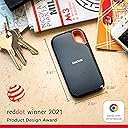
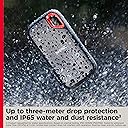
The SanDisk 2TB Extreme Portable SSD delivers ultra-fast NVMe performance with up to 1050MB/s read speeds and 1000MB/s write speeds, housed in a rugged, IP65-rated water and dust resistant enclosure with 3-meter drop protection. Featuring 256-bit AES hardware encryption and a handy carabiner loop, it’s designed for professionals and creatives who demand speed, security, and durability in a compact, portable form factor.


| ASIN | B08HN37XC1 |
| Additional Features | Dust Resistant, Water Resistant, Portable, Hardware Encryption |
| Best Sellers Rank | #1 in External Solid State Drives |
| Brand | Sandisk |
| Built-In Media | 1 x SanDisk Extreme Portable SSD |
| Cache Memory Installed Size | 2 |
| Color | Black |
| Compatible Devices | Desktop, Laptop, Tablet |
| Connectivity Technology | USB |
| Customer Reviews | 4.6 out of 5 stars 89,748 Reviews |
| Data Transfer Rate | 1050 Megabits Per Second |
| Digital Storage Capacity | 2 TB |
| Enclosure Material | Information Not Available |
| Form Factor | Portable |
| Global Trade Identification Number | 00619659184674 |
| Hard Disk Description | Solid State Drive |
| Hard Disk Form Factor | 2.5 Inches |
| Hard Disk Interface | eSATA |
| Hard Disk Rotational Speed | 500 RPM |
| Hard-Drive Size | 2 TB |
| Hardware Connectivity | USB 3.2 Gen 2 |
| Hardware Platform | Mac |
| Item Dimensions L x W x Thickness | 5"L x 2"W x 5"Th |
| Item Type Name | External SSD |
| Item Weight | 0.11 Pounds |
| Manufacturer | Sandisk Technologies, Inc. |
| Media Speed | 1000 |
| Mfr Part Number | SDSSDE61-2T00-G25 |
| Model Name | Extreme Portable SSD |
| Model Number | SDSSDE61-2T00-G25 |
| Number of Items | 1 |
| Read Speed | 1050 Megabytes Per Second |
| Special Feature | Dust Resistant, Water Resistant, Portable, Hardware Encryption |
| Specific Uses For Product | personal, gaming, business |
| UPC | 619659212155 619659184674 |
| Warranty Description | 5-year limited manufacturer warranty |
C**F
Fast, reliable, and perfect for backing up photos and video
I’ve been using the SanDisk Extreme Portable SSD (1TB) to back up photos and video, and it’s been one of the most useful pieces of gear in my kit. Transfer speeds are genuinely fast, so moving large batches of RAW files or video clips takes minutes instead of forever. Drives in this line are rated around 1000–1050 MB/s read and ~1000 MB/s write, which makes a noticeable difference when working on tight timelines.  The size and build are a big plus. It’s small enough to keep in a pocket or camera bag, and the rubberized shell feels rugged. These drives are designed with water and dust resistance and drop protection, which gives some peace of mind when traveling or shooting outdoors.  Setup is simple with USB-C, and the included cable and adapter make it easy to use with both newer laptops and older USB-A ports. I’ve used it for everything from field backups to editing directly off the drive, and it’s been consistently reliable. If there’s one small downside, it’s that like most compact SSDs, it can get slightly warm during long transfers, but nothing concerning. Overall, it’s a great portable SSD, especially for photographers, videographers, or anyone who moves large files regularly. Fast, durable, and easy to carry, which is exactly what you want in a travel drive.
J**F
Fast Transfers in a Small Form Factor
The Good: - Smallest form factor I seen - Fast data transfers with the USB C cable that comes with it The Bad: - USB C cable that comes with it is ridiculously small - Doesn't work well with Android Phones, sometimes it reads, sometimes it doesn't. I think it might require an external power or maybe a firmware upgrade since the SanDisk Memory Zone Android app also doesn't recognize it The What? - It kept disconnecting on Windows 11 when transferring files, so I had to download SanDisk Memory Zone app to upgrade the firmware. Now it works flawlessly even transferring 100+GB worth of files.
D**D
A Solid Option
This seems to work pretty well. I don't have much to compare it to, since my last external drive was a disk drive, but it transfers data relatively fast and I like the password protection feature that comes with it. I haven't tested the limits of the storage, but I have used it right after it was in the cold (about 15°F) and it worked well. It's also a nice compact size, but not so small that it can get lost easy. Overall, I think this is a solid option for external storage. I bought a case for it separately, and it gives me some additional peace of mind that it won't be damaged, so I would recommend buyers do that, too. Is it worth the price? So far, so good. I'll definitively say yes if it's still working well in eight years or so (that's how long my old external disk drive is and it still functions well).
S**M
Rugged, Compact, and Incredibly Fast External SSD
I picked up the SanDisk 2TB Extreme Portable SSD as an upgrade from my older external hard drives, and it’s easily one of the best storage devices I’ve used. The speed difference alone makes it worth it—transfers that used to take minutes on my traditional hard drives now finish in seconds. Large files, videos, photos, and backups move incredibly fast with no lag or stuttering. The size is another huge win. It’s unbelievably compact—smaller than most phones and light enough to clip onto a backpack or keep in a pocket without even noticing it’s there. Despite the small size, it feels durable and solid, with a rugged rubberized exterior that helps protect it from drops and everyday wear. Compared to traditional hard drives, there’s no spinning disk, no noise, and no worrying about bumps causing damage. It stays cool during most normal use and has been extremely reliable so far. I use it for work files, media storage, and backups, and it has handled everything without a single issue. A few small caveats worth mentioning: • It can get a little warm during long or heavy file transfers (not dangerously hot, just warm to the touch). • To get the full advertised speed, you need a USB-C port that supports USB 3.1/3.2 Gen 2. On older ports, it will still work fine but will be slower. • Like most SSDs, it’s pricier than traditional external hard drives, but the speed and portability make the difference worth it. • The included cable is on the shorter side, so you might want a longer one depending on your setup. Overall, this SanDisk Extreme SSD is a huge step up from regular external drives—faster, smaller, tougher, and much more convenient. If you need a dependable portable drive with great performance, this one is absolutely worth it.
S**R
Complete Game Changer for Media Enthusiasts
So once I got to the point where the library I wanted to carry around could no longer fit on the biggest USB powered drive I could find, I was having more and more of my bag taken up with storage. Well now I have the same amount of storage in less than a quarter of the footprint, including the protective cases. Less room required, higher performance, and no moving parts so it's noiseless. Yes it's definitely pricier, but if you can afford the additional cost you get the value back in convenience and performance. Can't wait for the next upgrade.
P**R
great for travel
Great size and easy to use without external power, but wants to launch a new window every time the computer is unlocked. This is annoying. I bought two (different colors) and they both do this.
F**S
Reliable, Easy to install and use, Quiet, Good Value for your money
An admitted computer geek, I have 14 external Solid State Drives ranging in capacity from 1 TB to 8 TB, with speeds of 1k and 2k. Most capacities are 4 TB. I’ve found this specific Sandisk model (in any size and speed specification) to be the fastest and most reliable for my Dell XPS laptop with Thunderbolt 3 compared to competing products with similar specifications, (with the one exception being the Samsung T9, which is a fine unit with roughly the same performance as a Sandisk. I have two Samsung T9s. Do NOT confuse it with the T7, which provides significantly inferior performance.) The Sandisk units are quiet, easy to install, and may get warm with heavy use, but never hot if sufficiently ventilated. I confess I like the faster speeds of the 2k units over the 1k, but the maximum usable speed difference with my equipment is an increase of about 40% when transferring data between two drives with 2k speeds plugged into their own Thunderbolt 3 ports. I don’t achieve twice the speed. Unless I’m backing up several TBs of data, the speed difference is not significant in my productivity. If purchasing a 4TB SSD I’d still purchase the 2k speed due to the minimal price difference. When the 8TB drives become reasonably priced at 2k I’ll likely buy one or two. For now, however, I’m surprisingly satisfied with the speed of my two 1K 8TB drives. Over the last few months, the price has dropped by 40%-50%, so I took the plunge and was delighted with the performance. Plugging fewer units into my computer (or docking station) helps avoid a variety of issues and allows the computer to run a little faster overall. The 8TB 1k drives are, in my actual use, about 25% faster than the 2TB or 4TB 1K drives. I have only guesses, but no confirmed explanations that clarify the reason for the increased usable speed of the 8TB drives over the 2TB or 4TB 1k drives. I reformat my drives to NTFS, which I think is superior to EXFAT if used exclusively on a Windows computer. I have tried both formats and have not noticed a difference in read or write speeds. My preference for the NTFS is the extra information and other things that can be done with files in that format. The price of Solid State Drives tends to move frequently, and often for only a day or two at a time – and sometimes for only a few hours. I keep the drives and other items that interest me in my “Save for Later” section with Amazon. If you’re unfamiliar with that, you can easily get there by going to your CART (even if it’s empty) and selecting “Saved for later” just below the cart. I check the items I’m interested in purchasing daily and nearly always find a time (or an event) where the price is notably discounted. However, I offer one piece of advice if you embrace this form of price monitoring: when the item reaches a price point you’ve pre-determined is acceptable, BUY IT without delay. Waiting a day (or sometimes even hours) can result in the price returning to its pre-sale level.
C**H
Unusable, crashes PC/Mac - NOT suitable for large filesizes/quantity
When handling more than a small amount of files, and/or files larger than a couple dozen MB, it's extremely slow - much, much slower than transporting the same files on my multi-TB WD and Seagate HDDs. It sometimes hangs for a minute or more, particularly on Windows, seeming to do nothing (loading bar doesn't progress and shows no files transferring in the prompt). If the transfer task is more than a GB, and/or hundreds of mostly small files, it might even crash, making the OS unresponsive and requiring a relaunch of File Explorer or Finder, or, in more than one case, FORCE POWERING OFF THE DEVICE TO DO ANYTHING! IT SHOULDN'T BE THE CASE THAT AN SSD BREAKS THE COMPUTER SO EASILY! Deleting large files or a large quantity of files from this SSD, by default, moves them to the trash (which you're likely to do - it's a 1 TB SSD, so why wouldn't you bin files from it you no longer need?), where they continue to take up space, and soon enough the SSD is virtually out of space so you need to clean the trash to continue using it (short of reformatting). 2 issues here. First, clearing the trashed files, if you used multiple OSs such as Windows and Mac, may require using both OSs since the trash only shows files that were deleted on the OS it was plugged into when trashed. Second, it has an EXTREMELY hard time clearing the trash, especially on Mac. It's impossible. Keeps freezing, making the OS unresponsive (even Force Quit and Restart won't work), requiring a force power off, which isn't ideal for disk data integrity. Perhaps the reason it keeps freezing is that there is something corrupt in there. Which begs the question, how can something be so easily corrupted on this disk within months of use, which has never happened on the many HDDs I've owned? I've always taken good care of this SSD. In any case, it's obvious that there are MAJOR technical issues with this junk. I can only guess the positive reviewers are transferring files that are small enough in number and filesize that a multi-GB USB flash drive would be adequate - and in fact would probably work better than this paperweight. (Well, since it's light it can't even really be used as a paperweight.) Eventually I selected to Erase the disk on Mac, using exFAT format again, and will see when it next trips up. For the near future, I will be using this as no more than a bloated flash drive.
A**ー
軽量で大容量の保存が可能です
軽量で保存容量が大きため重宝しています。 iPadと接続して使用していますが、反応も早いためお気に入りです。
F**K
Zeker een aanrader
Heel goed
M**A
Le top du top
Rapide, solide, efficace, voilà plus de deux ou trois années que j'en ai un et j'en ai rien à dire. Je l'ai certes payé cher au départ. Mais à l'arrivée il est mon meilleur compagnon pour mes vidéos et autres. Je conseille les yeux fermés. Seul, petit bémol le cordon USB qui est vraiment trop petit.
G**Y
Scan Disk SSD 1TB
Very cool delivery, on time, very happy with the SSD drive, it is a little more expensive than the usual one, but since my previous hard drive failed and I lost all my data irrevocably, it is better to get a reliable drive, although the price is higher for the sake of reliability and quality.
S**E
Great
Great otem
Trustpilot
4 days ago
1 month ago