![ARRIS (SB6183) -Cable Modem - Fast DOCSIS 3.0 16x4 Gigabit, [Check with Your Provider for Compatibility], 1 Gbps Port, 400 Mbps Max Internet Speed, 2 Year Warranty](https://m.media-amazon.com/images/I/51POnPIU9NL._AC_SL3840_.jpg)

Desertcart purchases this item on your behalf and handles shipping, customs, and support to South Korea.
๐ Surf the future with ARRIS SB6183 โ where speed meets stability!
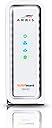
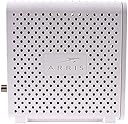
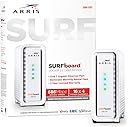
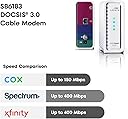
The ARRIS SURFboard SB6183 is a DOCSIS 3.0 cable modem featuring 16 downstream and 4 upstream channel bonding, delivering up to 400 Mbps internet speeds via a single gigabit Ethernet port. Compatible with major U.S. cable providers, it offers reliable, stable connectivity ideal for streaming, gaming, and remote work, all backed by a 2-year warranty and excellent customer support.


| ASIN | B00MA5U1FW |
| Best Sellers Rank | #3,840 in Computers & Accessories ( See Top 100 in Computers & Accessories ) #23 in Computer Networking Modems |
| Brand | ARRIS |
| Built-In Media | True |
| Color | White |
| Compatible Devices | Major U.S. Cable Providers, Personal Computer, Router |
| Connectivity Technology | Ethernet, coaxial cable |
| Customer Reviews | 4.3 out of 5 stars 8,980 Reviews |
| Data Transfer Rate | 400 megabits_per_second |
| Global Trade Identification Number | 00612572204009 |
| Internet Service Provider | Cox, Mediacomm, Spectrum, Suddenlink, Xfinity |
| Internet service provider | Cox, Mediacomm, Spectrum, Suddenlink, Xfinity |
| Item Dimensions L x W x H | 5.25"L x 2.17"W x 5"H |
| Item Type Name | 16x4 Cable Modem |
| Item Weight | 1.4 pounds |
| Manufacturer | CommScope |
| Maximum Downstream Data Transfer Rate | 131 megabits_per_second |
| Maximum Upstream Data Transfer Rate | 686 megabits_per_second |
| Mfr Part Number | SB6183 |
| Model Number | SB6183 |
| Modem Type | Cable |
| Number of Ethernet Ports | 1 |
| Number of Items | 1 |
| Number of Ports | 1 |
| Product Dimensions | 5.25"L x 2.17"W x 5"H |
| UPC | 612572204009 |
| Unit Count | 1 Count |
| Warranty Description | 2 Year Limited Warranty |
B**T
Great modem - increases connection stability - note on setup.
Pros: - Great speeds - Stable - Easy to setup (see note below) Cons: - Runs warm - Bright LED lights I bought this to replace an aging DOCSIS 2.0 modem I had been renting from Time Warner Cable (and had, over the years, paid enough in rental fees by many modems - gulp). It works great with the TWC service and based on standards and prior experience, I see no reason it wouldn't work with all major providers. As others have noted, you get a minor "speed boost" over older modem - this is not due to an increase in sheer maximum speed, since that is set by the cable company, but rather due to the ability of this modem to bond up to 16 channels maintaining the maximum speed more stably (instead of the speed bouncing up and down). The only thing that troubles me about this device is the fact that it does get fair warm to the touch - so make sure it's in a well ventilated area. The blue LEDs in the front panel are also very bright - and even if you wanted to cover them up, you can't effectively block the light as it comes through the main body (sides and back) of the device which cannot be covered due to the need for ventilation. This isn't a problem for me since I keep it in a "wiring cabinet" with plenty of ventilation and a door to block the light, but I can see it being an issue for some. Note on setup - I attempted and failed to be able to use TWC's "auto-setup" so I called their support line. They told me there was an "outage" in my area so while they would enter the data, I wouldn't be able to use the modem until the outage was repaired. This was curious to me, since my internet worked perfectly with the old modem not 30 seconds before. So, with the guy on the phone (without him telling me to), I unhooked this new modem and re-plugged in the old one...suddenly he tells me the outages is fixed and he's able to provision the new modem. Strangely, as soon as he enters the new modem, the "outage" reappears. So again, I switch modems without him telling me to (now having the new one plugged in) and boom, outage gone and new modem works like a charm. Long and short of it? If TWC doesn't see the modem they have in their system plugged in and powered on, there's an "outage" and they can't install a new modem. So if you can, plug in both your existing modem and this new one at the same time (maybe in different rooms) and they'll be able to set the new one up with no issues - in fact, auto-provisioning may work.
P**B
Works Perfectly - No Problems After Several Months
This Surfboard SB6 183 has not had a single problem in the time I've owned it (several months). We use it with MAC OS X, Android and whatever Roku uses. We consistently get our plan's rated speed from the cable provider (30 mBps down & 5 mBps up). Once in a while, we get over the speed we pay for (when the cable company goofs) and this modem is more than happy to oblige. Al channels bond all the time, so that's a good thing for maintaining speed. Actually this modem does a better job of maintaining speed in the evening (when the "Netfilx Effect" slows our cable) than the ISP's rental modem. We can still get 30 mBps.) I've never speed checked & got lower than what we pay for. (Good marks for Wowway and Arris) We can surf the innner-tube-web-net while both of our televisions are streaming educational documentaries on PBS. (OK- Chick flicks & monster movies) This modem doesn't even break a sweat- even in the evening. Tech support is excellent. When i first got it, it would not register on Arris' warranty registration page. Apparently it was already registered to someone else & they must have returned it. My call to tech support was answered by a real, live English speaking person in 1 minute. The technician fixed the problem in less than 2 minutes and offered to stay on the phone while I connected it, just in case I had a problem. Cool, huh? Cheerful guy, too. Connecting it was simple. All I had to do was call the ISP and they did the rest. They could see that it was registered to someone else and Arris fixed it. Once I reached a person at the ISP (20 minutes), provisioning it took about 3 minutes. Simple! The provider is Wide Open West (Also called "Wow" or "Wowway") I did have a problem with setting the Energy Saving feature. The manual's procedure didn't match what the screen said. I wrote to tech support. About an hour later I got a reply. One has to unhook it from the ISP to set this feature. The manual skipped that part. Oh well! Later, I wanted to re-boot it for a test in case the power ever goes out. It would not re-boot, following the manual's procedure. I called tech support. One minute later, a person came on the phone. He said to unhook it from the ISP cable to re-boot it. (Again- Excellent tech support. Crummy manual, however). Note that when we have had power failures, it does re-connect to the ISP with no intervention on my part. I gusee you only have to unhook the ISP cable if you are doing a software re-boot. The actual device runs cool. Very cool actually. This is probably because of two things: The venting pattern and the fact that the power supply is not inside the device. This is good & helps the circuitry run cooler. Actually, since the power supply is a (little) brick- and the brick is outside, it runs cooler too. (And can be replaced wth a generic if needed.) It plays well with my TP-Link Archer C7-AC 1750 router. There are no family feuds between them. Report Card: Performance = A+ Reliability = A+ Easy Of Connecting = B (Only because of the registration problem) Temperature = A+ Compatibility = A+ Tech Support By Phone = A+ Tech Support By E-Mail = A+ User Manual = It's Off To Summer School for Those Writers. Personally, if this ever needs replacing, I will buy Arris again. And, I will buy it on Amazon. Why Amazon? They helped me out when the first one I bought (from a private seller on Amazon) turned out to be second hand and, per Arris, possibly bootleg. (So much for cheaping-out & not buying from Amazon...) So, I do highly recommend this device. If it ever messes up & Arris can't help out, I'll update this review.
R**N
Doesn't get any better than this!
This is without a doubt one of the best products I've purchased in years. With my old Technicolor modem that Comcast provided for my internet service, my download speeds topped out around 70 Mbps and my upload speeds at highest were a disappointing 7-8 Mbps. Keeping in mind those were my highest speeds that I was able to produce maybe two/three days a week for short periods of time. Realistically I was maintaining download speeds at around 45 Mbps and upload speeds around 6 Mbps. After some research and deciding it was time to get rid of modem rental fees, I purchased this with high confidence because of all the amazing reviews it was receiving. But I must say the reviews on here absolutely don't do this modem proper justice. Installation with Comcast was painless and I didn't even have to call customer support for activation. I simply used the Comcast self activation web service and within about 10 minutes I was activated with no problems. I then connected the modem to my Netgear Nighthawk WiFi Router and set up my QOS for gaming. I immediately ran speed tests and was absolutely blown away by the improvements in my internets performance. My pingtest results were astonishing at a solid 9ms ping with a barely registered 1ms jitter. Download speeds so far have topped out at 120 Mbps although my network statistics show I'm maintaining a solid 105 Mbps. Upload speeds have topped out at an impressive 30 Mbps and network monitoring shows I'm maintaining a solid 23 Mbps connection. Because my Nighthawk Router supports dual band wireless N and AC WiFi, those speeds I listed were monitored and recorded on the 2.4GHz 802.11n band and I can confirm that the 5GHz 802.11ac band provides approximately 10% better performance if your devices are capable of operating on the 5GHz band. I couldn't be happier with the results and ease of use with this modem. Bottom line: if you're looking to improve your internet speed or just simply buy your own modem to get rid of rental fees, look no further than this modem. For the ultimate WiFi gaming experience for hardcore gamers like me that don't have the luxury of wired network connections, pair this modem with a Netgear Nighthawk dual band router for the most reliable, lag-free, high speed gaming experience of your life.
D**H
Nice Cable Modem with Room to Grow
I purchased this modem to avoid the $8 per month modem rental fee that Time Warner Cable (TWC) charges. Although I am retaining my Turbo plan, which is only 20Mbps upload and 2Mbps download (no laughter please!), this modem sells for only about $50 more than the low-end modems. At $8 per month, I will recoup this money in half a year and need not worry about future upgrades for a long time. FYI, my TWC phone and Internet service seem to work just fine. Internet speed tests remain the same. PROS * Works with Time Warner Cable's Turbo 20/2 plan and my Asus RT-AC68P router. * Recommended by TWC for speeds up to 300Mbps. * Currently, it is probably the most popular high-speed cable modem. CONS * No phone port ...but that's not a problem for TWC customers (you split your connection to your old TWC modem and your new SB6183 modem; however, if your pay for TWC's phone service then TWC will no longer bill you $8/month for using their TWC modem). * Warm... It requires 8-watts of power; I assume that future versions will reduce excess power that is converted into heat? * Extremely bright, especially in the dark... Think of a night light bulb. One reviewer said that the modem lights-up like a disco ball. The unit is full of holes all around its top and sides (probably to dissipate excess heat). Unfortunately, the front panel's LEDs, which are already bright, don't seem to be sealed. That lets light shine through the modem's holes. I keep the modem in a separate room (surrounded by several objects a few inches from it), but it's bright enough that my wife commented about it without being prompted. INSTALLATION 1. I purchased this modem [$125.95], a pack of three 1.5 feet Cable Matters CL2 In-Wall (CM) Quad Shielded RG6 Coaxial Patch cables [$7.99; Model Number: 701005-White-1.5x3] and a 2-Way Monster Standard RF Splitter for CATV Signals MKII [$7.95; Model Number: SS2RF MKII]. 2. I attached two of the new 1.5-foot cables to the two outputs of my splitter. 3. I removed the cable from my TWC modem and attached that end of the cable to the input of my splitter. 4. I attached one of the cables from the splitter's output to my TWC modem and the other cable to my new SB6183 modem. 5. I verified that my phone and Internet were still working. 6. I attached one end of an Ethernet cable (included) to the SB6183 cable modem and the other end to my laptop. 7. I plugged the SB6183 modem into an electrical outlet and waited for all LEDs to light-up (the middle ones appeared blue, indicating a DOCSIS 3.0 connection). 8. I started a web browser, but it was unable to display any web pages (that was expected). 9. After finding my MAC ID (it's on the instruction booklet that comes with the modem; it's also on the modem, but that's not as convenient), I called Time Warner Cable (1-800-892-4357) to activate my modem. After a few minutes, my laptop had an internet connection. My call with TWC was now complete. 10. For my Wi-Fi devices to work correctly, I had to update my Asus router (you could probably access yours through http://192.168.1.1/ with my new modem's MAC ID, but you will probably need your router's ID and password).
E**S
Reliable, Fast, and Still a Solid Choice
Reliable, Fast, and Still a Solid Choice Iโve been using the ARRIS SB6183 cable modem and it has been rock solid from day one. Setup was straightforwardโjust a quick call to my ISP and it was activated within minutes. Itโs DOCSIS 3.0 with 16x4 channel bonding, which isnโt the newest standard anymore, but for internet speeds up to 400 Mbps itโs more than enough. I consistently get the speeds Iโm paying for without drops or lag, and it pairs well with my existing router. One of the things I appreciate most is the simplicityโno built-in router or WiFi to fuss with, just a dependable modem that does its job well. The compact design means it doesnโt take up much space, and the indicator lights are easy to read at a glance. The only watch-out is compatibilityโyouโll want to double-check with your ISP, as the listing notes it isnโt supported by Spectrum. Also, if you plan to upgrade to gigabit service in the future, this model wonโt keep up with those speeds. Bottom line: A reliable, easy-to-use modem thatโs perfect for anyone with internet plans up to 400 Mbps who values stability and simplicity over extra features.
C**N
save your money, get the relaible sb141 instead
Initially, the modem worked great. I was getting over 135 mbps download, I normally get about 100 mbps beofre the 'upgrade.'. After a week though, the speed would drop to less than 2 mbps. I would have to reset the modem and the speed returned to 130 's again. This went on for a couple weeks. At first, it was daily, eventually every 2 -3 hours. I contacted ARRIS customer support. They ran some tests on the modem and assured me my modem was fine and passed the blame onto the cable provider. I had several technicians from cable company come out to trouble shoot. They ended up replacing my line from the main box in the street to my box on my lawn. Then, the line from the box on my lawn to the box on my house. Eventually replacing the line in my house upto the modem. They also replaced the components in these boxes. After about the 15 visits and 2 months later, with the cable company insisting that it was a problem with my modem and ARRIS insisting that it was the cable company, I listened to my wife's advice. I hooked up my old sb141 modem. Now I am getting 140 mbps downloads consitently. ARRIS has managed to drag this along for over 30 days so I can't return the modem. On a brighter note I have brand new cable lines run from the main box in road into my house. I have been a strong supporter of the SURFboard modems for 4-5 years, starting with the sb121, then the sb141 and then sb 161. I have never had a problem with them until the sb183. The sb141 was probably the best modem they made. Product quality have suffered since they were taken over by ARRIS. Customer support is disappointing. If you own the sb141 keep it and don't waste your money upgrading to sb183. If you are looking to buy a modem, get the sb141 and hope that is does not break, because ARRIS does not stand behind their product.. Or go with some other company. Please that once the cable company replaced all of my lines, the sb141 was as fast as the sb183.
C**E
Easy install, but Xfinity is a nightmare
Previously, I tried to install two other cable modems to replace my existing one. The first was an Arris, but a different model. I think it was refurbed or something because it had a dead ethernet jack. The second was a Netgear which would have worked if I only had one computer because it had a built in NAT. No use to me. Then I bought this model. Back to calling xFinity because if you already have a comcast modem, you CANNOT use the self install, own your equipment self activation. You must jump through hoops, endless voicemail redirects, and get someone who can provision your modem. They just need the model and mac address on the bottom. So after 9 hours, over 4 days of trying to get my own equipment working, it finally IS working. I pay for 800 blast, and this modem is limited to 686 mb I think. Regardless, the comcast modem which was here since 2006 (also an Arris, 16 years old) worked adequately (275 mb down) but was a little slow on the upload (9mb up). I have a 10 camera security system that streams to our phones so we needed better upload speed. I would not have thought improving the download speed would have made a difference from 275 to 565 (my top download speed confirmed by 3 different applications and my router diagnostics) but holy moly, websites no longer 'load', they snap into place. Instead of take a second or two, they are there instantly. Crunchyroll on my Roku was so slow I was ready to give up on the channel. It used to take 20 seconds minimum until I could see the high resolution thumbnails in the selection menu. Now it takes about 6 seconds. Quite an improvement. Netflix, Hulu and Youtube now pretty much load instantly. So I CAN definitly recommend this modem, either to improve your speed if you have an upgraded plan, OR to get rid of the $14.00/month rental fee. FYI, I have paid over $2,800 to rent the $28.00 modem that I currently have in place. And the worst part is that when I upgraded to Blast pro 8 or 9 years ago, NO ONE TOLD ME that I needed to upgrade the modem. Comcast admitted that they 'forgot' to let me know that a free modem upgrade came with the upgraded package. I was paying $50.00 a month more for nothing. Absolutely nothing.
C**N
Nice hardware.
Nice modem offering potential higher bandwidth, however I live south of Detroit and have the ever so wonderful comcast and unfortunately, nope they weren't hiding any higher bandwidth tiers unfortunately. Still 105M max. Modem physical install as always was simple and easy and even the router/modem played nicely together this time around(replaced a sb6121 and it took me about a month to geta d-link N dir-615 route to play nicely with the 6121). This time around it was with an ASUS RT-AC66R running completely stock fw ATM. Now the funtimes begin(as I expected, I half dreaded receiving the modem knowing what likely pits of pain were awaiting me but foolishly the afternoon of the day that I received it I had a few minutes and decided WTH install it). Everything looks smooth no router/modem problems, modem syncs up to the cable network, run the activation via browser. Everything looks OK until: OK, let's check speedtest and just to be nice(?) let's let it run off the locally hosted comcast server. 6183: 30M down/ 6M up... hmmm... (I'm on the 50M/10M plan ATM, 105M is unfortunately max here, small joke) 6121: 60M down/12M up... Check the modem status, 8 channels down, decent SNR, 3 up good power. Spend some minutes trying to remember WTF my comcast id/pw are(yes I use their "services" quite a bit ;) ), acct #/etc. were phailwhale as usual. OK, both modems show up in my account. Seems AFAICT that the 6183 is active. Take the dive into the depths of hell and CALL comcast(I know what awaits, but I usually come off on the plus side with a lower bill and better services, so WTH). Get the usual I can sort of speak english but also have the added detriment of being in an EXTREMELY NOISY room CSRs which makes for great fun trying to understand them(be OK w/o the extreme background noise). Play the script game, MAC addr, try to resend config nope. Insert some feeble upselling, which for some reason didn't seem to have actually been entered as he offered a good price for 105M v. what they advertise, but my acct still shows 50M. End up randomly scheduling a "tech" (and I use the term loosely) to come. (By this time the 6183 has disappeared from my account, but it's still passing data, so I leave well enough alone FTM plan). Fortunately I am home when this guy shows up(noticed the van there as I'm about to leave. And ask him if he's here for this address.) So we get re-add modem to account(mysteriously disappeared see above), apparently is sent correct config this time(but not achieving anywhere close to perf of 6121 not to say that 50M is anything to write home about). Also find out SURPRISE SURPRISE that there's apparently a line problem somewhere with 185' of my house. (I say surprise as comcast NEVER EVER does ANY plant maintenance, even DTE shows up every 15y or so to hack away at trees.) So yeah, basically the modem seems good. My only real complaint is the log file will not default to the December whatever it was/1970 date if it cannot sync up time, just puts the oh how helpful "Time Not Established" in the time/date field and then the log message. At least if it defaulted to the 1970 date/time I would have a relative offset as to how far apart the log messages are spaced. The sb6121 had that behavior. This is putting me right back on the hoping for FTTP before I croak train though, thanks to the ever so wonderful comcast.
A**B
rubbish
leave it ALONE more TROUBLE than its worth problem seller 1/10
T**N
good download
just upset stupid internet provider service, modem really good
D**S
Verify with your service provider model of the modem
Everything is fine with a product. Looks nice, i chose white color. That is all i can tell. I did not use it, due to service provider refuse adding it to their network. Reason? No idea. Even though i checked specs with them before purchasing it, they declined this specific model.
N**S
Good quality
Exactly what I needed. Works perfectly.
C**O
Simple and easy to set up
Unit was a great value. A simple design, and I've run it for a few weeks and I've not had any issues so far. Very simple set up.
Trustpilot
5 days ago
1 month ago