
Buy anything from 5,000+ international stores. One checkout price. No surprise fees. Join 2M+ shoppers on Desertcart.
Desertcart purchases this item on your behalf and handles shipping, customs, and support to South Korea.
🎮 Elevate your game with precision, style, and control — don’t just play, dominate.
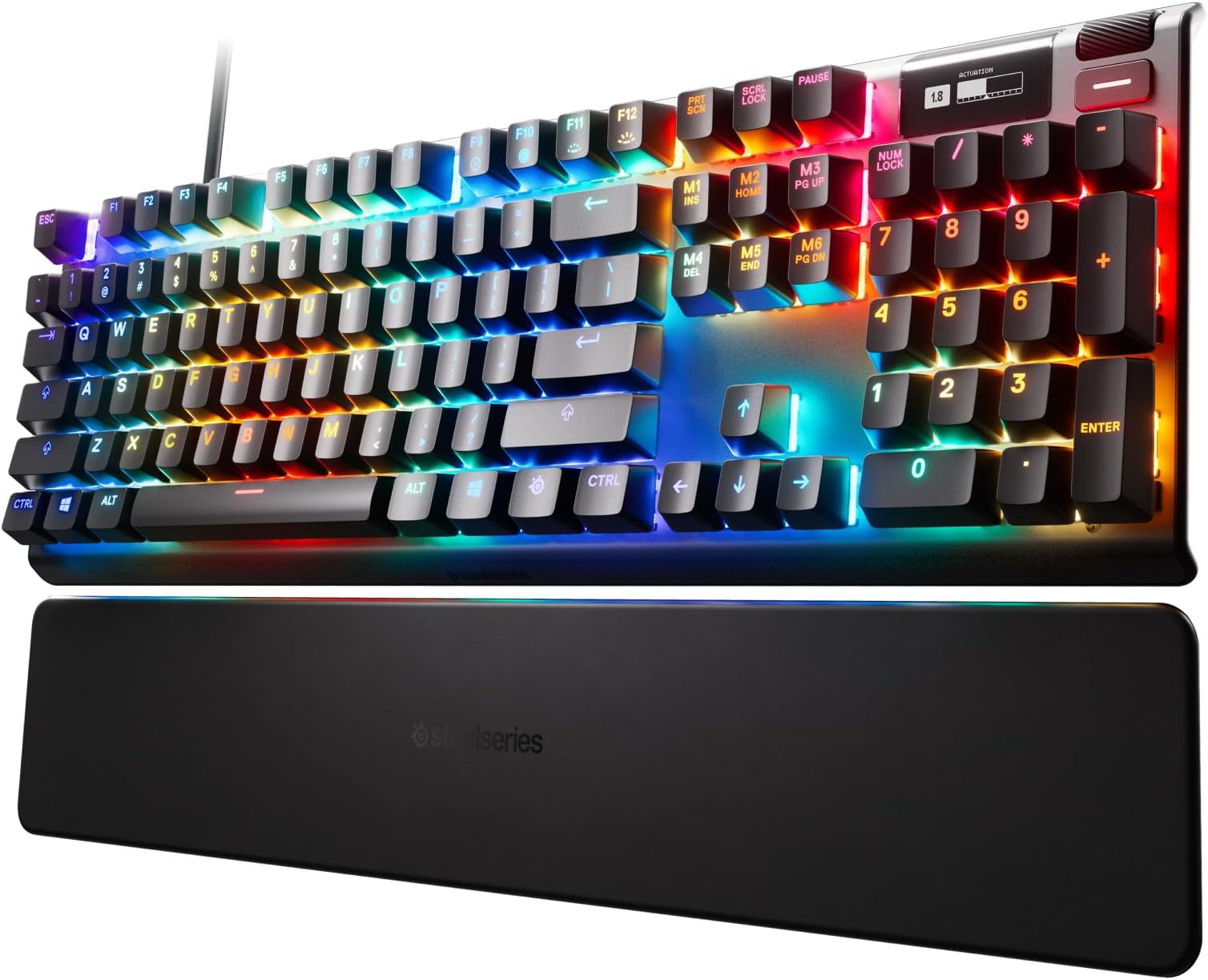
The SteelSeries Apex Mechanical Gaming Keyboard features OmniPoint adjustable switches with customizable actuation from 0.4 to 3.6mm, an integrated OLED smart display for real-time game and app info, and a durable aircraft-grade aluminum frame. With 16.8 million RGB colors per key and a premium magnetic wrist rest, it combines cutting-edge technology with ergonomic comfort for professional-grade gaming performance.


| ASIN | B07SVJJCP3 |
| Additional Features | Wrist Rest |
| Antenna Location | Gaming |
| Best Sellers Rank | #38,374 in Computers ( See Top 100 in Computers ) #969 in Computer Keyboards |
| Brand | SteelSeries |
| Built-In Media | Apex Pro Gaming Keyboard|Download Arctis Pro Product Information Guide|Magnetic Wrist Rest|Product Information Guide |
| Button Quantity | 104 |
| Color | Pro Gen 2 |
| Compatible Devices | Gaming Console |
| Compatible Operating System Family | Windows |
| Connectivity Technology | USB |
| Customer Reviews | 4.6 4.6 out of 5 stars (3,950) |
| Enclosure Material | Aluminum |
| Hand Orientation | Ambidextrous |
| Is Electric | Yes |
| Item Dimensions L x W x H | 43.7L x 14W x 4.1H centimeters |
| Item Type Name | Keyboard |
| Item Weight | 2.14 Pounds |
| Keyboard Backlighting Color Support | RGB |
| Keyboard Description | Gaming |
| Keyboard Layout | QWERTZ |
| Language | English |
| Manufacturer | SteelSeries |
| Mechanical Keyboard Switch Model | steelseries_omnipoint |
| Mfr Part Number | 64626 |
| Model Name | Apex |
| Model Number | 64622 |
| Number of Keys | 104 |
| Power Source | Wired (USB) |
| Series Number | 64622 |
| Style Name | contemporary |
| Switch Type | Mechanical |
| UPC | 813682029432 |
| Water Resistance Level | Not Water Resistant |
U**R
might be the last keyboard i buy
this keyboard is so good and as someone who plays on high delay the low latency omni point switches helped me massively, the OLED screen is nice as you can add gifs or you can add system information the like gpu and cpu temps. Overall the keyboard is good does not have a very loud click compared to blue switches and is the fastest in the market currently. 10/10
J**S
Great keyboard
I went from a k95 plat to this keyboard. I got to say this wasnt a bad a choice, this keyboard is nicely customisable and is really great feel to the touch and smooth
O**D
Best keyboard I ever had
So cool
F**N
Love it
Love it
M**G
would recommend
i bought this because my old keyboard was too noisy and this one is a big improvement. They keys feel different to cherry keys but that is to be expected and did not take long to get used to it. The Software is not amazing but it does the job and i dont have any problems. This is a quality item and i would recommend to anyone considering it.
A**R
Really good keyboard
I am generally pretty impressed with the performance of SteelSeries products and this keyboard technically performs to the expectations. The mechanical keys are amazing, the feedback on key press is one of the best I've experienced, and the RGB lighting and effects are amazing. I would have given a 5 stars review if it were not for the material used for the wrist rest. While the material is comfortable to the touch, it does actually absorb moisture and oil from your wrists and that causes it to lose some particles that get into your hand and fingers. It's crucial to wash your hands regularly when using the keyboard over extended period of time and avoid touching your face or eyes as that would cause irritation (personally experienced). I hope SteelSeries can consider a different material for the next version.
M**D
No arabic letters
the keyboard is super great and i love it. the only issue i have is that it has no Arabic letters. its true in the Pictures it shows no Arabic letters but i thought those are just for show and the ones sold in UAE will have Arabic letters but it turned out it doesn't have them. now i have to look for those stickers but the problem is that there is a high chance those stickers will ruin the keyboard buttons -.-
M**I
Steelseries
Love it, smooth, colourful and amazing.
K**R
I am writing this after my kid dumped a large mug of chocolate milk on his SteelSeries Apex Pro. He didn't clean it up immediately so it had time to spread. When he tried it, about the only thing that worked was the tilde key. I've been in IT for years so I figured I'd try to clean it up before trashing it. It was already totaled so why not try, eh? Liability statement: If you try to clean a keyboard this way, it is at your own risk. Don't blame me if something doesn't work. So, I decided to take this apart and literally wash it. I was impressed with how sturdy the keyboard is. They have tons of screws that create a strong attachment from the circuit board to the casing. The USB/power cable is anchored really well inside the case. The casing was also very solidly screwed together. There are good protectors keeping the cable from shorting the main board and also good guides for the smaller wires. Some engineers put some time into the design of this and did a good job imho. Taking off all the keycaps was easy. But I found the switches couldn't be removed without dealing with desoldering, etc. which I've never tried before. So they stayed in. After I got the main circuit board removed, I literally washed it - twice. I could see areas where the chocolate milk was dried on the board and it was a bit goopy. I put the board in a large sink with a bit of dishwasher soap and some vinegar and shook it around. There were some areas the milk needed to be scrubbed off with a gentle brush. It was a testament to being a good product since none of the board solders came loose or seemed impacted by the scrubbing. Then I rinsed it well under cold water. I did this twice. I also did this with the top portion of the case which included the led display in the upper right corner. Then I let both dry outside in the heat but not in direct sun for 2 days. I hand scrubbed the bottom part of the case since it had tape that was working as vents or something I didn't want to ruin. I put it back together with very low hopes. Son of a .... if the thing didn't work perfectly. Even the LED screen worked and had retained the memory with my kid's macros and custom mini led screen drawing. So, this review doesn't address all the advertised features. There are many video reviews that can tell you more. My kid thinks it is great and leaves the thing on all night so he can see the leds flashing. His macros work well. The keycaps washed off well. The switches literally were soaked goopy liquid that dried and then in water and worked just fine after proper drying. My kid got pissed off once and banged the space bar hard enough to break it in two but even that didn't hurt the switch or the risers. (Some superglue fixed the space keycap). I'm not an expert in keyboards like this but I can say this thing is a beast, solidly built. For us, this was a great choice. I hope this helps you make a decision on your keyboard. Good luck.
I**N
Great and recommend
A**A
The Apex Pro.. Right away with the cons.. •price is too high! Unfortunately the Magnetic Switches not across all the switches just the main side which is the Numbers above the letters and the letters and SpaceBar..etc the Functions key are Red Switches. Even the Arrow are red switches. •the Keycaps aren’t Doubleshot and they feel cheap. •I don’t call this a con, but I don’t like the placement of the LED. I prefer the hidden one PCB Mount. The Pro.. •The Magnificent Switches (Magnetic) is Amazing! •The Quality of the keyboard. •the Included Rubber WristRest is Amazing! ••• 3 points for the Key Switches and stabilizers! They feel lubed and the stabilizers I barely can hear Rattling!! I no longer enjoy using my Corsair K70 feels so cheap! I modded the K70 But even with the mods, doesn’t have a chance against the apex Pro. •Plug and play no need for software! I just feel bad i paid this price and it is near perfect! Glad I own a Doubleshot keycaps! feels much better and sounds a lot better!
P**R
When a rogue Win 10 update took out my Gskill KM780 RGB unexpectedly, I had to pull the trigger fast on a new KB instead of having to endure using my spare membrane board. After a solid day of research, I took a chance on the Apex Pro. Coming from Cherry MX Browns, I had some reservations about OmniPoint. The Browns have a tactile point which I liked. I had tried MX Reds, and wasn't a fan of the linear feel. With these Omni switches being linear, I was unsure but somehow compelled to pass on the Apex 7 with MX Browns and go Pro. TBH, I was half expecting to return it. Needless to say.... I was surprised when I hooked this up! First off... dat switch. Wow. SUPER smooth. The inherent scratchiness of linear MX switches is GONE. It feels like the keycaps are just sort of floating over the brushed aluminum base. The adjustment ability is unique compared to most mechanical boards, bringing a true Hall Effect switch to people. (Look up Hall Effect... gets a little complex for explanation here, but very cool) Actuation can be adjusted from a light brush on the keys (probably overkill) to making the switch bottom out completely. This can also be done on a per key basis. Lot of range to play with! Another key strength... the RGB lighting. Its nothing short of fantastic. The raised caps let the bright and vibrant lighting spill over the board itself, creating a very cool and clean lighting effect. Even for those who don't much care about RGB lighting, it's very tastefully done here. Typing is unreal. I spent 15 mins just typing random weirdness on a word doc just for them feels when I first hooked it up. And for some reason, I find myself with a lot less errors compared to old board with the Browns. I'd commonly get keypress duplication (as if I held the key down) with that switch, and with these Omni switches, it doesn't happen anymore. Of course, these Omni switches are much quieter than the tactile Browns given their linear nature. Not much bad to say here. Some minor gripes would be somewhat "meh" software from Steelseries and the keycaps being ABS instead of something like double-shot PBT caps. The latter feel much sturdier and more premium, and I suppose one could buy some PBT caps if it was a huge issue. Not sure how that would affect the lighting though. The small B&W OLED screen in the upper right doesn't add much in reality, but its kind of a geeky fun thing that you can customize with whatever you want. It does have some functionality with brightness and other features, which is nice to have versus having to use the software. Also, only the primary keys have Omni switches. All the F keys, num pad, and extra function keys are on a generic linear switch that feels good enough. Would be nice to have all keys on omni switches, but it makes sense from a cost perspective and isn't a big deal to me. All in all, fantastic keyboard that towers over my old Gskill in every respect. I really wish MS terrible updates hadn't bricked old board, but I guess things happen for a reason. If you have the cash and want a great analog-based mechanical keyboard with adjustable hall effect switches.... this is the one for you. Very hard to fault this board. Steelseries done good here.
M**O
Ótimo produto, resistente, teclas confortáveis e macias, porém, o ponto fraco é o software que é extremamente bugado e não salva muitas vezes a configuração do teclado, minha recomendação é alterar e fechar o software, não deixa-lo iniciar com o windows e apenas abri-lo quando necessário. O teclado apresenta erros com teclas piscando, é bom dar uma lida na internet de como lidar com eles, tive problemas com o software (teclas piscam azul) e com o hardware (teclas piscam vermelho) e solucionei facilmente, o suporte da Steelseries já é inexistente lá fora, aqui no Brasil então, desiste.
Trustpilot
1 month ago
2 weeks ago