Buy anything from 5,000+ international stores. One checkout price. No surprise fees. Join 2M+ shoppers on Desertcart.
Desertcart purchases this item on your behalf and handles shipping, customs, and support to South Korea.
✒️ Write your future, one stroke at a time.
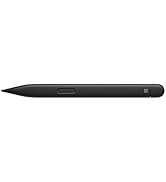
The Microsoft Surface Pen Platinum combines 4,096 pressure sensitivity levels with ultra-low latency and Bluetooth 4.0 connectivity, delivering a natural writing and drawing experience on compatible Surface devices. Designed for professionals, it integrates seamlessly with Windows Ink and Office apps, enabling precise note-taking, editing, and creative workflows with tilt shading and an intuitive eraser.


| ASIN | B072K5TXGT |
| Are Batteries Included | Yes |
| Are Batteries Required | Yes |
| Average battery life on standby | 8.5 Hours |
| Battery Average Life Standby | 8.5 Hours |
| Battery Description | Alkaline |
| Best Sellers Rank | #17,566 in Computers ( See Top 100 in Computers ) #31 in Graphic Tablet Pens |
| Brand | Microsoft |
| Built-In Media | Microsoft Surface Pen Platinum, 1 x AAAA Battery |
| Color | Platinum |
| Colour | Platinum |
| Compatible Devices | Laptop |
| Customer Reviews | 4.6 out of 5 stars 8,402 Reviews |
| Enclosure Material | Rubber |
| Global Trade Identification Number | 00889842202700 |
| Item Dimensions | 14.6 x 1 x 1 centimeters |
| Item Type Name | Microsoft EYU-00009 Surface Pen, Platinum |
| Item Weight | 0.04 Pounds |
| Item weight | 0.04 Pounds |
| Manufacturer | Microsoft |
| Material | Rubber |
| Model Number | EYU-00009 |
| Number of Batteries | 1 CR2 batteries required. (included) |
| Number of batteries | 1 CR2 batteries required. (included) |
| UPC | 889842202700 |
| Unit Count | 1 Count |
T**Q
Excellent
Excellent product and fast delivery
I**S
As described. The battery that came was low in energy
Works and integrates fine.
M**D
Amazing
Just what you need for completing the surface
T**I
Nice
Good Product
L**I
Good looking color, still needs better windows features, very expensive
I'm a fan for writing digitally on the screen to take notes instead of using a paper notepad. I've been doing it in the iPad for years before the iPad pro came out with the pen, using all sorts of digital pens. I was excited about the Surface pro computer and using the pen. First thing is that the cost of the pen is too high considering that it is not a premium looking pen. The feel of the pen on the screen is quite good, with some resistance which helps to feel that you are not writing on glass. The precision is very good though not perfect: for drawing digitally this would probably not be enough for professional work. But to me he topic that bothers me the most is the writing recognition tool that Windows uses which is not very effective and it requires corrections. I wouldn't use that to take notes, it's just too slow. In the iPad I use special programs, that allow me to write with my hand writing and then convert that into text once I'm finished. That works well, specially Notes plus which has an excellent recognition software.
S**A
Genuine product
Working good
M**R
Love it
Amazing product worth the money
C**0
The colour is more rusty red than poppy red
As I already have a surface pen, I knew what to expect. Unfortunately, I expected a darker shade of red as in the photo. The actual colour was closer to a rusty red than a poppy red.
C**S
I bought a $5 one and a $30 one for my windows surface wanting to save some money , they just don't do the job. Very high quality, uses AAAA battery that is easy to find. Very good build quality and feels good to write on. Perfect weight and feels nice in the hand. A must have for artists to get the 4000 pressure points. You can make nice shades and really acts like a pencil when drawing. In terms of the style, I really like how it looks. Looks very nice with the windows surface and matching. I also like how it attaches well to the side of the windows surface. This works by magnets and it works on both the right and left side of the surface which is very nice. You feel like you are writing on a very smooth surface with the nice pen tip material. It doesn't come with any case but I just put it in the pen pocket of my surface bag which is very common in surface bags. Order the AAAA batteries from Ebay 2 months before you need it, its cheapest there.
S**N
I don't know why I got myself one - the darn thing is so pricey, and the only thing I can draw is a Coconut Tree that somehow ends up looking like Bin Laden' beard... Got myself one just to complete my Surface Pro though - I got mine (the SP4) without the Pen, but with the Type Cover... Simple but effective packaging by Amazon, though it took its own sweet time to arrive. The Surface Pen Platinum does not work with all the features (for example, Tilt and all 4096 Pressure Levels) on the SP4, as it does on the SP 2017 Edition... Having never used a Digital Pen all my life, I need to now use it! So far, I have just put in about 30 Minutes usage! Initial impressions are therefore that; - Its a Magnificent piece of Architecture - The Weight and Grip are just sooo right - Snaps Strongly onto the SP, yet, easy to grab out and work with it too! - It GLIDES over the SP's Screen, making a slight Ssss sound - feels Great! - Works as my finger, works as a Pen too - More than losing it, I am mortally scared of dropping it on its Tip... Shudder!! - Where do I get cheap, long-lasting AAAA Batteries from, next year, for the Surface Pen??? Edit after a year plus of using the Surface Pen: the Batteries are still over 50%, so I can put off buying replacement Batteries for another year! Batteries cost a small fortune too... And err. although I haven't suddenly turned into an Artist, I do love having the Pen around, to sign Digital Documents or just to wow people! 😁😎
R**Z
This review applies to the Platinum Surface Pen in use with a Surface 2017 model. The official Surface Pen has proved excellent in use. It is comfortable in my hand, feels natural against the touch screen, writes with no lag, has flawless palm rejection and attaches firmly to the magnetized side of the device. My only problem with the hardware was that it failed to pair automatically with my Surface as the enclosed instructions stated it would. Though far from expert, I'm comfortable with technology and was able to pair it manually in seconds. I suspect my experience was atypical so I did not subtract any stars because of this. Although I use my Surface primarily as a laptop with the Type Cover, adding this Surface Pen definitely expands its functionality. When precision mousing is required, such as in photo editing or using OneNote's drawing tools to make a garden plan, I can be more accurate using the pen's mouse buttons than using the track pad or a conventional mouse. Thanks to the programmable eraser button, with one click I can open a OneNote page to quickly jot something down without hunting for pen and paper even if I'm in the middle of doing something else with my computer. I am no artist, but I have poked around in my amateurish way with drawing apps that support direct on-screen inking and the conventional kind of program that would be used with a graphics pad and stylus. In my non-expert opinion, the Surface Pen would be an invaluable tool for any real digital artist. Finally, a tip for the thrifty: the platinum pen, the least expensive color option, matches the metal casing of the Surface. It won't match your Type Cover, but it won't clash with it either. So unless you're bent on making a fashion statement, pick the platinum model and save a few bucks.

K**E
Great product and services
R**R
Comparado con el anterior modelo este resulta mejor, ya no hay que presionar tanto el lápiz para hacer trazos de manera suave. Se extraña el sujetador que tenían antes, lo hacía sentir más seguro. La inclinación del lápiz funcionan bien pero la forma de punta hace que al inclinar de más el cuerpo del lápiz llegue a raspar la pantalla, la forma de la punto debería ser como los de apple (más parecido a un lápiz de madera y no a un lapicero)
Trustpilot
1 week ago
2 months ago