Desertcart purchases this item on your behalf and handles shipping, customs, and support to South Korea.
💼 Elevate your storage game—fast, flexible, and ready to swap on the fly!
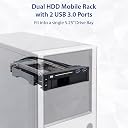
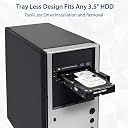
The Syba SY-MRA55006 is a sleek 5.25" bay mobile rack designed for professionals who demand quick, tool-free access to both 2.5" and 3.5" SATA III drives. Featuring dual bays with independent power switches, it supports blazing 6Gbps transfer speeds and includes two front USB 3.0 ports for expanded connectivity. Its anti-shock design and easy installation make it a must-have for efficient data management and emergency drive swaps.


| ASIN | B00834SJ8K |
| Best Sellers Rank | #231 in Enclosures |
| Brand | Syba |
| Built-In Media | 5.25" Dual Bay Mobil Rack (without 2.5", 3.5" HDD)^2x SATA Data Cables (18")^Screws^Molex to SATA Power Cable (4")^User Manual |
| Color | Black/White |
| Compatible Devices | Laptop |
| Connectivity Technology | usb |
| Customer Reviews | 4.2 out of 5 stars 474 Reviews |
| Data Transfer Rate | 600 megabits_per_second |
| Enclosure Material | Plastic |
| Global Trade Identification Number | 00810154016426, 08101540164268 |
| Hard Disk Form Factor | 3.5 inches |
| Hardware Interface | USB |
| Hardware Platform | PC, Mac |
| Item Dimensions L x W x H | 5.25"L x 5.25"W x 5.25"H |
| Item Type Name | 5.25" Bay Tray Less Mobile Rack for 3.5 Inches and 2.5 Inches SATA HDD with Extra 2 Port USB 3.0 SY-MRA55006 |
| Item Weight | 1.3 pounds |
| Manufacturer | Syba |
| Material | Plastic |
| Mfr Part Number | SY-MRA55006 |
| Model Number | SY-MRA55006 |
| Number of Items | 1 |
| Product Dimensions | 5.25"L x 5.25"W x 5.25"H |
| Supported Devices Quantity | 1 |
| UPC | 810154016426 796594204404 |
| Unit Count | 1 Count |
| Warranty Description | 1 Year Warranty |
B**B
Best dock design yet
This is the single most useful computer accessory I've purchased in a long time. I've been using eSATA docks for years, both to retrieve data from drives of other computers and for my own emergency preparation. This is a great improvement on the concept of a dock. I have a three disk ZFS mirror on my system; one disk is now in this dock instead of sitting on an external dock. In the event of an emergency (such as an earthquake), I can just pop out the drive & off I go. This is nicer than an external dusty dock & drive, plus there's no external power supply or cable necessary. Both the 2.5" & 3.5" slots have their own SATA connector & they share a power cable. Each supports SATA III and they can be used simultaneously, along with the USB ports (of course). Each bay has its own ice blue LED to indicate a drive is inserted, plus the LEDs flash purple when the drive has any activity. The blue LEDs are a bit bright, but are small & nicely integrated. The USB 3.0 connector is only for a USB 3.0 motherboard header, which is obvious from the photos & web pages. I'm surprised people give it bad marks because of this, because it's clear before you make the purchase. This is something I wanted, because my Intel dq77mk motherboard has the appropriate header and I of course had to plug something into it.(!) I have found at least three versions of this product, each with a different face plate but the same guts. There are no drivers necessary for this--just plug it in. Even if I ran Windows, this device requires no drivers and no special software. The three versions of this product that I have found are below, and the prices can vary quite a bit. It depends on your aesthetic preference, and if you want one, two, or zero locking bays: Kingwin KF-253-BK Thermaltake ST0026Z Syba SY-MRA55006
E**R
Great Time and space saver, Quality product thats very useful
This is really a great product, it save you space by allowing 2 drives in the place of 1. Handy in the respect that you can have an 2.5 SSD drive to boot from and directly below it have a much larger hard drive. The unit has a power switch to allow for spin down and hot swapping. The unit also features rubber mounting for the actual drives so it does absorb the vibrations all HDD's have. The only downside is the unit is somewhat fragile, this is not to say that it is not made well but must be handled carefully so not to bend or break anything during the installation. Also, if your desktop uses attached plastic rails the rack may wobble around when installed. If your rack directly screws into the inside of a drive bay your golden. Kingwin features an almost identical unit, its priced $10.00 more and requires a key to remove either of the drives. I feel this unit is a better value then the Kingwin product. Finally, the rack also features 2 usb 3.0 ports on the front of the unit. The cables are long and will easily reach to the USB header on your mother board. Be aware you will need a usb 2.0 to 3.0 adapter if you only have 2.0 usb headers inside your machine. You could also add an internal USB card in your PC.
C**S
Very useful
Great use for a spare 5.25 inch bay. I am often copying data from old drives or doing health checks. This makes it super easy to swap in a drive and run a hdd utility. My only complaint is sometimes I have to push kinda hard to get the front door to fully close depending on the drive.
M**T
Just what I always needed
I popped it in, set the two used SATA ports to be hot-pluggable in the UEFI, and everything was good to go. I could've used a SATA dock years ago but I've always been so short on desk space and spare USB ports that it never became a high priority to get a more common external USB dock. I was looking for a dock like this one a few months ago but everything was built cheap and crappy and I didn't want any broken drive doors or anything like that. This one seems to be made to last. I love that it has functional activity lights for both drives too My only issue: I kind of wish they made a version without USB, maybe an SD card reader instead or something along those lines. My case already happened to come with two USB 3.0 ports on the front and they're already connected to the only USB 3.0 header I have on my motherboard so now I have two additional ports that don't do anything. Not a huge deal, I just tucked the cables away inside the 5.25" bay area underneath and my case has a front door covering the 5.25" bays anyway to hide it but I'm a little OCD about having non-functional ports on my computer. And speaking of the door on my case, that brings me to another plus: Unlike other 5.25" docks of this type it doesn't have any large locks, buttons or finger-handles that stick out of the face so I can actually shut the front door on my Corsair Obsidian 550D perfectly fine, this was a big worry of mine as I was looking and I'm glad I happened to come across this particular drive, it even matches everything else when the door is open. I highly recommend using the supplied screws to mount it, especially if your case has iffy tool-less mounts or even if it has a decent tool-less mount but only on one side like mine. This isn't like an optical drive where it just needs something in the screw holes to hold it still; you're gonna be exerting a bit of pressure on this as you push drives into it, the last thing you need is one of these suddenly shooting backwards into your case, especially with the weight of a 3.5" drive inside it. In addition, it has its own shock dampening system too so keeping everything tightly mounted is optimal for noise control. Overall this is a very useful addition to my computer, it should definitely help me out with backing up drives or dealing with problem drives for computer sidejobs
Z**H
Very cool 5.25 inch bay accessory
I bought this because my HP Z600 workstation didn't have enough drive bays (A measley 2 3.5 inchers built in with 2 5.25 bays available). This allowed me to add an additional SSD because my main SSD was running low on space, and an additional 2TB drive to my workstation. What makes this thing unique among the competitors is the fact that not only does it hold 2 drives, but it has an ultra-useful additional 2 USB3.0 ports. I upgraded my workstation with this card ORICO PVU3-2O2I USB 3.0 PCI Express Card Adapter Expansion Card PCI-E USB 3.0 HUB Controller Adapter Card for Windows Vista PC Laptop to add USB3 support, and that card in combination with this bay adapter gave me 2 front USB 3 ports (Which was something I wanted). The design of the drive rack is well thought out, it requires no hardware or tools to add drives, the drives just slide straight in with no tray and lock into place with the flap on the front. It fits my 5.25 inch bays perfectly, and it's easy to cable up. One of the very nice features on the subject of cable management is the fact that it only takes one SATA power connector to power both drives. One possible thing to look out for though is that some SSDs may require a stick on riser if they're the thinner type to line up correctly, my Crucial BX200 480GB SATA 2.5 Inch Internal Solid State Drive - CT480BX200SSD1 came with a stick on adapter, which made it fit better. I'm sure the drive will hang just fine off of the connector inside, but it's preferable to have the weight of your SSD supported by the bottom side, rather than an electronic connection. All in all, this is a great product, awesome idea, and an awesome price for it. I'm incredibly happy with this purchase.
A**R
Dead on Arrival - Extremely Poor Quality
No matter what one tries, the unit would not power up as it was sent from the factory. It obviously was not even minimally factory tested to see if it would power up. The answer I got back from SYBA tech support (which answered quickly) was an answer that says to connect the up with two separate power cables, not the configuration and supplies sent in the box. SYBA already knows that the units won't work as shipped. The one Sata to 4-pin power supply connector was also of extremely poor quality - the 4 pins to the power supply connector simply pushed out and came loose immediately, and the Sata connector end would hardly stay connected to the unit. The unit's Sata power connector cracked immediately upon insertion at the "L" portion, but the rest seemed to stay intact. Such extremely cheap junk connectors are a hallmark of this product. I should have researched this more; if you go out on the Web you will find numerous postings as to power issues with this and other SYBA products (see above).
R**N
BSOD Hell until I figured out driver/hardware conflicts.
This device is being hooked up to an ASRock Z87 Extreme6 on ports 0, 1 (SATA3_A1 & SATA3_A2) on the ASMedia 106x SATA controller. OS: Windows x64 10.1607.14393.51 ASMedia SATA drivers: 3.1.6 (ASUS drivers. Originally ASRock's 1.4.1 version) --- First of all, uninstall XFastUSB if you have it installed. Version 3.02.31 causes memory allocation BSOD issues in the aforementioned Windows version *even if the rack is hooked up, without the PSU attached, to the SATA ports*. This has only been currently tested to that end result on ports 2, 4 (SATA3_A3 & SATA3_A4). Either UsbHub3.sys or ntoskrnl.exe are the causes of the BSOD in this configuration. The device did not allow for safe removal unmounts when hooked to the Intel SATA ports when they're configured to allow for hot swapping in the BIOS. This may be in part due to having 14.5.0.1081 installed. I may attempt to upgrade to the latest version (14.8.0.1042 at this time) due to the additional system compatibility, but having access to SATA3 vs SATA2 is worth staying with the ASMedia controller for the time being. --- Current thoughts: I've only used it for a SanDisk Extreme Pro SSD and a Western Digital 6Tb Black . The SSD required the attachment of the size adapter to allow for proper fitting to the 2.5" bay. I may simply keep another riser on hand for compatibility with other SSDs down the road. It functioned quite well for migrating my old OS SSD to this vastly larger SSD. The 3.5" bay *needs* to have air flow underneath for long-term continuous usage so as to keep the drive temp down. After doing a 8.5hr backup session, the drive was hitting upwards of 58c. My case does not have an extra bay available for this purpose, but long term heavy usage sessions are not likely to often happen due to my use of differential backups. --- Usage purposes: Backups, data recovery, quick and painless data access, data copying, disk imaging, 2x more USB ports. :) Primary reason for purchase was the physical disconnect power switch so as to dramatically reduce the chance of power surge damage and malware infection of a backup disk left inserted.
J**B
Great little device for hot-swapping SSD's and HDD's
First off, I really love this thing. there isn't much else I need to say about it but I will add some things to it anyway. I wanted a hard drive caddy for my computer but I wanted it to be able to hold an SSD as well as a hard drive. When I was looking there were a few that didn't have very good reviews but when I saw this one I took a chance on it and so far it works great. It can run both the SSD as well as a full mechanical hard drive at the same time as well as the two USB ports when connected to a USB 3 header on the motherboard. My computer only has one such header, but I plan on getting an expansion card in the future to take advantage of all 4 USB ports (2 on my computer and 2 on the caddy). The SATA power is split between the two with just one connection. The SATA data is separate from each other though. So 1 power connection and 2 data connections make this tray work. On my Asus motherboard, I have the two ports that these are plugged into hot-swappable so all I have to do is eject the drives in Windows and pop them out. I've only had it for two and a half months so I can't really attest to the longevity factor, but so far it's working very well for my needs. If I have to guess a failing point that might occur it's probably the latch for the 2.5-inch drive. You have to push it quite hard to get it to latch and it's just plastic holding it in place.
G**0
Good product
Easy install. Convenient hot swapping for 3.5 and 2.5 HDD. Working without errors for 3 months. Wish it had lock system.
J**H
Buen producto, buen precio
M**)
Delivered in time.
Used in the computer. Good Stuff.
L**T
Syba Have a good day. LiberT
C'est la seconde unité que j'achète depuis un an. Le design est inspirant et tout est bien placé et accessible. Utiliser ce périphérique est un plaisir en sachant qu'il ne bug pas. Avoir dans la même unité et lecteur 31/2" et lecteur 21/2 et deux ports usb 3.0 est un luxe qui comble à l'excellence sa bonne et complète utilisation. Mais le plus important qu'offre ce bijou de travail est avant tout: la vitesse de transmission des données inter disques, fiable-constante et free error transmission. En plus de l'insertion facile des disques, c'est un très bel appareil et aussi très robuste. C'est la Mercedes des unités interreliées pour le prix d'un simple ticket de cinéma. Thahk You all the gang, Syba Have a good day. LiberT. P.S. Comme cadeau de la fête des Pères, j'ai demandé un Syba en cadeau, au cas où une de mes unités auraient des problèmes.
A**R
Nice unit, good features, works as described, but needs careful installation
Nice unit, well built and worked from get-go. Could use more explicit installation instructions and, while accommodating two drives, the fit is quite dense. The two USB 3.0 worked when installed, but after finishing up mounting only one now works. That's disappointing and it's now too much trouble to uninstall and reinstall the unit in my workstation. Overall the unit looked and felt well constructed, nice finish on the metal parts and proper wiring and connectors for attaching to power, data and USB 3.0 socket on the motherboard. I would recommend this item but caution to be careful when mounting drives, and the device itself, into your desktop tower.
Trustpilot
3 weeks ago
2 weeks ago