

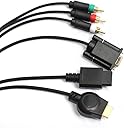


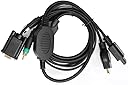
Mayflash Wii/PS3 VGA HDTV AV Cable
Product ID: 263032
🎮PS3 & Wii support
📺HDTV compatibility
🔌5-foot length
🎮 Level Up Your Setup with Mayflash!
The Mayflash Wii/PS3 VGA HDTV AV Cable is a versatile solution for connecting your gaming consoles to HDTVs, LCD TVs, projectors, and PC monitors. With a length of five feet, it supports resolutions of 480p, 720p, 1080i, and 1080p for PS3 and 480p for Nintendo Wii, ensuring a high-quality audio-visual experience.
| ASIN | B0015MISAG |
| Brand Name | Hyperkin |
| Cable Type | Component |
| Color | multi-colored |
| Compatible Devices | Monitor, PC, Projector, Television |
| Connectivity Technology | VGA |
| Connector Gender | Male-to-Male |
| Connector Type | VGA |
| Customer Package Type | Standard Packaging |
| Customer Reviews | 3.3 3.3 out of 5 stars (355) |
| Indoor Outdoor Usage | Indoor |
| Item Shape | Round |
| Item Weight | 9.92 ounces |
| Manufacturer | Hyperkin |
| Model | M04882 |
| Number of Items | 1 |
| Number of Pins | 15 |
| Part Number | 8.6879E+12 |
| Recommended Uses For Product | Connecting PS3 and Nintendo Wii consoles to HDTVs, LCD TVs, projectors, and PC monitors for high-definition gameplay |
| Unit Count | 1.0 Count |
M**P
NINTENDO WII
MONITER: HP 2010i 20" Diagonal HD Ready Widescreen LCD Monitor this is a great product for the price, it does what it says and is easy to use **YOU MUST PLAY IN 480p** 1. OPEN PACKAGE AND PLUG THE CABLE INTO YOUR TV 2. GO TO WII OPTIONS > SCREEN > RESOLUTION > 480p 3. SETTINGS SHOULD SAVE, YOU CAN NOW BRING IT TO YOUR MONITER -------------------------- THE ONLY PROBLEM WITH THIS PRODUCT IS THE FACT THAT THE SCREEN WILL GO BLACK FOR 3 SECONDS EVERY 20 MINUTES OR SO i like this product too much for it to be a problem to me though i play animal crossing so it's whatever for me, after a day i got used to it it does happen a lot during games with big bangs or flashes it happens a lot during call of duty for example, but that shouldn't be a problem if you're a pro like me ;) great product, i dig it 5/5 because i read previous reviews and was aware there would be black screen bug and it's not a problem to me
D**W
Great Design, a Few Flaws (PS3)
GENERAL: (PLEASE NOTE: this review is for the cable while using a PS3, I did not have a wii to test it with) I bought this because I am deployed and I didnt want to have to buy an hdtv when I already have a 19' monitor I use for my laptop. I was pleasantly suprised at all the subtle features included with this cable. It came with a gender adapter for the cable which was a lifesaver for me because I didnt want to have to unplug the cable everytime I switched between my PS3 and Laptop. Also notable is the extension cables for the audio which even includes a headphone jack! (brilliant inclusion as far as im concerned because I can play my PS3 without waking people up!) And now the bad parts: Right away my biggest peeve was the installation. It requires you to hook the cable to a tv and your pc monitor silmantaneously when you first install it. This is frustrating mainly because they give you very little cable slack between the av plug and the vga plug. I was forced to hold the tv up with one hand and adjust the settings because I couldnt make the cords reach between the tv and monitor otherwise. And now the Ugly: Theoretically this adapter can support all the way up to 1080P. But because it is only a cable and it doesnt have its own dedicated box your images look a little washed out, the picture was also dark on both monitors I tried even after I adjusted brightness and contrast, and worst of all you have to adjust the screen with your monitor controls to make the image fit properly... something you will be doing almost every time you insert a different game or movie. 720p Gave me the best results on the two monitors I tried this cable with. (19 and 21 inch lcd monitors) PROS: -Cheap Solution For a Hi-Def Experience -99% Artifact Free Image -Inclusion of gender adapter was a nice courtesy -Headphone jack a much appreciated add-on -Great Value Considering you can use this for PS3 and WII CONS: -Image appears a little washed out, Though still noticeably improved over the regular AV cable. -Lack of Dedicated box means you will be rescaling the image manually...often... -Initial setup is clunky and frustrating. -Even after adjusting you are sometimes forced to let parts of the screen be cut off. OVERALL: I was slightly dissapointed with the overall package. I have owned a vga adapter for Dreamcast as Well as XBX360 and both would beat the snot out of this cable. The fact that I had to manually adjust my picture every time it changed resolutions wasnt just frustrating but seemed ridiculous to me. However on the same token I am enjoying my ps3 games in high def without having to spend moolah on an hdtv. With this cable it was easy for me to switch between my stereo system or a pair of headphones which is convenient. Overall it was a decent buy for the price, but I hope some other company (or god forbid Sony themselves!) will step up and release something better in the future. Get it if you cant afford an hdtv or are short on space, etc. But if you have an hdtv handy, just spring for the official Sony Component Cables, youll be much happier I promise.
L**A
Great, but with a minor issue
This is a great product for anyone who anyone who absolutely must plug in their wii to a VGA port. If that is the case for you, then please feel free to buy this. The only problem that I had with this, (and I had researched this before,) was the occasional black screen. Now, if you go to other sites and find similar cables, you might see other reviews that rant on and on about how annoying this black screen is. Some might say it's deadly and ridiculous, and that this product is garbage because of it. The truth is: about every 5 minutes of game time, (I have not timed this, so this is only an estimate of a gamer wrapped up in his game.) the screen will black out for roughly 2-3 seconds, and promptly return. The sound is still playing, but the screen is black. That's it. It sounds alot worse than it is. Some might say it's a deal-breaker, I say it's more of a minor annoyance. You will need speakers or some other input for the RCA cable. It DOES NOT come with a gender changer for the VGA, it is a Female VGA cable. Set-up is simple. You will need a television, (which for some of you you might be thinking, "that's dumb, I bought this because I don't have one,") but you will only need it for roughly a minute or two. Instructions are included, but at the very bottom of this review I will quickly (and simply) run over the steps. Overall, this product has helped me immensely, and I am very happy with my purchase. I have only tested it with a Wii, but the results have been satisfactory. I recommend this product to anyone who would like a Wii to VGA cable. INSTRUCTIONS: Plug in the Wii to TV, using the green connector to the usual yellow video input. In the Wii settings, change the resolution to 480p, from 480i. The screen might go black, and the Wii might restart, (I don't quite remember) but all you have to do now is connect the Wii to your VGA input. It should be working.
P**K
DONT BUY read my review
This cable is absolute garbage. THe cable didnt work as described on the instructions. I have a ps3 and you have to use a regular tv first to change it to component. Then plug it into your monitor. After I figured that out myself it was still garbage. The picture quality was just darn awful and higher resolutions don't work because either they dont fit correctly or the screen spases and flickers black and white. 480P works without flickering but the picture quality still sucks. Don't buy unless you don't have a TV. I do have a TV and thought it would be convinent to play in my room. My sister watches the TV alot so I get less play time if I use the tv. however, I rather sacrifice play time and NOT use this cable. I wish I can return it but I guess it does work so I don't really have a compelling arguement. I wish I read the previous reviews.
K**N
Can work but not so good
I wouldnt recommend this cable if your planning on using it on a wii and want to play gamecube games on it. Also if your monitor does not scale to lower resolutions very well then you might want to avoid this. On a Samsung syncmaster p2570 the image quality was terrible. Figured that due to the native resolution is 1920 x 1080. On some of the screens in the wii menu I would get a pink line across the bottom of the screen. I tried using it on a second monitor with a native resolution of 1280 x 1024 the quality looked better but I would still get the pink line. My main problem with the cable is that it seems that it will not allow the wii to display gamecube games on the monitor. Probably due to the wii is switching display modes from 480p to 480i. If you have a low resolution monitor and only plan on playing wii games then this cable may work for you. If not then I would avoid the cable and look at the converter boxes.
G**N
Works as promised, but you need to follow instructions
I wanted to connect a PS3 to a projector that only had a VGA RGB connector. This cable did the trick. It allowed me to connect the PS3 and set the resolution to 720p (max for the projector). These instructions were very helpful: Instructions for PS3-to-VGA 1. Connect the PS3 AV plug to the PS3 AV MULTIOUT port 2. Connect the VGA plug to the Monitor. * If you do not see you PS3 at startup you must connect to a TV for a one-time setup o Connect the Green RCA connection to the Video In connection on a TV o Connect and start the PS3 console. A black and white image will appear on the TV which you can use to complete the setup 3. With a PS3 controller, navigate through and change the settings as marked below: * Settings * Display Settings * Video Output Settings * Component/D-Terminal * Change and press Enter to the next step * Select 480P, 720P, 1080I and/or 1080P and press right on the D-Pad 4. You should see the video on your computer monitor. Make sure to confirm your settings within 30 seconds or the video settings will revert to their previous values. 5. Set your audio output port to AV Multi 6. Confirm your settings
C**R
Works like a charm!
I was skeptical at first because of sketchy reviews for most of these cheap cable adapters - plus most game stores don't carry anything like this. As long as you have a monitor that supports 720p (because I don't think you'll get 1080p out of your PS3 through analog) or similar widescreen resolutions this will work as a PS3 -> PC Monitor cable. (Just make sure to set your resolution on your PS3 while connected to the TV first, because if you're at a resolution the monitor doesn't support it won't auto-detect - you usually have to set it on a tv, then plug it into the monitor) I also tried this on a projector, though keep in mind that many projectors/monitors don't have very good split input options (the projector I tried will only let you use a 3.5mm audio jack for the VGA input so I needed a 3.5mm to RCA adapter) One nice touch to this cable is the female adapter on the VGA connector - this will let you connect the cable to a longer VGA cable as an extension.
T**Y
Wii & a Samsung 24 inch LCD
First I want to say that this cable came with an extra headphone adapter cable, that is not shown in the picture. So EVERYTHING you need is in the box! Be warned, that you should use headphones that have volume control built into them because there will not be a way to adjust the volume without it. Setting up for the Wii to work with the VGA cable took a couple of steps that could be a hassle for some, however this a Wii setup issue and has NOTHING to do with the cable. The directions are printed on the back and are easy to follow so Im not sure why people are having such a hard time with using this cable. You must change an option in the Wii settings to get the Wii to display properly out of the VGA portion of the cable. Unfortunately in order for this option to be selectable, the VGA cable must be connected to something as well. Thankfully, I have a TV downstairs that has a "VGA" input, so I connected my Wii to the TV with the Green, Red & yellow heads and also connected the VGA head to the same TV. Powered up the Wii, went to settings,selected the VGA option, I don't remember the exact wording, and then the screen went dark. This indicated to me that the Wii had successfully switched to the "VGA" output mode. I powered down the Wii and it works PERFECTLY on my LCD monitor upstairs. Shipping was fast and the packaging was top quality.
Z**N
Perfect for Hi-Def gamers
The only thing I did not like is this does not work with the PS2 even if the PS2 does support Hi-def, this cable will not work with a PS2 On the PS3 and Wii though you get the best possible picture with both consoles
C**S
PERFECTO PARA WII U SIN HDMI
¡¡¡La solución perfecta para Wii U si tu tele no tiene conector HDMI!!! Tras días de búsqueda en foros y consejos de "expertos" afirmando que para ver HD con sonido en Wii U hay que comprar un carísimo "adaptador/conversor HDMI/DVI + sonido", resulta que la cosa era mucho más fácil de lo que aparentaba… Este cable acepta hasta 1080p conectado en el puerto VGA de ordenador/monitor de la tele (también se puede usar si el puerto es DVI –como es mi caso– con un adaptador VGA a DVI). El sonido lo he puesto a través del equipo de música (R y L) y el resultado es espectacular. La única condición es que tu tele tenga un puerto VGA o DVI (los que te permiten conectar la pantalla del ordenador). El cable te ofrecerá la máxima resolución que tu tele acepte (1080i en mi Philips FlatTV HD Ready, con el adaptador VGA-DVI incorporado y sin defecto de imagen alguno). La Wii U detecta automáticamente la conexión como "conexión por componentes", y una vez obtenida automáticamente la imagen por defecto puedes cambiar la resolución desde el Wii U Gamepad hasta el máximo que tu tele permita. Incluye además dos adaptadores, uno de estéreo dual a mini jack y otro hembra/macho VGA. Excelente compra, excelente caja de tamaño importante (cable protegido, conectores perfectamente ordenados y separados) y excelente resultado. Lo único que hay que tener en cuenta es que si la entrada de tu tele es DVI necesitarás un pequeño adaptador VGA a DVI que cuesta 2 o 3 € y tienen en cualquier parte.
W**M
Really like these wires
Really like these wires; saved me a lot of money since i was able to just plug my wii into my monitor instead of buying a new TV. Just to clarify some things I wasn't able to see about these on the web; Pros: -It does work with my version of Zelda: Wind Waker on gamecube. Some reviews on the amazon US said that it wouldnt work with gamecube games but at first it says ''signal input not recognized'' or something like that and then couples of minutes later the game appear. -The wires came with a AV cables (RCA) to JACK converter which allows you to plug speakers or headphones into and hear your game's sound. Cons: -The resolution seems, on my screen, not that good... there are some lines in the screen, like if you were playing on an old Tv. -The sound that goes into my headphones is not that good... and i have a pretty decent pair of headphones. I would still give this a 5 stars because i am not quite sure at the moment if the screen resolution and the audio problems are the fault of the cables. Plus, i dont really mind since I can play my old games (even the gamecube ones). Definitely recommend it.
L**8
très bien!!!!!!!!!!!!!!!!!!!
pour ce que l'annonce offre, il est tout ce que j'attendais(sachant que j'ai était deçue par plusieurs adaptateurs HDMI vers VGA défectueux ) l'image est moins bien qu'en qualité HDMI, mais cela est normale puisque que c un cable VGA... et la qualité reste plus que convenable comme même!!!!(sachant que mon port HDMI de ma ps3 ne marche plus a cause d'un adaptateur HDMI vers VGA de mauvaise qualité!!!!!!!!!!!) très pratique car contrairement à ce que j'ai pu lire dans un autre commentaire, il est envoyé avec un changeur de genre HD15 femelle vers male et même un adaptateur audio(c'était peut être déjà écrit dans la description mais je n'ai pas fait attention) moi qui est un simple moniteur PC avec entré RGB j'ai pu tout simplement branché ce câble à la ps3 et brancher des enceintes (ou un casque pour ce qui veulent) bref pour avoir fouillé partout sur internet et pour vouloir acheter cela de façon pas trop cher, moi qui suis juste une joueuse du dimanche ayant érité du copin; la ps3 et du papi ;le moniteur, de jouer à des JV ne me revient pas si cher que cela.:) Je suis même appelée un magasins concurant spécialisé en informatique et JV sur paris, qui ma dit que ce produit était en rupture de stock chez eux et que malheureusement ce produit est amené à disparaître ,il ne se fait plus car tout passe par la HDMI ... Je ne sais pas si c'est le même cas pour le vendeur qui vend ce câble si en espérant avoir pu vous aider ...
A**R
cavo hd vga per WII / PS3
Provato su Playstation 3 primo utilizzo seguendo le istruzioni un po’ macchinoso, ma nel giro di 10 min. tutto funziona su monitor VGA. Nessun problema, tutto ok.
Trustpilot
3 weeks ago
2 weeks ago