Desertcart purchases this item on your behalf and handles shipping, customs, and support to South Korea.
๐ง Upgrade Your Tech Game!
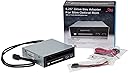
The Syba 5.25" Bay Adapter is a versatile solution for mounting slim optical drives and 2.5" SATA HDD/SSDs in a single 5.25" bay. With a data transfer rate of up to 6Gbps, tool-less installation, and dual USB 3.0 ports, this adapter is designed for efficiency and ease of use, making it an essential addition to any professional's tech arsenal.

| ASIN | B0081IOSOW |
| Best Sellers Rank | #145 in Enclosures |
| Brand | Syba |
| Built-In Media | 2 Serial + 1 Parallel Ports Pci Card, Bracket With 2 Serial Connectors, Driver Cd, User Manual |
| Color | Black, white |
| Compatible Devices | Laptop |
| Connectivity Technology | USB |
| Customer Reviews | 4.0 out of 5 stars 101 Reviews |
| Data Transfer Rate | 6 megabits_per_second |
| Global Trade Identification Number | 08101540164190 |
| Hard Disk Form Factor | 2.5 inches |
| Hardware Interface | SATA 6.0 Gb/s |
| Hardware Platform | x86_64 |
| Item Type Name | 5.25" Bay Adapter for Slim Optical Drive |
| Item Weight | 1.4 pounds |
| Manufacturer | Syba |
| Mfr Part Number | SY-MRA55005 |
| Model Number | SY-MRA55005 |
| Number of Items | 1 |
| Number of Packs | 1 |
| Supported Devices Quantity | 1 |
| UPC | 810154016419 796594140894 191120013619 |
| Unit Count | 1 Count |
| Warranty Description | 1 Year Warranty |
A**Y
Looks good, does what it is supposed to.
I ordered the Syba 5.25-Inch Bay Adapter for Slim Optical Drive and 2.5-Inch SATA III HDD/SDD with 2 USB 3.0 Ports SY-MRA55005 for use in a desktop with the blu-ray drive from an older laptop. I'm giving it 4.5 stars because it does everything it is supposed to and looks good, but it does not come with everything you need to connect a slim drive to a desktop PC. To adapt from slim to normal SATA and power you will need this: StarTech.com Slimline SATA to SATA Adapter with Power(SLSATAADAP) http://www.amazon.com/gp/product/B002O1W6ZK/ref=oh_details_o03_s00_i00?ie=UTF8&psc=1 Also, if you are pulling an optical drive from a laptop computer to use with this bay adapter you may need to grab a new bezel/face plate for your drive, the one originally on my drive was designed to fit the laptop and was too big for the bay adapter. You can get a replacement bezel here: http://www.amazon.com/gp/product/B00E2WCQU4/ref=oh_details_o00_s00_i00?ie=UTF8&psc=1 After connecting the two USB 3.0 slots to my motherboard they both worked with the flash drive I used to test them, unfortunately I do not have any actual USB 3.0 devices to test them with at this time, but there is nothing to indicate any problems with them. If you don't have a USB 3.0 connector on your motherboard I would recommend buying this PCI card which comes with 5 USB 3.0 slots and an internal connector: http://www.amazon.com/gp/product/B00FXMGC5M/ref=oh_details_o03_s01_i00?ie=UTF8&psc=1 The hot swap bay works well with a 2.5" drive I pulled from the same laptop as the blu-ray drive, you'll need to connect SATA/power to the rear of the adapter. The slide button works well for ejecting the HDD. If I recall correctly the packaging included some screws to mount the bay adapter into a standard 5.25" bay, a SATA cable, and a molex to SATA power cable. Mounting the bay adapter in my desktop went well, it sits flush with the case and does not wiggle or seem insecure at all. If I could change one thing about this bay adapter it would be to swap the locations of the USB and hot swap bay, the SATA connections for the HDD and optical drive are a little close on the back side, but it's nothing worth taking a star over. Overall, I am very satisfied.
T**Y
Works Great - Couple of Notes
I love this item. My music PC is a powerhouse, But I wanted to put it in the smallest enclosure possible, giving me only an open 3.5 and 5.25 bay. I have a multi-card reader in the 3.5 and this item in the 5.25. The computer's internal hard drive space is occupied by 2 2.5 500gb drives raided and there was a little space under the multi-card reader that I shoved a 2.5 SSD as my boot drive. Where this item comes to play in the 5.25 bay. It houses a blu-ray burner, leads to the USB 3.0 PCI express card and an open hot-swap bay. NOTES: other reviewers noted the necessity for the SATA/Power adapter for the CD/DVD/Blu-ray drive bay. This is correct; this adapter does not come in the package and needs to be purchased separately. The frame gives a little too much clearance around the CD Bezel (think dell flat type), but that isn't a worry... Here is something I have yet to see anyone note; NOT EVERY 2.5 Hard Drive is Hot Swappable! It will be hit or miss. I believe most Western Digital drives are not Hot Swappable in this device. Also, after ejecting a hard drive (using the operating system) and reinserting the same drive; some motherboards may not recognize it being reinserted and you may have to reset for it to be initialized. This will differ depending on your motherboard's manufacturer, and drivers installed. My computer is an older Core2-Quad in an intel motherboard <--so that could be my issue; your results may very. Just take note that it's a possibility... Now BUY IT!
J**D
Great for mounting slim DVD drive with hot swappable 2.5" drive and USB 3.0 connectors.
I bought a Corsair Air540 case to build my new system. The Air540 is a mid-tower cube with very good air flow, great cable routing and a huge window on one side so you can see your system build. (Since the case has a huge window on the side, and plain case fans, I had to replace the fans with LED fans, but that's another story.) Unfortunately, the DVD drive bays sit vertically. Since most computer DVD drives have a tray, they are a little difficult to use sideways. Accordingly, I bought a slot mounted hard drive which works like the ones in a car, slurping up the DVD/CD. However, in order to make it fit, I needed to purchase a bay adapter. This one works perfectly. In addition to the slot for the thin DVD drive, it has a bay for a hot swappable 2.5" hard drive, which I think is very useful. It also has two front panel USB 3.0 ports, which I need because the case only had two USB ports on front panel instead of the standard four. However, my motherboard only had one front panel USB 3.0 connector. This required me to purchase a card with an extra USB 3.0 connection to make it work.
L**C
I am a little worried about the 2.5" HDD door. (Also, info on what is included)
The door is being constantly pressed outwards. I am very worried the very little lock, holding it closed, will break. (I haven't seen any reviewers reporting that, though.) Other than that, it is all working so very well. It was not clear to me what cables were included: It comes with a SATA cable (for the 2.5" HDD enclosure), and a power connector (that, as far as I understand, it MUST be used so the HDD enclosure led can be powered). It also came with the necessary set of screws. It DOES NOT COME with cables for whatever ODD you might install. I don't think this a bad decision because there is more than one possible interface the slim ODD you choose can come with. Also, this is for the older "slim" ODD drives for laptops. Nowadays, the ODD in laptops are a newer even slimmer variety. (So do check specks. I am not sure you can fit the slimmer one.)
A**S
Hot swap bay causes huge PC lag
**********EDIT********** I noticed my PC was starting to have a lot of lag, usually every 10 minutes or so it would just lag really hard for 2-3 seconds. No matter what I was doing, it would lag. Gaming, watching videos, YouTube, Adobe editing, anything. It caused more than one total freeze as well, only a hard power button reset would cure that. Trying to think of what could be causing it, I thought maybe there was some lag coming from the hotswap bay drive. I removed the ssd from the hot swap bay, & my system has been running fine ever since. I tried the bay with hotswap both enabled and disabled in bios, but it didn't make any difference. It still lagged. I can't recommend this in its current state. This thing fits a samsung 850 evo and a slim dvd-rw (12.7mm I believe) and looks pretty good. Minus one star because it may be my eyes, but the USB 3 ports look a little...crooked lol. Fits vertically in my Corsair Carbide Air 540 case pretty well, everything is just about flush, and the USB 3.0 (gen 1) ports work as they should. I have the drive bay set as non hot swap in BIOS simply because I don't ever need to swap it, but I tried it as a swappable and it worked fine.
G**.
Poor design decisions keep this from being a true winner.
I wanted to install a slimline IDE drive using this thing but it has one annoying factor that kept me from doing it: the USB cable is routed through the UPPER half of the case. For whatever reason the USB cable isn't run through the bottom, despite plenty of clearance next to the 2.5" dock. Instead it starts at the bottom where the ports are then is lifted up to the top to exit, cutting off the cutout for the slimline drive interface. This prevents me from not only installing the drive with its adapter inside the enclosure (because the cutout doesn't stretch across the entire length of the back) but also installing the drive by itself inside the case and then plugging in the adapter from the outside. It was impossible to use my IDE drive in this enclosure and I was forced to fall back to a SATA optical drive. This could have been avoided with more thoughtful design. Furthermore, the weird Y-cable it comes with to power the LED on the front of the 2.5" dock has a MOLEX input for some reason. The power that goes into the dock's drive power adapter is a SATA cable but the lead on the female end that plugs into the power supply is Molex. The Y-cable is a somewhat unorthodox cable since it has a 4-pin power output for the LED on the face of the 2.5" hot swap bay in addition to the end used to plug into the SATA power on the bay so you need to use it but why is it SATA out but not SATA in? This combined with needing to use a SATA optical drive (which means I need to use an interface adapter that also includes a Molex connector) actually ended up making it so it was better to use a Molex chain on my modular power supply instead of a SATA chain, which is not how I was planning this to go and disrupts some of my wiring efficiency in the process. Beyond I can confirm this is fully functional so I can't complain about any issues that prevented me from actually using it but in terms of what I was trying to do with my own system, it fell on its face.
H**D
great adapter/enclosure!
Great internal enclosure to convert a 5.25 bay to something very useful! i put a laptop dvd burner drive and my SSD drive in it and they both worked great! be aware that this does not come with a slimline sata adapter. you will need an adapter specifically for optical drives (additional 12v line as well as 5v) like this one: StarTech.com Slimline SATA to SATA Adapter with Power(SLSATAADAP) the 2.5" bay could be hot swappable if that is what you wanted it for, but i needed a slot for my SSD drive so it was just floating in my case. The two usb 3 slots are a great way to add usb 3.0 to the front of an older case (like mine). make sure your board have front USB headers on the motherboard though. the entire bay adapter is a little bit shorter than a standard desktop size optical drive, which is nice.
A**R
A good idea but needs some improvements
It is a great concept to fit both a slim DVD, a 3.5" HDD or SSD drive, and a USB 3.0 port on a single 5.25" external bay. I have an older computer case with only USB 2.0 ports, this would instantly add two USB 3.0 ports, as long as the motherboard has a USB 3.0 connector (or you can get a PCIe card for that). There are a few slim DVD drives available from Amazon, but you need to be careful to get one with the right front plate/bezel. The screens for securing the slim DVD drive is a bit flimsy. The main issue is the SATA drive connector. I wasted about two days installing Ubuntu, and was getting very weird results. And I finally figured out that the SATA connector was defective, which causes the BIOS to lose the drive after reboot. Amazon was great to deal with replacement, but it does irritated me a lot, as the drive was DOA. The replacement works, so that's 50% fail rate for me. One thing about the SATA drive is that it does not have a key to lock the drive in. The latch that releases the drive feels like cheap plastics. I would use the drive for my primary SSD, so I hope I won't accidentally eject the drive when the computer is running. With the slim DVD button and the USB 3.0 ports nearby, you never know how frequent this could happen. We'll see...
D**R
Does exactly what you want it to, and better!
Ordered this from Amazon.co.uk, and this was shipped from Amazon.com via the Amazon Global service, I wish more products did this, it was well worth it! I bought an HP Prodesk 600 G1 SFF and wanted to turn it into a budget gaming PC. After building it into a Coolermaster M-ATX case (using the necessary adapters to allow for use with a standard ATX PSU) I wanted to make use of as many components from the original HP case as possible, including the Laptop DVD drive. This was PERFECT for what I wanted, not only does it let you use a slim laptop drive in a desktop (and it mounts firmly), but the 2.5" HDD Rack makes access to my SSD effortless. And the button/catch to release the HDD is nice and firm too, so accidently bumping it isn't a problem. Of course, the two USB 3.0 ports are just gravy. It also has blue LED's on the front, when there's a HDD in it, its lit up blue, and when that HDD is accessed, it flashes purple (probably a red LED mixing with the blue light). All in all, very pleased with this, does everything it says it does, and does it well with great build quality. If you need to use a laptop dvd drive in a desktop, and want some extra addons like a HDD tray and some usb ports, you can't go wrong with this!
M**H
Almost perfect
Allowed me to add a laptop BluRay drive and USB 3 to my SFF console replacement rig. Required a small 3D printed shim for a clean fit in the 5.25" bay, but that may be manufacturing tolerances.
A**R
Good robust unit
A well made piece of equipment that allows multi use of a PC case slot. The only complaint is they don't mention the need for a slimline SATA cable adapter for the DVD drive.
P**L
Very nice.
Works very nicely (especially in a vertical installation, as I have it) and looks great.
G**O
Perfect
I was able to insert a Laptop dvd player and an SSD "hot swappable" on my desktop computer. Plus it has the added benefit of 2 USB 3.XX ports. Overall ... a good buy. I am very very pleased.
Trustpilot
3 weeks ago
2 months ago