Buy anything from 5,000+ international stores. One checkout price. No surprise fees. Join 2M+ shoppers on Desertcart.
Desertcart purchases this item on your behalf and handles shipping, customs, and support to South Korea.
🚐 Drive with Confidence: See Everything, Miss Nothing!
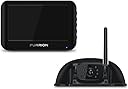
The Vision S Wireless RV Backup Camera System offers a high-resolution 720p camera with infrared night vision, a 5-inch anti-glare monitor, and a robust wireless signal that reaches up to 492 feet. Designed for easy installation and enhanced safety, this system is perfect for RVs, trucks, and buses, ensuring you have a clear view and peace of mind on the road.


| ASIN | B07D8ZNX2K |
| Best Sellers Rank | #2,840 in Electronics ( See Top 100 in Electronics ) #8 in Vehicle Backup Cameras |
| Brand | Furrion |
| Built-In Media | Camera, Camera Bracket, Instruction Manual, Monitor, Monitor Power Cable, Warranty Card, Windshield Stand |
| Compatible Devices | Monitor |
| Connector Type | wireless |
| Customer Reviews | 4.5 4.5 out of 5 stars (6,382) |
| Display Technology | LCD |
| Global Trade Identification Number | 04897023269110 |
| Installation Type | Dashboard Mount |
| Item Dimensions L x W x H | 7.4"L x 1.2"W x 4.9"H |
| Item Type Name | Vision S Vehicle Observation System with 5" Display and Shark Fin Camera Bracket |
| Item Weight | 1.9 Pounds |
| Lens | Wide Angle |
| Manufacturer | Furrion |
| Optical Sensor Size | 1/3 inch |
| Optical Sensor Technology | CMOS |
| Real Angle of View | 120 Degrees |
| Screen Size | 5 Inches |
| Unit Count | 1.0 Count |
| Video Capture Resolution | 480p |
| Voltage | 12 Volts |
| Warranty Description | 1 Year |
B**N
I installed this in about 10 minutes on a Rockwood Roo, but the Roo was prewired for the camera. If your rig isn't prewired, there are extra steps you will need to take to make this work for your setup but those are outlined in the install instructions. For the prewired Roo, it already had the black fin plate attached to the back of the rig so I didn't have to drill or caulk anything and honestly it took more time to lug out the ladder than it did to install this whole setup. The first step is to pair the camera with the monitor, which was pretty easy. Plug in the monitor to the cigarette lighter/adapter in the car, then plug the camera into the split wire connection (the monitor power wire has a split connection that you plug the camera into), turn the monitor on and it pairs. You may have to hit the menu button on the side of the monitor and select pairing, but the whole process was very simple. Second step was to install the camera. On the Roo there is a black attachment at the top of the back of the rig that looks like the case the camera is in but without the camera. Essentially you remove the camera from the factory case and mount it in the case already on the rig, which is very easy. On the RV case there is a small plate where the camera mounts which is held on by 4 screws, just unscrew the plate but don't lose the screws because they are very small. Then remove the camera from the case it is installed in and plug the camera into the wire preinstalled in the rig, push the wires back into the case on the rig, then attach the camera with the 4 screws. It is really very easy if your rig already has the black fin case already attached. Finally, adjust the camera to the angle you want and you are set. The monitor attaches to a suction cup which then attaches to your windshield. The monitor plugs into the cigarette lighter/adapter for power. I added a small velcro strap to the wire to bundle it. Overall it has excellent picture quality and is very easy to install and easy to adjust the camera angle. You just "click" the camera up or down by moving it and it stays in place. It does not move at all even when going over rough roads. I used it while driving and had no issue with picture loss and everything was real time. I could see cars coming up on either side of my rig without having lag issues. Also I did not have to "mirror" the image. Cars coming up on the left appeared on the left of the screen, cars on the right appeared on the right, no problem at all. You would just have to double check your connection to see if you would need to mirroe the image. Now for the "CONS". The monitor and the power cord. I hate cords hanging all over the place and this cord is long. I just used a velcro strap to bundle the excess wire and it seemed to work fine but because they used a bulky ciagrette lighter type adapter plug, it stuck out and kept getting in the way until we got use to it being there. I wish they would have thought about using a USB cord to power the monitor because then I wouldn't have had the huge adapter getting in the way. Honestly though, that would be my only real complaint. Overall the camera and monitor are an excellent addition to my rig. My only suggestion or recommendation to Furrion is to work on making this iphone/android compatible so that the monitor setup could be replaced using a phone or tablet. But again, this is a great setup for my rig.
L**M
Works great for my trailer
R**A
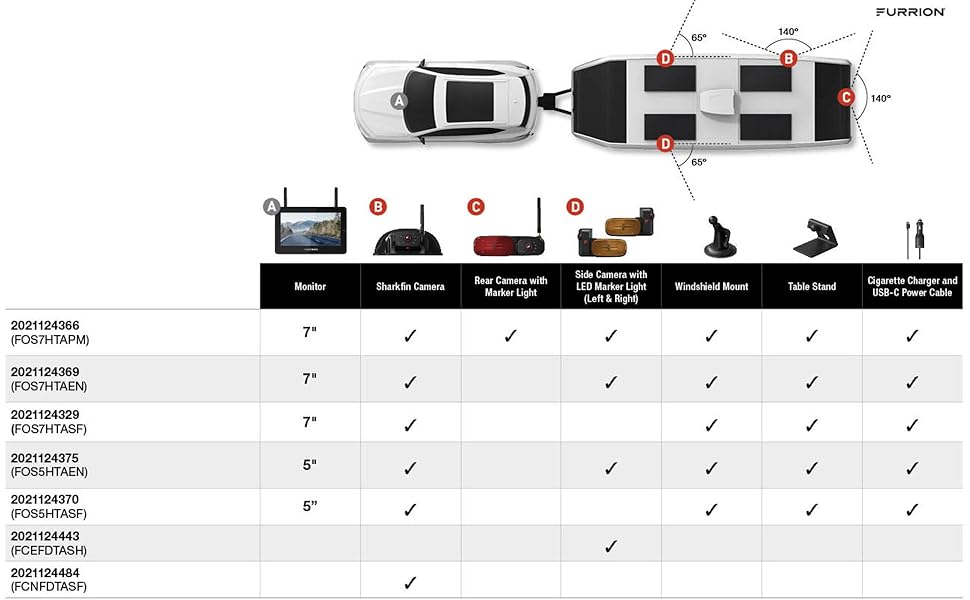
We purchased the Furrion back up camera system over a year ago and are very impressed with it . I have owned both the 7” and the 4.3” monitors . There are so many things to like about the furrion camera system but the main thing is it works all the time . We have yet you loose connection between the monitor and the cameras well using it . This is by far the most refined camera system on the market . You may find other back-up cameras out there for a lower price or that claim better spec but trust me if you don’t wanna mess around , this is the back up camera system to go with . The camera system is expandable for up to four cameras if you have the 7” monitor , if you have the 4.3” it is for the back up camera only . As mentioned we upgraded to a 7” monitor and are now running furrion back up Cameras with the furrion side cameras . This has basically removed the need for my wife to attempt to guide me well backing up . This is a huge game changer because this was usually the only arrangements we would get into well camping ( “ I don’t know what all your flaying arms mean”:) ) the best part is the camera has a micro phone so if need she can talk to me through the camera ! The night vision on these camera is also amazing which is great for those days where you arrive at the camp site after dark . The monitor is touch screen easy to use and includes a variety of mounting solutions. The picture is very good and there is basically zero lag time . Install is super easy , if your camper is prepped for a furrion camera ( most campers after 2018 are ) all you will have to do is remove the four small screw from the camera cover on the “ shark fin prep cover “ , plug in the camera to the connection behind the cover , mount the camera where your prep cover was . That’s it ! your done , go plug the camera into your truck and it should work … if not you just need to running the pairing option in the manual . If your trailer is not prep it will take you about an hour to install . I won’t go into detail as there are many options amd way to do it . Mine was not prep so I can say it’s honestly an easy 1 hour diy . If you have small children this really gives an added value of safety knowing a kid is not directly behind your trailer . Honestly I would recommend this to anyone with a travel trailer , rv or motor home . It just takes all the stress out of backing up a trailer .
M**N
After a purchasing a Furrion "compatible" back up camera for our RV and being quite disappointed (which we promptly returned) we decided to go with an original Furrion since our RV was pre-wired. It is absolutely plug & play - we had the camera installed and the monitor set up in less 20 minutes. The monitor (ours is the 5" model) is beautiful quality; light and easy to attach to the windshield. Although it is capable of using up to 4 cameras, we are only using it for one at the rear of the unit. We've recently used it for parking our RV and it worked perfectly, giving a large field of view. It also has an audio function where the driver can easily hear someone at the back of the unit providing direction if needed, so the microphone has good pickup. In theory, that person could converse with the driver but, for me (the directing person), the camera speaker is too high to clearly hear anything being said. May work well for someone who doesn't have hearing issues though. Although the cost was considerably higher than the original "compatible" kit we ordered, I think it was ultimately worth the money. I would recommend the Furrion Vision S, particularly if you have a pre-wired RV.
M**L
camera arrière avec haut-parleur (peut ajuster le son) et la personne qui est derrière la roulotte (FW) peut communiqué avec le chauffeur entend ça voix et comprend bien bonne vision couleur (Le prix n'est pas donné mais vérifier avec d'autres vendeurs c'était le fournisseur le moins dispendieux au moment où je l'ai acheté) N'oubliez pas il faut toujours ajouter les taxes. J'ai aussi les caméras de gauche et droit très bonne vision(avant d'installer vos caméra vérifier s'il n'a pas d'obstacle nuisible à la vision)(ex: le bras de l'auvent peut être une obstacle à votre vision)
Trustpilot
3 weeks ago
1 month ago