Buy anything from 5,000+ international stores. One checkout price. No surprise fees. Join 2M+ shoppers on Desertcart.
Desertcart purchases this item on your behalf and handles shipping, customs, and support to South Korea.
⚡ Scan smarter, work faster, stay ahead.
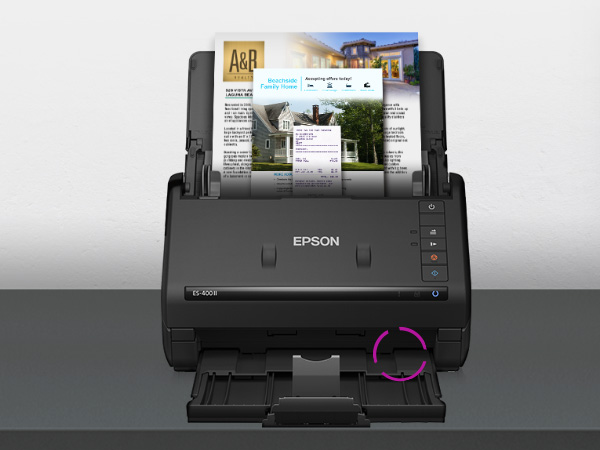
The Epson Workforce ES-400 II is a high-speed duplex desktop scanner designed for professionals who demand efficiency. With a 50-sheet Auto Document Feeder and 35 pages per minute scanning speed at 300 dpi, it effortlessly digitizes double-sided documents. Its advanced Epson ScanSmart software enables seamless cloud sharing, OCR text recognition, and easy file management, making it an essential tool for modern offices and remote work setups.


| ASIN | B08P3YVH3X |
| Best Sellers Rank | #2,891 in Office Products ( See Top 100 in Office Products ) #3 in Document Scanners |
| Brand | Epson |
| Built-In Media | Item |
| Color Depth | 8 bpp |
| Connection Type | USB |
| Connectivity Technology | USB |
| Customer Reviews | 4.5 out of 5 stars 1,198 Reviews |
| Item Dimensions D x W x H | 14.5"D x 10"W x 11.25"H |
| Item Type Name | Document Scanner |
| Item Weight | 3.7 Kilograms |
| Light Source Type | LED |
| Manufacturer | Epson |
| Media Type | USB |
| Minimum System Requirements | PC and Mac compatible |
| Model Name | B11B261201 |
| Optical Sensor Technology | CCD |
| Product Dimensions | 14.5"D x 10"W x 11.25"H |
| Resolution | 300 dpi |
| Scanner Type | Document |
| Standard Sheet Capacity | 50 |
| UPC | 010343960183 |
| Unit Count | 1.0 Count |
| Warranty Description | 1-year limited warranty in the U.S. and Canada |
A**E
Great job Epson!👍🏼
As far as I am concerned, this is one of the greatest little devices since… Forever. I have been intending to buy a scanner like this for a long time, but I couldn't really justify spending the money. However, I have come across many times when one would've been very handy to have, especially when sending documents back-and-forth between attorneys or other professionals, regular people and myself. I'm just an average person out here, not a high-powered anybody. Thus, I just tottered along making do with the stuff I had. I recently had the need to send documents to an accountant for tax purposes. When needing to do something like this in the past, it was a tedious job of moving files to a printer, and then scanning, then uploading and THEN having to send them through email. Just a chore. However, I did decide to go ahead and buy a scanner after that last episode of hellish back and forth fun doing it the old way. I did some research and settled on the Epson ES-400 II. Other customers seem to be satisfied and I took that leap of faith, having purchased Epson equipment many, many years ago and not having had previous problems with the brand. The next time an opportunity came, I powered on the Epson, (by the way, setting it up was as simple as plug and play) put in my documents, and I was simply astonished with how easy it was to use the product to get the information out of my home and into the office of the accountant. I could almost slap myself (but I don't believe in self-flagellation) for waiting so long to buy a standalone machine. Instead, I was making do with my all-in-one printer that was quite ancient. It's been replaced too, with a simple laser printer that does nothing but print. The bottom line is that I appreciate the simplicity of operating this machine. It scans beautifully, the image quality is good, it's simple to operate, has tons of options of where you can send the images to, it was worth every penny, and I recommend it to others.
L**L
Efficient and Reliable Document Digitization with Epson Workforce ES-400 II Scanner
Today, I had the opportunity to test the Epson Workforce ES-400 II document scanner and I must say that I was pleasantly impressed. This duplex desktop scanner is an excellent tool for any office or workspace that requires quick and accurate document digitization. The initial setup was very simple - I just connected the scanner to my computer via USB and downloaded Epson's software. The software interface is easy to use and offers a variety of scanning options to suit my needs. What I liked most about the ES-400 II is the speed and quality of the scanning. I was able to scan a stack of multiple-page documents in a matter of minutes, and the end result was crisp and clear. Additionally, the scanner has an automatic orientation correction feature, which made the scanning process even easier. Another useful feature of the ES-400 II is its duplex capability, meaning it can scan both sides of a sheet at the same time. This saves time and effort, especially when working with multi-page documents. Overall, I am very pleased with the Epson Workforce ES-400 II. It is a high-quality scanner that is easy to use and offers excellent scanning results in a short amount of time. I would recommend it without hesitation to anyone looking for an efficient and reliable digitization tool for their office or workspace.
J**H
Great Scanners
I have several Epson scanners at our work and they are very reliable and easy to use and easy to setup.
T**A
It’s a great gadget
This is one of the best gadget I ever bought. It scans very quickly, auto-adjusts the size, and even read the date of the document saving time naming the document. I’m digitizing my records, and this scanner has been a blast!
A**N
Sportscard listing workhorse
Epson ES-400 Scanner – Great Value for Sports Card Sellers I bought the Epson ES-400 specifically to scan sports cards for eBay listings, and it has become a game-changer for my side hustle. The compact size is excellent — it fits perfectly on my small desk without crowding my workspace. Setup requires some initial time to configure the software, enable double-feed detection, and adjust the right settings, but once dialed in, the process runs much smoother. The scan quality is outstanding. Paired with Epson’s included software, it delivers crisp, high-resolution images that clearly show card centering, corners, edges, and surface details. This has directly increased my eBay sales. Cards in the $1–$3 range that I used to skip are now quick and professional to list. I’m moving significantly more volume at slightly lower prices, which attracts a wider “low-rent” buyer base. Combined with eBay’s Plain White Envelope (PWE) shipping, it creates a very efficient low-end selling system. The automatic feeder handles loose cards and penny sleeves very well. However, cards in thick top loaders often jam or misfeed. The included roller wheel can also risk minor scuffs on chromatic or refractor finishes, so extra care is needed there. I’ve heard about more advanced scanners that perform better with top loaders, but they cost 4–5 times as much. For the price of this brand-new unit, the ES-400 gets the job done efficiently and has genuinely cut my listing time while boosting weekly sales. Overall Rating: 8.5 out of 10 Strongly recommended for sports card sellers or anyone needing reliable, high-quality scanning on a budget. If you mostly scan raw or sleeved cards and want to professionalize listings without spending a fortune, this is a smart, practical choice.
R**M
Very glad we purchased this scanner
I have used an Epson ES500 scanner at work, so when.my wife suggested we get a good scanner, I already knew what I wanted. The scanner is super easy to set up and it works so well! We have scanned over 2000 images and documents since we got it. The speed and ease of scanning is amazing. Photos and documents fly through. Scanning both sides at the same time is super quick, and the software keeps up with the hardware. I found that if I turned off the automatic double feed detection, I can scan envelopes with no trouble. The size of the scanner is great and much easier to travel with than a flatbed or 3 in one scanner. The more we use and learn about it, the more we like it! We use it for genealogy forms, photos, letters, etc. The "searchable PDF" mode is amazing! It lets you search the PDF for words and lets you copy and paste the scanned document. The OCR interface has worked wonderfully with many different font faces scanned.
L**W
Fast desktop digitizer
Excellent technology tool. Fast, accurate. Have digitized approx. 10,000 pages to date without issues. Just be sure the pages are flattened and without staples or sticky notes or tape. Works on all sizes. Software is decent as well.
J**.
Simple and powerful
Plug and play. Simple. Easy interface.
M**S
Conforme a descrição
Funciona perfeitamente
L**.
Excelente!
Pese a un PÉSIMO servicio de entrega, porque dejaron la caja afuera de una casa a 5 cuadras de mi casa, afortunadamente las personas de esa casa me conocían y me llamaron para decirme que afuera de su casa había una caja con mi nombre. La impresora está excelente! Estoy feliz con ella, no rinde las 6mil hojas que dice con los cartuchos, sin embargo, unas 3mil si las da.
L**E
Great Product!
I've always struggled finding a scanner that isn't finicky. But I bought this one after I've used the model at work. It works like a charm! A little expensive, but worth it, knowing that it's a work horse.
P**I
Huge Upgrade to Scanner on Epson ET-4550
I expected that duplex scanning would make my workflow more efficient, but I had no idea how much faster it would be at the actual scanning process. It's breathtaking. It sits next to my Epson ET-4550 all-in-one, which I now only use for flatbed scanning. Plus, if you squint, it looks like a Star Wars mouse droid, so that's worth at least one star.
G**Z
El producto es muy bueno
La instalación fue muy sencilla, el producto funciona muy rápido, me sorprendió cuando el escáner fue por los dos lados de las hojas, me gustó mucho y lo recomiendo
Trustpilot
1 day ago
2 weeks ago