Buy anything from 5,000+ international stores. One checkout price. No surprise fees. Join 2M+ shoppers on Desertcart.
Desertcart purchases this item on your behalf and handles shipping, customs, and support to South Korea.
🎬 Elevate your stream game with pro-grade clarity and lighting mastery!
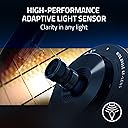
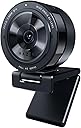
The Razer Kiyo Pro is a premium USB webcam featuring a large, ultra-sensitive STARVIS CMOS sensor that adapts to any lighting environment. It streams uncompressed Full HD 1080p video at 60FPS with HDR support, and offers an adjustable wide-angle lens (80°-103° FOV) for versatile framing. Designed for professional streaming, video conferencing, and content creation, it connects via USB 3.0 for maximum video fidelity and seamless plug-and-play compatibility.


| ASIN | B08PKBZ428 |
| Antenna Location | professional use of streaming, video conferencing and content creation |
| Are Batteries Included? | No |
| Best Sellers Rank | 3,327 in Computers & Accessories ( See Top 100 in Computers & Accessories ) 27 in Webcams |
| Box Contents | Webcam |
| Brand | Razer |
| Brand Name | Razer |
| Camcorder Type | Webcam |
| Colour | Black |
| Compatible Devices | Laptop, Personal Computer, Smartphone, Tablet |
| Customer Reviews | 4.2 out of 5 stars 2,479 Reviews |
| Digital Zoom | 7 x |
| Effective Still Resolution | 2.1 MP |
| Effective Video Resolution | 1080 Pixels |
| Exposure Control Type | Automatic |
| File Format | MP4 |
| Flash Memory Bus Interface Type | USB |
| Flash Memory Type | SDXC |
| Flash Memory UHS Speed Class | U3 |
| Flash Memory Video Speed Class | V60 |
| Flash memory type | SDXC |
| Focus Type | Autofocus, Fixed Focus |
| Form Factor | Compact |
| Global Trade Identification Number | 08886419377146 |
| Has Image Stabilization | No |
| Image Aspect Ratio | 16:9 |
| Image Capture Speed | 60 fps |
| Image Stabilization Type | Optical |
| Item Dimensions D x W x H | 6D x 6W x 10H centimetres |
| Item Weight | 350 Grams |
| Lens Type | Wide Angle |
| Log Gamma Curve | Log Gamma Curve |
| Manufacturer | Razer |
| Maximum Aperture | 2 f |
| Maximum Display Resolution | FHD |
| Maximum Focal Length | 1 |
| Maximum aperture | 2 f |
| Maximum focal length | 1 |
| Minimum Aperture | 1.7 f |
| Minimum Focal Length | 1 Millimeters |
| Model Name | RZ19-03640100-R3M1 |
| Model Number | RZ19-03640100-R3M1 |
| Network Connectivity Technology | USB |
| Number of Batteries | 1 A batteries required. |
| Operating System | Windows |
| Optical Zoom | 1 x |
| Photo sensor technology | CMOS |
| Product Features | Lightweight |
| Product Warranty | 1 Year Manufacturer |
| Screen Size | 2.2 Inches |
| Sensor Type | CMOS |
| Shooting Modes | Auto, Manual, HDR, Full HD 1080p at 60 FPS, Fixed Focal Length |
| Style Name | Kiyo Pro |
| Supported Audio Format | 16 bit 48 kHz |
| Supported Image Format | JPEG |
| Unit Count | 1.0 count |
| Video Capture Format | MP4 |
| Video Capture Resolution | 1080p |
| Video capture resolution | 1080p |
| Viewing Angle | 103 Degrees |
| Water Resistance Level | Not Water Resistant |
| White Balance Settings | Auto |
| Wireless Compability | Bluetooth |
| Zoom | Optical and Digital |
K**E
Premium webcam with excellent image quality and reliable performance
The Razer Kiyo Pro is a high-end webcam that delivers strong performance across the board, particularly when it comes to image quality and build. I use several Razer products and am more than satisfied with all of them. Build quality and design Right out of the box, it looks and feels premium. The materials and finish are in line with what you would expect from a higher-end product, with a solid, well-constructed housing and a stable mounting system. Image quality The standout feature here is the image quality, which is superb for a 1080p webcam. The larger light sensor does make a difference, especially in less-than-ideal lighting conditions, producing a clear and well-balanced image. Autofocus and performance The autofocus works very well most of the time, keeping the image sharp without excessive hunting. It’s reliable enough for both streaming and everyday video calls. Software and compatibility The Razer Synapse software allows for fine-tuning and customisation, but it’s not essential to get good results. It works seamlessly with: - Video conferencing platforms - Streaming software like Open Broadcaster Software No compatibility issues encountered, which is exactly what you want from a plug-and-play device. Everyday use Whether for video calls, streaming, or content creation, it performs consistently and reliably. Value for money It sits at a premium price point, but the performance, build quality, and reliability justify the cost if you need a high-quality webcam. I got it at a deal, so happy with that. Overall A well-built, high-performing webcam with excellent image quality and dependable autofocus. A solid investment if you want a reliable upgrade over standard webcams.
S**S
Not good on Mac
This review is for Mac users only. I do not know if the issues I have replicate on Windows based machines. Unlike windows based machines, there are no drivers or apps for a mac to adjust settings like FPS. I took my chances as the unit has excellent reviews: 1. Pro's - Solid unit, great quality feel - Excellent image and colour balancing - a step up from standard MacBook Pro webcam, except as below :-( - Decent auto focus 2. Cons (for Mac users) - No software or apps for Mac OSX to upgrade firmware or adjust settings on camera - Possibly due to no app, image is fuzzy on straight lines, like a set of drawers or dark eyeglass rims. See attached photo, zoomed in. Extremely irritating to have fuzzy lines around eyeglass rims and furniture items with straight lines, like drawers. This effect is less pronounced on Zoom and FaceTime but truly awful on Teams (image shown) which is what I use for work 90% of the time. Unfortunately had to return as a result.
B**N
Quality kit - requires setting up and may be more than you need
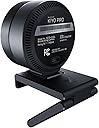
I was drawn to this thanks to the 1/4 inch screw in the base of the camera head, allowing a neat and flexibile mounting option with tripods and clamps etc. Having the little mount that rests on top of the monitor and obscures a small amount of screen annoys me - my monitor has a very narrow bezel. You can tell it's quality when you open it up - fancy packaging (think Apple but lime green), heavy metal body, quality thick braided cables. And it's comically huge on anything below a 27" monitor. I decided to return in the end for a couple of reasons. Image was sharp and accurate. But be careful what you wish for - it made me look my age. It didn't deal well with two windows behind me - face was not bright enough. Bundled software (Razer Synapse) allows tweaking but didn't seem particularly stable and caused me problems on a work machine where permissions etc are locked behind administrator rights. May not be the fault of the camera, but fails the plug and play test which my 20 quid Logitech passed with flying colours. That same Logitech deals with the brightness issue perfectly well also. Overall, probably the right choice for content creators, but for getting to meetings it might just add additional hassle - and a further layer of software for MS Teams to get confused about.
V**T
great quality
picture is clear the quality is durable, great value for money, the mount options seems very well made sturdy, the privacy cap is brilliant
C**Z
Best I’ve had and I’ve had a few.
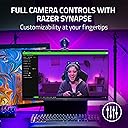
Ok, as most users are streamers and more so now normal home users. I know it’s a bit pricey, and I’m guessing most of you will be stepping up from the great stalwart and dam good Logitechs. So let me start by the pros, this thing is sturdy, you could break walls with this thing, that a great feature, withstands some abuse. But here are the best things , for one it saves it’s settings once added, meaning no more messing about with settings everytime we stream. It’s even got HDR tbh I’d steer clear of this, yes it gives a slightly better picture, but it can take up too many resources for average set ups. It also has its own Razor software, we’re you make all your adjustments and save them, you can even make profiles. I have 2, one for daytime and one for night, as lighting is so important. Talking of light, the quality of this camera in dark environments is fantastic. It also has a plastic lense cover , so if your setup is permanent this comes in handy to just clip over the top. So once you set up in its software, you then add it to wherever your using, I stream so it’s OBS, again works great, you can make small changes if you like, such as green screen tweaks, colour, lighting and the like. Only one con really, and that’s the auto focus, as is usual in all these types of camera, just a pain, highly recommend turning off, and using the main manual focus slider in the software if you have a regular spot you use it from. Overall an excellent and in my opinion best can out there, you won’t regret this purchase. I use mine on twitch streaming with my “same name” if you’d like to take a look at the quality. It’s a brilliant top quality camera, highly recommended.
W**S
Fantastic Camera
Incredibly good camera. Minus the requirement for USB-3 for a smooth capture, which I really can't fault it for, it's a perfect camera for the price, with great clarity in colour and overall quality.
R**B
Worked for a while and has now died, no way to get a refund
UPDATE: The camera now only works for a few minutes before the picture freezes but the audio still works. There's no option on Amazon to return it so I've had to raise a ticket with Razer. Original review: I bought this webcam as I'm on Teams meetings most days and needed a clear camera with customisable settings. The app is mostly brilliant and there's a ton of settings including 3 viewing angles so you can narrow the field of view if you like. The issue I have is the camera keeps dropping off and isn't selectable or during a call I'll see the little light goes out and my picture freezes for a while before coming back on. I've tried different wires but it seems to be an issue with the app. Hopefully an update will fix it as the picture from the camera is really sharp and the colours are great even in poor light. The supplied stand is really good with the option to mount on a tripod if you like or you can perch it on top of your screen.
M**8
Nice features, but too many issues for the price
The Razer Kiyo Pro is a decent camera in terms of image quality. The video quality itself is good, the face tracking works well, and the autofocus is also solid. Those are definitely the positives, and when it works properly, it looks great. However, for me, the negatives unfortunately outweigh the positives. The biggest issue is that it keeps disconnecting. If I use something like NVIDIA Broadcast to set up the camera with background blur, the camera suddenly can’t be located. The same thing happens in Windows camera settings, Google (for Zoom), and in OBS. When this happens, the only way to fix it is to physically unplug the camera and plug it back in again. This happens most often after my computer has been shut down and turned back on, but it also happens randomly while the computer is already on, which makes it feel very unreliable. I don’t want to constantly get up and unplug and replug the cable, especially because I don’t want to mess with the camera positioning every time. The mount itself is actually a bonus. It’s very easy to place on top of the monitor. But because the cable plugs directly into the back of the camera, having to keep pulling it out to get the computer to recognise it again gets very annoying very quickly, as you can't do it without adjusting it. What makes this more concerning is that my partner has also tried this camera on his desktop and laptop, and the exact same issues occur. So it’s not just my setup. I’ve also seen many other people mention this problem, which makes it seem like a wider issue. I even tried buying a replacement. The price had gone up from around £90 to £120 (not sure if I bought it on discount the first time), and the replacement has the exact same problems. So this has now happened with two different Razer Kiyo Pro cameras for me. If you don’t experience these disconnecting issues, then it is a good camera for the price. But given how often this happens for me, it’s a major fault to be aware of. Because of that, I can only give it three stars. Just something to bear in mind before buying, as it may not affect everyone, but it has been a consistent issue in my case.
C**O
Qualità Video Impeccabile con Razer Kiyo Pro
La Razer Kiyo Pro è una fotocamera di trasmissione USB che offre una qualità video eccezionale per streamer, creatori di contenuti e professionisti. Il sensore di luce ad alta resa garantisce immagini nitide e luminose anche in condizioni di illuminazione sfavorevoli, consentendo di catturare ogni dettaglio con precisione. L'installazione e l'utilizzo della fotocamera sono estremamente semplici grazie alla connessione USB plug-and-play e al supporto versatile che consente di posizionarla facilmente su qualsiasi monitor o treppiede. La compatibilità con una vasta gamma di software di streaming e videoconferenza la rende una scelta versatile per molteplici utilizzi. Inoltre, la Razer Kiyo Pro presenta un design elegante e robusto che si integra perfettamente con l'estetica di qualsiasi setup. La costruzione di alta qualità suggerisce una durata nel tempo che giustifica pienamente l'investimento. In conclusione, se stai cercando una fotocamera di trasmissione USB che offra prestazioni eccellenti e affidabilità, la Razer Kiyo Pro è sicuramente da prendere in considerazione. Consigliata a tutti coloro che cercano una soluzione professionale per le loro esigenze di streaming e videoconferenza.
F**L
Worth it
I have been using it for a few months now and I am impressed, compared to the crappy laptop cameras. It has a solid heavy build, including the mount. I am surprised by how well the mount works just staying on the laptop screen without any fasteners. The resolution is good, but not as good as I had hoped in low light. No solution for that, other than having additional artificial lighting. It also has this weird behaviour of disconnecting when it gets moved around, possibly because it’s some data overload. The apps are pretty much useless.
R**S
Taylor Swift / 20
Logiciel facile à prendre en main, hyper quali, rapport qualité prix le meilleur du marché (j'en ai test des cams a 400 balles qui arrive pas a la cheville de celle la). Honnetement je pense ne pas avoir besoin de faire sa pub vu les gens qui m'en ont parlé, je ne regrette pas mon achat du tout c'est simple j'ai rien a dire de mal dessus (je suis pas parisien mais c'est rare que je rale pas sur qqch). Même sans eclairage on me voit j'ai l'impression d'etre une star Hollywoodienne en vacances a Dunkerque.
S**M
Just Wow!
Previously had the Razer Kiyo (non PRO version) and I must say that this big brother is a beast. The actual look is just so amazing and the performance was a total upgrade from the previous gen. I definitely recommend this product.
S**N
Proffsig webbkamera
Proffsig webbkamera, rätt stor så inget att flytta mellan olika ställen. Men fantastisk skärpa och ljus. Bra med lock.
Trustpilot
5 days ago
1 week ago