

🔥 Stream Smarter, Not Harder 🎬
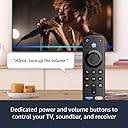
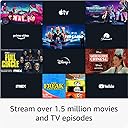
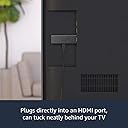
The Fire TV Stick (3rd Gen) delivers fast, Full HD streaming powered by a quad-core 1.7 GHz processor and dual-band MIMO WiFi. With Alexa Voice Remote, control your TV and soundbar effortlessly using voice commands. Access over 1.5 million movies and shows from popular streaming services plus thousands of free titles. Enjoy immersive Dolby Atmos audio on select content, all packed into a compact device that plugs directly into your TV’s HDMI port for instant entertainment.
| Size | 3.4” x 1.2” x 0.5” (86 x 30 x 13 mm) |
| Weight | 1.1 oz (32.0 g) |
| Processor | Quad-core 1.7 GHz |
| GPU | IMG GE8300 |
| Storage | 8 GB internal |
| Wifi | Dual-band, dual-antenna wifi (MIMO) for faster streaming and fewer dropped connections than standard wifi. Supports 802.11a/b/g/n/ac wifi networks. |
| Bluetooth | Bluetooth 5.0 and Bluetooth Low Energy. Pair with compatible Bluetooth speakers, headphones, video game controllers, and more. |
| Voice support | Yes, with Alexa Voice Remote (included) or the free Fire TV app (available for download on Fire OS, Android, and iOS). |
| IR device control with included Alexa Voice Remote | The included Alexa Voice Remote can control Fire TV Stick and certain functions (such as power and volume) on a wide range of compatible IR-enabled devices, including TVs, soundbars, and A/V receivers. Note: Certain functions may not be available on some IR-enabled devices. |
| Cloud storage | Free cloud storage for digital content purchased from Amazon. |
| Ports | HDMI output, micro-USB for power only. |
| Audio support | Dolby Atmos, Dolby Digital, Dolby Digital+ surround sound and HDMI Audio passthrough for Dolby Digital, Dolby Digital+, Dolby Atmos. |
| Video content formats supported | HDR 10, HDR10+, HLG, H.265, H.264, Vp9 |
| Output resolution supported | 1080p and 720p up to 60 fps |
| System requirements | High-definition television with available HDMI input, internet connection via wifi, a power outlet. |
| TV compatibility | High-definition TVs with HDMI capable of 1080p or 720p at 60/50 Hz. |
| Warranty and service | 90-day Limited Warranty and service included. Optional 2-Year and 3-Year Extended Warranty available for U.S. customers sold separately. Use of Fire TV is subject to the terms found here. |
| Content availability | Certain apps and services are subject to change or withdrawal at any time, may not be available in all areas and languages, and may require separate subscriptions. |
| Accessibility features | VoiceView screen reader enables access to the vast majority of Fire TV features for users who are blind or visually impaired. Screen magnifier enables viewers to zoom in and out, and pan around the screen. Text Banner consolidates onscreen text into a compact, customizable banner that appears on the screen. Watch videos and TV shows with closed captioning displayed. Use Audio Description for verbal descriptions of what is happening on the screen, including physical actions, facial expressions and scene changes. Captions and audio descriptions are not available for all content. You can also listen to Fire TV with compatible Bluetooth headphones. Learn more about accessibility for Fire TV. |
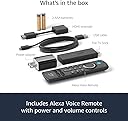
| Included in the box | Fire TV Stick (3rd Gen), Alexa Voice Remote (3rd Gen), power cable and power adapter, HDMI extender, 2 AAA batteries, Quick Start Guide |
| Software Security Updates | Learn more about these software security updates. If you already own a Fire TV, visit Manage Your Content and Devices for information specific to your device. |
| Size | 38 x 142 x 16 mm |
| Weight | 43.4 g (without batteries) |
| Batteries | 2 AAA (included) |
| Technology | Bluetooth |
| Compatibility | Fire TV Stick (3rd Gen), Fire TV Stick 4K, Fire TV Stick 4K Max |
K**J
Still my most reliable Fire TV Stick after 4 years on the job!
I've been using Amazon Fire TV Sticks for several years, and this 3rd-generation Fire TV Stick continues to impress me. Setup is quick, navigation is smooth, and it handles all of my everyday streaming without any issues. I regularly use Prime Video, Friendly TV, Paramount+, Peacock, Disney+, ESPN, and Xfinity Stream, and it has been consistently reliable. One thing that stands out is just how dependable this model has been. It has become my "go-to" Fire Stick because it simply works. The interface is responsive, the remote is comfortable to use, and I haven't experienced the kinds of reliability problems that can occasionally happen with electronic devices. For comparison, I also own a Fire TV Stick 4K Max. My original 4K Max developed freezing and black-screen problems and Amazon replaced it under warranty. That experience actually made me appreciate this 3rd-generation Fire TV Stick even more because it has continued to perform reliably throughout my ownership. If you don't absolutely need 4K streaming, this remains an excellent choice. With over half a million customer ratings and a 4.7-star average, it's easy to see why this model has earned such a strong reputation. In my experience, it has been dependable, easy to use, and an excellent value. The picture quality is always clear,
Y**A
Excuse the water stains in the screen
I bought this Fire TV Stick after losing the original remote for my 2015 TV, and it ended up being one of the best purchases I’ve made. Setup took just a few minutes, and pairing it to my older TV was incredibly simple. It instantly gave my TV access to apps it never supported before, like Disney+ and Peacock, making it feel brand new without having to buy a new television. The interface is fast, responsive, and honestly works better than the replacement remote I had ordered. Navigation is smooth, apps open quickly, and the picture quality stayed exactly the same as before. One of my favorite features is being able to control my toddler’s TV from my phone while I’m in another room—it has been so convenient! I’ve been using this Fire Stick for over two years now, and it has been completely reliable with zero issues. I also love that it’s easy to unplug and use on other TVs when traveling or moving it to another room. If you’re trying to breathe new life into an older TV, save yourself the money of buying a new one and get this instead. It has been worth every penny!
M**A
Easy setup and smooth streaming
I’ve been using the Fire TV Stick for a while now and it’s been a really good upgrade for my TV. Setup was quick and straightforward, and everything runs smoothly. The picture quality is clear and sharp, and streaming is fast with no buffering so far. I like how easy it is to switch between apps and find something to watch. The remote is simple to use, and having voice control makes it even more convenient when I don’t feel like typing. Overall, it’s a great little device that makes streaming a lot easier. Definitely worth it.
J**R
Not bad
So to clarify, we’ve been streaming since about 2015, for most of that time have been using roku devices. My first impression with fire sticks was they were garbage due to the fact we tried a 1st gen fire stick, and the remote quit working inside a week. Went to roku and never looked back. Fast forward a few years and my in laws got internet for the first time and were going to cancel their direct TV service. So we set them up with YouTube TV. However about this time, roku was having a dispute with Google about YouTube TV, and now YouTube itself. So we ended up setting I up on a fire stick 4K. The interface can be a bit busy, but they are not the most tech savvy, however they can pick it up and use it with no issues. I felt the fire stick 4K had a slightly better picture quality than our roku premiere. We now have fire sticks on 3 of 5 screens around the house. My honest opinion of fire stick vs roku, the roku is great and simple for first time streamers. There’s almost more aftermarket for it. I’ve bought remotes from eBay/Amazon that were very clearly 3rd party, but that I’d taught to work the sound bar TV etc. The fire stick has good options, but they leave some things out. Like the fire stick seems to stop streaming after a few hours if you don’t touch the remote. That setup doesn’t work in the situation where our dog is sometimes in the house alone where we’re at work and we like to leave programming on for him just to have noise for him to hear. I saw there are options for this by getting into the fire stick via a program on a computer, however these types of options could be included by default. Roku has this, where you can turn off bandwidth saver. All in all, the fire stick is a great little device and does what you expect. I do suggest to go in and disable all the data and content monitoring, if for no other reason than to help speed up your device and allow it to stream a little better. But overall once you start using it, it’s easy to set up and use. Once suggestion I do have. If you ever find your streams are having issues, check for updates and install them, and reboot the fire stick. That usually resolves some things.
W**T
BEST PURCHASE!
One of my best purchases yet! I had a TV the was slow and never worked but when I got recommend this and tried it, it was a life saver! It was very easy to set up and to navigate. Everything works very well. The only complaint is that the battery runs out after a year in the romote but I replaced it and it ended up being perfectly fine!
S**"
Great! Worked good!!
Good for The $$ streams well/easy!!
C**E
Love Roku!!
Perfect gift for my mother’s in law. She need an updated version. It is easy to operate and now has volume controls on it
L**4
Should Have Bought This Years Ago
This is so easy to setup and use, I wish I got this years ago. I'll be honest, and I feel a bit foolish admitting this, but: Despite hearing about the Fire TV stick's existence for years, I never considered it because I thought there was a monthly fee! I didn't want to pay for anything beyond my subscriptions, so I never even read the details. I put my television in a box in the attic when I 'cut the cord' with my cable company in 2012 and it's been there ever since. I've been watching 'TV' on my desktop PC or on my Kindle. This worked well enough for years, but during the pandemic I began spending a lot more time streaming shows and despite replacing my desk chair with a more comfortable chair, it just wasn't ergonomic and became more and more uncomfortable, so I needed to reconsider my TV setup. Enter the Fire Stick! This time I read the details - and then re-read them, and then Youtubed videos about it, because I couldn't believe it really didn't cost anything per month! You just buy the stick and plug it in and that's it?! Yep! So here's a few noteworthy points: First, it does not use USB; I saw this pop up in the questions for this product quite a bit. Technically the wall adapter plugs into the included USB cord - just like your kindle charger, etc. But there's no USB needed for the actual television end, it uses an HDMI port and that's it. Interestingly, I almost didn't get it because I was sure the TV I bought back in 2009 wouldn't have an HDMI port, but I finally went up to the attic to check and sure enough, it has one! So be sure your TV has an HDMI port, that's required. Setup was ridiculously easy. Just attach the items in the box together and plug it into the HDMI port on the back of your TV and then plug the other end into a wall outlet. That's it! Then turn the TV on and the setup will walk you through the rest, signing you into your Amazon account, calibrating the included remote control, updating (several times), choosing streaming apps to start with, etc. It's all very simple. If you want to watch paid streaming services such as Netflix, Hulu, etc you must have a paid subscription to them. But there's other services/apps such as Pluto TV and others that are totally free and have a decent variety of ad-supported content, both shows and movies as well as news. And Amazon's apps are of course there, like Amazon Music and Prime Video (if you subscribe to Prime Video). I only have Hulu and Prime Video currently as paid subscriptions, but there's plenty of free content to supplement. In fact, I even have my local news which surprised me (they must stream on a live app and I never realized it). So basically, it aggregates various paid and free streaming apps to one place and this little stick presents them all in one nice looking interface, letting you use your remote to choose programming, just like TV. To be clear, the Fire TV stick runs off your wifi signal, so be sure you have wifi at home. On one hand it doesn't give you anything you can't get without it, but on the other hand, the convenience of having it all accessible in one place is fantastic and makes it feel like I'm getting all kinds of new content. Some of the apps I've never even heard of, so there is new-to-me content in that regard. The interface is excellent and fairly intuitive, and the remote works great. I am super glad I opted for the Fire TV stick option that comes with the remote that also has TV controls like volume and mute, so I can do it all with the remote that came with it. Now I can sit in my living room like a normal person and watch TV (streaming services) comfortably from my couch; I should have got this years ago. Just be sure you have: 1. A TV with an HDMI port 2. Wifi at home 3. OPTIONAL: Paid services if you want to watch Hulu, Netflix, etc. Otherwise you can still use this to access free content.
Trustpilot
2 months ago
1 month ago