Buy anything from 5,000+ international stores. One checkout price. No surprise fees. Join 2M+ shoppers on Desertcart.
Desertcart purchases this item on your behalf and handles shipping, customs, and support to South Korea.
🚀 Print smarter, faster, and wirelessly—because your small team deserves big efficiency!
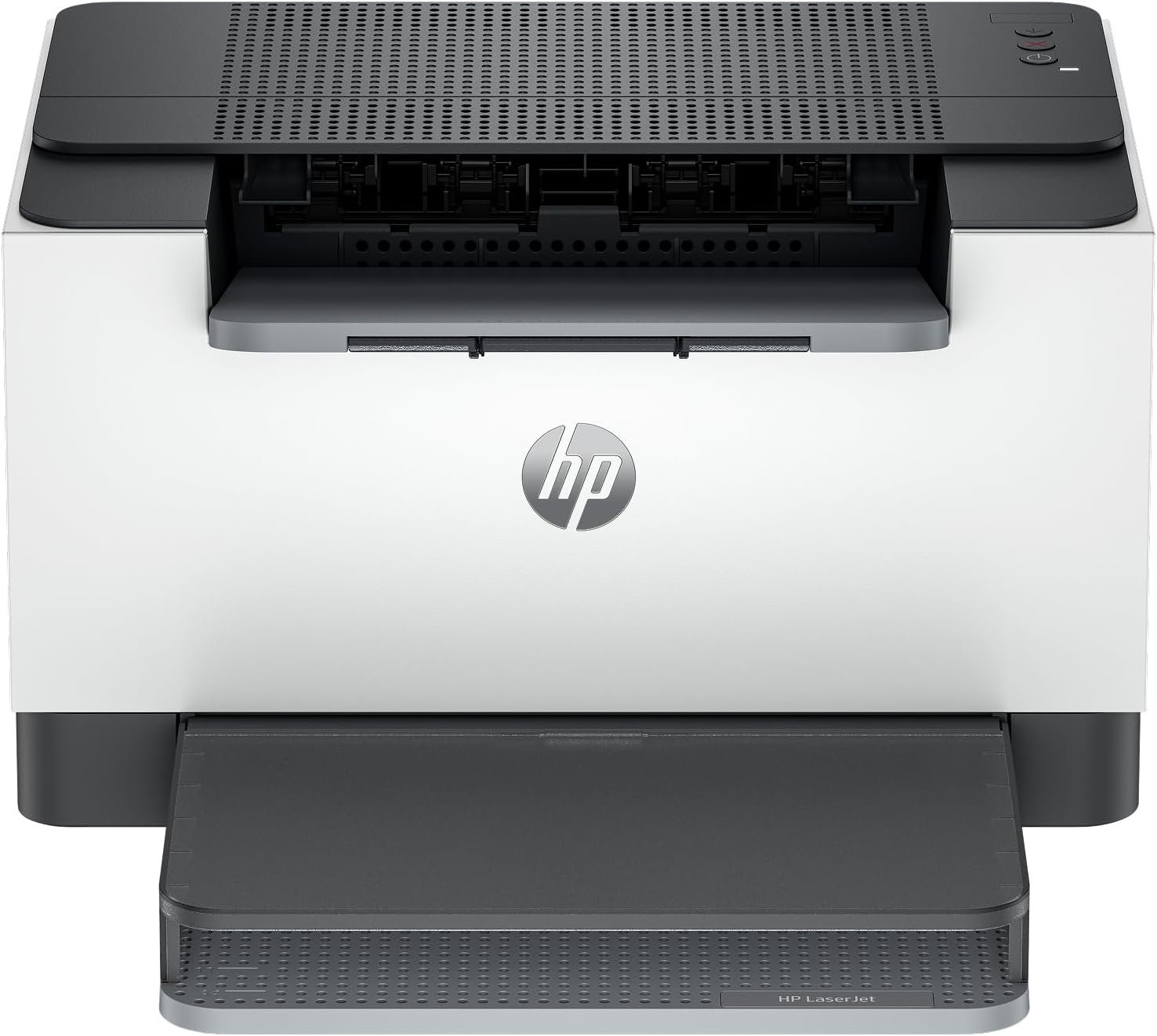
The HP LaserJet M209dw is a compact, monochrome laser printer designed for small teams (1-5 users) that demands speed and reliability. It delivers up to 30 ppm single-sided and 19 ppm two-sided printing with automatic duplexing, features dual-band Wi-Fi with self-reset for stable wireless connections, and strong built-in security. Compatible with a wide range of devices and integrated with the HP Smart app, it streamlines mobile printing and scanning workflows while reducing printing costs with efficient black toner usage.


| ASIN | B08VF3XRQ8 |
| Additional Printer Functions | Print Only |
| B&W Pages per Minute | 30 ppm |
| Best Sellers Rank | #5,125 in Office Products ( See Top 100 in Office Products ) #22 in Laser Computer Printers |
| Brand | HP |
| Built-In Media | 6GW62F HP LaserJet Pro M209dw Printer; HP Black LaserJet Toner Cartridge(~700 pages); Dust Cover; Reference Guide, Setup Poster, Warranty Guide & Flyer in some countries; Power cord |
| Color | Gray |
| Color Depth | 1 bits_per_pixel |
| Compatible Devices | Laptops, PC, Smartphones |
| Connectivity Technology | USB, Wireless |
| Control Method | Touch |
| Controller Type | Amazon Alexa |
| Customer Reviews | 4.2 out of 5 stars 1,246 Reviews |
| Display Type | OLED |
| Dual-sided printing | Yes |
| Duplex | Automatic |
| Hardware Interface | Ethernet, USB 2.0 |
| Ink Color | Black |
| Is Electric | Yes |
| Item Dimensions D x W x H | 11"D x 13.98"W x 8.07"H |
| Item Type Name | Laser Printer |
| Item Weight | 12.35 Pounds |
| Manufacturer | HP |
| Maximum Copies Per Run | 150 |
| Maximum Copy Resolution Black and White | 600 x 600 dpi |
| Maximum Copy Speed Black and White | 30 ppm |
| Maximum Media Size | 8.5 x 14 inch |
| Maximum Print Resolution Black and White | 600 x 600 Dots Per Inch |
| Maximum Sheet Capacity | 150 |
| Model Name | LaserJet M209DW |
| Model Number | M209dw |
| Model Series | 4000 |
| Number of Ethernet Ports | 1 |
| Number of Trays | 1 |
| Other Special Features of the Product | Auto-Duplex, Dual Band Wi-Fi, Energy Star, Network-Ready |
| Output sheet capacity | 150 |
| Paper Size | 4 x 6 to 8.5 x 14 |
| Print media | Card stock, Envelopes, Labels, Paper (plain) |
| Printer Connectivity Type | USB, Wireless |
| Printer Output Type | Monochrome |
| Printer Type | Laser |
| Printing Technology | Laser |
| Processor Count | 1 |
| Resolution | 600 x 600 |
| Scanner Type | Flatbed |
| Series Number | 4000 |
| Special Feature | Auto-Duplex , Dual Band Wi-Fi, Energy Star, Network-Ready |
| Specific Uses For Product | Office |
| Total USB 2.0 Ports | 1 |
| Total Usb Ports | 1 |
| UPC | 194850664281 |
| Unit Count | 1.0 Count |
| Warranty Description | One-year limited warranty |
| Warranty Type | Manufacturer |
| Wattage | 420 watts |
T**T
Works great
Well, I'm no computer expert by any means. I couldn't get it to work "wirelessly" so I did get it working great with a regular printer cable, now it works great. The print is clear and sharp. It's easy to use (using a cable). It's small enough you can place it in a small area.
J**S
Great Home Printer
This little printer is better than I had hoped for. It was a breeze to set up and prints lightening fast. I can certainly recommend it for anyone needing a home printer. The only glitch I had was with my laptop trying to save my print jobs rather than send them to the printer. Once I got the laptop glitch corrected, everything has been perfect. This printer is well worth its cost.
J**M
Used- Worth it!
Got this "Used- Very Good" condition for $118 and it was totally worth it! The only blemish was on the box. The item itself was perfect. Functioned exactly as expected. Saved $60.
S**I
Please save yourself some heartache and stay away from HP printers.
I bought this printer for home use, primarily for our son's homeworks, activity sheets, etc - which goes to say that we did not use it everyday and when we did, we probably printed 2 or 3 sheets. I threw the printer in trash after using it for 13 months because of HP's evil business plan. I am judging this wireless printer on these aspects - print quality, software, wireless and printing cost. This printing aspect of the printer is OK. It does as well as any laserjet printer would do. For what I used this printer, I wasn't looking for business quality print anyway. The wireless aspect is terrible. The printer will not want to connect to wifi and when it does, you will find it offline everytime you want to print something. Which means that you will have to walk to the printer to wake it up, wait for that to happen, then print. For the software, the app that HP will make you install is for 1 purpose only. To push you to purchase more cartridges, paper, etc from HP. This app was not designed to enhance the printing experience in anyway. In addition, HP will push you to create an account so that they can monitor your usage and push more products. As if this were not enough to make money, HP has an evil business model. Regardless of how much life is left in your cartridge, the firmware in the printer will refuse to print once you have printed so many sheets. IT IS ACTUALLY BASED ON THE COUNT OF THE PRINTED SHEETS. Please save yourself some heartache and stay away from HP printers. I just upgraded to Epson EcoTank (color inkjet) which gives you complete control of the ink.
M**E
Attractive, easy set-up and performs admirably.
My first HP printer in decades after moving-on from Epson-branded inkjets. Set-up was easy and the results have exceeded my expectations and the fact it is quite attractive,
P**Y
Superior print quality and extremely FAST!
Easy to set up and use. We use 98% black & white printing. The HP printer does far superior quality and MUCH faster than our old color printer! Also, the cost per sheet printed is significantly reduced using the included black ink "toner" cartridge (also, replacement toners are far less than a multi-color printer!). The HP LaserJet M209dw wireless printer has an estimated monochrome cost per page of approximately 3.8 to 4 cents per sheet. We still have the option to send color prints to our other printer but will be using the HP for ALL black & white prints!
H**Z
Great home printer
I was super skeptical ordering this printer. I have never been a fan of HP products, their inkjet printers are honestly garbage. I went ahead and pulled the trigger anyways. Set up was super easy. And it being compatible with my Macbook is a huge bonus. Prints great quality, and prints fast. I have an older model of this printer in my office at work, and wanted something for my home office. Price was great too, and was brand new as opposed to refurbished. Overall I would recommend.
S**E
I should have stuck with HP.
After some bad experience with another brand, I went back to HP for my basic printing needs. This printer fits my needs very well, and, in comparison to that other printer, is faster with a better mechanism for printing two-sided.
J**E
HP LaserJet M209dw – Fast, Compact, and Reliable Monochrome Laser Printer
I’ve been using the HP LaserJet M209dw as a compact black-and-white printer, and it has been excellent for everyday home and small-office use. Print speed is fast, text comes out sharp and professional, and the printer wakes up and starts printing quickly. The compact size is a big plus — it doesn’t take up much space but still feels solid and well built. Setup was straightforward, and wireless printing works reliably once connected. I also appreciate the automatic duplex printing, which saves paper and is something not all compact printers offer. For a monochrome laser printer, it’s quiet and efficient. This printer is strictly black-and-white, so it’s not meant for photos or color documents, but if your main needs are documents, labels, and forms, it does exactly what it’s designed to do with minimal fuss. Overall, a great value for anyone who wants a fast, no-nonsense laser printer without the bulk of a large office machine.
V**H
This HP Laserjet had a lot to live up to
Full Disclosure: I received this printer two months ago so this review is based on my initial impressions regarding set up, speed and print quality thus far; it doesn't factor in longevity or customer service. I will update this review in 6 months and at the year mark to weigh in on those factors. I recently had to replace an HP 4500 Envy printer that I've had for twelve years. It was a work horse. I'm hoping this HP Laserjet M209dw lasts as long. Set up was incredibly fast, the HP Smart app was required to set up wireless which took a couple of minutes but did so with ease. Once it was set up, every phone or computer on the same wifi could connect & print. Clear, easy to understand set up instructions with just 4-5 steps included. It handles double-sided printing which is one of the main reasons I purchased this model. It doesn't have a flatbed for making copies, which is a feature we use less and less these days and we can always scan from our phones & print. Printing is fast - a two-sided document from pressing Print on my phone to completion took about 20 seconds (see video). The pro model (different brand) at my business takes about the same amount of time. It comes with toner installed but I purchased an HP 134X High Yield toner (the large capacity). The AC power cable is also included but you'll need to purchase a USB printer cable if you're hoping to connect your printer with your computer. I assumed this printer came with a "demo" toner but we've been printing hundreds of forms for our business and still going strong after 2 months. I've been impressed with HP printers over the years so I'm hoping this laserjet continues that tradition of quality. In short, as of right now, this has been a fantastic addition to our home office.
A**I
Good product
Good product
L**S
Mon *Laser Jet*
L'imprimante fonctionne très bien *Laser Jet* HP, mais j'ai dû la brancher avec un câble *Non Inclus*. Mais sans fil *NE* fonctionne pas, dites-moi *Pourquoi??*
A**R
Easy Windows 11 Setup
Perfect laser home printer.
Trustpilot
2 weeks ago
3 weeks ago