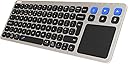
โจ๏ธ Elevate your smart setup with seamless control and wireless freedom!
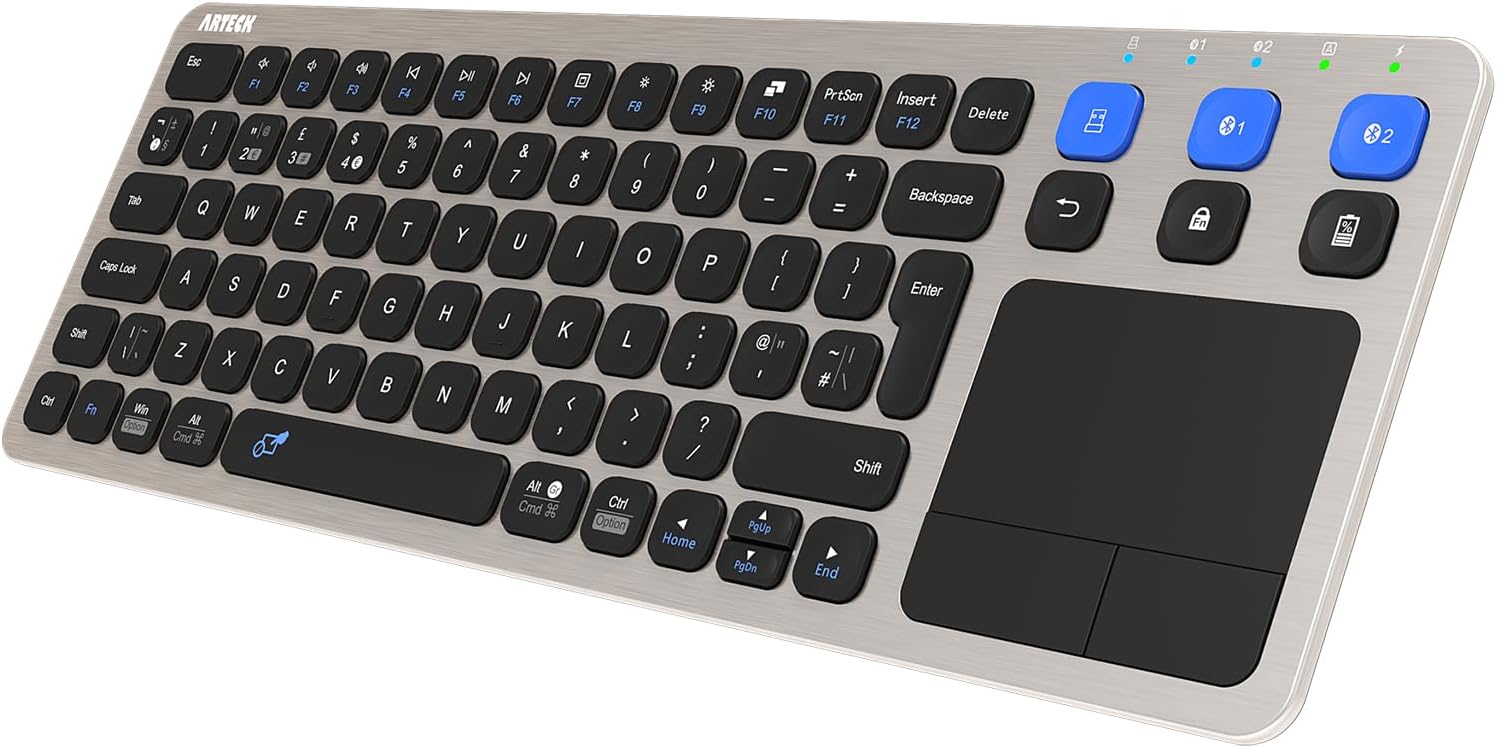
The Arteck Universal HD197 is a sleek, wireless keyboard featuring 3-device connectivity (2.4G USB + 2 Bluetooth), a built-in touchpad, and a 10-meter wireless range. Designed for smart TVs, HTPCs, and multi-platform compatibility, it offers quiet, durable keys and media hotkeys for effortless control. Perfect for professionals seeking a clutter-free, versatile input device with a 2-year warranty.
| ASIN | B08YN44ZFQ |
| Antenna Location | Office |
| Best Sellers Rank | 32,608 in Computers & Accessories ( See Top 100 in Computers & Accessories ) 479 in Keyboards (Computers & Accessories) |
| Box Contents | USB Cable |
| Brand | Arteck |
| Brand Name | Arteck |
| Button Quantity | 19 |
| Compatible Devices | Laptop, PC, Smart TV |
| Compatible Operating System Family | ChromeOS, MacOS, Windows |
| Compatible devices | Laptop, PC, Smart TV |
| Connectivity Technology | Bluetooth, USB Wireless |
| Connectivity technology | Bluetooth, USB Wireless |
| Customer Reviews | 4.1 out of 5 stars 420 Reviews |
| Enclosure Material | Aluminium |
| Hand Orientation | Ambidextrous |
| Item Dimensions L x W x H | 37.2L x 12.8W x 0.4H centimetres |
| Keyboard Description | Multimedia |
| Keyboard Layout | QWERTY |
| Keyboard description | Multimedia |
| Manufacturer | Arteck |
| Manufacturer Part Number | HD197-UK |
| Minimum Required Operating System Version | Windows 7 |
| Model Number | HD197 |
| Number of Batteries | 1 |
| Number of Keys | 85 |
| Number of Sections | 1 |
| Power Source | Battery Powered |
| Product Features | Wireless |
| Product Warranty | 2 Year Limited Warranty |
| Recommended uses for product | Office |
| Special feature | Wireless |
| Style Name | Modern |
| Switch Type | Linear |
| UPC | 741527408800 |
| Unit Count | 1.0 count |
R**N
What more could you ask for
Very useful keyboard supplying wireless usb and 2 additional Bluetooth connection for up to 3 devices in total which have never disconnected randomly or malfunctioned. Battery life on the keyboard is perfect - around the 2 month mark is when I need to charge it, that being after 8-12 hours of use for 5 days a week (on average) Touchpad also makes things a lot easier, due to having a Bluetooth mouse that doesn't last as long (battery wise). Keys are appropriately sized and also suited for Mac and windows use, with the main layout considering windows and some keys have light grey markings to note the Mac keys. Overall a good keyboard, would highly recommend to anyone considering purchasing an efficient and productive keyboard
K**.
amazing keyboard for about 2 years then it died
i have used this for 2 years now and i can say i love it. while no backlight is a pain the battery life and ability to switch between bluetooth devices at the press off a button is soooo helpful. it just worked great. I used it as an extra keyboard for my phone and pc but mostly used it on my steam deck and can say I had no problems till about 1 and half year. then the bluetooth started to get aa bit choppy. so i switchhed to a different channel and worked fine for another 3 months then that started to struggle to work so switched to the usb stick and thatt worked for about 4 months. now however its more of a frustration so i'm getting another one. so expect it to last about 2 years before you need a new one.
A**.
Reliable quality build long term (5 year) review
A relative has asked for a wireless keyboard, and I just realised how long I have had THIS exact version. 5 years of normal function DAILY working from home. And it is still in perfect working order. I can thoroughly recommend this keyboard. I actually remember the reason I bought this because when COVID hit and we all moved to WFH, I didnt have a desk for separate mouse and keyboard, I had a window sill for the PC and monitors, and I used a large wooden chopping board in my lap to place a keyboard. With this kind of setup I needed an integrated track pad. Fast forward 5-6 years and the office has a full desk now and all the space, but this keyboard has just kept going. Nice bit of kit.
D**S
Looks good, works good, by golly it IS good !
People who know me will tell you I don't give 5 stars easily ! But this is a real exception to that rule. Rechargeable and the battery last days of operation. It has a simple one press, 4 light flashes (25,50,75,100 %) charge indicator. Charging cable is included, but it's a standard micro-USB anyway. 37cm wide it fits (IMO) perfectly in your lap and is light but the keys are big enough to operate easily. I don't know about you but I don't like keypads that are too small and fiddly. As Goldilocks once said this is "just right" ! Simple connectivity by radio to USB dongle, need to be fairly close but no problems or Bluetooth. I've connected to ; PC, Fire-stick, iPhone, Android mobiles all with no issues whatsoever. Good looking black and brushed aluminum with built in mouse pad and left and right mouse buttons where the numeric keypad would be on a regular keyboard. Mouse pad again (IMO) is just right, not sluggish and not lightening fast that you can't see it ! The fact it's mobile and can be used with many different devices make this a great thing to have in a modern household, especially if (like me) you hate typing on remotes. Just get one or stick it on your Christmas list !
J**S
Loud and clacky, but practical in private.
Summery of arteck hd197 keyboard trackpad combo. Build quailty: Good (metal front plate plastic back) limited deck flex. Rounded off keyboard buttons also will protect the keys from catching and getting damaged. Buttons: really loud, but big and tactile Trackpad: very useable, better then other keyboard trackpad combos ive tried. Pairing was easy for me on my samsung s23 ultra. Dont buy this keyboard if: you are looking to use this in meetings. Its as loud as some mechanical keyboards. If you want quietness get a logiteck pebble. Buy this if: you want a conveniant solution to quickly control a media station, edit spreadsheets on your phone, or use with a raspberry pi like device. Video below is typing sound comparison
B**L
Thoughtful design
This is a almost ideal sofa keyboard providing input to video streamers or PCs using the lounge TV as a display. There is a simple slide on/off switch and three buttons to select the required interface channel with indicators The USB channel uses a bespoke radio dongle in the form of a USB plug to transmit info at 2.5GHz. To a computer it looks like a standard USB hybrid keyboard/mouse. Each of the two Bluetooth channels can be individually paired to a different device. The keyboard is charged via USB and an indicator changes colour when fully charged. The power indicator flashes a number of times, when a power check button is pressed, the more flashes the greater the remaining charge. When the charge becomes low the power indicator flashes to provide a warning. When used with Android devices select keyboard language in Settings to get ยฃ sign etc. I have been using it for some months and the 3 communication channels are a great advantage. There is a matching mouse with the same versatility Works well with Fire TV Cube and modern PCs. Such good design is worth your patronage.
N**O
Low range -- unusable
tl;dr: don't waste time and money and listen to other reviews mentioning short working range. Biggest flaw -- both Bluetooth and USB dongle working range are the worst I've ever seen. For USB dongle it will work ONLY in direct sight of it, and 2-3m max. Anything obstructing direct sight to dongle will make keyboard unusable -- even if you put it on your laps in front of TV, it will stop working. If you turn it a bit, it will stop working. BT is a bit better but the same overall -- won't connect to my laptop under TV in a closet behind thin wooden door. Keyboard itself is pretty nice for this price (metal panel, good buttons, has touchpad, sturdy), and having two BT connections plus USB dongle is a big advantage but it is COMPLETELY ruined by the fact that nothing works unless the keyboard is <1m from the connection source.
W**E
Saves a lot of desk clutter, easy switching between devices
With 2 PCs it is inconvenient littering a desk with 2 keyboards and 2 mice so I jumped at the opportunity to get this keyboard with trackpad because it supports 3 devices with easy switching between them. But really I would not have done so if it had not been for developing bad RSI from unavoidable over-use of a mouse, reason being that I am hopeless with trackpads, I always give up on them and use a mouse, but here I had a reason, the need to let my hand recover from mouse-induced RSI. So I eagerly set up the new keyboard and quickly had it working with 2 PCs. The non-Bluetooth connection with the dongle works well. Bluetooth connections to PCs I find are flaky because of the inadequacies of Microsoft's Bluetooth implementation in Windows, leading to missed button-clicks, missed movement, and so on, so for my main PC I always use a non-Bluetooth connection. I made an effort to adjust to using the trackpad, which Windows sees as a mouse, so I adjusted the mouse options in the Settings app, which helped. But I quickly discovered why I never got on with trackpads in the first place. Firstly I find using a mouse is much quicker, I can't get the knack of using a trackpad quickly, I've tried, but it just doesn't work for me. The other problem is that occasionally my little finger would accidentally graze the trackpad, something which, with time, I might learn to avoid, but it caused me no end of confusion wondering where my text cursor had vanished to, as that light graze caused focus to switch to another app. Not the fault of the keyboard or its trackpad, just MY fault in not being able to re-train myself. So I persisted for a couple of days, by which time my RSI had lapsed somewhat, so I went back to my familiar keyboard (also an Arteck!!!) and (Anker) (vertical) mouse. But I keep the new keyboard handy for when I need it. It is always useful to have spare items such as this, you never know when you will need them. Incidentally the trackpad can be disabled and the keyboard itself has a nice action and a good layout. Not quite as quiet as my other (first) Arteck keyboard but good enough. I did notice however that on occasions I would press a key hesitantly and get 2 characters appear in my edit, which suggests debounce is not as good as it should be. Not a problem I have with my first Arteck keyboard. So I am glad I got this keyboard, and using it with the trackpad disabled is an option if I can't fix my tendency to accidentally graze the trackpad. The trackpad incidentally responds to 2-finger movements for scrolling, which is good. I also like the fact that, as with my other Arteck keyboard, it is rechargeable, which saves a lot of hassle with batteries. And lastly, the keyboard is stylish, smart-looking, and it does not wobble or shake, as it has good resistive feet on the underside. As well as an on/off switch in case it is not being used for a while. AND a recess with a magnet to retain the USB dongle used for the non-Bluetooth connection. Overall, it's a very versatile keyboard. Not often you get something this versatile.
Trustpilot
4 days ago
3 weeks ago