Buy anything from 5,000+ international stores. One checkout price. No surprise fees. Join 2M+ shoppers on Desertcart.
Desertcart purchases this item on your behalf and handles shipping, customs, and support to South Korea.
⚡ Power up your workspace, stay ahead of the curve!
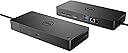
The Dell WD19S 180W Docking Station is a high-performance USB-C hub designed for professionals seeking a streamlined multi-monitor setup. With 130W power delivery, dual DisplayPort, HDMI outputs, and six USB ports, it powers and connects your devices efficiently while maintaining a sleek, compact profile. Ideal for Dell laptops, it ensures future-ready compatibility and workspace optimization.
| ASIN | B08XNJDRFB |
| Best Sellers Rank | #1,959 in Electronics ( See Top 100 in Electronics ) #29 in Laptop Docking Stations |
| Brand | Dell |
| Built-In Media | Docking Station |
| Color | Black |
| Compatible Devices | Likely compatible with USB-C enabled devices, particularly Dell brand laptops and devices |
| Customer Reviews | 3.7 out of 5 stars 859 Reviews |
| EU Spare Part Availability Duration | 3 Years |
| Global Trade Identification Number | 00884116398349, 05397184513989 |
| Hardware Interface | USB Type C |
| Item Dimensions L x W x H | 8.07"L x 8.1"W x 1.1"H |
| Item Type Name | Docking Station |
| Item Weight | 1.3 Pounds |
| Manufacturer | Dell Technologies |
| Mfr Part Number | FPFY9 |
| Model Number | WD19 |
| Number of Ports | 2 |
| Product Dimensions | 8.07"L x 8.1"W x 1.1"H |
| Smart Home Compatibility | Not Smart Home Compatible |
| Total Number of HDMI Ports | 2 |
| Total USB Ports | 6 |
| Total Usb Ports | 6 |
| UPC | 884116398349 |
| Unit Count | 1.0 Count |
| Warranty Description | manufacturer |
| Wattage | 90 watts |
D**G
Perfect for what I need
Lost the cord to my work computer on my out of town meeting. This appears to be exactly the same, or at least exactly equivalent. I don’t see the difference, but I hadn’t looked to close to begin with.
M**B
"USB device not recognized" connection and disconnection noise every 5 seconds!
Before this Dell laptop I had a Lenovo and it wouldn't connect easily to my 2 fancy Dell monitors, so IT was kind enough to give me a DELL laptop. Of course it did not like working with my ZumiPNG docking station and wouldn't do a pass-through charge via USB-C which is super weird/dumb, but now I've come to realize Dell might be a little stuck-up on itself! With that in mind I splurged on this docking station, and it would have gotten 5 stars if not for the incredibly annoying USB connection "beep-bop-beep" it makes every 5 seconds followed shortly by the "brrrrr-uuun-nnng" noise to let you know something disconnected (see accompanying photo of the error message). Everything works, so I really don't understand why it's doing this to me - my IT Director believes it's a connection issue with one of the USB-C female plugs in either my laptop, the docking station, or my monitor. Either way it's incredibly annoying, but it's better than my previous situation so I'm just going to live in USB-connection-and-disconnection purgatory, annoying everyone in all my virtual meetings, and I'll try to be thankful that at least I can at least see all 3 of my monitors now. UPDATE 2024-03-07 - I have tried to transfer ownership of the DELL product on their website to myself, and I was denied because "Previous owner information provided in the request is not valid for asset provided. Please contact your seller or your Dell sales representative." This is clearly not a new item and is broken and they tried to resell it to me. Originally I thought it was my equipment, but IT finally was able to do a test on another DELL laptop and the same issue happened, so it is an issue with the docking station itself. And of course I've passed the return window. DO NOT BUY FROM THIS SELLER!
H**N
works well
works as described
I**H
Amazing delivery speed and brand new!
Shipped and was delivered within 3 hours. Top notch, brand new. I needed this for work so they came in the clutch! Thanks!
C**H
Great product
Definitely connected fast, didn’t have to do any updates . Thank you 😊
A**S
Dead Out of the Box
I purchased this in March of 2026. By the time I got my new office set up in May, this docking station was dead and will not work. I've used about 4 of these docking stations, but this one is a dud, it will not even power on, and of course I'm out of the return window by 2 weeks!
J**R
Does the job
Works as expected. Happy with the purchase.
T**I
Charges powerful laptops, Great Functionality, Good expansion
Purchased used from a third party seller, needed a new dock for a second work setup. Updated the firmware and it worked like new, have been using with my Dell Precision laptop ever since 10/10 would buy from seller and would use this Dock. Has all the IO I need, also charges a very high demand work laptop that has a quadro in it(Dell precision 7560), Great functionality.
K**N
I'd not recommend any DELL products
I bought this device in June 2023, DELL offered 3 year Basic warranty on this product. It died in 2024 (after 1 year) and got it replaced in Warranty, Replacement took 45 days.. Now in 2025, it again died. I am chasing DELL support for a replacement. 1. Disappointing Product Quality. 2. Disappointing Customer Service. 3. Not worth for the Cost. Considering the Cost, Quality and Service Experience, I'd not recommend any DELL products.
P**R
Prima Produkt!
Nutze die Docking Station mit meinem Dell Laptop nun mehreren Monaten. Funktioniert technisch einwandfrei und erweitert vielfältig die Anschlussmöglichkeiten.
S**Y
Dock is not working 😕
I received the Dock and it is not working 😕 it seams that the docks socket is damaged and therefore the power is not stable and the Dock keeps switching off.
B**I
defictive device, it is not working properly. الجهاز به عطل، لا يعمل بشكل سليم
L**D
Doesn’t output dual screens with Mac Pro M3 pro
It does not work on Macs if you use two screens which is annoying, but dell has products for that. I never returned it because why bother so I plug an HDMI and a USB -C to my computer. The dock outputs to one screen charges my Mac and connects a mouse and more devices if I wanted to.
Trustpilot
4 days ago
1 month ago