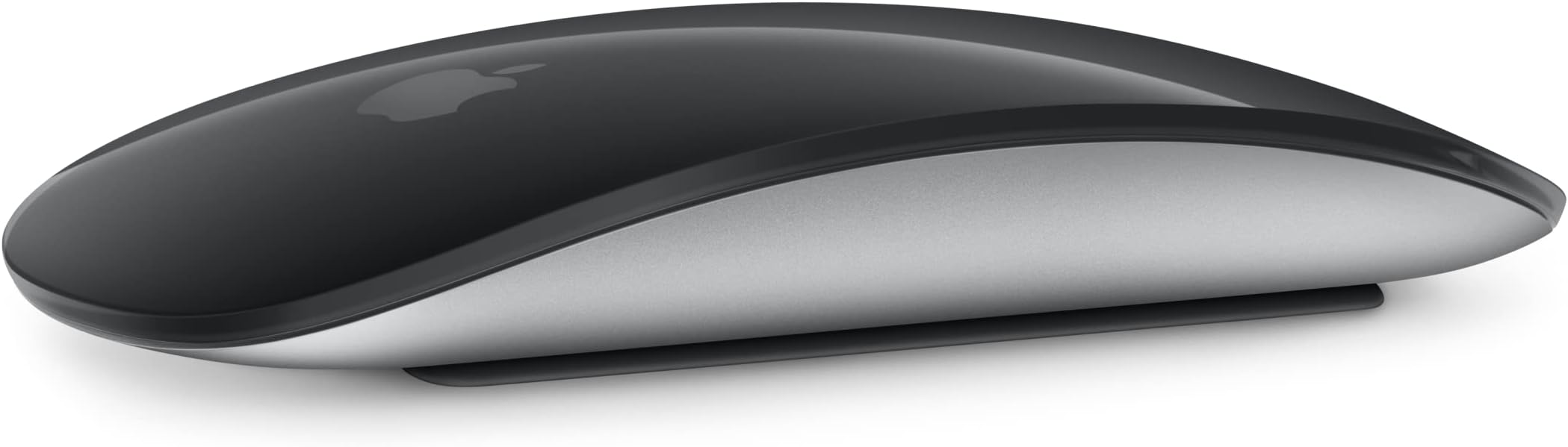
🖱️ Elevate your workspace with the Magic Mouse — where innovation meets effortless control.
The Apple Magic Mouse is a rechargeable, Bluetooth-enabled wireless mouse designed for Mac and iPad users. Featuring a Multi-Touch surface for intuitive gesture controls, it offers up to a month of battery life per charge and pairs instantly with compatible devices. Its minimalist design and smooth glide make it an essential productivity tool for professionals seeking seamless, cable-free navigation.
| ASIN | B09BRD98T4 |
| Batteries | 1 Lithium Ion batteries required. (included) |
| Date First Available | August 3, 2021 |
| Item Weight | 0.634 ounces |
| Item model number | MK2E3AM/A |
| Manufacturer | Apple |
| Product Dimensions | 5.12 x 2.91 x 1.42 inches |
J**G
Best Wireless Bluetooth Mouse I’ve Ever Owned.
This is the best addition to any MacBook Pro ever! The pad is extremely awkward to use if you’re a first time MacBook Pro owner. This is our first MacBook Pro and it has a learning curve that you have to get use to using if you want to use the love that it is wireless via Bluetooth and eliminates the need for using one of the few USB ports on the MacBook Pro. It makes using your MacBook more convenient and easy to navigate than using the pad that is built into the laptop. Our MacBook Pro is the space gray version and we bought the same color mouse. I’ve used the wired mouse on the older Apple Mini Macs in the past and it was just a little bit different than what I was use to using which was a Windows OS mouse. If you’re a first time MacBook Pro user, you should invest in this mouse. The charge is great and last for several days or hours depending on how long you use your MacBook. The pad is a real learning curve and this will help eliminate a lot of frustration when you are a new MacBook Pro owner. As far as gaming goes, I can’t exactly say how well it works as I am not a gamer. But the response time , in my opinion, is fast and I think there are other options for gamers that are really into gaming that own a MacBook Pro and I’m sure they are aware of those options. I have owned three apple desktop counting the latest MacBook Pro and those both had a wired mouse and keyboard that was separate from the Mini Mac. Sitting down with my new laptop was quite a different experience than the other Apple desktop’s that we have had in the past and it is not like a Windows laptop in the way the pad works , but this was worth the price of not relying on the built in touchpad which I had a lot of learning to do if I was going to rely on the MacBook Pro built in pad. Not a big fan of the white keyboard and mouse as we have had two different sets of the white items and they start to look kind of dirty after a few months of use. The one thing I absolutely miss about the older Mac Minis that ran on the Intel processor is that the newer M3 chipsets don’t have the ability to run Parallel’s which most people know what that means. I don’t really miss the ability to use Windows on my MacBook Pro now anyway because it was always the source of all of the problems we had with the older Mac minis in terms of malware and viruses. I do however miss the CD or DVD drive as well because I have a lot of Japanese MQA CDs and they can be unfolded to enjoy the full potential with a external drive and the software that you can buy for the MacBook Pro. It gets the most use as a MQA decoder than any other type of computer usage. We have the newest iPad Pro versions and they are almost as good as the MacBook Pro. I have heard that the newer versions that are coming out are going to be basically the “MacBook Pro Killer” as they are supposedly going to have a lot more RAM and powerful processors and the ability to run programs that only a desktop or MacBook Pro can handle now. But I think the price point is probably going to be outrageous for most people. My only regret is that I didn’t get the MacBook Pro Bluetooth keyboard in the space gray when they were more a available, because they are extremely hard to find now and expensive in comparison to the standard white model. The keyboard has to have the finger print reader on it as I would like to sit in in a cradle instead of having it opened up on my workstation. So that makes it even more difficult to find and expensive. I have seen used ones sell for twice the price of the new white version, but it is the only thing that is really left to buy for this set up.
M**Y
Excellent mouse for MacBook
Excellent mouse for MacBook. Very comfortable and precise, connects easily and responds immediately. The design is elegant and the battery lasts quite a bit. Ideal for work and daily use. I recommend it
T**2
Sleek Design and Great Functionality with Minor Drawbacks
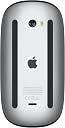
I have been super excited to try the Apple Magic Mouse. I finally bought one yesterday. I was able to get it same day since I live close to a distribution center! Here are my thoughts: Likes: Build Quality and Design: The Magic Mouse lives up to Apple’s reputation for premium build quality and sleek, modern aesthetics. It fits perfectly with my Apple Magic Keyboard and looks fantastic on my desk. Trackpad Surface: The multi-touch surface is truly a game-changer. It allows for intuitive gestures like swiping and scrolling, making navigation smooth and effortless. Seriously, it took almost no time for me to realize this is better and easier than using a trackwheel or left/right mouse buttons. Seamless Connectivity: Pairing the mouse with my Mac was a breeze, thanks to its flawless Bluetooth connection. The connection remains stable, ensuring uninterrupted productivity. I am coming from a Satechi setup. In all three of these areas, Apple's Magic Mouse is superior. However, this in no way implies the Satechi setup is bad. I guess it's all about bang for the buck. Apple's setup is substantially more money. Dislikes: Scrolling Speed Adjustment: I had to make changes to the scrolling speed in the settings to suit my preference. While this wasn’t a major issue, it did require some extra time. It would be ideal of Apple could figure out how optimize this out of the box, by making adjustments based on your existing mouse and settings. Charging Port Placement: The charging port being located on the bottom of the mouse is less than ideal. It makes it impossible to use the mouse while it’s charging, which can be quite inconvenient. Price: The Magic Mouse is on the pricier side for a mouse. Although it offers excellent features and design, the cost may be a consideration for some. Additional Insights from Other Users: Many users have praised the Magic Mouse for its sleek design, intuitive multi-touch surface, and seamless connectivity. The rechargeable battery and its long-lasting charge have been highlighted as significant improvements over previous models. Some users have noted the excellent performance in detailed tasks like graphic design and photo editing. However, the placement of the charging port and the high price point were common points of criticism. In summary, the Apple Magic Mouse is a perfect blend of style and functionality. Whether you’re a professional or a casual user, this mouse is bound to elevate your computing experience. Highly recommended, despite a few minor drawbacks.
C**L
Great mouse!
This mouse works smoothly and pairs easily with both my Mac mini and MacBook. I find its surface tracking is very responsive, and scrolling feels natural. While the location of the charge port is slightly odd, I find it doesn't get in the way due to its battery life. It's sleek, lightweight, and great for everyday use.
B**G
Overpriced but decent mouse
I gotta agree with the so-so reviews - this is a luxury, overpriced mouse that feels weird to hold and has no ergonomics to speak of. The "magic" scrolling works pretty well, but let's be honest - it's kinda gimmicky and doesn't really have any advantage over an actual physical scroll wheel (unless you somehow manage to break the scroll wheels on mice all the time). On the upside, it does look great and screams "Apple", if you care about that stuff. I know some people hate on the battery port location but the battery life is pretty good and charging isn't that big of an issue. I think the biggest upside is that it's the only mouse I know that works well on my Ipad Air. I've tried multiple made-for-Windows mice and web scrolling feels chunky and delayed. Not sure if it's a problem w/ my hardware, or (more likely) if Apple made it that way by design to force you to buy their products, but I guess I'm stuck with a mouse I don't really love as my only option!
P**K
So I live in both the Mac world and the Windows world. I recently decided to pick one of these up because I liked how it fit into my laptop bag. It works well for Mac but has a limited feature set for WIndows. Frankly, this didn't suprise me as I had expected it and thus didn't peanilize the product for not working better with Windows. Yes, I know there are utilities to squeeze more functionality out of the mouse for Windows but this is an out of box review. The setup with Mac is as seamless as you would expect for a Mac product and after a couple seconds you are off and running. The scrolling is extremely handy but it will take a little getting used to as there is an art to using this mouse but with a little effort you will see the brilliance of the design. You just have to work through any initial frustrations you might have. Overall, this is a great product and feel it was well worth the money but it is best used with Mac OS.
H**E
The Apple Magic Mouse is a sleek and stylish accessory with a smooth multi-touch surface for intuitive gesture controls. Its rechargeable battery lasts for weeks, though the charging port on the bottom prevents use while charging. The mouse is highly responsive and integrates seamlessly with the Apple ecosystem. However, its low-profile design may cause discomfort during extended use.
D**L
Estoy echadisimo a perder con ratones para juegos que hacen hasta lo imposible porque no lo notes mientras lo usas. Usando el de Apple descubrí que tengo mil mañas e intolerancias que me hicieron imposible quedarmelo: Pros: - Calidad Apple 100%. - Carcasa de aluminio y multitouch, va a durar muchisimo. - La pila es interminable. Cons: - Es chiquito (tengo manotas) y no apoya la palma. - El sensor no tolera torsión (tiendo a mover y seleccionar en diagonal y el sensor se atonta, no compensa x/y). - Carcasa de aluminio lo hace pesado y cansado (levanto todo el tiempo el ratón cuando hago lo que sea). Si usas el ratón como la gente decente y dentro del ecosistema Apple, este mouse es para ti. Si eres como yo y lo avientas por todos lados y necesitas cinco metros para usarlo correctamente, buscate alguno gamer con bluetooth (aunque pierdes los gestos de este).
M**O
This product is genuine and came in original APPLE packaging. And worked without issue would buy again.
F**D
I've been using a Magic Mouse for years as I find it the most ergonomic for me. I wanted a backup one so I got this. Same good quality, and keeps a charge for many days. Too bad you can't use it while charging but I just charge overnight, no big deal.
Trustpilot
2 days ago
4 days ago