Desertcart purchases this item on your behalf and handles shipping, customs, and support to South Korea.
🎥 Capture. Convert. Relive. All without a PC!
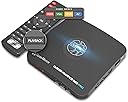
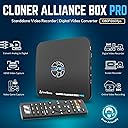
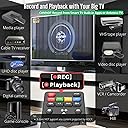
The ClonerAlliance Box Pro is a standalone 1080p@60fps digital video recorder and analog-to-digital converter that supports HDMI, RCA, Component, YPbPr, and VGA inputs. Designed for easy use without a PC, it enables instant playback on TVs, scheduled recording, and converts legacy analog footage into MP4 files compatible with modern devices. Ideal for archiving VHS tapes, camcorder videos, and capturing live gaming or online content, it offers ultra-low latency and broad USB storage support up to 8TB.


| Antenna Location | Video Recording |
| Asin | B012T1D0IG |
| Av Output | MPEG-4 |
| Best Sellers Rank | #47 in Internal TV Tuner & Video Capture Cards |
| Brand | ClonerAlliance |
| Built In Media | Capture Card |
| Compatible Devices | Television |
| Customer Reviews | 4.0 4.0 out of 5 stars (2,113) 4.0 out of 5 stars |
| Hardware Interface | 3.5mm Audio, Component Video, Composite Video, HDMI, Micro USB 2.0 Type B, USB 2.0 Type A, VGA |
| Item Dimensions | 4.3 x 4.3 x 0.6 inches |
| Item Weight | 6.8 ounces |
| Manufacturer | ClonerAlliance |
| Mfr Part Number | CA-998P |
| Minimum System Requirements | No PC Required |
| Model Name | ClonerAlliance Box Pro |
| Model Number | CA-998P |
| Number Of Items | 1 |
| Operating System | Windows |
| Other Special Features Of The Product | Passthrough Latency, Schedule Recording |
| Platform | Windows |
| Tuner Type | NTSC, PAL |
| Unit Count | 1 Count |
| Upc | 712395957967 |
| Video Capture Resolution | 1080p |
| Warranty Description | 90-Day No Hassle Return (at our cost) and 2-Year replacement Service. |
User
Impressive little Device A Few Small Issues
2021 update ive bought another one. Yes another one. These little boxes accept line in inputs from everything. I uad to jave another one. This little box has processed 5000 recprdings so far. And is still humming along at warp speed. Really impressive. This is tue only model out of all tue game recorders out tuere to have multiple line hook ups. Of you have old dvds vhs vhs c laser discs ect. You can process them all. Worth your time. This little box is. Software can be wonky but effective. Use sandisk thumb drives 32gb to 116gb best response to recordings. Thos will record from all game systems as well. Though you may have to tweak your consoles settings depending on what you have. Customer service is in it for the long haul too. They actually have humans. Can take a day or 2 to respond but its a human....2019 review Okay I had to order a second box as the first one was somewhat defective.. The USB port was very loose. So Getting a replacement for it. Helpful Solution to this problem. Buy an added angled USB Extender And hook up your USB stick to that. USB sticks can be kind of heavy on the port It managed to record one tv Program and Game capture before it failed to do anything.. The picture Quality is nothing short of spectacular... Amazon has left and Right switchable angled Cables to aid in your quest for perfection.. https://www.amazon.com/gp/product/B06W56VLLY/ref=ox_sc_act_title_1?smid=A2IME0Z5O2LH6Y&psc=1 This device so far performs well But it does have Its Quirks.. First Recording in NTFS Mode can be problematic. Your likely better off In FAT32 mode. Cloner box provides software via download from its web portal.. This will allow you to assemble your recordings nearly issue free. and they also offer Burning software to burn to disc. My issue is no ability to title your projects unless you use a PC to do it. Its a thing they are most likely working on to add in the future. The remote that comes with the unit does not have batteries with it. those are AAA in size so be sure you have some on hand. as you will need the remote almost immediately upon first use. Be sure to format your thumb drive to NTFS or FAT 32 Fat 32 being your better option.. And make sure your USB stick or drive does not exceed 2 Terabytes But make sure the USB is larger than 32 Gigabytes As most recordings will be large. You are recording in HD format MP4 video. You can lower your bit rate to make files smaller. This device does require that you have a bit of Know how to set it up. But a little bit of internet reading allows you to easily understand Bit rates and Formats for video. Not that hard to do. Make sure you read up on those as the instructions could be a little bit more descriptive. that come with the product. Cloner box does have an online instruction manual and how to section that is very easy to understand. That will allow you to save the PDF to your PC for future review. Suggestion also For a very good picture use the component in of this box or HDMI port in. But you can not record HDCP protected content via HDMI. You can however do so Using a work around Or The component YPbPr Connection. You can also use the HDMI out on your preferred device into a converter which lowers it to YPbPr which is still 1080p resolution. You will need a converter for that but that method does not transport the HDCP signal to the Cloner box. or any recorder for that matter. https://www.amazon.com/gp/product/B01F6URXYY/ref=ox_sc_saved_title_3?smid=A3GE4HK1J73CN8&psc=1 Amazon has a huge array of converters so they are easy to find. You will find the picture quality is really good regardless.. until HDCP is eliminated this is the method you have to use to copy HDCP protect content.. Advisable if you are trying to copy Blue ray discs ect. Convert your signal down then back up to HDMI via a second converter. Though your image will be better via just the component Direct connection..Now that we have this out of the way. The unit itself is very small and very light.. All connections except the USB port are on the back of the device. The USB port is on the right side of the unit. Though it looks well constructed That USB port is in a very bad spot and the heavier your USA stick is the more it will weigh down on that port. The suggestion above solves this issue easily With an angled connector. All other ports were solid. But your PC Connector cable is way too short. I recommend an upgrade to this https://www.amazon.com/dp/B0143K4ZSK/ref=twister_B07CBVG4L8?_encoding=UTF8&psc=1 This will be a 10 FT cable. Reason being is the provided cable is really short. And really thin.. If your pc is far away from the cloner box and most peoples PCs are you will need the length to use the record to PC feature.. Its basically a long phone charger cable. Make sure its USB data capable. The MIC recording feature also works really well to capture your own audio over gameplay for recordings.All in all this is a good purchase once you figure out how to get it to do what you want it to do. And Cloner alliance has very good customer support. They can help you solve a lot of problems. Note this will be some culture shock to those users used to DVD recorders. its a bit more complex but for the picture quality its worth the time. to upgrade to this format. Im sure future releases of boxes will have newer features and smoother operation. I myself will be keeping my eye open on Cloner Box They are the top of the line when it comes to capture boxes..What I would like to see added to cloner boxes in the Future.. Longer cables for PC connections. An angled USB connector for the USB port.. Titling ability via the Remote.. But you can do this Via Your pc later its just an added annoyance The box itself could be about an inch or 2 larger to space out your connectors as they are really close on the back of the box. Also I would like to see smaller Formats added as most or large format recordings that are very high Gigabyte size More of a 300 to 700 Megabyte range. That would lower image quality But it would also allow Space saving for phones and Tablets.. Other than this the box is a great addition to a mediaphiles Equipment.. I hope this helps some of you to have a good experience with this device
User
I LOVE MY CLONER BOX PRO!
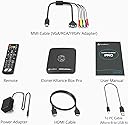
I initially purchased the HDML Cloner Box (non Pro) because of the good Amazon reviews. I was looking for an HD DVR device and the HDML Cloner Box reviews said that it would record virtually anything across an HDMI connection with excellent video quality. I ran into the common issue of the “blank screen” after hooking up the Cloner Box and went the manufacturer web site (Cloner-Alliance) for help and found the “Pro” model with Remote Control, Timer Recordings, and Instant Playback. The Pro being a new product had no reviews on Amazon so I didn’t see it on first pass. After testing the Cloner Box and seeing for myself that recorded everything I tried (CATV, Blue Ray, PC Stream) with Excellent Quality, I instantly purchased the Pro Model and arranged to return the Box version. The blank screen on the Box version was resolved by pressing the 1080/720 button for 5 seconds (you do the same with the Input button on the Pro).In addition to wanting an HD DVR, I also am in the process of moving my owned DVDs and Blue Rays to MP4 files for my Home Theater Server. I have another software solution for moving my Blue-Ray movies to MP4, but the Cloner Box can do that too. I have found using the Cloner Box for the “Extras” is nice because I have to view them to choose which one to copy and it is easier on the Cloner than the software solution.I LOVE the HDML Cloner Box Pro. Similar to the non-Pro Box, it records EVERYTHING coming across the HDMI port with EXCELLENT Video quality. The Remote functionality is fantastic. I have yet to test the Timer recording, but understand how it works. The Pro also allows you to Record on the PC through a 2nd Mini-USB port using their HDML-Cloner Pro Helper Application. The PC recording functions worked perfectly, giving you a mirror image of the HDMI stream on the PC (with a slight delay) and full recording control (with the addition of a Pause that you do not get on the USB Drive recordings). The recordings on the PC were as perfect as the ones on the USB flash drive. I can see one advantage of the PC recording is that you can record without having an HD monitor handy. I’m going to test recording from my DSLR Camera where that functionality will come in handy. The Cloner Box Pro Also has a Mic AND Headphone Jack (Mic Jack also on the Box), adding a headphone monitoring capability I currently do not have on the DSLR. The PRO also allows you to control the volume of the HDMI stream and Mic to get a perfect mix. One thing I noticed is my initial recordings had low volume (the Box recordings were slightly louder than the original program). I had to adjust the HDMI volume higher (controlled via remote) to get my recorded volumes back to “normal.”The file sizes on the recorded videos are very large. Cloner-Alliance obviously made a decision to provide the best possible MP4 video quality and did not try to over-compress the video. I’m seeing that the Pro files are about 2G per half hour of video. You can choose between 1080 or 720 recording quality, but the file size does not change a whole lot. The Pro also has a 2G file size limit so it creates a new file every 2G (or 30 minutes). Cloner-Alliance recently removed that restriction on the Box version and is promising new Pro firmware soon that removes that restriction. I had a problem trying to record baseball games where the recording stopped after 1 hour and it appeared the Pro had trouble creating that 3rd file after filling 2 2G files. Cloner-Alliance support was excellent and suggested a different USB flash drive. That appears to have been the problem. Since changing flash drives I have been able to record two 2 hour movies without issue. After the All-Star break I will try baseball again.Cloner-Alliance also provides another software application “MP4-Cloner” which allows you to “Trim” “Combine” “Convert” and “Burn” (to Disk). The Trim and Combine function do not re-compress the video so they work very fast, and do not diminish the quality. “Trim” allows you to remove extra things that are recorded at the beginning or end of the file (lead-in and recordings after the program had ended). Trim on a 30 min 2G file only took a few minutes. Combine allows you to combine the 2G MP4 files together into one file. The last 1.5 hour movie that I combined only took about 10 minutes to complete. “Convert” allows you to convert the native MP4 streams into other formats, although what I used it for was to reduce the 6G movie file down to 3G by decreasing the BPS setting. “Convert” does re-compress the video so it takes a bit longer. The video quality of the 3G file was still very good.The Pro also allows you to record from various other input types: VGA, RGB, and standard AV signals. This is accomplished by a provided cable with those various plugs that feed into a multi-purpose plug (reusing a 2nd HDMI-looking physical connector). Of course I purchased the Cloner-Box to get away from an older RGB recorder so I don’t see using anything other than HDMI.If you’re looking for a device that will record Full HD Video from your Game Console, Cable TV Box, PC Streams, or Blu-Ray Player, the Cloner Box and Cloner Box Pro is the device you have been looking for.
User
Works well. "Passthrough" is not a true passthrough and driver is tricky. Component is great.
Overall this device actually works great. I very much like the fact that it can operate at least somewhat externally from the computer without taking up a card slot. This means it will never interfere with the PC upgrade process and can be used with a wider variety of devices (for instance a laptop if its CPU is powerful enough.) Its form factor is small and convenient for the most part (though once you have those cables sticking out it gets significantly less convenient.) The choice to give us a remote for controlling various function is actually a huge plus and I have to give them kudos on that.I just have two main complaints in regards to the product itself. First, the driver can be a bit tricky. They don't offer a naked driver but, instead, it's part of an install process via software they give you a link to download. The software is unintrusive, but I ran into a problem where somehow I managed to accidentally install the wrong driver and it was then nearly impossible for me to get the right one in there. You can't manually point the device manager to a driver (the files in the installation folder didn't work right even,) but pretty well must get it to install the driver during the software install process. If you somehow load the wrong driver like I did you have to uninstall the software and force remove all of the files that driver uses, reboot, and reinstall. Most of the time this won't happen if you install normally, but this is something to bear in mind.Probably the biggest thing that is both a con and, ironically not (more on why not in a moment) is that the "passthrough" function is NOT an actual passthrough. Rather it still goes through the device itself and has some processing. This has two down sides. One, a tiny bit of latency is still added and two, the image ends up less clear with just a tiny bit of blurring. The latency is actually very little and in most things you won't even notice (really even 2D fighters seemed to be ok for me) but I did try playing Overwatch (PC version with a mouse) running through it and I found the latency to be sufficient to completely ruin my ability to play. (I had hoped to offset at least part of the capture and encoding process via the device with a bit less load on the PC versus just directly capturing the game.)Now here's the advantage of the output actually being processed a bit: this actually means that when you feed it a signal from an analog source it can work on LCD monitors. For example, I was positively ecstatic to discover I could play my PS2 on the monitor I've been using with all of my other consoles. A normal low latency HDMI converter for the PS2 still leaves the output at the usual 480i which a typical monitor simply will not accept, however, this thing produced a progressive output (probably 1080p in fact) that the monitor would accept. Also, as I've stated, the latency is actually low enough that it does seem I was able to play 2D fighters and music games in my testing so far. That was a pleasant surprise. I've actually been trying to find some way I could get a device that could handle converting the PS2's component output to my monitor's HDMI with a progressive output that wouldn't have too high of a latency and it's actually surprisingly hard to find. (Most that do cost as much as this thing does, so you may as well get the one device that does two purposes I guess.) It also has composite and VGA inputs for other analog options. I haven't tested these yet, but I expect that the results would be very similar.It's worth taking a moment to note that if you record from an analog source (like the PS2) the inverse telecine in the actual recording to USB seems to be very simplistic -- maybe even just a simple deinterlace. While the output on the screen looks completely normal and great, I think the recording probably just drops the framerate in half instead of trying to apply a complex IVTC filter. This makes the recording a lot less nice than the image you see on the screen. It still comes out pretty well for a device that can handle this in realtime though. A true IVTC filter likely would require too much processing for an embedded device to handle on the fly like this. This mostly only matters in really high motion scenes as slower motion will mostly look normal with this. I didn't see any options to configure this or even to leave it out. It may not do this if you're recording through OBS or etc -- I haven't had the opportunity to test that yet.One thing I would also say would make for room for improvement is if the device itself could handle the encoding when you're using it along with a computer for streaming or etc. Even though the device itself is capable of recording (as it does when it records to a USB device,) when you plug it into a PC it does not send the video to the computer in a ready format but must instead be reencoded by the software. It would be a lot harder to actually send it in a pre-encoded format obviously (probably not compatible with software like OBS) but it would have advantages like working with systems that have weaker CPUs/GPUs. This is not a point against it as possibly nothing does this at this time, but it is something I think would really improve it and similar products.
User
DO NOT BUY if you are looking for a TiVo-type Over-the-air DVR
At the top of the Customer Reviews, it says, "Customers say ... Customers find the TV tuner card to be a fantastic digital recorder with excellent video quality, particularly noting that it records and 1080p content very well." This is very misleading if not downright false. This device does NOT include a OTA HDTV tuner. It only records video from the output of an already-tuned TV or Cable box or Video streamer box. In effect it's just a video signal ripper. Which means this DVR cannot tune and record even a single channel, unless you manually tune the TV, start the recording, when done, then switch to another channel to record the other TV program, all using the video output of your TV. I only found this out after receiving the shipment and opening the box and reading the owner's manual. Luckily Amazon did allow me to return it.There are other Tivo-type DVRs that can simultaneously tune to and record two different programs on two different channels at the same time. Some models allow tuning/recording 4 channels at once. Amazon sells Tablo and HDHomeRun DVRs that do this. Search for "OTA DVRs".
User
Good product with room to improve. Extremely happy customer.
The main reason I purchased the Cloner Box Pro was to record some online videos for my daughter in our next road trips. I had a mix feeling at first because the built-in firmware didn't work with my SanDisk 256G USB3 stick in the first 2 days, but there was no other easy solution within affordable budget. Yet very soon, I received excellent support from Julia in their customer support department. This changed the whole picture completely.Out of the box, the "old" firmware was able to record the videos (out from my laptop if that is important) into my NTFS formatted 256G USB. However, after the recording, the NTFS partition would not be accessible again in Windows 10. By plugging it back into the Cloner Box Pro, or even my home QNAP NAS, I could see the files. But not under Windows 10. I tried to format the USB with another Windows 10 laptop and did few recordings again. But I got the same results. I was very frustrated after close to 48 hours of trial-and-error. If it was another item, I would have already make a return request. Lucky I didn't. Instead, I contacted their tech support by email, and Julia got back to me within 12 hours.Then in the next 2 days, we exchange few other emails. And most important, Julia has been very patient trying to understand my issues. She sent me few other beta firmware, which didn't work until the 3rd one. This made me to believe that, even the item was not prefect (at least not working with my 256G USB) but the company was really behind their products. While I am writing this review, I have done over 30 hours of recordings in the last 4-5 days. Julia did even send me a follow up email 2 days ago to make sure my issues were truly solved. I am so surprised and glad for this level of tech support and customer service from a Chinese company. In the US, people usually stay away from items that were made in China. I can honestly tell you I am one of them. But this experience with ClonerAlliance really changes my mind. There is still hope. I have been shopping at Amazon since 2002, and I have been Prime member for around 5-6 years. This is one of the very few times I make a happy review.While I am 100% happy with the support & service, I believe the product still have room to improve. Below are few points I would recommend the company to spend some time on.- Having schedule recording feature is good. However, everytime the power was removed, the date / time would go back to 2016 May. It looks like the item doesn't have a CMOS BIOS to maintain the time. Instead, it relies on the OS.- The schedule recording feature is good to record programs that with a preset program schedule (and a reliable clock). But it would be even more useful to have a feature to auto stop the recording after certain hours / minutes. For example, after I started the recording, it would be much easier for me if I could set it to stop after 45 mins. For now, I will need to either setup a timer on my phone to remind myself, or I have to go back to my bedroom to check the TV once a while. It happened few times that I left the room and forgot about the recording. And the files were so big due to the extra hours of idle screen. I believe this could be easily implemented.Even without the "auto-stop" feature, I am still very happy with this device. So I am giving it a 5-stars. Special thanks for Julia. Now I could have a relatively easy trip with my terrible twos.Few other tips for others.- It does work with my FireTV, and should work with all other HDMI output video sources. This device is just a simple "video recorder."- The output format is MP4. In case you need to do some simple edition, you don't need to buy any professional software. In Windows, I use Movie Maker. It came with Windows 7 but now Windows 10. In Windows 10, you could Google "Live Essentials 2012 Windows 10." Movie Marker is part of the package.- All my recording was on 720p. The unit was kind of hot after 3-4 hours straight recording. You may want to let it cool down for a while.
User
Excellent capture device but watch your harddrive for corruption/bad sectors.
I mainly purchased this to take off recordings from my cable box so it doesn't fill up with the paltry server oriented 500gb offered. One nice thing about the ca pro is that it has a small profile so you can put it and your external hard drive on the same table top as your flat panel. It will not obstruct the tv viewing experience. Hookup was quick and easy and took 2 minutes to do it. You are basically putting the device between your cable box and flat panel.Once you turn the device on for the first time you will invariably get a dark screen with the words: "ouch blah blah". Just hold the source button (located on the front of the device) in for about 10 seconds, then release. It should then show a normal tv picture.I record at 1080 and a 12 bitrate. An average 1 hour show uses 4.15gb but the picture quality is superb on playback. I have a roku tv so you can plug the usb from your drive into your tv and use roku media player to watch your shows or watch them via the device itself. Why anyone would want to use a key drive is beyond me. At 4.15gb/hour you can't get much on one. An external hard drive is much easier and can hold much more data.Here is the rub. I use WD hard drives. The max you can use is up to 2TB. I use a 1 and a 2. They are only about a bit over a year old so should be no problem. For some reason or another I have had each of the two drives develop bad sectors and I MEAN BAD SECTORS. I have read about not disconnecting the drives w/out first turning off the ca pro. I always did that and still got bad sectors. This means once hooked up to a desktop you are unable to open the drive ie corrupted/bad sectors. Of course, you can format the drive and fill the bad sectors with 0's but say goodbye to your videos. How do you notice this "in action"? You hit record on the cloner box and you do not see any read/write via observing the lights on the hard drive. The easiest solution to fix this and still save your videos is via the command prompt. Use CHKDSK /f/r X: where X is the letter of your drive. This takes a long time so be patient. You will then be able to see the files. I recommend backing them up to a folder on your pc hard drive. All I can tell you is that sooner or later the drive is going to fail. This is the one and only reason why I did not give this product a "5". Correct this and I will amend my rating.You must format the drive in MBR (Master Boot Record) NTFS file system. If you don't know how to do this cloner has an excellent "how to" pictorial on their website.Although tech support had no clue regarding the constant bad sectors, their support and response time is excellent. If you send them an email you will get an answer in less than a day from Julia. The answers tend to be canned but when you are going through the short learning curve, they can be helpful.I have had ca pro for about 3 weeks now. I will change my rating if and when the hard drive issue is corrected via a software/firmware upgrade. Otherwise, it is an excellent product.UPDATE APRIL 13, 2020I have given this product a 5 star review. This has nothing to do with anything they did or advised. To avoid hard drive problems, you must and I REPEAT, you must plug your external hard drive into a ups device; they are available for about 50-70 bucks. I found out that after a power blip the external hard drive becomes corrupt. Hooking it up to the ups has fixed everything. On the safe side, I also turn the external hard drive off when not in use.UPDATE AUGUST 8, 2020I cannot recommend this anymore for anyone wanting to take off tv shows, movies, big time. For this, tiny flash drives will not suffice. The reason for dropping my 5 star rating to a 1 is simple. A COMPLETE AND UTTER NON COMPATIBILITY WITH NTFS FILE SYSTEMS when using an external 1 or 2TB drive. I cannot get more then 25-30 shows recorded w/out the thing crashing. It JUST stops recording. I have run CHKDSK /F/R from the dos prompt but that does no good outside of correcting bad sectors. You cannot use EXFAT file system. So all I do is swap out ext drives then use diskpart and win/r key to bring up disk management to run new volume/format. This is ridiculous. Until they get the product compatible with NTFS drives this device is basically worthless.
User
Amazing Product. Great Price. I'd buy from ClonerAlliance in the future.
What an amazing product. I'd give it 6 stars if i could. A child could operate this device and the video and audio quality achieved are very good.I purchased this game to record classic video games videos for Youtube. I have recorded 25 half hour Let's Play videos and streamed classic game-play videos using the available software.Even when you're recording classic systems (I have attached a sample of a recording from a Super Nintendo Game played on a reproduction system to illustrate) you get a very respectable video quality. The audio isn't awful either (even when you use a cheap $13 microphone like I am).I have also used this to convert VHS to a digital format so my kids can enjoy some old videos I had around since I was a kid.A few notes:1) This tool DOES NOT REQUIRE a PC to record. You can record to a Thumb Drive/Jump Drive. Files get large so make sure you select a good size. I went with a 32GB but you could probably get away with smaller.2) When attached to a PC you still need a TV to play the game on. You can record directly to the PC but the lag is noticeable and off putting. To achieve this, you can use the HDMI out to connect to a TV while you use the supplied USB connection to connect to the computer.3) The software they provide is worth it's pretty much mandatory if you want to record to PC. This is ok because the software works. I know that sounds silly but look at other capture cards... They provide software that doesn't work or is total garbage.4) The price is amazing for what you get. The Mixed Media input (allowing for attachment of multiple classic media hookups) solves the problem of having a multitude of different adapters. This alone is a huge selling point vs. a comparable Elgato capture device.5) You don't need a crazy microphone. I purchased a $13 condenser microphone off Amazon and I feel like the quality is adequate and the box does a good job. Pro-tip however, you can adjust the microphone volume independent from what the box is recording. Make sure you keep this in mind if you find your voice is getting overpowered or if your feel you can't hear your voice.6) If you are switching between a Mixed Media Input and HDMI make sure you have the right input type selected. This seems minor but many times I've made this mistake.7) *** When you press record wait 5 to 10 seconds *** You can always crop your video down, but it can take time for recording to stop. Better to have to trim a video than to miss moments of a recording. ******All in all I'm tremendously happy with my purchase and will likely purchase other products from Cloner Alliance in the future
User
This thing has so many features, it's almost a must-have for everyone.
When we first got this box, it seemed like it didn't work at all. We were ready to ship it back. But as other people have indicated these guys have great customer service and helped us get it up in running within a day. You have to hold down the power button for a long time to get it to turn on the first time you use it. Just pressing the power button, or even holding it down for a few seconds, does nothing. Just keep holding it down and eventually the thing will turn on.I bought this to capture videogame footage for my youtube channel, and it works spectacularly for that, but the multitudes of additional features give it far more functionality than that. All those extra features also makes this far superior to other gaming capture cards on the market too.Since it has a remote, you can start and stop your captures without having to trek across the living room to the TV, which is spectacular. But the box is also capable of playing back the video you record instantly right on your TV, without being attached to a computer. This makes the box essentially function much like a DVR - except with external usb drives, so you can just swap out a new device any time your drive gets full, rather than trying to deal with replacing an internal hard drive, or deleting old files to make room for new ones. It even has a timer, so you can set it to start recording at a specific time - although this functionality is limited and won't have as much versatility as an actual DVR. You can only schedule a single recording at any given time.The video doesn't have a lot of compression, so the files are quite large. If you were using this for movies that you're planning to keep, such as backing up and digitizing your blurays or dvds, you'd probably want to run the files through handbrake or a similar file compression/conversion tool to get the files down to a reasonable size.You can choose to record at various resolutions, including 1080p, 720p, and a PC setting that can vary slightly, and you can choose between a few odd resolutions by pressing the PC button multiple times. Video is saved as mp4 file type, with h.264 compression. Long story short, that means the files will be readable by almost any device that can handle video.You can also take still images, which are saved as .jpg. I would have preferred something with lossless compression like a .png, but this isn't a huge issue.Additionally, the device can read and play back many different types of video, music, and image files, and even txt files, so you can use it as a media box, transferring various types of media to it for playback on your TV, beyond just what the box is capable of recording. You press the playback button on the remote and it switches your display on the screen to a menu where you can select and play back various files. All this is available without running the box through a PC.The device comes with a MMI cable converter that allows you to connect VGA, Component cable, or AV input - allowing you to connect almost any device to it for recording. I only use the HDMI input myself, but it's nice that I could connect a non HDMI computer video output to the device if I needed to.The actual video quality seemed a little lower than my last capture card at first, but then I realized I was recording at a lower datarate. You can actually choose between three datarates - high, medium, and low, from the device's menu settings, in addition to the resolution setting. The highest data rate is around 16MB/s, which is very high quality. There is some signal loss with this device. My previous setup, running through a splitter, was not viable. It caused an extremely grainy picture with terrible artifacting. Luckily, this device can bypass HDCP protection, allowing me to record my videos without needing the splitters. After removing the splitters from the chain my video came through just fine. I still run everything through an HDMI hub so I can switch between multiple game systems as needed.The recorder changes resolution output based on the output you select on the remote, allowing for changes with the press of a button, which is also extremely convenient for recording game footage, because I can adjust my resolution without having to take the time to go through the game console system settings.The box also has both in and out jacks for audio, so you could use it to add a headphone jack to any device you're using, or to add commentary to videos with a microphone.You may have to do a firmware upgrade on the device to enable some functionality. This can be kind of a technical process, but from what I've heard the customer support is great if you need their help installing the newest firmware. I didn't have any trouble doing this, but if you're not used to doing this type of thing it could be difficult.After the update you can create large video files - taking up the full space on your attached drive in a single file. The drive needs to be formatted to NTFS file system to do this. Without the update, video files will be broken down into a maximum of 2G file sizes.I don't have the device attached through my PC. I don't need that functionality and was specifically looking for a box that I wouldn't have to run through my PC to record. But it's nice to have the PC option available to me. This makes it possible to do streaming setups and a few other options if you wanted to use it for that. I also haven't tried out any of the software that came with the device. It's just not anything I need. I have other tools for doing these jobs.One complaint I have is the naming convention. It's just a bunch of nonsense numbers - which seems pretty random, and can sometimes apparently place a video you just recorded right in the middle of a group of videos, making things difficult to find at times.
User
Maravilloso aparato para grabar video.
Excelente producto. Graba con una calidad espectacular. El sonido es muy bueno también. Viene listo para usarse. Sólo conectas el cable HDMI del servicio de cable y un cable HDMI de la grabadora ClonerAlliance hacia tu televisor, le pones una memoria usb al aparato y listo. Tooooodo lo que ves en la pantalla lo puedes grabar instantáneamente, cuando digo TODO, es todo. No necesita softweare extra o puentear o formatear nada. Aprietas el botón de grabar en el control remoto y ya. Aprietas el botón de detener cuando quieres dejar de grabar y entonces guarda el video en segundos en la memoria usb. Desde ahí puedes reproducir lo que grabaste en la televisión sin necesidad de desconectar nada. Sólo aprietas el botón de reproducir en el control remoto y ya. Es una maravilla porque además graba en 1080 HD y se igual que el original.
User
Good Stuff
Added this one to my collection as a latest version. These always work well.
User
Top produit
Fonctionne parfaitement avec une très bonne qualité et une grande réactivité.Je l'utilise pour numériser des cassettes VHS et Hi8, la possibilité de visionner en direct la conversion est vraiment pratique.
User
Perfeito
Estou encantado com o cloner alliance, muito fácil de usar, muito boa qualidade, não tive que fazer nada nos settings a não ser alterar o bitrate.Em conclusão uma ótima compra, recomendo.
User
Indispensabile.
Non avendo più la possibilita di salvare il mio contenuto sul DVD perche i registratori DVD non esistono più non sapevo cosa fare.Ho trovato questo goiello quest'anno, registra da qualsiasi fonte, DVD player/recorder, VCR, Decoder satellitare e persino l'Amazon firestick.Ottimo, 5 stelle.
Trustpilot
1 week ago
3 days ago