Buy anything from 5,000+ international stores. One checkout price. No surprise fees. Join 2M+ shoppers on Desertcart.
Desertcart purchases this item on your behalf and handles shipping, customs, and support to South Korea.
⌨️ Elevate your Mac setup with sleek, smart typing power!
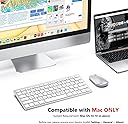
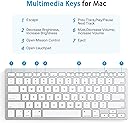
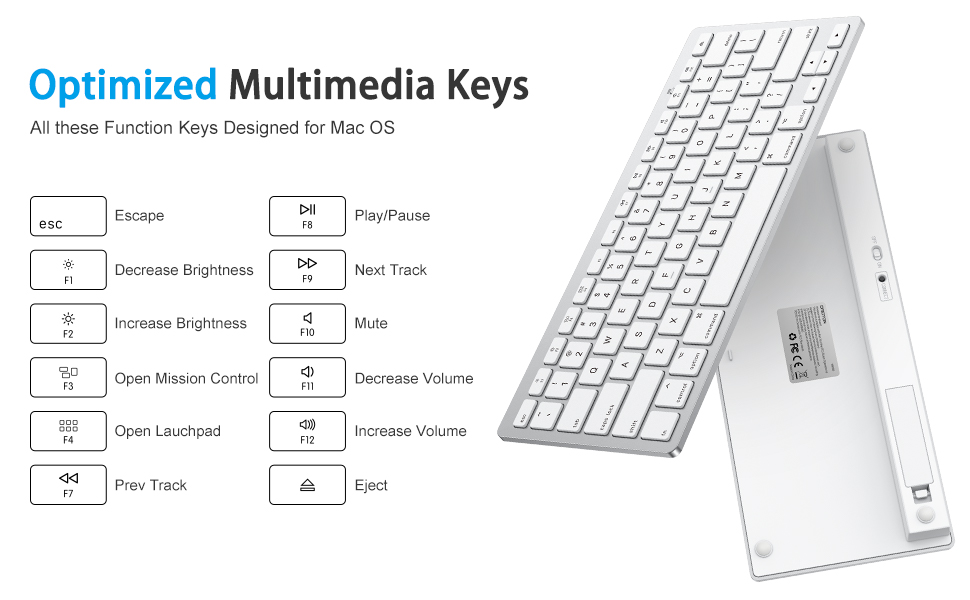
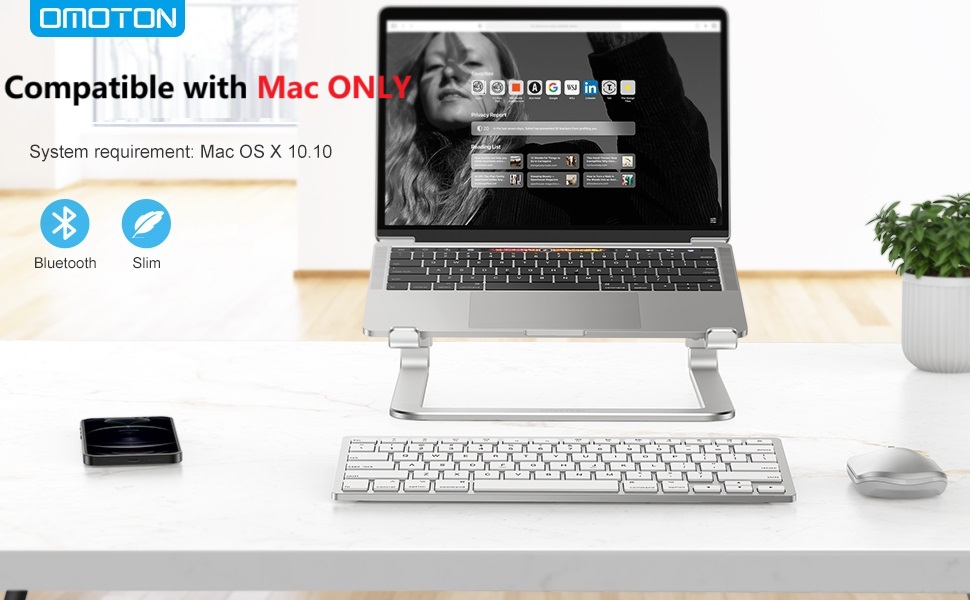
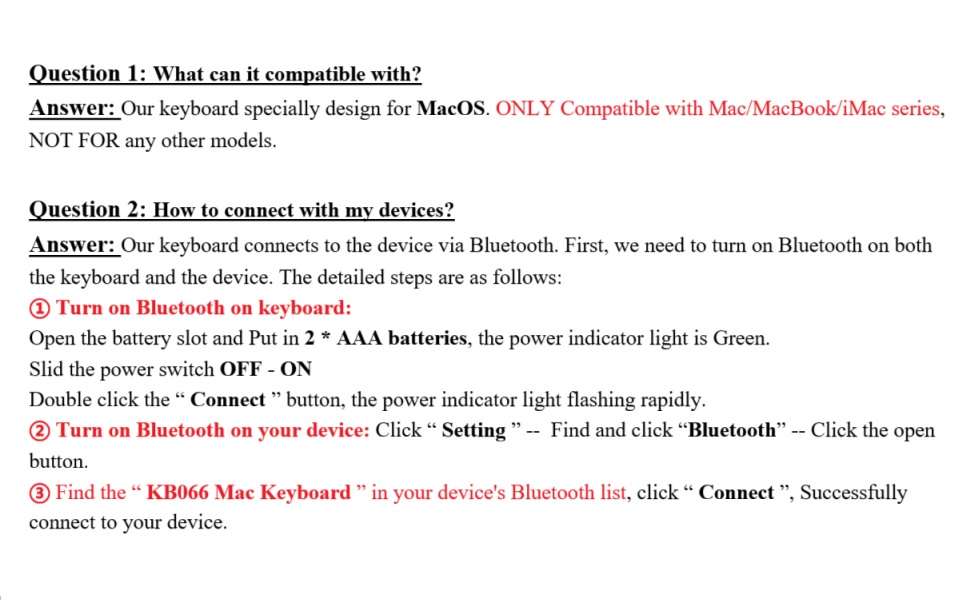
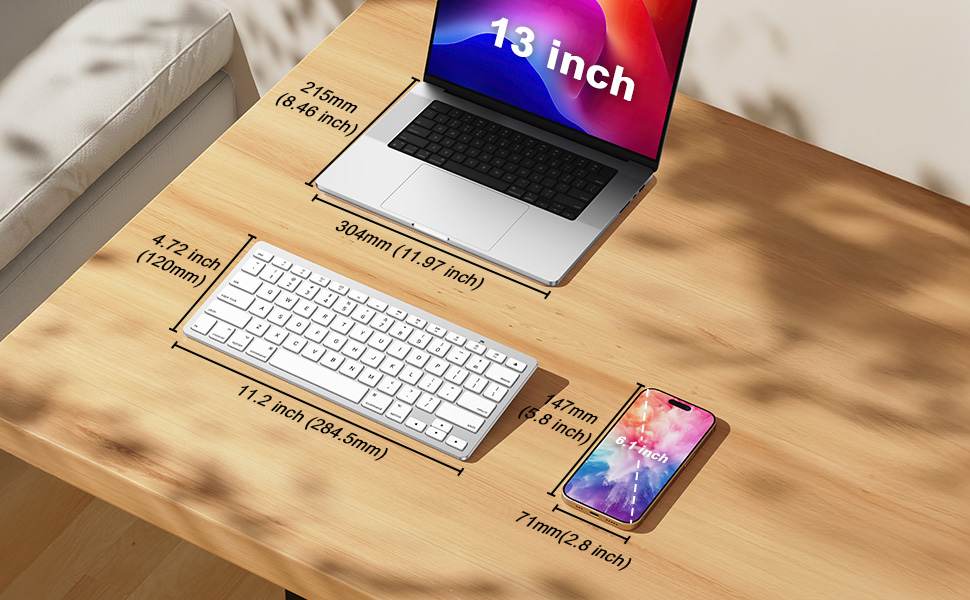
The OMOTON Bluetooth Keyboard is a compact, aluminum wireless keyboard designed exclusively for Mac devices running OS X 10.10 and above. Featuring 78 tactile keys including 12 Mac-specific shortcuts, it offers seamless Bluetooth connectivity via a dedicated pairing button. Powered by 2 AAA batteries (not included), it boasts an eco-friendly auto-sleep mode to extend battery life. Its slim 11.22" x 4.72" profile makes it ultra-portable, perfect for professionals seeking efficient, stylish typing on the go.


| ASIN | B09899K4L6 |
| Additional Features | Bluetooth, Wireless |
| Antenna Location | Office |
| Best Sellers Rank | #321 in Computer Keyboards |
| Brand | OMOTON |
| Built-In Media | USB Cable |
| Button Quantity | 78 |
| Color | Silver |
| Compatible Devices | Mac OS X 10.10 and above (MacBook, MacBook Pro, MacBook Air, Mac, iMac, iMac Pro, Mac Pro/Mini etc) |
| Compatible Operating System Family | MacOS |
| Compatible Tablet Computer Models | AAUB P30 |
| Connectivity Technology | Bluetooth |
| Customer Reviews | 4.1 out of 5 stars 2,428 Reviews |
| Enclosure Material | Aluminum |
| Hand Orientation | Ambidextrous |
| Item Dimensions L x W x H | 11.22"L x 4.72"W x 0.86"H |
| Keyboard Description | Multimedia |
| Keyboard Layout | QWERTY |
| Manufacturer | OMOTON |
| Model Name | kb066 mac |
| Model Number | kb066 mac |
| Number of Batteries Required | 2 |
| Number of Keys | 78 |
| Number of Sections | 1 |
| Power Source | Battery Powered |
| Recommended Uses For Product | Office |
| Special Feature | Bluetooth, Wireless |
| Style Name | Contemporary |
| Switch Type | Tactile |
| Unit Count | 1.0 Count |
| Warranty Description | 12 Months |
M**A
Worth it
I know it a cheap keyboard but legit, I’ve been using it for 6 months now with my iMac and it’s been great! It even has the controls on the F keys for volume, screen brightness and stuff which I didn’t notice at first. I don’t really have a need for a number pad so if you don’t need one either this is a great keyboard. I don’t use it to game cause I got an Apple not a PC, and I don’t type with it heavily but I have written a few papers for school and it’s holding up fine. Battery is great and it automatically turns off and reconnects very easily every time.
A**R
Best Keyboard Ever
Disclaimer, I got this product during the Prime Day sale that went on for about a week. This keyboard was an incredibly amazing value; I got this product for 18.23$ in total. The first keyboard that I received had a mechanical issue where the I key wouldn't work properly; I went ahead and started the exchange process, and I received a replacement the next day in the mail. The new keyboard works PERFECTLY. I love this keyboard so much! It's among the best products I've ever used in terms of value for money. The ergonomic style of this keyboard is actually really amazing, and the keys are super satisfying to click. I can type on this keyboard lightning fast. I own a Macbook Air M1 and I just got a laptop stand for this laptop so that I could sit properly and have good posture, meaning using the built-in keyboard is no longer an option. Honestly, I like this keyboard even more than the built-in keyboard. The buttons sound like mechanical buttons, they are nice and clicky and I love the way they feel when I press them! I don't prefer a larger keyboard that has a num-pad because it takes too much space and makes it so that I have to have my mouse way out to the side, so this product is just the perfect size. It's pretty much a replica of the keyboard I have on my Macbook Air M1, but it's better because the keys are nicer. I love the white color of it as well. For a keyboard that I got for 18$, this keyboard is literally amazing. The keys are nice and satisfying to press, I can type LIGHTNING fast on this keyboard, and there are tons of other cool features! Honestly, if I paid the money to get an apple official version of this keyboard, I'd probably be paying 10 times as much, and it wouldn't have the features that this keyboard has. I also got 40+ AAA batteries from the prime day sale, so that's going to last for an eternity. I love the fact that this keyboard is wireless ie Bluetooth, it's so amazing not having to waste a port by having to plug in the keyboard. Also, the feature that this keyboard has to shut itself off after 10 minutes of inactivity is literally genius, I can only imagine how long this keyboard can possibly run just off of 2 batteries, that's why I said these 40 batteries will probably last an eternity. All in all, this product is an incredible value for the money, and the shipping is very fast which is nice. Honestly, I doubt you could find a better deal for a mac-style keyboard, so go for this one 100% !!!! I have literally never been more impressed by any product I've ever used; this keyboard gets a 20 out of 10 rating. Oh, also, it's very beautiful looking and the function keys are very useful. I can imagine that if someone has a different MacBook, that MacBook might lack the function keys so this keyboard will be very useful for that purpose. Having function keys to control brightness/audio is literally amazing; not only that but there are tons of other useful keys like F3 shows you all available desktops, and F4 brings up all the apps that you have installed and a search bar. GET THIS PRODUCT!!!
M**.
Good, inexpensive substitute for Apple keyboard
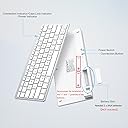
If you're looking for a keyboard to work with your iMac or MacBook, but don't want to pay the prices associated with genuine Apple products, this Omoton compact wireless keyboard is a good substitute. It has the keys and functions you need to work with your Apple computer, including Control, Option and Command keys, and there are also function keys to use to easily access Mission Control and Launchpad. Other function keys are available to change your display brightness, to change the volume, and to move through music tracks you're listening to. I've been accustomed to using a full-sized keyboard (designed for Windows computers), so at first it took some getting used to the smaller size of this keyboard and the loss of the number pad on the right side. I also think that the Omoton keyboard might have slightly less of an incline (it sits a bit more flat) than my Logitech keyboard. I would have liked the power switch to have been at the top or side of the keyboard, instead of being on the back. The first time you pair the keyboard with your computer, you will also have to press a small black button on the back. Once it is recognized and paired with your computer, all you have to do going forward is to turn the keyboard on or off to start typing. There is a slight delay of a second or two before the keyboard inputs will be shown on screen after you first turn it on. When you look at the keyboard, you'll notice that there is a Delete key but not a Backspace key. The Delete key on this keyboard performs both functions. If you are typing and want to remove characters to the left of your cursor, just hit the delete key as many times as needed to remove the characters. Hitting the delete key will not remove characters to the right of your cursor; instead you'll have to highlight them and then hit the delete key. Lastly, there is a small green LED that comes on briefly (above the F11 key) to indicate power when you turn on the keyboard. It does not stay lit while you use the keyboard. The same LED also comes on during the bluetooth pairing process. This LED will also come on when you press the Caps Lock key, and go off when you remove the Caps Lock. The keyboard has a power saving feature that will put itself to sleep if no keystrokes are detected after a certain period of time. This works fine in my experience, as I see a "Connection Lost" notice on my screen when the keyboard goes to sleep, but to me it seems like an unnecessary feature, as the battery in my other keyboard has lasted quite a while without a similar feature. I did not rate the battery life as I have only had the keyboard for a week or two as of writing this review.
J**N
Quality Keyboard for Price -- Perfect for MAC
This keyboard gets the job done for a great price. It is the exact size of a MAC keyboard, so it is nice to have it closer to you when using a MAC on a desk hooked up to monitors. If you don't own a MAC and plan on using this for another computer, just know how small MAC keyboards are as this may surprise you upon purchasing... I have read this keyboard seems not to last with other reviewers... I can't speak to that yet as I have only had it for a few weeks. The only 2 slightly annoying issues with this keyboard is the inability to raise or lower it; it is stuck on 1 setting. And also when the keyboard goes into rest mode, it takes a few seconds to turn back on while you are sitting there clicking buttons. Both of these issues are really nitpicky and I am very satisfied with the quality of this product with how inexpensive it is (compared to Apple's version of a keyboard to be used with MAC). If this keyboard doesn't last or encounters any other issues throughout the course of the year, I will report back.
M**N
The packaging had me worried, but everything works great!
I am so happy that I finally got this. Already, my posture is improving and my eyes feel better. I have a little folding desk that has a shelf. Now the screen is near eye level and both my arms are supported by the desk while I type. I love the feel of this keyboard! The individual keys are SO much better than bizarro MacBook Air weirdo feeling keys. The keyboard is tilted and already my wrists feel better. The Bluetooth connection thing was really easy. I think the key point is for the user to figure out where she/he/they finds the Bluetooth menu on her/his/their individual machine. Also, it took me a minute to figure out how to press the "connect" button on the back of the keyboard. My fingers fumbled, but I figured it out. It's a little black dot. Also, you literally just place the keyboard right next to the laptop and it will start "pairing" which is a pretty bizarre concept to people my age. Anyway, if I can do it, anyone can! The booklet is clear, concise and helpful. There is also a helpful video. If you have an iPhone or hearing aids, put them far away when you first pair the keyboard. In my situation with the MacBookAir, at the top near the volume button is the Bluetooth symbol. I clicked on that and eventually clicked something else which showed the list of choices to "pair." Look for the numbers as instructed in the booklet. It took like literally 3 minutes from unbox to typing. I was a little worried at first, because the keyboard was delivered in its regular box, literally, with no outer box, no padding, no nothing. But all is well. I was a little surprised, too, that I needed 2 AAA batteries. I thought this was rechargeable, but I probably made a mistake. Anyway, I am having so much fun typing on this keyboard that I may never stop writing this review! Cheers!
K**I
WORKS with a Windows PC!
I am typing this review with this keyboard which I use with my Windows PC. Connects just fine and all keys work. Just need to use the laptop keyboard for the delete key because there isn't one on this (Mac doesn't use delete). The command keys act as the windows key and the control key here works the same as CTRL on the PC. So for anyone who might need to use this with either a Mac or PC rest assured, works for both. Battery life is very long as well. I change batteries maybe twice a year and use it for full time work, 40+ hour weeks. UPDATE July 2025: Some of the keys stopped working correctly in a diagonal line from the numbers 2 & 3 down through c & v - typical with wear and tear and repeated use after nearly 2 years. For the price, not a big deal and easy to replace.
S**K
Nice but sometimes it does not connect -often when it's time sensitive and I need it to work!!
Well, it looks good and typing is good. The price was good. The issue is that it doesn't always connect to my MAC, it is battery operated so you will have to keep an eye on that. Sometimes it stays connected throughout the day. Other times, especially when I need to log on to a meeting or something REALLY IMPORTANT...it doesn't connect. It can cause a major freak out...what to do? Turn it off/on, push the connect button, keep trying - nada! Murphy's Law I suppose. I was going to return it but lately it has been cooperative so I am still with it. It's worth a try.
A**R
Seems to work good
It connected quickly and easily, seems to work great. Not sure I’ll be using it every day. I bought it as a back up way to connect to laptop and I’ll explain. I purchased this yesterday, because my MacBook was having issues with the keyboard and Trackpad. For the past week or so every time I put my MacBook to sleep, or restart it, the trackpad and keyboard were non responsive with the exception of the power button. I was able to connect a mouse to It, both wired and wireless. Since those were working, I needed a keyboard and I didn’t have any other keyboards. I decided to order this even while I was troubleshooting and trying to fix the issue. I do think I fixed it (reset SMC and NVRAM) after I placed my order, as I have not been having the issues today. But I am keeping it as a back up in case something like that should happen again. I say all of that because I may not be using it often. I will update if I should have any issues with it in the future. But the buttons press nicely, it’s light weight , sleek, etc. I do like the idea of having a separate keyboard for when I am using it for more than just surfing the web. I do use it for zoom meetings from time to time, my taxes, update some spreadsheets. I do have an Apple wireless keyboard that is paired with my Mac, and this is lighter. I did try to pair that, but I think because it’s paired with the Mac, I have to unpair it… And that’s kind of a hassle. Especially when I initially ordered this, and I was having consistent trouble with the MacBook. I would’ve had to do that every time I wanted to use the laptop.
J**N
Excellent
J'adore les touches, leurs mouvements, comme un piano. Identique à l'original. Pour le prix= Bravo
F**H
اصلي
انصح بع
V**O
Funcionamiento
Que es muy similar al original. Sin embargo hay ciertas funciones en el teclado que uno tiene que buscarle para encontrar la correcta.
D**Y
Small, compact, and lightweight keyboard
Really like this keyboard! It’s small, compact, and super lightweight. It’s perfect for travel and it looks great too. Bluetooth pairing is quick and reliable. It runs on 2 AAA batteries, but they last a long time. I’ve had mine for over a year and only had to change the batteries twice, even with almost daily use for a few hours.
N**.
Good compact keyboard with soft keys and easy connection
This OMOTON Bluetooth keyboard works well, connects quickly and the keys feel soft and comfortable. It’s compact and easy to use with a Mac and it turns off after inactivity to save battery life which is a nice touch. The only downside is that it isn’t USB-C chargeable which would have made it more convenient. If you need a simple wireless keyboard for everyday use this one performs well and is easy to set up.
Trustpilot
2 weeks ago
3 weeks ago