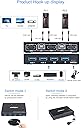
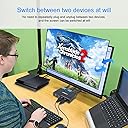
🔗 Streamline your dual-PC setup with AIMOS: One switch, endless efficiency!
The AIMOS 2-Port HDMI KVM Switch is a sleek, metal-encased device that lets professionals effortlessly control two computers using a single keyboard, mouse, and 4K monitor. Supporting 4 USB 2.0 peripherals and offering both push-button and remote switching, it delivers plug-and-play convenience with broad device compatibility and crisp 4K@30Hz visuals—perfect for multitasking managers craving streamlined workflows.
| ASIN | B08GK6V4GB |
| Actuator Type | Push Button |
| Best Sellers Rank | #160,147 in Computers ( See Top 100 in Computers ) #387 in KVM Switches |
| Brand | AIMOS |
| Brand Name | AIMOS |
| Circuit Type | 2-way |
| Color | Black |
| Connectivity Protocol | Usb |
| Connector Type | Plug In |
| Connector type | Plug In |
| Contact Material | Metal |
| Contact Type | Normally Open |
| Contact type | Normally Open |
| Control Method | Remote |
| Controller Type | Wired Controller |
| Current Rating | 1.4 Amps |
| Current rating | 1.4 Amps |
| Customer Reviews | 4.1 out of 5 stars 339 Reviews |
| International Protection Rating | IP54 |
| Item Dimensions | 10.2 x 6.5 x 1.9 centimeters |
| Item Weight | 0.64 Ounces |
| Manufacturer | AIMOS |
| Material Type | Metal |
| Model | 201C02 |
| Mounting Type | Plug-In Mount |
| Number of Items | 1 |
| Number of Positions | 2 |
| Operating Voltage | 5 Volts |
| Operating voltage | 5 Volts |
| Operation Mode | 2 computers share 4 USB devices |
| Operation mode | 2 computers share 4 USB devices |
| Part Number | 201C02 |
| Specification Met | CE, HDMI1.4a, HDCP, IP54 |
| Switch Type | MOSFET/IGBT |
| Terminal | Quick-Connect |
| UPC | 788125932788 |
| Unit Count | 1 Count |
| Wattage | 10 watts |
J**J
Died in less then two months
Did exactly what I wanted for a little under two months, then one of the USB ports died. I would avoid if I were you.
L**N
Simple, excellente qualité et efficace.
Prise en main ultra fastoche. Plug and switch. Écran, camera, clavier peu importe, je le recommande!
I**S
Muy práctico
Funciona bastante bien, para cosas básicas de trabajo, considero que le hace falta algo de voltaje a los puertos USB de salida, ya que no puede alimentar una webcam, solo un teclado y mouse. Viene incluido todo lo que se necesita.
F**S
Works well, but has a strange thing
I connected my home and office computers in this, and also a USB hub to one of the USB ports of the KVM. Switching between computers is quick (less than 2 seconds), so all should be good. However I noticed a strange thing: my Logitech Unifying adapter was connected to the external USB hub, and the computer stopped recognizing the click of the center wheel (usually used for panning documents/pictures/drawings). All other mouse and keyboard functions seemed to be working as should. Connected the Unifying adapter to the mouse port on the KVM, and all worked fine again. My Loupedeck Live shuts down when switching between computers. Since it uses Ethernet over USB, I think it has something to do with network security. But that would be a plus. The only con I have is that pictures lead to think that it uses USB 3.0 ports (blue). The actual product has black ports, and with further inspection, there are not enough contacts for USB 3.0, so these are USB 2.0 at best. Since I won't use the KVM for storage (neither should you, as constant constant disconnecting devices without unmounting will cause damage), this is fine.
J**S
Freesync at 2560x1080 works! 2 computers and 4 ports, works great
I was reluctant to buy this KVM since it had no reviews, i took a chance and glad i did. In the box came 2x HDMI cables, 2x USB cables, and the remote (more in the remote later). Everything needed was in the box and saved me having to dig through all my boxes of computer tables to find what i needed for this KVM. I got everything connected with my gaming desktop and my software development laptop, i connected a Logitech Unifying Reveiver, a Mechanical Keyboard and a wired gaming mouse... everything worked flawlessly. Since this KVM has 4 USB ports and so far i have only used 3 the next step is going to be getting a USB Sound Card and then I can truly have a single solution for both my computers. As far as my setup, I connected the KVM to my computers and my ultrawide monitor and I placed it hidden in the cable space in my desk and i put the remote on the desktop. Need to mention that when both computers are powered on its kind of hard to tell on the switch which machine is the selected one since the LEDs on the KVM box, but on the remote is easier to tell. Finally, the most important thing to me was AMD Freesync. I have an RX580 videocard and a LG Ultrawide 2560x1080 monitor; my biggest concern was that Freesync would not work through the KVM... to my relief it works just fine!!! it connected my gaming pc to my monitor at 75hz and Freesync works perfectly!! now i do not have a full 2K or 4K monitor, thus i cannot speak to that, but for my monitor and the specific resolution it worked just fine!!! Glad i took a chance and bought this even though it had no reviews.
Trustpilot
3 days ago
5 days ago