Desertcart purchases this item on your behalf and handles shipping, customs, and support to South Korea.
⌨️ Elevate your Surface Pro game — type, swipe, and conquer anywhere!
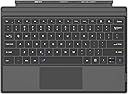
The Arteck Microsoft Surface Pro Type Cover is an ultra-slim, portable Bluetooth keyboard designed specifically for Surface Pro 3 through 7 models. Featuring a magnetic attachment, mechanical keys, and an extra-large touchpad, it offers a laptop-like experience with up to 50 hours of battery life on a quick 1-hour charge. Ideal for professionals and students seeking a compact yet powerful typing solution, it comes with a 24-month warranty and dedicated customer support.


| ASIN | B083NZ77M2 |
| Antenna Location | Business, Education, Everyday Use, Multimedia, Personal, Student |
| Best Sellers Rank | #36,945 in Computers & Accessories ( See Top 100 in Computers & Accessories ) #307 in Tablet Keyboards |
| Box Contents | USB Cable |
| Brand | Arteck |
| Brand Name | Arteck |
| Button Quantity | 78 |
| Colour | Black |
| Compatible Devices | Surface Pro 7/6/5/4/3 |
| Compatible Operating System Family | Windows |
| Compatible Tablet Computer Models | Microsoft Surface Pro 3, Microsoft Surface Pro 4, Microsoft Surface Pro 5, Microsoft Surface Pro 6, Microsoft Surface Pro 7 |
| Connectivity Technology | Bluetooth |
| Country of Origin | USA |
| Customer Reviews | 4.1 out of 5 stars 1,700 Reviews |
| EU Spare Part Availability Duration | 2 Years |
| Enclosure Material | Plastic |
| External Testing Certification | Não aplicável |
| Hand Orientation | Ambidextrous |
| Item Type Name | keyboard |
| Keyboard Description | Surface Type Cover |
| Keyboard Layout | QWERTY |
| Manufacturer | Arteck |
| Manufacturer Part Number | HB187 |
| Minimum Required Operating System Version | Windows 10 |
| Model Name | Arteck Microsoft Surface Pro Type Cover |
| Model Number | HB187 |
| Number of Batteries | 1 |
| Number of Items | 1 |
| Number of Keys | 78 |
| Number of Sections | 1 |
| Power Source | Battery Powered |
| Product Features | Rechargeable |
| Recommended Uses For Product | Business, Education, Everyday Use, Multimedia, Personal, Student |
| Series Number | 187 |
| Special Feature | Rechargeable |
| Style Name | Classic |
| Switch Type | Mechanical |
| Theme | Everyday Use |
| UPC | 741527408732 |
| Unit Count | 1.0 Count |
| Warranty Description | no warranty available |
R**H
Its does not give feeling of Original Laptop.
I recently purchased this Surface keyboard from Amazon, but unfortunately, it does not match the quality of the original keyboard. There is no light indicator on the function keys, which makes it difficult to use. It requires pressing Function Key along with other key. The touchpad also does not provide the smooth and responsive feel of the original Surface laptop keyboard. Additionally, since this keyboard requires charging, it is difficult to determine the battery percentage, which is quite inconvenient. Overall, I regret buying this product. In my opinion, it is better to upgrade your old Surface device with an original keyboard rather than purchasing this alternative.
A**A
Works well but no backlight
Good product , fits well with my pro 6
T**Z
Great Keyboard
The Arteck Keyboard is a fantastic accessory that greatly enhances the functionality of the Surface Pro lineup. As a proud owner of the Surface Pro tablet , I can confidently say that this keyboard is a must-have addition for anyone who uses their Surface device for work, creativity, or entertainment. Design and Build Quality: The keyboard is exceptionally well-built, featuring a sleek and slim design that seamlessly complements the Surface Pro's aesthetics. The attachment mechanism is robust yet easy to use, allowing the keyboard to securely snap onto the Surface Pro tablet. The Alcantara fabric material on the keyboard not only looks elegant but also provides a comfortable and luxurious feel to your fingertips. Typing Experience: Typing on the Arteck Keyboard is an absolute delight. The keys are well-spaced and have a satisfying travel distance, striking a perfect balance between comfort and efficiency. The tactile feedback is precise, making it easy to type for extended periods without experiencing fatigue. The keyboard layout is familiar and user-friendly, so transitioning from a traditional laptop keyboard is seamless. Functionality: One of the standout features of the Arteck Keyboard is its versatility. The keyboard acts as both a protective cover and a keyboard, which means you don't need to worry about carrying a separate case. The adjustable hinge lets you position the Surface Pro at various angles, enabling comfortable typing and sketching experiences. Additionally, the keyboard features shortcut keys that provide quick access to important functions like screen brightness, volume control, and more. Connectivity and Battery Life: Connecting the Artek Keyboard to the tablet is a breeze via Bluetooth, and the magnetic attachment. The keyboard must be charged via USB, but charging is a breeze and pretty quick. Once fully charged keyboard usually last a very long time. Conclusion: In summary, the Arteck Keyboard is an exceptional accessory that elevates the Surface Pro experience. Its impressive design, comfortable typing experience, and seamless integration with the tablet make it an indispensable tool for professionals, students, and creatives alike. While the keyboard might be a bit pricey, its quality and functionality more than justify the investment. If you own a Surface Pro device, the Arteck Keyboard is a must-buy that will undoubtedly enhance your daily computing tasks. Pros: Large touch pad Sleek and elegant design Comfortable and tactile typing experience Versatile hinge for adjustable viewing angles Seamless integration and connectivity with Surface Pro tablets Cons: Cost No backlight Overall, the Arteck Keyboard is a premium accessory that adds value to the Surface Pro lineup. It's a well-worth investment that enhances productivity and makes using the Surface Pro enjoyable.
A**R
Affordable, & it works!
Very good product, I appreciate being able to afford the keyboard that works with the surface. My work gave me the tablet but no keyboard, so it was on my dime. Thank you
A**O
Great product
Really good product and brought some "newness feel" to my surface pro device. Great value for money. Battery life is good and I've charged it just once in the last 5 weeks. An exceptional design effectively meeting needs and exceeding expectations. The responsiveness is pretty amazing.
J**I
Great Quality
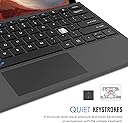
I purchased a replacement keyboard (OEM) once before, it was almost $250, this time based on the age I tried to use the on screen keyboard but that wasnt working. I looked at these that dont charge like the OEM but wasnt sure it was going to work, although when I saw this at the super special price I figured it was worth the gamble. To my surprise the fit an finish of this keyboard is actually nicer than the factory MS one, the keys are smooth and precise, it has a simple process to turn off the trackpad when needed. Charging was simple and even if the internal batteries at some point fail, the charging cable is small and goes right in the side of the surface pro and does not get in the way of anything. This item is amazing, they created a better than OEM at a tenth of the price, I think I grab a spare so I wont need to worry next time I spill on it or break it. Get off that fence and order one!
Q**N
Trackpad difficult, otherwise great!!
I’m a masters student and use it everyday for hours on end. Overall, this keyboard is great value for the money. To begin, the battery life is excellent. It’s easy to charge with the USB port on the surface charging brick. The keys are responsive and have a good “click” to them. The magnet bar which attaches it to the surface tablet it also strong, I’ve never had it fall off accidentally. The only downside is the trackpad. It is very small... then again I’m 6’4” with large hands so it may be easier with smaller hands?? In addition, it is difficult to click subtle items on the screen using this trackpad. I would only recommend this keypad if you plan on regularly using a pen or a mouse. Conversely, if you don’t care about a very mediocre trackpad then go for it. I use a mouse with my surface and treat it more as a “desktop” than a tablet. Only when taking notes do I use it as a tablet. In general I would recommend this keyboard. I would also recommend using a mouse with it if you plan on spending long hours on it. For the money I don’t think there’s a better alternative :)
Trustpilot
1 month ago
3 weeks ago