Desertcart purchases this item on your behalf and handles shipping, customs, and support to South Korea.
🖨️ Elevate your print game—where style meets pro-level precision.
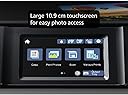
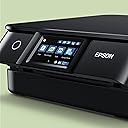
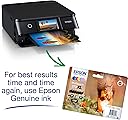
The Epson Expression Photo XP-8700 is a compact, wireless A4 multifunction inkjet printer designed for professionals and photo enthusiasts. Featuring a 10.9 cm touchscreen, dual front-loading paper trays, and a rear specialty feed, it supports versatile media including CDs/DVDs. Powered by 6-color Claria Photo HD inks, it produces high-resolution prints (up to 5760 x 1440 DPI) with longevity of up to 300 years. With seamless Wi-Fi connectivity via the Epson Smart Panel app, automatic duplex printing, and a motorized output tray, it combines style, convenience, and professional photo quality in one sleek device.
| ASIN | B09GKZ9VJH |
| Additional Printer Functions | All In One |
| B&W Pages per Minute | 9.5 ppm |
| Best Sellers Rank | 6,632 in Computers & Accessories ( See Top 100 in Computers & Accessories ) 14 in Portable Photo Printers |
| Box Contents | Power Cord |
| Brand | Epson |
| Brand Name | Epson |
| Color Depth | 24 bpp |
| Color Pages per Minute | 20 ppm |
| Colour | gray |
| Compatible Devices | Printer |
| Connectivity technology | Wi-Fi |
| Control Method | App |
| Country of Origin | Japan |
| Customer Reviews | 4.2 out of 5 stars 952 Reviews |
| Display Type | LCD |
| Dual-sided printing | Yes |
| Duplex | Automatic |
| Hardware Interface | USB |
| Initial Page Print Time | 500 ms a 1 segundo |
| Ink Colour | Black, Cyan, Magenta, Yellow, Light Magenta |
| Item Dimensions D x W x H | 13.4D x 13.7W x 5.6H centimetres |
| Item Type Name | Inkjet Printer |
| Item Weight | 5.5 Kilograms |
| Manufacturer | Epson |
| Maximum Copies Per Run | 50-100 copias |
| Maximum Copy Resolution Black and White | 5760 x 1440 dpi |
| Maximum Copy Resolution Color | 5760 x 1440 dpi |
| Maximum Copy Speed Black and White | 33 ppm |
| Maximum Print Resolution Black and White | 5760 x 1440 DPI |
| Maximum Sheet Capacity | 100 |
| Maximum Supported Paper Size | A4 |
| Maximum print Resolution Color | 5760 x 1440 DPI |
| Model Name | Expression Photo XP-8700 |
| Model Number | C11CK46401 |
| Model Series | XP |
| Model name | Expression Photo XP-8700 |
| Network Connectivity Technology | Wi-Fi |
| Number of Drivers | 2 |
| Number of Trays | 2 |
| Other Special Features of the Product | Auto Power On, Auto-Duplex, CD-Printing, Memory Card Slot, Touch Screen |
| Output sheet capacity | 100 |
| Paper Size | 210 millimeters |
| Power Consumption Size | 2 Watts |
| Print media | Card stock, Glossy photo paper |
| Printer Output Type | Colour |
| Printer Resolution Horizontal in Black and White | 2267 Centimeters |
| Printer Resolution Vertical in Black and White | 576 Centimeters |
| Printer Type | Inkjet |
| Printing technology | Inkjet |
| Processor Count | 1 |
| Product Warranty | 1 Year |
| Resolution | 5760 x 1440 |
| Scanner Type | Photo |
| Series Number | 10 |
| Special feature | Auto Power On, Auto-Duplex, CD-Printing, Memory Card Slot, Touch Screen |
| Specific Uses For Product | Home use, document printing, photo printing |
| Total USB 2.0 Ports | 1 |
| Total USB Ports | 1 |
| Unit Count | 1.0 count |
| Warranty Type | limited warranty |
| Wattage | 2 watts |
S**N
I escaped the Canon WiFi Bermuda Triangle!
After years of loyal (some might say masochistic) service to the Canon printer empire, I finally broke free! Last week, I, a creature of habit, even bought another Canon. Oh, the foolish optimism! The WiFi setup, a task that I believe Canon engineers designed specifically for masochists and telekinetic wizards, proved utterly impossible. My router and the printer engaged in a silent, passive-aggressive standoff, refusing to acknowledge each other's existence despite my increasingly desperate pleas (and a few muttered expletives). Back to the seller it went, a monument to my fleeting hope for a wirelessly connected life. And then, like a beacon in the inky blackness of my printer-related despair, came the Epson XP-8700. What a revelation! I swear, the setup process was so easy, I thought I'd accidentally downloaded a self-installing spiritual guide. It practically set itself up while I was still trying to locate the power button. No wrestling with cryptic error messages, no consulting ancient online forums for a solution to a problem only five other people on Earth have ever encountered. Just… it worked. It connected to my WiFi faster than I can say "ink cartridge replacement." But wait, there's more! Not only did this printer spare me from a nervous breakdown, it also looks like it belongs in a sleek, minimalist art gallery, not my cluttered home office. Its compact design is a breath of fresh air compared to the blocky, utilitarian appearance of its predecessor. And the functionality? Oh, the functionality! The intuitive touchscreen is so user-friendly, even my technophobe dog could probably navigate it (if she had opposable thumbs, which, thankfully, she doesn't). This bad boy isn't just a pretty face. It prints photos that actually look like photos, not blurry approximations of them. The separate ink cartridges are a godsend – no more replacing an entire multi-color cartridge because I ran out of just one shade of blue! It has automatic duplex printing, saving trees and my sanity. And the front-loading paper tray? Pure genius! No more contorting myself to load paper from the back, feeling like I'm performing some kind of printer-based yoga pose. Plus, it's got a dedicated photo tray, so you don't have to swap out paper every time you want to print a masterpiece. And yes, it scans and copies with admirable speed and clarity – a true all-in-one champion. In conclusion, if you're teetering on the edge of printer-induced madness, do yourself a favor and buy the Epson XP-8700. It's not just a printer; it's a therapeutic experience. My blood pressure has plummeted, my WiFi is no longer an enigma, and I can finally print without wanting to throw something out the window. Bravo, Epson. Bravo!
A**A
epson XP-8700
Very happy with this printer. After careful step by step setup it is working splendidly with my iMac M4. This printer has a small compact footprint which is excellent. Print quality is excellent. It is nicely made - scans, has an additional usb and flash disk port, paper trays, AirPrint. Although it has separate inks and does not have eco tank inks - I rather chose the XP-8700 because of the 6 COLOURS and the PAPER TRAYS. (Are you listening Epson?) Epson would be foolish to stop manufacturing this printer. Lovely little printer connects to iMac and mobile devices over wifi with AirPrint easily and efficiently. The Epson Creative software works on all my IOS mobile devices - it would be good if such software would be available for desktops too so that is something Epson should look into. ***** from me
S**D
Perhaps I was just unlucky?
Epson Expression XP-8700 Inkjet Printer – Review I have reluctantly awarded this product as much as four stars. Bear with me, because it came within a heartbeat of being returned to its Amazon supplier after a tortuous six hours spent trying to get it to print! The only way I eventually managed to resolve the problems was by using Google Chrome's AI assistant, which identified an issue that I am convinced nobody without a fairly comprehensive knowledge of Windows, Microsoft Word and Epson's own software would ever have thought of! This printer is a direct replacement for my very old HP Photosmart C5180, which has provided sterling service over many years. Unfortunately, persistent blocked nozzles finally suggested that its working days were over and it was time for a replacement. Having installed the Epson driver bundle to provide printing, scanning and copying facilities, with the printer connected to my desktop via a dedicated USB cable, I was somewhat perplexed when it simply refused to print! The problem, as it eventually transpired, was that the software had somehow defaulted to the Photo Tray, something that was not at all obvious from the printer settings. This also generated a persistent prompts to remove or replace the CD/DVD tray, which is located underneath the main paper tray. Only after considerable investigation was the solution discovered. It involved making changes within Microsoft Word itself, navigating settings that would mean absolutely nothing to the occasional user – such as me! For anyone experiencing the same problem, the solution is relatively straightforward once you know where to look: Open a Word document. Select Layout from the top ribbon. Locate the small arrow in the bottom-right corner of the Page Setup section and click it. In the Page Setup dialogue, locate the paper source settings. Change the default setting from Photo Tray to the appropriate main paper tray. That resolved the printing problem! I just hope there are no further surprises lurking around the corner because, I have to say, I actually quite like this printer. It has a relatively small footprint and now is working as intended However, I really shouldn't have had to spend six hours getting to this point. Be warned!
F**C
Excellent all round printer - now it works with Windows 10
Used for a home/ SME printer to replace my XP-6100. Very easy to setup. The Epson site, which is shown in the very brief setup sheet, has several sequential videos which show the complete process. Basically: connect with your USB cable if using direct connect and switch on. Put in some paper, install the 6 included cartridges and that’s it. The printer then goes through the quality analysis and alignment process and that’s it The included CD is pretty redundant, as all it does is to tell you there are updates available, so you will have to be internet connected to get them all initially. Print quality is great, the LCD screen is much larger and more intuitive than the 6100 and the extending of the print output tray is all automatic now, as is the process of shutdown. Printer ink replacement is much simpler with more space and access and the scanning function seems a lot faster One BIG beware, which isn’t the fault of the printer by the way. My previous 6100 and this 8700 both refuse to print with the error message, ‘the system cannot find the file specified’ at the beginning This is due to Microsoft’s latest Win10 update KB5010342 which caused that problem on a lot of printers. Uninstall that update and all is well. Epson or MS will no doubt fix that soon hopefully, but I now have a fully functional XP-6100 to get rid of! Oh well . . such is the life of Computer stuff. Very pleased so far with this little beastie! The problem it turns out, was the Print Spool Service. Switch to Direct Printing and all is well. Thanks to Epson for the NON help!
M**Y
Ridiculous ink prices, but decent printer.
I struggled with what rating to give this. The printer itself is very good. it has all the features I wanted and printed well. Then the ink ran out. Perhaps I should have checked this before buying the printer (Should I really though!), but I paid £103 for the Printer and a set of XL cartridges are £130. Ink has always been expensive but for 1 set of ink cartridges to cost more than the printer is very poor. So, if you are rich and don't mind spending £130 each time you need to fill it with ink then go ahead, its a very good printer 5 stars. If you want to pay a fair price for the inks then I'm afraid its a pass. 1 Star from me. A perfectly good machine that's 1 year old is now going to the tip.
S**N
Great printer, great price
This was my first venture into such a functional printer, the quality is impressive. It took a bit of messing about to get the wifi setup, the app really helped smooth it out. I have used this printer for various documents, homework, photos and I even put magnetic photo paper through the rear feed. This printer even prints on both sides of the paper. The ink you get with the printer will last a bit, but as we all know, these cartridges are never full. Official cartridges are in the pricy side, but I imagine quality demands it, although there are alternatives which we know can be just as good. The screen is touchscreen and intuitive, it has a variety of options and settings. The scanner is quick and quiet, the printer has a quiet print setting, however it isn't particularly loud. It prints fairly fast, even when doing photos, I would not recommend this for bulk printing as other companies will print far cheaper for you if you can wait. It does have a cartridge for maintenance and keeping the insides clean, this will need replacing from time to time.
M**N
Compact all in one printer
Very happy with this all in one printer. It prints reliably from my phone, iMac and iPad, produces excellent quality images on gloss or matt photo paper and also works well as a photocopier for occasional use. The original ‘starter’ ink cartridges seemed to last quite a long time and I’ve had no problems with poor quality printing even if it hasn’t been used for a while. Original inks aren’t cheap (£55/set of 6) but they are probably no more expensive than similar printers. It’s also easy to set up and use. Downloading the Epson Print App adds functionality and more control when you are printing outside of mainstream applications.
M**R
OK - But.............
Print quality is good. It does drink ink e a vast rate and with XL Epson Ink costing way more than the printer it's not cheap to run (remanufactured ones are available at a fraction of the price but quality can be iffy). Also the thinking time from pressing print to it actually start to print is abnormally slow if printing photos . Conclusion good prints, cheap to buy, expensive to run and a little slow.
M**O
buona
facile e intuitiva , sopratutto stampa bene , almeno fino ad ora
L**R
Super Drücker
Super Drücker
B**3
CORRESPOND A L ATTENDU
Quelques difficultés pour l'installation, mais fonctionnement parfait une fois celle-ci faite
K**D
ممتاز
شكرا جزيلا
D**I
Eccezionale
Mi è piaciuto tutto specialmente la stampa da vero professionista e che può stampare direttamente su CD e DVD , io lo comprata per questo specifico motivo . Prezzo più che buono anzi buonissimo . Grazie e complimenti per le tantissime funzioni della Stampante.
Trustpilot
1 week ago
1 month ago