Buy anything from 5,000+ international stores. One checkout price. No surprise fees. Join 2M+ shoppers on Desertcart.
Desertcart purchases this item on your behalf and handles shipping, customs, and support to South Korea.
๐ Own the room, one slide at a time.
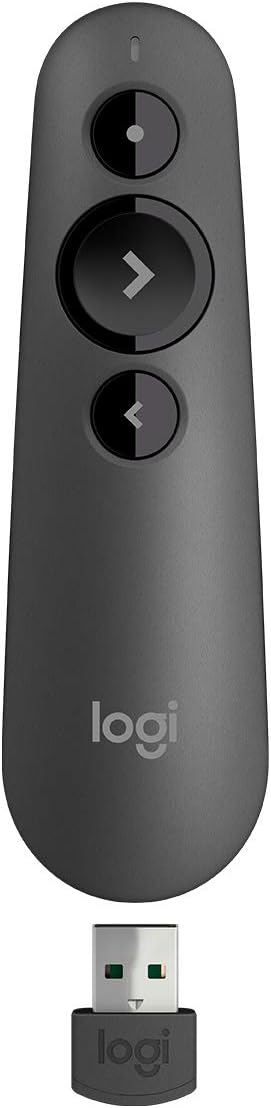
The Logitech Wireless Presenter R500s is a sleek, ergonomic presentation remote designed for professionals who demand freedom and precision. With a robust 20-meter wireless range, dual USB and Bluetooth connectivity, and a vivid red laser pointer, it empowers seamless control across Windows, Mac, iOS, and Android platforms. Its smart battery management delivers up to 12 months of uninterrupted use, while the Logitech Presentation App offers customizable controls and real-time battery monitoringโmaking every presentation smooth, confident, and impactful.


| ASIN | B0972FLM2Z |
| Additional Features | Ergonomic |
| Battery Type | AAA |
| Best Sellers Rank | #545 in Office Products ( See Top 100 in Office Products ) #1 in Office Presentation Remotes |
| Brand | Logitech |
| Built-In Media | Item |
| Button Quantity | 3 |
| Color | Red Laser |
| Compatible Devices | Computer, LCD Monitor, Television |
| Connectivity Technology | Radio Frequency |
| Controller Type | Android, iOS |
| Customer Reviews | 4.5 out of 5 stars 588 Reviews |
| External Testing Certification | Nรฃo Aplicavel |
| Global Trade Identification Number | 00097855171351 |
| Item Dimensions L x W x H | 4.9"L x 1.4"W x 1"H |
| Item Type Name | Presentation Pointer |
| Item Weight | 0.2 Ounces |
| Manufacturer | Logitech |
| Max Number of Supported Devices | 1 |
| Maximum Number of Supported Devices | 1 |
| Maximum Range | 20 Meters |
| Mfr Part Number | 910-006518 |
| Model Name | R500 |
| Model Number | 910-006518 |
| Number of Batteries | 1 AAA batteries required. (included) |
| Smart Home Compatibility | Not Smart Home Compatible |
| Special Feature | Ergonomic |
| UPC | 097855171351 |
| Unit Count | 1.0 Count |
| Warranty Description | 1 Year Limited Hardware Warranty |
J**R
Great remote for presentations
Great presentation remote. It works well and is very responsive. It's plug and play. It has a good range and only needs one battery. I like that the receiver stores easily within the remote. The laser pointer is nice, but if you're wanting to point at a monitor (instead of a projector screen), you'll probably need a green laser.
J**N
Works great both USB and Bluetooth
Bought this because a presenter was insistent that he control his own slides for a banquet and we didn't have a method to put a laptop on the stage. Using a USB extension cable we got the receiver above the heads of the audience, and the presenter had no problems controlling his show from the stage 50' feet away. Also, although Powerpoint/Keynote is the usual use for such a controller, we used it to control ProPresenter with no issues. The presenter never used the laser pointer, so I can't speak to that functionality. I specifically bought this dual mode (USB/Bluetooth) so that I could also use it with IBooks on my IPad. That functionality is just great, and now I can run on the treadmill and turn pages in my book without taking my hands off the handles.
F**L
Recommended by my speech coach
I bought this because I was scheduled to speak at an international event & the event host said they did not have a handheld way to advance the slides, but I was welcome to recruit someone at the event. Saying, "next slide" over and over was simply not going to work for me. My speech coach suggested this specific product and I could not be happier. It is super basic and super simple to operate. The USB dongle stows in the clicker & I just plugged it into my laptop & I was ready to start advancing slides. If you plan to use someone else's computer & bring your slides on a thumb drive, make sure the host computer has 2 USB slots - one for the presentation and one for the dongle. I think it can also work via bluetooth, but I did not use that functionality. 100% recommend! Edit: The only negative is that the built-in laser pointer only shows up on old fashioned screens, not on LED screens. I maintain my 5 star rating, but more & more venues use LED big screens. I don't even know if there are pointers that work on them.
L**8
Works fine
Works great and easy to use. Price could be better.
M**P
Seamless and Comfortable for Zoom Presentations
I recently used the Logitech Wireless Presenter R500 for a Zoom presentation and absolutely loved it. It connected seamlessly and made advancing my slides completely stress-free, letting me focus on my delivery instead of the tech. I didnโt end up needing the laser pointer for a virtual talk, but the remote itself fit perfectly in my hand and felt very natural to use. The compact, low-profile design also meant it was barely noticeable on camera, which I really appreciated. Overall, itโs a simple, reliable presenter that Iโd happily use again and recommend to others.
R**O
IPAD APPLE LASER POINTER AND SLIDE PRESENTER
I have a presentation with slides on a big screen. I have it on my IPAD. I needed a slide changing device to show my slides. You do have to buy an adapter to connect the R500 USB to the iPad. I have tested the R500 many times now and it works great; as represented. It is very simple to operate. I would like the instructions to be more clear about how to sink it and how to turn it off at the end. I had to sink it several times before it would stay on, which is me not doing something correct; not the R500. Also, I could never find out how to shut it off so I just remove the battery. I worry that it may go off on its own, but for an hour presentation that has 10 -15 minutes of inactivity I donโt want it to go off in the middle of my talk. That is a fear, not a fact; but that should be addressed in the minimum instructions. I trust LOGITECH brand so I will have to figure it out; but the above info would be helpful. Roger of Orlando
B**.
Love t
So comfortable to hold it!! Works well and like the design of connector attached
A**R
Not Truly iPad-Compatible, Despite Claims
Although the product specifies it is not compatible with iPad Pro models, it claims to support other iPads running iOS 8 or later. However, newer iPadsโsuch as the iPad Air M3โrun iPadOS, not iOS. That distinction seems critical, as the device does not function correctly under iPadOS 18.5. Before purchasing, I asked Amazonโs Rufus whether the device would work with my iPad Air M3. Rufus responded that it was compatible with iPads running iOS 8 or later. Technically, that statement is correctโbut incomplete. Rufus did not mention that iPadOS is a separate operating system, and the device appears to lack compatibility with it. The remote connects easily to the iPad via Bluetooth or the included USB receiver, and the iPad recognizes it. Unfortunately, the Forward and Backward buttons (the remote has just three: Laser Pointer, Forward, and Backward) do not advance slides in PowerPoint or Keynote. Instead, they only navigate through interface elements like menus, making the device unusable for presentations on iPad. In contrast, the remote works as expected with an iPhone 16 (iOS 18.5) and an iMac running macOS Sonoma 14.6.1. If youโre using an iPad running iPadOSโespecially a newer modelโbe aware that this product may not be compatible, even if descriptions (or digital assistants like Rufus) seem to suggest otherwise.
C**R
Great, comfortable remote
Really satisfied with this remote. Opted for the 3-button version and love the large advance button in the middle: easy to feel for it while presenting without looking down. I primarily use it from about 40 ft from where the USB sensor is plugged into the computer and it works really well.
J**.
Excelente produto!
Excelente produto!!! Nรฃo falha no Bluetooth e atende as expectativas
S**J
Plug and Play
3 buttons (laser, forward, and backward). Comes with a Duracell battery inside. Worked well without any flaw.
D**F
Original Product
Original product, works great. Thanks
A**.
Good product as expected
Trustpilot
1 month ago
1 week ago