


Desertcart purchases this item on your behalf and handles shipping, customs, and support to South Korea.
๐ง Upgrade your 3D printing gameโnever run out, never pause!
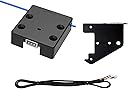
The Original Creality Ender 3 V2 Filament Runout Sensor is a precision-engineered module designed for 32-bit motherboards (versions 4.2.2 and 4.2.7) across multiple Ender and CR-10 series 3D printers. Featuring a mechanical proximity micro switch and a blue LED indicator, it detects filament presence in real-time to prevent print failures. The sensor boasts a modular, stylish frosted cover design and comes with an installation bracket for Ender 3 series printers. Firmware flashing is required for Ender 3 models, while Ender 6 and CR-10S PRO printers are ready to use out of the box, ensuring seamless integration and enhanced printing reliability.
| ASIN | B099ZT1KNY |
| Best Sellers Rank | 89,755 in Business, Industry & Science ( See Top 100 in Business, Industry & Science ) 2,291 in 3D Printer Accessories |
| Brand | HOCENWAY |
| Colour | black |
| Country Of Origin | China |
| Customer Reviews | 4.3 out of 5 stars 377 Reviews |
| Display Type | LCD |
| Display type | LCD |
| Item Weight | 50 Grams |
| Item weight | 50 Grams |
| Manufacturer | HoCenWay |
| Manufacturer Part Number | Ender 3 V2 Filament Runout Sensor |
| Material | Plastic |
| Model Number | Ender 3 V2 Filament Runout Sensor |
| Operating Temperature | 15 Degrees Celsius |
| Smart Home Compatibility | Not Smart Home Compatible |
| UPC | 791548328182 |
| Unit Count | 1.0 count |
| Voltage | 3 Volts |
M**E
Another great upgrade for my ender 3 pro
As far as I know I now have most or all of the Creality upgrades available for my ender 3 pro, with this in mind I struggle with the firmware, they didn't seem to have the file which related to all of the upgrade combinations I have on their website. After talking to Creality tech support over a period of a couple of days they managed to provide the firmware that matched my hardware. Although it worked, it sometimes crashed , so I took the bull by the horns and ended up adapting my own from source. Now it works better than it ever did. Really happy with it now, I dont blame Creality as I think it may have been a language barrier which caused a lot of the confusion. All in all the machine works really wel , and I happy with it.
R**N
Awesome
Don't doubt or delay, these work like a dream
S**Y
Great but BEWARE if have a dual gear extruder
I have an Ender 3 V2 Neo and it does fit but it's not easy to assemble. Be prepared to get stuck into dissembling your machine. Not only do you have to get to your motherboard compartment but you'll have to remove extruder, frame and make sure have some wire straps ready. It will need a upgraded firmware were it doesn't prewarn you that it could break your machine but that's the firmware NOT the product. The other big thing to take into account, if you've upgraded your extruder to a dual gear, it's much taller than the frame that is provided so before you make my mistake, try and work out if it will fit. My advice get to fusion or Blender and design a stand to make it fit for purpose. Now you've got it attached and fitted. Great. It does actually work brilliantly, it will save you money in the long run. I ran a print and the filament snapped, it paused the print, so I changed the filament (easy to do with the firmware) and continued the print as if nothing happened. No reprint, no waste, brilliant The reason why I put three star its because it doesn't prepare you and warn you for potential risks
D**E
First upgrade Iโve bought that wasnโt worth the hassle
I have a very pimped-out Ender 3, I bought this really just to complete the build. Itโs a pain to be honest - hard to push filament through, and tricky to find firmware that works with the upgraded board and the bltouch and this all at the same time. I bought it and am not using it, perhaps thatโs all you need to know!
A**6
lรคsst sich einfach montieren
auf YT findet man ein Video zur Montage, wo fast der ganze Drucker zerlegt wird. Im Grunde muss man nur den Extruder und Stepper demontieren und dann die 3 Muttern bei den Fรผhrungsrollen der Z-Achse demontieren und schon kann man das Montageblech ersetzen. Die ganze Prozedur dann in umgekehrter Reihenfolge fรผr den Zusammenbau. Positiv am Sensor ist, dass nun das Filament nicht mehr an der Gewindestange des Z-Antriebes scheuert und genau in den Extruder gefรผhrt wird. Preislich ist das Ganze ok. Bescheiden ist aber eher die Suche nach der richtigen Firmware, insbesondere, wenn auch Touchscreen und CRTouch verbaut sind. Ich weiร als Anfรคnger nicht, welche Firmware ich hier benรถtige. Meines Erachtens ist die 3D-Szene etwas chaotisch und unstrukturiert. Warum kann man keine Liste mit Firmware erstellen, wo auch die Features beschrieben sind. Bin noch auf der Suche nach der korrekten Firmware.
S**8
Nickel
Comforme avec cr10 v2 ๐
J**.
Perfect fit for Ender 6
This perfectly replaced the original part on my Ender 6. It was an exact fit to the existing bracket, and it was easier to feed than the original part. It works just like the original.
L**I
Funktioniert einwandfrei
D**Y
Never ruin another print due to running out of filament
This is perfect for my ender 3 v2. Rather than running out and the printer thinking it is still extruding, this sensor pauses the print until you reload and it will then resume where it left off. Perfect....
Trustpilot
1 month ago
1 month ago