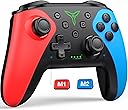
ELISWEEN Wireless Switch Controller for Switch/Lite/OLED, Programmable, Turbo, Vibrate, Gyro, Ergo Design, Auto Wake-Up, 10-Hour Battery
Product ID: 389468231
⚡Turbo Mode
🎮Programmable Buttons
🔋10-15 hr Battery
Desertcart purchases this item on your behalf and handles shipping, customs, and support to South Korea.
🎮 Level Up Your Playtime!
The ELISWEEN Wireless Switch Controller is a high-performance gaming accessory compatible with Switch, Lite, and OLED models. It features programmable buttons, a turbo function, and a long-lasting battery, ensuring an immersive and comfortable gaming experience.


| ASIN | B094VK65VP |
| Additional Features | Ergonomic |
| Best Sellers Rank | #110 in Video Games ( See Top 100 in Video Games ) #1 in Wii U Gamepads & Standard Controllers |
| Brand Name | ELISWEEN |
| Button Quantity | 10 |
| Color | Red+Blue |
| Compatible Devices | ['Nintendo Switch', 'Nintendo Switch 2', Lite', OLED'] |
| Compatible Video Game Console Models | Nintendo Switch |
| Connectivity Technology | Wireless |
| Controller Type | Switch |
| Customer Reviews | 4.4 4.4 out of 5 stars (7,578) |
| Hardware Platform | wii, wii u |
| Item Weight | 0.26 kg |
| Manufacturer | Qixun Tech |
| Model Name | controller |
| Model Number | X107 |
| Package Quantity | 1 |
| Power Source | Battery Powered |
T**S
Perfect for additional controller for Nintendo Switch
Works perfectly with Nintendo Switch, easy to pair and doesn't need charged very often.
J**A
Pairs easily and performs great.
This game controller is wonderful. I was EASILY able to pair it with my old TV for setting up and playing Amazon games. My TV searched and immediately recognized the controller as "PRO controller". The grip fits comfortably in my hand. I feel I got a good product for a great price. :)
D**A
Great Pro controller alternative.
I have never used an actual Nintendo Pro controller, but for $80. I was looking for something a bit cheaper. For the $30 I paid here, it works great. It feels comfortable, the button layout is good, and the buttons are nice and punchy. They are not stiff and don't take excessive force to push, but not soft enough to question if you are providing input. All the buttons have been responsive for the 10 or so hours I have used it. The main thing I wanted was bottom buttons. I personally like mapping A and B to the handles for jumping/sliding/ducking actions (and since I play FPS games with southpaw controls). The locations of those buttons are little too far up on the handle, but they are still reachable. Could be better for better finger tip access. I'm not sure if this is the controller or the game I have played with it, but the there does feel to be some excessive dead zone in the sticks. Specifically in Metroid Prime 4. Not awful, but noticeable. I have not had any connection issues. It connects to my Switch every time. My original Joycons (still from 2017) were drifting and randomly disconnecting. Thus, the need for something better. Size-wise, I have small-ish hands and it feels ideal. Way better than Joycons, which were designed to fit a 2 year old's hands. All that said, I have only used this controller with Metroid Prime 4, so I can't speak for different style games like Smash Bros or something. Overall, a good option for a Switch Pro controller. Does it feel cheap? A little. It doesn't have heft to it like my Xbox Elite 2 controller (I wish I could just use that for the Switch), but it works just fine and does what I need it to do.
M**E
Good value, no complaints
I have had this for about three months and so far I am quite happy. It handles well, and the motion feels crisp and smooth. The battery life is very good, and it charges quickly. It is a bit smaller than some other models, which is a bonus for me as both my wife and daughter have smaller hands and find this very comfortable. I'm considering picking up a few more to have as spares. This is a good value for your dollar.
S**S
Excellent budget controller
I never write reviews, but have had 2 of these for 3 years and both of them still work amazing. Genuinely the only off-brand videogame controller I've ever had (for any console) that has been worth the money. And the battery life is great as well, I almost never have to charge them. Small note: connecting them is a bit weird, hold the home and y button while on the "Change grip/order" section of the switch's "controller" menu. If connecting to a PC, do the same thing while searching for bluetooth devices. It's great that there's a way to not pay nintendo $80 for a controller while also not feeling like you're sacrificing quality.
Trustpilot
2 months ago
2 months ago