Description
- Compatible with devices that have Thunderbolt 4 port and/or video-enabled USB-C port, Windows 10 RS3 or newer, MacOS (Big Sur Version 11) or newer, iPadOS (Type-C iPads only); Recommended for Thunderbolt-enabled Laptops manufactured Year 2019 and newer.
- This docking station has 12 ports that include SD Card Reader, Audio In/Out, USB-C 3.1 Gen 2 port with PD 3.0 Fast Charging, 2x Thunderbolt 4 ports, 2x HDMI 2.0 ports, Gigabit Ethernet, 2X USB-A 3.1 ports, and 2X USB-A 2.0 ports
- High-def resolutions of up to 8K @ 60Hz for a single display, up to 4K x2 for dual display, triple display support available for select laptops
- Connect, power, and display video at the same time through a single cable connection with this docking station.
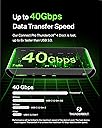
- Docking Station supports up to 3 extended displays. Display compatibility is limited based on host and OS. Verify host compatibility and required connectivity. M1-based MacBook computers can only enable one extended screen; Intel-based MacBook computers require a USB-C to video adapter to enable two extended screens..Power Delivery up to 90W to power laptops, tablets, smartphones, hard drives, and more.This docking station supports 40Gbps for fast data transfers.
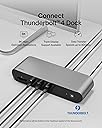
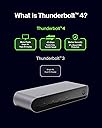
Cater to all your connectivity needs with the Belkin Thunderbolt 4. The ultimate docking solution for your Mac or Windows laptop, it has 12 ports to connect your MacBook or Windows laptop to multiple devices, video, ethernet, and power through a single Thunderbolt 4 cable – enough to receive recognition from entities such as The Verge and Forbes. Get up to 40Gbps data transfer speeds—that’s 8x faster than USB 3.0. Charge your laptop and other connected devices simultaneously with up to 90W of Power Delivery. Immerse yourself in a smoother and clearer visual experience with top-tier video resolutions on as many as three additional displays. Included Thunderbolt 4 cable is compatible with Thunderbolt 3, USB-C, and USB4.Enjoy easy access to monitors, networks, power and peripherals: SD Card Reader, Audio In/Out, USB-C 3.1 Gen 2 port supports Fast Charging PD 3.0 , Thunderbolt 4 port, Power in, 2x HDMI 2.0, Gigabit Ethernet, 2x USB-A 3.1 ports, 2x USB-A 2.0 ports.Note: Docking Station supports up to 3 extended displays. Display compatibility is limited based on host and OS. Verify host compatibility and required connectivity. M1-based MacBook computers can only enable one extended screen; Intel-based MacBook computers require a USB-C to video adapter to enable two extended screens.
Review: If you're using a Mac - READ THIS! (and know your specs) - For those Mac users complaining about display issues - you need to look at the specs for YOUR machine. This hub is not the problem, it works as expected. It even says multi display port is limited by hardware and OS. Do not drop a grand or more on hardware if you don't know its capabilities or limitations! This works great, I use it with my M2 MacBook Air and My M2 Mac Studio. I originally purchased for my MBA, when I got my Studio, it already has a lot of the ports - but since I use both at the same station, instead of unplugging my external thunderbolt drive and other accessories from the hub and plugging it into the Studio, I just plug the Studio into the hub. If you have a desktop, look up the specs on Apple's site... but here's a quick rundown of how many displays most popular M series laptops support. MacBook Air M1 Simultaneously supports full native resolution on the built-in display at millions of colours and: One external display with up to 6K resolution at 60Hz MacBook Air M2 Simultaneously supports full native resolution on the built-in display at 1 billion colours and: One external display with up to 6K resolution at 60Hz MacBook Pro M2 13" Simultaneously supports full native resolution on the built-in display at millions of colors and: One external display with up to 6K resolution at 60Hz MacBook Pro M3 Simultaneously supports full native resolution on the built-in display at 1 billion colours and: One external display with up to 6K resolution at 60Hz MacBook Pro M3 Pro Simultaneously supports full native resolution on the built-in display at 1 billion colours and: Up to two external displays with up to 6K resolution at 60Hz over Thunderbolt, or one external display with up to 6K resolution at 60Hz over Thunderbolt and one external display with up to 4K resolution at 144Hz over HDMI One external display supported at 8K resolution at 60Hz or one external display at 4K resolution at 240Hz over HDMI MacBook Pro M3 Max Simultaneously supports full native resolution on the built-in display at 1 billion colours and: Up to four external displays: Up to three external displays with 6K resolution at 60Hz over Thunderbolt and one external display with up to 4K resolution at 144Hz over HDMI Up to three external displays: Up to two external displays with 6K resolution at 60Hz over Thunderbolt and one external display with up to 8K resolution at 60Hz or one external display with 4K resolution at 240Hz over HDMI
Review: Best performing Thunderbolt 4 Dock for MacBook Pro with M1 Pro chip - I had originally purchased the CalDigit TS4 Thundersbolt 4 dock for more money than the Belkin dock. The Caldigit TS4 constantly dropped ethernet connectivity and sometimes could not connect my Macbook to the internet period! Unacceptable for working from home. The internet throughput speed was also markedly slower on the Caldigit than on this Belkin. The Caldigit had NO HDMI ports (REALLY!). I had to buy a separate usb c to HDMI dongle to plug into the Caldigit TS4 and that Caldigit dongle heated up to an extreme. The TS4 also put off a tremendous amount of heat. The Belkin has built in HDMI and usbC thunderbolt for ports and the ethernet connectivity is identical to being connected directly to the router. The Belkin produces little to no heat and is cheaper than the CalDigit. I returned all of the CalDigit garbage, purchased this Belkin and could not be happier with the swap. It also supports two monitors with the M1 Pro chip in my MacBook.