Desertcart purchases this item on your behalf and handles shipping, customs, and support to South Korea.
📺 Elevate your screen game—cut the cords, not the quality!
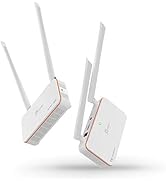
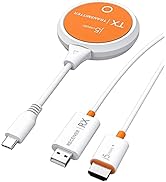
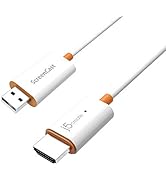
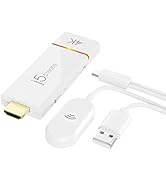
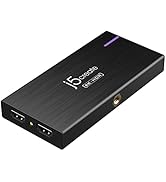
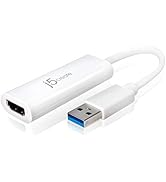
The j5create ScreenCast 4K HDMI Wireless Adapter Receiver lets professionals effortlessly mirror or extend their device screens to TVs in crisp 4K resolution. Compatible with all major casting standards and operating systems, it offers a secure, customizable, and cable-free presentation experience with up to 50 feet wireless range, making it ideal for home, office, or on-the-go use.


| Asin | B09JG8QRZD |
| Best Sellers Rank | #5,518 in Electronics (See Top 100 in Electronics) #30 in Streaming Media Players |
| Brand | j5create |
| Color | White |
| Compatible Devices | Television |
| Connector Type | HDMI |
| Current Rating | 1 A |
| Customer Reviews | 3.9 3.9 out of 5 stars (186) 3.9 out of 5 stars |
| Item Dimensions | 0.43 x 1.26 x 3.74 inches |
| Item Weight | 2.72 ounces |
| Manufacturer | j5create |
| Mfr Part Number | JVAW76 |
| Model Number | JVAW76 |
| Number Of Items | 1 |
| Number Of Ports | 1 |
| Package Quantity | 1 |
| Power Plug Type | No Plug |
| Unit Count | 1 Count |
| Upc | 847626005695 |
| Warranty Description | 2 Year Limited Manufacturer's Warranty |
| Warranty Type | Limited |
User
Really happy with this
This is a great device. I have a somewhat older, lower cost TV with limited features. It was easy to setup and wirelessly connect my laptop to the TV. This allows me to display my photoshop work live and see it at the final size. Well worth the cost.
User
Best wireless display adapter!
We needed to find an alternative for the Microsoft wireless display adapter, and we ended up finding an upgrade! We have multiple conference rooms with tvs at my work and some of the Window laptops would not connect to the Microsoft WDA. When Microsoft discontinued them, we found these and LOVE that you can cast Apple devices to it. And every Windows laptop has been able to cast effortlessly. Devices do not need to be connected to WiFi, which is an added bonus. All that needs to be done is connect to the TV and cast! We're in the process of replacing all of our Microsoft devices with these.
User
Not streaming compatible
This will not stream any tv or streaming apps like Netflix. Probably should be stated in the product details.
User
Works Great—But Samsung TV Setup Can Be Confusing
When I first plugged the ScreenCast into a 75" Samsung TV in a classroom, the TV entered its device detection mode and appeared to stall there. I wasn’t sure how to proceed. Rebooting didn’t resolve the issue, and I experienced the same behavior when I tested it on a smaller Samsung TV at home.At that point, I assumed the unit was defective and exchanged it.With the replacement, I tested it on an LG TV, and the ScreenCast menu appeared immediately—no issues at all. However, when I returned to the Samsung classroom TV, the same “device detection” behavior occurred again. This time, I exited that mode using the TV’s “Previous/Back” button, and the ScreenCast menu appeared as expected.After that, setup with iOS screen mirroring was straightforward, and performance was excellent. The picture quality was very good, with no noticeable lag.I’m giving this product 4 stars due to the initial confusion. It works well once you get past the Samsung TV’s device detection screen, but the lack of guidance around this behavior could be frustrating for first-time users.
User
It did as it supposed to
Great
User
Great for Windows/Android but Unacceptable for macOS/iOS
I am an IT professional. I purchased this item as a possible solution to cast a to a TV so that you could easily mirror a desktop computer to a TV without having to run cables between them. It is pretty fantastic if your environment only has Windows and Android devices. You can easily add it to your wifi network and configure it from your computer. My favorite part was that it displayed the connection instructions on the TV so end users can easily be reminded what (very simple) steps need to be followed to mirror to the TVUnfortunately, the macOS and iOS options are unacceptable. In order to connect such a device, you have to disconnect form your current network and connect to the ad hoc network being broadcast by the j5create ScreenCast. Then you can use Airplay to mirror. So, unless you have a wired connection, you lose your connection to the internet.Additionally, the thought of having hundreds of end users needing to be trained on how to accomplish the goose, grain, and fox puzzle of connecting to this network but remembering to disconnect to avoid internet connectivity issues is the stuff of nightmares for people in my line of work.If you are blessed to be in a Windows only environment, this is a rock solid solution. But, I'm looking for an OS-agnostic single solution to deploy enterprise wide, so I must keep looking.
User
Pricey but effective
This was a little more than I wanted to pay at the time, but it works flawlessly. Great way to hook any (essentially) device to a tv/monitor very quickly without running cables.
User
goo
good
User
Review cheomcast
Works great
User
Köp inte
Produkten fungerar inte tillfredsställande. Den tappar ofta kontakten med datorn. Efter att ha mailat tillverkar blev jag rådd att köpa en annan produkt då detta tydligen är ett kännt problem. Jag ville då att dom ska ta tillbaka produkten men jag måste vända mig till tillverkaren.
User
Très bien
Très bien
User
Up-scaled 1080p, NOT 4K. If wanting to stream at 4K resolution,this is not for you.
This product description is a lie. Its description is Screencast 4K, the box says "Supports 4K Ultra HD ar 30 Hz", and the website states "Stunning 4K Picture Quality, Enjoy a crystal clear resolution up to 4K and lifelike colors optimized for your TV.", but its all a lie. Having purchased this for one of our meeting rooms, I confirmed that when plugged into the tv, it said 4K 30p. When connecting to the dongle, Windows 11 would only allow a resolution up to 1080p. Having updated the device, and finding nothing to resolve it, i contacted the manufacturer's support. Their response:-"Due to the limitation of Miracast 1.0 that JVAW76 complies with, the output resolution of source device will be limited to 1080p, 720p and 480p. The JVAW76 will upscale the source resolution up to 4K with 4K display."This device is using a standard that was first ratified in 2012!. In July 2017, 2.1 was ratified, which does support 4K, however J5Create think its reasonable to claim a product can stream 4K, when its only capable of streaming at 1080p, and upscaling to 4k. Massive con in my opinion, and I will steer clear of any of their products in future.
User
Seems great
It was extremely easy to set works great no problem so far streaming no buffering problem
Trustpilot
1 month ago
1 month ago