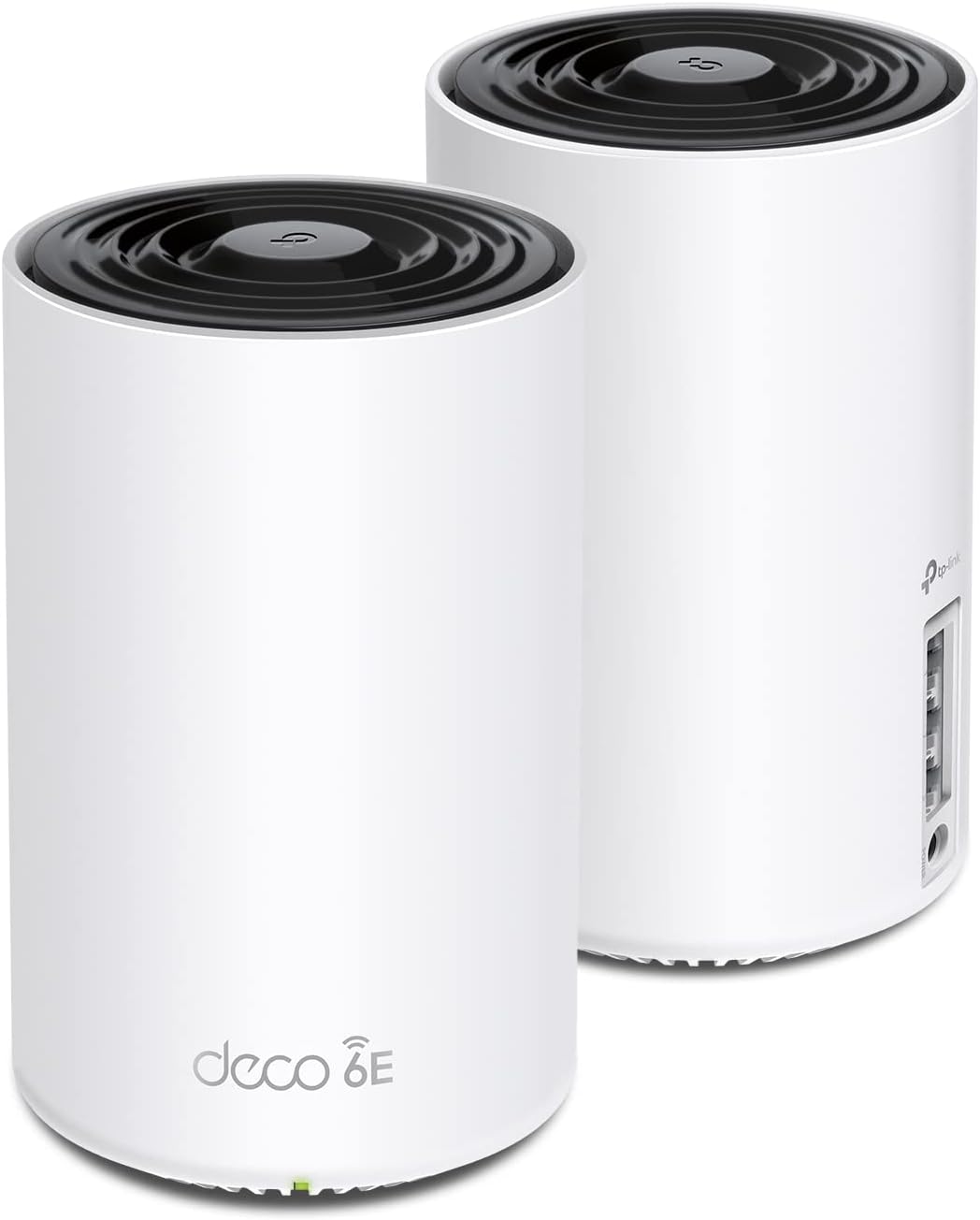
Desertcart purchases this item on your behalf and handles shipping, customs, and support to South Korea.
🚀 Elevate your WiFi game—speed, coverage, and smarts that keep you connected everywhere!
The TP-Link Deco XE75 AXE5400 is a cutting-edge WiFi 6E tri-band mesh system designed to cover up to 5500 sq.ft with ultra-fast speeds up to 5400 Mbps. Featuring a new 6 GHz band for interference-free connectivity, AI-driven mesh technology for seamless roaming, and advanced security with HomeShield, it replaces traditional routers and extenders to deliver a future-ready, reliable home network. Easy app setup and Alexa compatibility make it ideal for tech-savvy professionals demanding flawless, whole-home WiFi.


| ASIN | B09VW5JHPH |
| Antenna Location | Gaming |
| Antenna Type | Internal |
| Best Sellers Rank | #14 in Computers & Accessories ( See Top 100 in Computers & Accessories ) #2 in Whole Home & Mesh Wi-Fi Systems |
| Brand | TP-Link |
| Built-In Media | 1 x Quick Installation Guide, 1 x RJ45 Ethernet cable, 2 x Deco XE75 units, 2 x Power adapters |
| Color | Black and White |
| Compatible Devices | Personal Computer |
| Connectivity Protocol | Wi-Fi |
| Connectivity Range | 5500 square_feet |
| Connectivity Technology | Ethernet, Wi-Fi |
| Control Method | App |
| Controller Type | App Control |
| Coverage | 5500 square feet |
| Customer Reviews | 4.4 out of 5 stars 4,844 Reviews |
| Data Transfer Rate | 5400 megabits_per_second |
| Frequency | 6 GHz |
| Frequency Band Class | Tri-Band |
| Global Trade Identification Number | 00840030707131 |
| Item Dimensions L x W x H | 4.13"L x 4.13"W x 6.67"H |
| Item Type Name | WiFi 6E Mesh |
| Item Weight | 2.7 pounds |
| LAN Port Bandwidth | 10/100/1000 Mbps |
| Manufacturer | TP-Link |
| Maximum Upstream Data Transfer Rate | 2402 megabits_per_second |
| Mfr Part Number | Deco XE75(2-pack) |
| Model Name | Deco XE75(2-pack) |
| Model Number | Deco XE75(2-pack) |
| Number of Antennas | 3 |
| Number of Ports | 6 |
| Operating System | Linux 4.4.60 |
| Other Special Features of the Product | Alexa Compatible, Guest Mode, Internet Security, Access Point Mode, Beamforming, Parental Control, QoS |
| RAM Memory Installed | 512 MB |
| Security Protocol | WPA-Personal, WPA2-Personal, WPA3-Personal |
| Special Feature | Alexa Compatible, Guest Mode, Internet Security, Access Point Mode, Beamforming, Parental Control, QoS Special Feature Alexa Compatible, Guest Mode, Internet Security, Access Point Mode, Beamforming, Parental Control, QoS See more |
| UPC | 840030707131 |
| Unit Count | 1 Count |
| Warranty Description | 2 year manufacturer |
| Wi-Fi Generation | WiFi 6E |
| Wireless Communication Standard | 802.11ac, 802.11ax, 802.11b, 802.11g, 802.11n |
| Wireless Compability | 802.11ac, 802.11ax, 802.11b, 802.11g, 802.11n |
J**.
Best router I have used so far. Super FAST!!!! and setup in the app was easy
I typically don't write reviews but this time I feel I really want to write one for this product. My home is is not that big (~2000 sq ft) and in the past I have been using Google Nest router with a Nest point. The next router is located in the living room and the point is in the office. The connection in office is every weak and unstable. My internets speed is 400M download but I only get around 20M download in my office, and recently it even dropped to around 1M. I tired to reset and router and place the point at different locations but still no help. And the signal on my Ring doorbell and another Ring camera right outside of garage door were also very week. My Tesla on the drive way can barely detect the wifi signal. Finally I decided to try a different router. After reading so many reviews, I decided to go with Eero 6+ and I bought the package with two Eero 6+ units. Setup process was not smooth and it took me a couple of trials to get it up running and I can get over 100M download speed in my office. Much better than before so I was happy, until soon after I realized this product has ZERO parent control functions in the App unless you pay $99/year for the subscription???? this is totally absurd. I immediately returned the Eero 6+ and purchased this TP-link Deco AXE5400. The setup process was smooth and I could setup everything in less than 10 minutes. I placed the second Deco unit at the same location as the previous Nest Point. When I tested the internet speed, I was totally blown away!!! 400+M download speed everywhere in my home now!! I should have thrown away the Nest crap much earlier and switch to this product. Why should I have been suffering slow internet connections for such a long time when paying for 400M internet? This TP link Deco router is great, and App is easy to use. The only thing needs to improve is that it is hard to tell which device is which as the name shown in the App is not obvious. For example, we have three iPhones with different name in the family but all three are shown as "iPhone" so I need some extra work to figure out which devices are kids devices in order to setup parent control. But overall this is a great product for this price.
M**E
One of the very best mesh routers you can buy
I am a techno-geek. Have degrees in electronic engineering and in computer science (networking). Have been working in the computer and telecommunications fields for the past 45 years. Way before Al Gore even invented the internet. I have a ranch style house with full basement; approximately 3,000 sq feet + 2 car attached garage. I normally have 2 routers active; main router for all ethernet connected devices as well as providing VPN connection (Linksys WRT3200ACM); which also connects to the 2nd wireless router a netgear R7000 for my normal open WIFI for non VPN traffic and guests. Both routers are in the downstairs, centered, and work good. The VPN router/WIFI covers the areas of the house for fixed/PC/Laptop that use VPN; but the netgear providing clear WIFI couldn't cover the entire house with a usable signal; even though the R7000 is a very good high end wireless router. It covered MOST of the house, but none to the garage and very little outside front or back; and a couple of sketchy places in the house. I tried wifi extenders and even another router as an access point. Problem with those are there is no smooth transition when walking around with a cell phone, tablet, taking laptop out on the back deck, and other mobile scenarios. Great if you're going to a spot and staying there; but extenders and AP are not good if you're moving around. So, I went with a Mesh system; the TP-Link AXE5400 XE75. This has been awesome. Setup is easy, just follow the app instructions. I left my primary Linksys VPN router as is, and simply removed the Netgear R7000 and replaced it with the TP-Link. (Yes, double NAT is fine for 99% of traffic; IF the primary router, in my case the linksys, is set up properly to allow traffic flow to the TP-LINK to work properly). Anyway; the main TP-LINK router is where the netgear was, and I wireless connect the second slave node on the main floor. This is working great. My VPN linksys wired/wireless router still covers the 2 home offices that use the vpn; and most of the house for the other rare vpn occasions. The new TP-Link XE75, between the downstairs node and the main floor node, are covering every inch of the house, garage, back yard, and front yard. And being I gave it the SAME SSID name and password that the Netgear USED TO BE, I didn't have to change any settings in ANY of my wifi devices. Not even security cameras, Roku, AppleTV, phones, tablets, laptops, etc... All the devices were instant connections. And when I roam around the house, yard, deck, etc... the portable devices like phones and tablets transfer from the one node to the other node seamlessly. I was considering getting a 3rd node, but after using this for the last month, there's no reason to spend more money. This is the best setup I could have wanted. Definitely buy it if you need PORTABLE WIFI COVERAGE for phones, tablets, etc... that move around a lot. If your devices are pretty well fixed and don't move, like streaming tv boxes, smart tv, laptop/computer in an office, etc. then learn to better position your existing wifi router for better coverage or look into using an extender. Extenders are great if you're staying in one place; because it's shows a different SSID than the main and your device can't auto switch between them. But for fixed devices or scenarios where you stay put for long periods of time, extenders are great. Especially for the cost of the TP-Link. I got it on sale, but an extender is still much cheaper. But if you need the mesh technology so you can be more mobile with uninterrupted connections, then this is the mesh wifi for you.
M**T
Finally have stable Wi-Fi again
I have about a ~2k sq ft house, with about 75 Wi-Fi connected devices, many using Apple HomeKit. I had a popular mesh network setup before, but I got so frustrated with HomeKit devices going to the dreaded "No Response" state and Sonos being laggy and slow, I decided to switch to another brand and picked TP-Link and the XE75. When I first got the new mesh XE75 set up, I noticed two things: 1) Performance on my iPhone and Mac was significantly better than the previous mesh network. Like, crazy better, everywhere in the house. On the old mesh, throughput was spotty and would degrade over time, even when right next to the router. A hard power cycle would fix it for awhile, but then performance would degrade over time. I don't have this issue at all with the XE75. 2) HomeKit and Sonos were notably better! Not perfect, but significantly improved. I had some weird issues where an Apple HomePod Mini would cause HomeKit to basically die and network performance to get spotty and weird, so I left it unplugged and stuff worked like 95% of the time, up from the ~50% with the prior router. I switched my Sonos to SonosNet and that made Sonos performance work great. Then, firmware update 1.2.8 came out for XE75. I have no idea what sort of coding magic or sorcery they did, but no joke, my network has been literally perfect: like 0% HomeKit No Response errors and consistently great performance. It has been YEARS since I have enjoyed truly stable wifi and HomeKit performance as my network has grown, and I am finally back to a stable everything-just-works state. I even plugged in the HomePod mini and everything is good again. That said, full disclaimer: I have not been bold enough to remove SonosNet (and go to straight WiFi mesh) not have I re-enabled Fast Roaming, but I suspect those will work again if re-enabled (just trying to eliminate changing too many variables at once). I waited until firmware 1.2.9 came out before writing this review to make sure all of this as a fluke / stroke of luck, and sure enough, we are still looking great. I did a lot of technical analysis and I think improvements were made with multicast and mDNS performance that HomeKit and other home auto-discovery services rely on heavily. This directly influences the performance of Thread-bridged and direct Wi-Fi devices, working on both 2.4 and 5GHz bands. Anyway, I'm very happy with the XE75 set up. They are a great value, the app is solid, and the mesh technology has been bullet proof since the latest firmware upgrades. My phone and newer devices connect with 6E and networking is plenty fast at home. Note: I will downgrade this rating of this review if the quality deteriorates, but fingers crossed that never happens!
D**L
Not working out for me at the moment! XE75 2 Pair *Updated*
So far not so good. A quick background for me. I worked previously as a Network Engineer for over 10 years, with multiple degrees and certifications in the field. 4 years ago I left networking behind and moved into a different field. So I'm not new to this stuff at all. I purchased the XE75 (AXE5400) about a week ago. Setup was quick and easy. I initially set it up using the 6GHz backhaul, in AP mode. (I have a firewall upstream managing all the routing, DHCP, etc.) It worked for about 48 hours then everything went sideways. I couldn't get the "satellite" unit to connect to the "main" unit. I tried rebooting, moving the units closer together, checked the firmware, etc. and nothing worked, so I connected them both via Ethernet. I bought this particular model so I can use the 6 GHz band for the dedicated backhaul. At any rate, the Ethernet backhaul worked, and seems to be working well still. That being said, the 6 Ghz backhaul SHOULD work and it doesn't. That's very disappointing. With a work around for the backhaul problem in place...a couple days later I started just randomly losing my connection to the network. The SSID would disappear on my phone (and other devices) and it would automatically switch over to my LTE connection. I thought perhaps it had to do with a roaming issue so I checked that fast roaming was enabled, and it was not, so I enabled it but the problem persisted. I disabled fast roaming then I disabled beamforming, and the problem persisted. I prefer to mess with a single variable at a time so I know what fixes the problem. Neither of these settings solved my problem. I reached out to support about this, and they suggested the above steps, as well as disabling the security on my Guest Wireless network. I'm testing that as I write this. I will report back on my findings with that. When it works, which is intermittent at this point, it's been great. I've seen some pretty good reviews from some people that seem to be pretty qualified on the topic and have had a great experience so far. All I can say about that is I believe them, so there must be a production quality issue here and possibly some faulty hardware. Support is supposed to be calling me soon to talk to me. We'll see if that actually happens, and like I said previously, I will try to report back on that conversation. As of this moment, if that call doesn't put me on a solid path to resolution I will likely be returning these. P.S. - Something I observed, in AP mode you loose a lot of the security features outlined in the product description. That makes sense to me since they are routing functions, but keep that in mind. I use a Firewalla Purple upstream for all my routing, and content filtering needs. No monthly subscription! It's affordable, and works very very well. So all those extra features provided by TP-Link I don't need, and never intended to use. I literally just need my wireless devices to connect to the network, and it doesn't seem to be handling that well at the moment. *Update* So support did call me and they remotely connected to my Deco units. We did some troubleshooting for about 2 hours. We tested various things and they collected logs and other info to analyze further. After a few more emails back and forth afterwards we came to the conclusion that the 160Mhz band was causing problems. A setting I overlooked during my own troubleshooting, but when you click on your SSID password it brings up a few more options and at the bottom of the page you can select 160 or 80. After setting it to 80 things stabilized, in fact I don't have any problems at all except on the outside edges of my home and in my garage (my home is about 5,000 sq. ft. not counting the garage) I might just need another deco as I'm likely experiencing signal strength issues in those places. I did not realize my 2 year old iPhone doesn't play well with the 160Mhz band, and a lot of other devices for that matter. Even though the 160Mhz option is marked as recommended I wouldn't use it unless you know your devices support it. At any rate the problem seems to be resolved and support was very persistent. I actually got to the point where I was tired of troubleshooting it and told them so and wanted to just return these units but they really wanted to figure the problem out, and I think they did. So because of both of these reasons I increased my rating to 4 stars. One more thing, during our troubleshooting I noticed new firmware was released. The release notes mentioned wireless backhaul stability and general wireless stability improvements. I did NOT update during troubleshooting (again because I didn't want too many variables in play here). Once things were stable for a few days I did roll the update. It's been 24 hours and I have not noticed any problems. I want to disconnect my wired backhaul and see if that problem is now resolved with the update. I'll report back when I have a chance to test. If it does work that will be huge! I'm hoping this review helps others avoid some time troubleshooting. At this point I'd say my opinion of these has changed and I would now recommend them. Even though I can't take advantage of some of the features yet (i.e. Wifi 6e, 160 Mhz band) I got this unit to future proof my home network and because for the price and feature ratio you can't beat it with the other brands. Based on my experience with support they're determined to make sure they work. Another Update: I've been running the primary unit connected via Ethernet, and the the satellite unit is backhauled via the 6Ghz band to the primary unit for about 2 weeks now and it's working flawlessly. I suspect the firmware update fixed my stability issues. I'm going to leave my review at 4 stars because of the initial issues I had, but I'd definitely recommend these. Also, I never updated on disabling security on Guest Wifi during initial troubleshooting. It didn't work, as expected, but wanted to make sure others know incase they run into similar issues. Just make sure your firmware is up to date and disable the 160Mhz (use 80 instead) unless you absolutely know for sure your devices utilize 160. Those that don't use 160 will likely run into problems though. Test it yourself and see which works best for your devices and home. Good luck!!
B**Z
Solid upgrade from older Nest Mesh WiFi
I've had the Deco XE75 for a few weeks now and wanted to wait to write a review. Overall I've been very impressed with units and the performance we've been getting. We have 1 gb fiber from AT&T coming into our house. The majority of the house is wired with Cat6 but my son's gaming machine and my daughters laptop as well as all the phones are on WiFi so we need speed from both the hard wired and WiFi side of the router. First off on the wired side, with the Nest I was getting upper 700s to lower 800s for speed direct from the wall. With the XE75 I'm seeing 930+ up and down. A noticeable improvement when uploading to my website or downloading large files like games. On the wifi side is where we really noticed an upgrade. With the Nest we were getting upper 300s to lower 400s for speed and now we're seeing high 800s to sometimes even 900 at the computers and phones. Much higher than I expected via WiFi. I had considered hard wiring the kids rooms but with these speeds there is no need. We are all on the latest generation of iPhone so are able to take advantage of the 6 GHz channel. Very impressed with speed all around. System setup was very easy and I used the same SSID for both the 2.4/5 GHz and 6 GHz channels. Our older devices like our Wyze cams and the Ring doorbell connected easily which can be an issue with some routers. As far as stability, we did have a couple of hiccups the first few days as I was playing with a few settings but the system has stabilized now and we have had no dropouts or disconnects or even any hiccups. I admit I was a little worried in the first few days as I was fighting some speed issues and stability issues but those have not returned. The app itself is a little lacking in features. It has the basics but the one that I miss the most from the Nest app is being able to speed test the bandwidth getting to the router itself. That is a feature I would like them to add. Other than that you can do most of the things you'd want to do with a router in checking which unit individual devices are connected to and set some basics like parental controls and limiting router hopping for items like a desktop that aren't moving. Overall this was a very worthwhile upgrade and I have been very happy the system. Hoping we continue to have good luck going forward and everyone is very much appreciating the upgrade in speed. It's also nice to be getting all the network speed that I'm paying for. Especially on our main wired home entertainment unit and our work PCs as we both work from home.
L**I
Game Changer
EDIT: I did find out later that all of the internal settings for the pods are on the phone app, and yes, you can use 6g for clients to connect, but for my needs setting the second pod to being a dedicated backhaul got the best speeds. You will need to use an ethernet cable from the pod to your computer to get these speeds. Bottom line, problem solved! My problem was a video game called Diablo 4. The game requires a fast connection with minimal latency or it starts to lag. When I got D4, I noticed horrible lagging and asked to get my money back, but since I had played 2+hours they wouldn't refund me. Then I checked my network and discovered why I was lagging so bad. The fastest connection speed I could get was about 200mbs wireless which is not ideal for gaming. I tried upgrading to a traditional 6G router with a 6g wi-fi card, but the card would only work under windows 11, and when I upgraded to windows 11, it didn't work. The next thing I tried was to get another wi-fi adapter which did work, and I could finally see the 6G network and connect to it, but the speed was horribly slow, not even usable after that. I'm just too far from the router. I thought a lot about what might be going wrong and how I might fix it. After doing some research I found out that there were these things called mesh units which were all supposed to use 6G to connect to each other and cover the whole house with a strong 6G signal. I decided to give it a try. Well, the results were a bit mixed but I am plenty happy I got these. The mixed part is that you cannot make a 6G wireless connection directly to these mesh devices. You are still using the 5g/2.4g for the actual device connection. The 6G band is reserved for transmitting data from one pod to another, and it works better than I thought. Way better. I set up the second pod in my room and it still didn't resolve the speed issue, and then I discovered the real beauty of these pods: You can run an ethernet cable from any of the pods to your devices. I hooked up an ethernet cable to my pod and the other end to my computer and BINGO! My speeds went from the low 200s up to almost 900mbps and averaging around 600mbps. In other words the pods more than TRIPLED my speed on the same existing ISP network. The real trick here it to place your computer near enough to the pod to use the ethernet port on the back of the pod. I think they call it backloading and it works! Finally, I was a bit annoyed that you had to download and install an app and set up a cloud account to set up the pods, but the instructions were easy to follow and the whole setup was painless. Goodbye traditional router and goodbye wireless adapter! The only downside here is that you don't have any manual control over the internal working of the pods. There's no log in page or webpage to go to for management like a traditional router, but in my case, they whole thing worked right out of the box. All of the necessary settings are in the phone app, which brings up my last point: You WILL need a smart phone to set these up. There's no alternate option. Watching those line speeds triple was worth the price. I now have the fastest internet I can get in my home short of pulling out drywall and laying ethernet connections to every room.
C**B
Security Concerns
UPDATE 24-Jun-2026 While my technical analysis remains accurate, I've read too many concerns about security issues with TP-Link. A lawsuit filed in Feb '26 by the TX AG regarding: - Deceptive marketing about the security and privacy of their networking devices (routers, etc.) - Allowing potential access by the Chinese government to Americans’ home devices I recently switched to the STARLINK WiFi Router and it works nicely with my ISP - I have no need for satellite where I live. When considering any ISP-connected router, research to make sure you are comfortable with security. UPDATE 8-Dec-2024: In my review I mentioned the TP-Link Dual-Band BE5000 WiFi 7 Mesh Wi-Fi System (Deco BE25) was a lot more expense, and I suggested waiting until you needed WiFi 7. Well, the price is so close to the WiFi 6 I'd go with it now to help future proof! I didn't check other vendors, and I don't have the WiFi 7. If I had to buy today, I'd do the WiFi 7 for sure. 2-Pack WiFi 6 = $220 ($110 each) 2-Pack Wifi 7 = $230 ($115 each!!!!!) 3-pack, WiF 6 = $330 ($110 each) 3-pack WiFi 7 = $300. ($100 each!!!!!!!) UPDATE 29-Sep-2024: I'm totally satisfied. ZERO issues, works beautifully. I had this at 4-Stars to start as installation and set-up went smoothly however I wanted time for it to "bake-in" with use., now I'm at 5-Stars. There is a TP WiFi 7 model available that does cost less than other vendors, still expensive though. The WiFi 6E was $188 for the pair, WiFi 7 is $449 for a pair. That's a big jump, and yes, from what I've read you'll get higher performance. The question that needs to be asked: Do you need it for the extra price? If you can easily afford it, no reason not to. I've worked for 30 years as a network design/architect/consultant in the carrier industry. As described below, for my requirements the TP WiFi 6E is perfect. In 5 years, I may need to look into upgrading to a higher grade mesh. By then, prices will come down for a WiFi 7 and maybe when WiFi 8 is out that'll be a consideration. For now, WiFi 6E works. I give routers a 5-year life span as tech improves rapidly, but do you need annual upgrades? Not in my world, yet. I'm still waiting for 5G cellular service in my rural setting yet I do get 80Mbps down/19Mbs up (Verizon), and in some places in Colorado Springs I've clocked 1.3Gbps on my iPhone which is insanely fast. My iPhone does provide good hotspot backup if needed. If you have a "Brady Bunch" size family, maybe the WiFi 7 would better, and you may need more than 2 routers in the mesh depending on your house, basement, patio, number of devices and floors. The nice thing about the TP mesh is adding more as needed is easy, as it should be today. GENERAL: 16-Sep-2024 I needed a new WiFi mesh solution. I'll explain why in a bit. For 99% of the users at home, basic settings should be fine. For those with bespoke setting requirements, they know what needs to be done. This isn’t a commercial grade device like from Cisco or Meraki although for small offices, I think the XE75 would be excellent. DETAILS TO CONSIDER: I’m using the TP Deca XE75 – be SURE to know this, not Deco AXE5400 as this is not a choice when registering via the app. I use just a pair in a 3,800’ slab-on-grade ranch. Each XE75 works at 2.4/5/6Ghz. There are 3 “Networks”: Router, Guest and IOT to isolate connections. Pricing was excellent at $219 for the pair + a $30 discount coupon! This is not a Base plus Extender, these are both full-function WiFi routers with the first one setup being the Main. They each have 3 UTP Gbit ports. I only needed UTP on the Main. Password, frequencies, ect settings are all transparent across the mesh network. You can click on each Wifi router in the mesh to see what is connected to each. Each SSID will have its own password. Be sure to use Upper/lower/a few numbers/a few special characters, and MAKE SURE TO JOT THEM DOWN! SSID Router and Router_6Ghz + Password you create - iPhone, laptop, printer, SAN/NAS SSID Guest + Password you create: if I have visitors SSID IOT + Password you create: all other connections like Hunter-Douglas PowerView (motorized Roman shades), TVs, 22KW Generac generator, DTV, DVD, etc that have vendor access for updates and such. SETUP: SUGGESTION: Unplug your ISP equipment before you start setting up the app. My iPhone just downloaded via my Verizon cell connection nicely. This gives your ISP equipment the 5 or more minutes to quiesce (shutdown, clear). When I connected to my ISP equipment and powered-up, I called my ISP, they saw the new device, authorized and in a few seconds I was back on-line. Download the TP App, and follow the instructions step-by-step. When setting up, each XE75 has a barcode on the bottom that needs to be scanned as you set them up – easier than typing in the code. It’s a tad fuzzy to scan, just don’t give up. I used an iPhone 13 Pro to scan and was surprised how difficult it was. Just follow the instructions at setting up the router EXACTLY (keyword=EXACTLY) as they say. The app will ask you to name it, I used Office from the choices, and I think you could do a custom name. With my ISP, I have to call and tell them a new router is being connected so they can authorize it for security. My ISP is a local company in Colorado, Kellin, that services remote areas hence microwave (plans in the next 12-18 months include going up-to 500Mbps - way more than I need), and support is seriously fantastic after more than 10 years. The UTP ports (3 on each route) support 1Gbps. The TP should work for all ISP, probably even StarLink although check first to be sure. The App set-up worked great as I followed the instructions EXACTLY as they specified. Next, I created PASSWORDS for Office, Guest and IOT networks. Next, I added the other XE75 to the mesh using the barcode reader, and boom, up it came, connected to the mesh and I named it Bedroom. On the App you’ll see: ISP icon---Office/MAIN icon----Bedroom icon (these are my locations) plus you’ll see how many devices are connected to each with a footnote number for each. Nice. Next, I started discovery for Router – my laptop runs at 6Ghz. BTW, UTP connections go to Router only that I can tell, not Guest or IoT Next, I started discovery for IOT No Guests yet, however, they should connect as easily Under “More Settings” at the lower right corner of the app, click and you’ll see Wi-Fi Setting (Main Network), then Guest Network and IoT Network. Pretty straight forward; naming Wi-Fi Setting the same as the Main Network would make better sense at least to me. In Wi-Fi and Guest Networks you have 2.4/5Ghz and 6Ghz network options. In IoT you only have 2.4/5Ghz. I turned off 6Ghz for Guest as 2.4/5Ghz will be fine plus you’ll get better distance and plenty of bandwidth performance. If I need to connect my laptop to Guest or IoT, my laptop selects the highest frequency. My iPhone 13 doesn’t do 6Ghz. When I upgrade my iPhone in a year or 2, it’ll probably have 6Ghz. PERFORMANCE: My microwave ISP is 120Mbps Up/Down, plenty for me. I don’t game or have kids. I work from home as a consultant, do WebEx/Zoom/MS Teams video calls that are excellent quality, I’ll watch an Amazon Prime movie now and then, I use DirecTV not a streaming or cable service. So far, performance has been flawless. Generac has “issues” with mesh networks – this is on them to fix as it is 2024 and it is not a $50 device, but that is for another review. (Generac works great, it’s the 2.4Ghz WiFi set-up that is archaic.) If you do have a Generac, the best way is if the remote mesh router is near the Generac, turn it off and force the Generac to connect to the Base. Then, bring the remote router(s) back on-line. This seems to fix the stupid problem. And yes, it is stupid for a $17,000 device as it should have a great WiFi solution, it doesn’t. This is a problem for Generac with all mesh networks, not just TP. I did a lot of research and found a good work-around solution Reddit. For the price and performance, I think you’ll like this device. I only have the main and 1 remote. More remotes, no idea. My video calls, streaming with Amazon Prime (Netflix should be OK, I don’t have it) and gaming should be fine (I don’t game). Another thing that will affect performance over the Internet will be your ISP’s quality. They say like 1-Gig service however, that is the max you’ll probably get. During busy times performance may degrade based on how many people they support – it gets complicated with over-subscription to bandwidth during peak hours. Clearly, more users will be on between like 6PM and Midnight than at 1PM or 3AM in a residential area: streaming movies and gaming uses a LOT of bandwidth. That 1 Gig you subscribe to is not 100% all the time. This has nothing to do with TP or a home set-up. AND NOW FOR SOMETHING COMPLETELY DIFFERENT – Why TP? 2.4/5/6Ghz: What’s the difference? The higher the frequency, the more data that can be transmitted. Problem is, as the frequency goes up the ability to penetrate walls drops. 2.4Ghz carries less data however it penetrates walls better than 5Ghz and 6Ghz. I won’t get all wonky. Extenders are the reason they are needed in large houses/multiple floors to penetrate hence we have mesh networks today as single WiFi devices have distance problems at higher frequencies as more data is needed like for gaming, video, streaming, phone calls, ect all at the same time. I had to replace my Netgear Orbi 850 w/1 satellite. The Base unit UTP ports stopped working which means I lost ISP access and UTP devices. My hardware warranty ended 7 weeks prior. I paid over $600 in July 2023. I contacted sales to see if I could buy a refurb'ed 850 base at a decent discount. Nope. They just said your hardware warranty has ended - I was up-front and told them that. I connected my laptop to my ISP and it came right up. They wanted to troubleshoot. Waste of time. Duh. I’ve used Netgear for over 20 years, routers, WiFi and LAN switches. I upgrade when needed. This Orbi 850 issue and how they handled it was poor. This wasn’t a $50 device. And, now I have an Orbi 850 satellite I need to sell on eBay, the base will get recycled. Will I ever buy Netgear again? Extremely unlikely. I like the LAN switches, solid, reliable, lifetime warranty on the ProSafe products however I have all the Gigabit LAN switches I need as WiFi speeds get better. I tried the eero Pro 6E mesh Wi-Fi router, $184.00 + 20% rebate + $100 credit sending my Orbi back. Great deal. My ISP recommended eero. The set-up was a tad awkward (I wrote a review) and I got through it. Connected my devices and all. I noticed my laptop had really poor performance and disconnects. I decided to buy the eero Extender & wall mount total $95, neat set-up. Got it, however, my laptop kept going to the base router, never the Extender. The problem was the Extender only handles 2.4/5Ghz, not 6Ghz. I have no way to disable 6Ghz on my laptop, this is a deficiency and Lenovo support was no help. I called for eero support to see if a 2.4/5/6Ghz extender was available or if I could disable 6Ghz on the Base Router. No to each question. At least TP allows you to disable 6Ghz. The recommendation: buy a 2nd eero Pro 6E mesh Wi-Fi router, and now the price ~7 days later was $249. Not having an Extender at 2.4/5/6Ghz when the base equipment does is silly given we are now seeing WiFi 7 being released (EXPENSIVE though). I sent the eero stuff back for a refund. Had the eero Extender provided 6Ghz, I would have kept it as it did work really well, 2.4/5Ghz is fine for my house, and a new laptop would have cost a LOT more. If your device doesn’t do 6Ghz, eero would be fine. However, as with all technology we’ll see upgrades with new devices in the coming years. If you have a device that can’t disable 6Ghz, you'll have a problem. If you are still awake, I hope this helped.
D**S
An Outstanding Mesh Router System!
I bought this TP-Link Deco XE75 mesh router system to replace a TP-Link Archer A9 router and RE550 wifi extender. Although the former TP-Link system was working well, I wanted to introduce a mesh router system into our home. I'm very pleased to say that this Deco XE75 system has been a great addition! The system I bought includes the main base and one extension unit. Although I currently have the two units spaced at a fairly large distance between each other (around 45'), I'm still getting a medium signal strength reading on the 6 GHz link between the two, which I consider to be excellent. In the future, I could make the link stronger between the two units by either adding an additional Deco XE75 unit, or by connecting the two by a wired ethernet line since the system supports wired ethernet backhaul (a nice feature!). Since I already have a MoCA network within my house, I have coax connectors close to both units, and I might connect them that way in the future. But for now, both units work with no problems via a single wireless link. I have experienced no compatibility issues between the XE75 base system and any cable modem (I have tried 2), and I have experienced no problem with connectivity with any connected clients in my home or garage. One thing I like is that because this is a mesh system, there is only one SSID, regardless of which mesh unit your client might be connected to. This simplifies connecting devices, and enhances connectivity when a device (e.g. cell phone) is roaming within the house (signal strength is always strong and there are no dropouts). Another thing I like is that this is a tri-band unit (supports wifi on the 2.4 GHz, 5 GHz, and the 6 GHz wifi bands) for support into the future. This means that it will support up to 5400 Mbps speeds. Other nice features include support for WPA3 and HomeShield security, 160 MHz channel support in the 5 GHz band, connection capacity for up to 200 devices, and wifi coverage up to 5,500 square feet. On top of all of this, the Deco units look nice (much better than a stand-alone router with antennas sticking up). In summary, I highly recommend this mesh routing system!
C**N
Assez impressionnant
J'avais un vieux linksys et il commençait a mal fonctionné. Je me suis mis a la recherche d'un mesh wifi parce que je voulais que mon wifi fonctionne bien dehors. Problème réglé et le système fonctionne bien et est stable depuis l'installation. Environ 3 semaine. L'application fonctionne bien aussi. Au début je trouvais spécial d'être obligé de passer par l'appli pour tout installer, mais le tout s'est fait très facilement. Aucun problème de connexion ou quoi que ce soit. Les bidule de chauffe pas vraiment comparé a mon ancien router. Bien content pour le moment. Très rapide et le wifi se rend très loin. Probablement pas le meilleur, mais correspond à nos besoins a la maison. Faire attention au endroit que vous les mettez. Ils peuvent entrer en conflit et ne pas vouloir se connecter au bon bidule. Par contre ont peut forcer la connexion dans l'appli a un bidule.
M**F
Muy buenos para internet normal y 6E, regulares para IoT
Buen producto pero les cuesta el manejo de dispositivos de domotica o IoT. los compré para manejar cerca de 120 equipos de iot (focos y luces), aunque la caja dice que puede con HASTA 200 dispositivos, la realidad es que con 2 de estos, no puedes conectarle más de 40 quizá 60. los devolví y compre el paquete de 3 y aún así sufren para poder conectar los 120. en terminos de navegación y distancia son buenos, si tienes mejor velocidad en cada rincón, pero la distancia a la que puedes conectar uno de otro, tampoco es tanta y menos, si hay paredes.
W**N
منتج جيد جدا
منتج ممتاز ليه الان اكثر من سنتين وشغال اهم شي تحه جنب الراوتر الفايبر من غير حواجز عشان مايقطع
F**B
excellent
excellent
C**S
Stable and fast WIFI
So far it is outperforming my old mesh system in every way. The WIFI signal is strong all over my house and the speed is consistently better than I was getting previously. Having the 6 GHz component works amazing with newer hardware that supports it. Essentially you get 2.4, 5 and 6 capability for all your devices. The units are a bit larger than my last ones but the size trade off is worth it for faster and stable connectivity. The app is also very good and easy to use. You can get realtime information of the devices and what the are doing (ex. you can see that your computer is downloading at what speed, or if you TV is hogging your bandwidth). Anyone looking to try out better WIFI coverage, highly recommend this system.
Trustpilot
2 months ago
2 months ago