


Desertcart purchases this item on your behalf and handles shipping, customs, and support to South Korea.
🖱️ Elevate your left-hand game — comfort, control, and connection in one sleek lift!
The Logitech Lift Left Vertical Ergonomic Mouse is a wireless, left-handed mouse designed for small to medium hands. Featuring a 57° vertical angle to reduce wrist strain, it offers multi-device connectivity via Bluetooth and Logi Bolt USB, whisper-quiet clicks, and four customizable buttons. Compatible across Windows, macOS, iPadOS, Chrome OS, and Linux, it boasts up to 2 years of battery life and incorporates 70% recycled plastic, making it a sustainable, productivity-boosting essential for professionals.
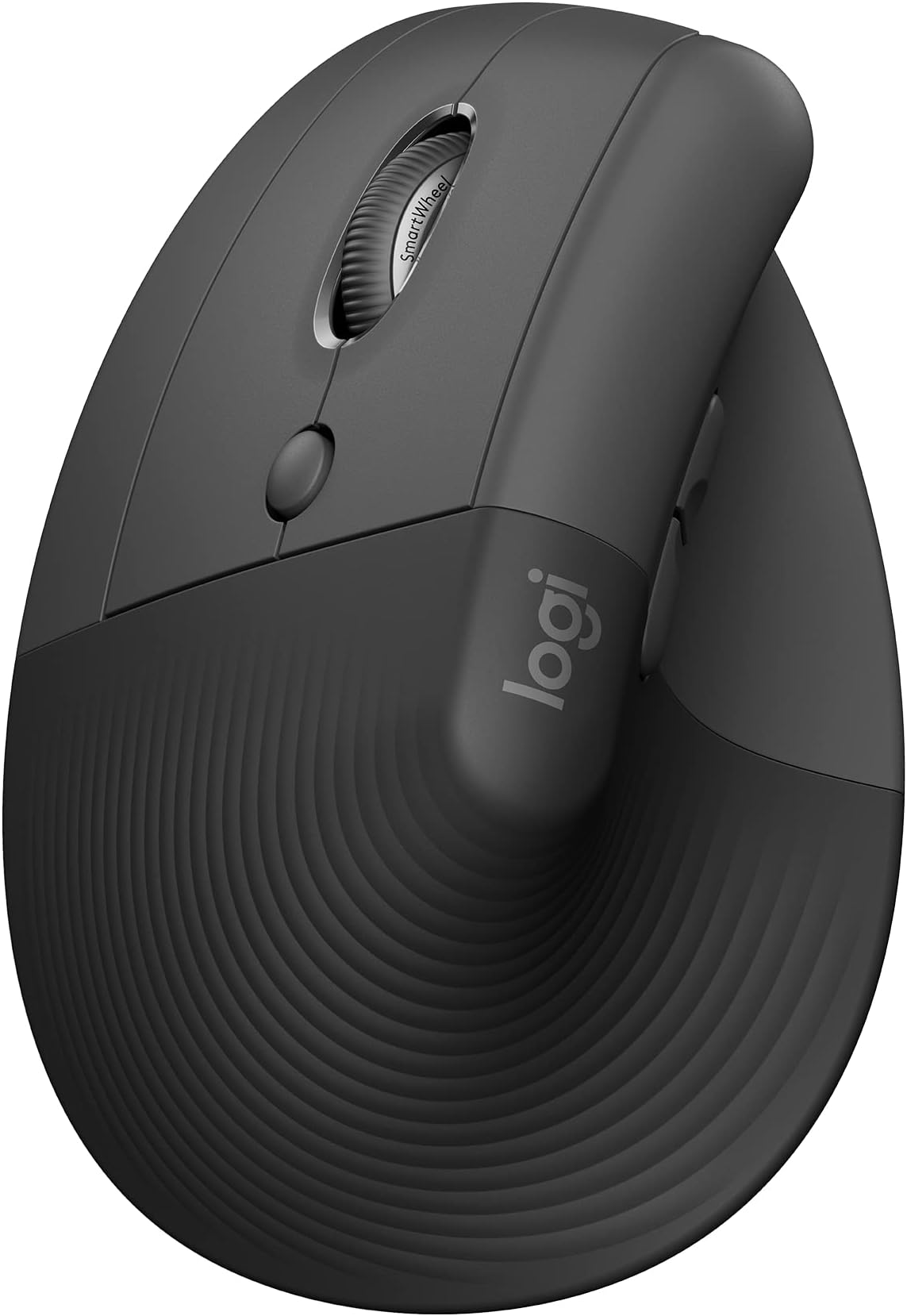







| ASIN | B07W8P4PDD |
| Antenna Location | Office |
| Are Batteries Included? | Yes |
| Are Batteries Required | Yes |
| Battery Average Life | 2 years |
| Best Sellers Rank | 95 in Computers & Accessories ( See Top 100 in Computers & Accessories ) 10 in Mice |
| Box Contents | Wireless receiver, AA battery |
| Brand | Logitech |
| Brand Name | Logitech |
| Button Quantity | 4 |
| Colour | Grey |
| Compatible Devices | Android devices on Android 8.0 or later, Chromebook, Mac, Personal Computer, iPad on iPadOS 14 or later |
| Connectivity technology | Bluetooth, Logi Bolt , USB |
| Country of Origin | China |
| Customer Reviews | 4.2 out of 5 stars 1,034 Reviews |
| EU Spare Part Availability Duration | 2 Years |
| Enclosure Material | Graphite, plastic |
| Global Trade Identification Number | 05099206099807 |
| Hand Orientation | Left |
| Hardware Platform | Mac, PC |
| Item Dimensions L x W | 10.8L x 7.1W centimetres |
| Item Type Name | Wireless Ergonomical Mouse - Left Handed |
| Item Weight | 220 Grams |
| Manufacturer | Syktcjgs |
| Manufacturer Part Number | 910-006474 |
| Model Name | Lift Ergonomical Vertical Mouse - Left Handed |
| Model Number | 910-006474 |
| Movement Detection | Laser |
| Movement detection technology | Laser |
| Network Connectivity Technology | Bluetooth, Logi Bolt, USB |
| Number of Batteries | 1 AA batteries required. (included) |
| Number of buttons | 4 |
| Operating System | Chrome OS, Linux, Windows® 10, Windows® 11 or later, iPadOS 14 or later, macOS 10.15 or later |
| Pattern | Left-Handed |
| Power Source | Battery Powered |
| Product Features | Ergonomic Design, Lightweight, Wireless |
| Product Finish Type | Plain |
| Product Warranty | 2 year manufacturer |
| Range | hasta 10 metros |
| Special feature | Ergonomic Design, Lightweight, Wireless |
| Style Name | Mouse |
| Theme | Ergonomics |
P**S
Left handed mouse.
Good mouse for left handers. Comfortable, easy to set up. Already own one, this for easier moving across different devices, tablets, pc’s etc. Bluetooth and logi bolt connectivity. Easy to connect to multiple devices (3). Overall great purchase even if not the cheapest. Recommended.
P**D
A little expensive, but perfect for us lefties
Although an unorthodox-looking device, Logi's Lift Left Vertical (great name) is the mouse you never knew you needed. It relieves virtually all of the strain that you normally experience with a traditional mouse by allowing your hand to sit in its natural position, without the need for wrist rotation. It does take some getting used to. Although clearly visible, the buttons are not where you expect them to be and therefore it takes time to rework your muscle memory. But after this initial process it's hard to go back. The function buttons all work as expected and can be configured globally as well as to individual apps. The 'centre' button is a little far back from the scroll wheel for my liking, so you do need to get used to a more relaxed grip so that you can slide your hand back to press it. I love the silent clicks too. I think 'quiet clicks' would be more accurate as they're clearly never going to be completely silent, but again compared to non-silent models the difference is night and day. They even feel better because of the sound dampening. All in all, perfect mouse for lefties!
M**R
Superb generally, but can have ergonomic issues when using 2nd-ary buttons + scroll
As one of the few left-handed vertical mice out there I went for this as wanted a second set of buttons to programme for vertical and horizontal zoom shortcuts. That all works great, and from a software perspective (using Logi Options+) it does exactly what I wanted. (I run an audio DAW application where I wanted the scroll wheel to work as a vertical zoom when holding down one of those buttons by the thumb, and a horizontal zoom when holding down the other. It is easy to set up, and per application configuration is a fab feature). The only issue is around the balance of this. I don't mean it topples over, but - for my hand at least - I find that to get a hand position where I can press one of those thumb buttons means I also need a finger on the top of the mouse to stabilise it when then rotating the wheel. So, I end up using my index finger to sit on the top, and then scrolling with my middle or ring finger. A very contrived way of saying this works fine, but I don't know the balance and relative positions of the controls are 100% thought out. As a guitar player my dexterity is pretty good so I don't think it's purely me being a muppet, but it could be! Aside from trying to use this function: for just holding, it's very comfy and a quick adjustment to make. For general clicking and scrolling (without the thumb buttons) it's also 100%.
N**B
Could be the perfect LH mouse for heavy use?
Just got this left-hand Logitech ergo mouse, after a cheaper brand of the same basic concept, acquired an intermittent problem with the scroll wheel, after only 6 months use at work. This one seems much better made, and comes with the useful Bolt USB receiver which can be replaced if the original goes up the vacuum cleaner. This mouse can be connected to other PC's via Bluetooth as well... Very handy! The left & right main buttons can be swapped in the software, and the scroll wheel + side button functions can also be altered. The middle button gives you the option of two curser speeds, both of which can be changed to suit the user in the software. Too soon to assess durability, but it looks pretty solid so far.
A**R
Easy setup
Game changer for those spending hours at the computer. Takes about 3 mins to get used to and easy to link to pc. My wrist and shoulder are thanking me !
A**R
Uncomfortable, unusable and unreturnable
From the off we found these are not that comfortable to use. It doesn't fit nicely in the palm and it's too darn heavy. When one of the two units we bought developed a nausea inducing clunk on the scroll wheel, (within the guarantee period) we subsequently discovered that logitech support is the worst I've ever known of any company. At this price point you'd expect to just return and replace right? NOPE. We had to send them a video of the clunk! They then took a monthto decide we could return the item for inspection but despite knowing that we didn't have a printer, they insisted we follow the most ridiculous and convoluted returns process we've ever known. Here's part of their instructions which we weren't able to comply with - so the item went in the bin. Never ever buying anything from this nasty company. Here's those instructions: Additionally, you will need three copies of a Commercial Invoice for international customs. The Commercial Invoices will need to be accessible from the outside of the shipping package. Please follow these instructions below to avoid any shipping delays with UPS. 1) Switch off the product before packaging and shipping. 2) If possible, place the product back in its original product packaging before placing it in a rigid shipping box. 3) Securely package the item to avoid damage during shipping. You may need to add bubble wrap or other packing material to ensure the product is secure. 4) Print out three copies of the commercial invoice that came with your prepaid shipping label or sent to you separately. 5) Attach a plastic ziplock bag to the shipping package. You should tape each side of the bag, except the opening, to the shipping box. 6) Fold all three copies of the commercial invoice and insert it into the ziplock bag. Seal the ziplock bag afterward. Please refer to these pictures as an example: 7) Attach the prepaid shipping label to the shipping box or on top of the ziplock bag When I asked why on earth the process was so convoluted, they replied: As previously mentioned you will need to provide the information as our Warehouse is in the Netherlands and therefore Customs will require it. Without, UPS won't be able to deliver the package back to us. You can find the Commercial Invoice attached. Pathetic.
A**R
Quality Mouse
Love this mouse. A million times more comfortable to use than a standard mouse and doesn't make your wrist/hand ache. The mouse wheel is very quiet and feels really good quality to use. Connectivity via Bluetooth or conventional wireless dongle provides a great choice, upto 3 Bluetooth devices plus 1 x plug in dongle. I brought the left handed version. The only way to enhance this mouse would be a rechargeable battery.
A**R
Slim but excellent mouse
I really love this mouse. Connectivity is swift, either via Bluetooth or the supplied USB stick. The buttons and wheel are responsive and super quiet. I've docked one star only because the mouse could be slightly bigger in hand, but that wouldn't warrant me returning it.
K**J
Super mysz
Wygodna
T***
The most comfortable left hand mouse
Although delivery took 3 weeks, it was worth the wait. I have small hands with long fingers so it fits my hand nicely. The only problem is my thumb is slightly shorter so it takes a bit of stretching to reach the furthest side button. I think after getting used to it, it will not be too big of a problem anymore. The angle of the mouse is just right and very comfortable.
C**N
Muis TOP! Bezorging HEEL SLECHT!
Een muis van € 65 gewoon voor de voordeur gegooid en zoek het maar uit... SCHANDALIG!
P**3
Extraordinaire !
Il est incroyablement plus facile et agréable d'utiliser cette souris plutôt que les souris classiques. La position ergonomique avec la main inclinée est plus naturelle. Je ne lève quasiment jamais la main du tapis en faisant bouger la souris autour de l'os extérieur de mon poignet (comme d'autres je pense) et la main étant désormais inclinée, c'est beaucoup plus facile de la faire pivoter, le reste s'effectue toujours avec les doigts pour pousser la souris vers le haut du tapis. Pour info, je suis gaucher mais utilise les boutons comme une souris de droitier (bouton principal à gauche). A l'aide de la molette, les défilements verticaux et horizontaux (en appuyant sur l'un des boutons supplémentaires à coté du pouce sont possibles. Une excellente idée que ces boutons auquel on peut en outre affecter des fonctions telles que couper / coller ou autre. Il m'aura fallu être à la retraite après plus de 40 ans comme informaticien pour me décider à en acquérir une. Je suis tout à fait convaincu de son utilité, surtout avec la réduction en cours (car sinon, pour la version gaucher, comme d'habitude pour nous, c'est plus cher).
S**L
Useful but expensive than it should be.
Once used to, it is very comfortable. The software should have left/right configuration per mouse. It just replicates OS mouse configuration.
Trustpilot
2 days ago
2 months ago