Desertcart purchases this item on your behalf and handles shipping, customs, and support to South Korea.
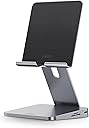
🚀 Elevate your iPad game — all-in-one power, style, and productivity in one sleek hub!
The Anker 551 USB-C Hub is an 8-in-1 connectivity and ergonomic solution designed for iPad Pro 5th Gen, Air 5th Gen, Mini 6th Gen and later. Featuring a foldable tablet stand, 4K HDMI output at 60Hz, dual USB-A data ports, microSD/SD card slots, a 3.5mm AUX port, and pass-through charging up to 100W, it transforms your tablet into a versatile workstation. Built with premium materials and backed by an 18-month warranty, it’s the ultimate all-in-one hub for professionals seeking seamless productivity and style.


| ASIN | B09MK6DBQL |
| Best Sellers Rank | #256 in USB Hubs |
| Brand | Anker |
| Color | Gray |
| Compatible Devices | Tablets |
| Customer Reviews | 4.4 out of 5 stars 985 Reviews |
| Hardware Interface | HDMI , USB, USB Type C |
| Item Dimensions L x W x H | 5.63"L x 5.55"W x 1.1"H |
| Item Weight | 1.4 pounds |
| Manufacturer | Anker |
| Mfr Part Number | A8387 |
| Model Number | A8387 |
| Number of Ports | 8 |
| Product Dimensions | 5.63"L x 5.55"W x 1.1"H |
| Total Number of HDMI Ports | 1 |
| Total USB Ports | 4 |
| Total Usb Ports | 4 |
| UPC | 194644088354 |
| Unit Count | 1 Count |
| Warranty Description | 1 |
G**I
Included C to C was DOA, but otherwise an AMAZING piece of hardware
The included USB C to C cable was dead on arrival, which isn't a big deal for me, but the size of the cable was just right for the size of the stand, which sucks that all of my other cables are longer. All of my other C to C cables worked just fine though, the only difference is the cable length. Other than that, the stand is extremely well made. The hinge is strong and tight, it can take a little bit of muscle to open and close the stand, but I'd rather it be a little too strong than not strong enough. The base of the stand is a little bigger than I expected, the width of the base is almost equal to the height of my iPhone 13 (base model). It hurts the portability a tiny bit, but it's still pretty compact, enough to where the size doesn't hinder my daily use at all. The weight is a tiny bit much though, it's pretty heavy. But again, I'd rather it be a little on the heavy side than too much on the light side; I want my iPad to be nice and safe in it, without fear that the stand is going to fall over. The ports on it are also great. Once you connect the C to C cable to your device, the indicator light should be glowing, and all of the ports just work. The audio sounds great, and powers my HD 560S perfectly. Every other port works exactly as you'd expect. I was also able to plug in my microSD card, and use samples perfectly fine in Koala and VividTracker, via audiocopy. I got this on sale for about 60 dollars and it is an absolute no-brainer steal for that price. Better built than the vast majority of other USB hubs at that price, not including that fact that it's also a stand. If you want an all-in-one solution like this, look nowhere else. This is where it's at.
F**S
Fantastic iPad Stand
This iPad stand is fantastic! The PD input powers the stand and is great for charging the iPad. Make sure you have an adequate charger. I plugged in HDMI to a 3440x1440 monitor, and it worked flawlessly in both Mirror and Extended modes. My mouse and keyboard also worked perfectly when plugged into the USB ports. I plugged in my headphones using the 3.5mm port, and they worked just as well. I bought this Used-Like New to save some money and it looks and feels untouched. I recommend using the supplied USB-C cable between the stand and the iPad, because I couldn’t get any other high bandwidth cable to work properly.
J**N
Read this before buying
This Anker USB-C hub is designed well. This is perfect for my on-the-go WFH setup. I am currently using this to hold my external monitor when using my work laptop or iPad Pro. I love that this is a hub integrated into an iPad stand. Hinges are solid, this thing is not budging without some force. The charging DOES work. You will need a power supply that provides 45W minimum because the hub requires power as well as the device that’s connected. So here is the problem I have noticed. There seems to be a good bit of complaints about the charging not working. If you have attempted by using the required power, the problem is the provided cable. I figured this out when I switched to a Thunderbolt 3 cable that I had. Everything worked, including the charging. This leads me to believe the provided cable is defective, also because this cable does not seem to be sold separately. If the cable worked, I would have given this 5 stars. For the time being, I will leave it at 3 stars. Reason being is the price. For $100, the cable provided should work. Anker has been contacted. I will update this review once they resolve this issue. Update: It was determined that the cable was the cause. Anker sent a replacement cable with no problems and it worked. I am still using this hub stand for external monitors with no issues. Because Anker worked with me on this and the product works 100%, I now give it 5 stars. So if you have an issue with charging, it is the cable. Hopefully this gets corrected.
S**Y
Cool but didn't do what I expected it to
This is a really well made stand. Let's start with that. It's sturdy, it holds your iPad really well, and it doesn't let it wobble all over the place. I wish that it maybe had one more point of articulation in order to just give it that perfect rating. The one thing that really bothered me, and this is so superficial, but the texture of the pad on the stand itself... It's this ribbed plastic and it gave me the ick to touch it. I know that probably won't bother most people, but I just couldn't get past it. Other than that, I had a bit of trouble getting my iPad to charge consistently while it was on the dock. It wouldn't always start charging when I plugged it in, and I know it was not my iPad because I've never had that issue with other cords (and still do not have that issue with others). Ultimately I ended up returning it because of the plastic pad. I know it's dumb but it freaked me out. It's a really nice case otherwise, and pretty cool for the docking capabilities (they work great) so if that's what you're after you might be fine with this.
B**H
Multi Use Device
I have used this with my Samsung Galaxy Z Fold 7 and it works very well. It's also great for connecting to my television using Dex Mode.
R**I
Works with Asus ROG Ally…but…
Great usb c hub. Plenty of peripherals and does as advertised. My primary use is actually to dock, play on larger monitor and charge the device. I played several games with about 30 hrs on it and didnt have any problems…aside from some setup issues. So when using and setting up, make sure you are using the correct power input. The hub needs, for my setup with the Ally anyway, you need at least 100watts going to it. If it doesn’t get it, the screen will go in and out and it won’t work. Initially I used a 30 watt apple charger and it didn’t hack it. Using the 30watt did work and display on my iPad. Also make sure you are using hdmi 2.0 or better cable. When I got my setup working I notice there wasn’t any sound. Swapping for a better 2.0 cable worked. The hub can’t do more then 60hz 4K so you don’t need a 2.1 hdmi cable. FYI, if you want 120hz or better, just know there aren’t too many games that can run at that. The hub also was able to charge my Ally and yes, it was able to run at 30watt turbo. Great hub for handheld gaming and iPad use. I don’t have a Steam Deck to test but based on the other reviews, it looks like that works too.
C**.
Premium Build, Perfect Functionality for Pixel Tablet - Turns it into a Workstation!
This Anker 551 hub is a game-changer for my Pixel Tablet. The high-quality build feels great, and it adds so much functionality. Connecting my 1TB external drive was effortless, and the ample ports handle everything I need. The foldable stand is sturdy, easily adjustable, and puts my tablet at the perfect eye level, making it so much easier to use as a workstation at home. Sleek design too! Highly recommend for expanding your Pixel Tablet's potential.
T**P
Definitely not made for iPad Pro M5
I have a brand new iPad Pro M5 and updated with the latest ios version. I also brought a brand new Anker 65w charger for this. This hub is supposedly "Made for iPad". I also have an S25 Ultra. When I connect my S25U everything works as expected. So that tells me the charger, cables, and hub works. When I connect the iPad it doesn't always detect the hub. If I don’t plug in power for PD it will connect and I can use my usb keyboard and mouse. As soon as I plug in power it disconnects and the blue plug icon in the top right will pop up every 10 seconds like it’s trying to connect but it won’t. I have to unplug and plug back in multiple times and sometimes it will finally connect. No matter what though it will not detect my USB drive. My phone will though. I plugged in my kids iPad (A16) same iOS version and it worked fine. This has to be an issue with compatibility with iPad Pro M5. I will be returning this and trying a different hub. This is not worth the price for the headache.
V**V
Supporto Hub per iPad
Hub per iPad quasi completo Trasforma l’iPad in un pc peccato che l’usb c è solo per ricarica Peso giusto per la stabilità Pienamente soddisfatto anche per i tempi di consegna
M**R
Very good product from Anker!
Initially the HDMI port didn't work. I was using an Apple USB-C to USB-C cable to connect my iPad Pro 12.9 to the hub. I wanted to try out different HDMI cables but after I reviewed one of the reviews, I discovered that there was in fact a USB-C cable in the packaging. Using this cable, connecting the iPad to the stand, & voila..the HDMI worked! As mentioned in the review, it's very easy to miss this cable in the package since It's tightly packed in the tube like cardboard & because it's so light, I didn't notice it until I read the review of Ron. The stand itself is well made & sturdy, stable, firm adjustability, and good range of motion. I experience no degradation from the HDMI in either display or sound. However, I found two scratches at the front of the hub, which I believe could’ve caused during packaging but I can live with that as long as the functionalities are working.
J**U
Buena calidad
Es un buen soporte metálico y un excelente hub con puertos de todo tipo.
T**I
update firmware
Bardzo dobry kontak z supportem Anker. Szybka reakcja i wszysko działa. Polecam
M**D
بالامكان عرض كل محتويات الايباد على التلفزيون بصوره واضحه
احببت جمع كل ما احتاجه في جهاز واحد
Trustpilot
3 weeks ago
1 week ago