🖋️ Elevate your digital creativity—because your ideas deserve precision.
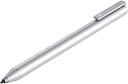
The HP Digital Pen (Natural Silver) is a precision stylus designed exclusively for select HP touchscreen laptops and tablets with Windows Ink support. Featuring advanced N-trig technology, pressure sensitivity, palm rejection, and customizable buttons, it transforms handwriting and drawing into seamless digital experiences. Powered by a long-lasting AAA battery, it requires no setup and is optimized for professional productivity and creative expression.


| ASIN | B06XVDK7TV |
| Batteries | 1 AAA batteries required. (included) |
| Best Sellers Rank | #158,746 in Office Products ( See Top 100 in Office Products ) #5,525 in Inkjet Printer Ink Cartridges |
| Brand | HP |
| Color | Platinum |
| Customer Reviews | 4.1 4.1 out of 5 stars (3,884) |
| Date First Available | June 5, 2017 |
| Is Discontinued By Manufacturer | No |
| Item Dimensions LxWxH | 0.37 x 0.37 x 5.43 inches |
| Item Weight | 1.41 ounces |
| Item model number | 1MR94AA |
| Manufacturer | HP |
| Number of Processors | 1 |
| Product Dimensions | 0.37 x 0.37 x 5.43 inches |
| Series | 1MR94AA |
L**1
I am now a fan of Windows Ink
I bought this product for use with my 2017 HP Spectre x360 machine. The 2017 Spectre x360 laptop comes with Windows Ink compatibility and an N-Trig digitizer on the screen. I am not an artist and I have no prior experience with active pens, but I think this pen works great on my laptop. With the Windows Ink apps and OneNote this active pen works almost as well as using a pencil on paper -- I am very impressed. The tip glides over the surface with almost no friction, which takes some adjusting when you are used to writing with pens or pencils. But it is extremely accurate -- you can cross your t's and dot your i's with the same precision as if you were writing on real paper. I did some writing and drew some sketches and the end product almost looked like I had scanned a real notebook of mine (but cleaner). It has a pressure sensor on the tip so pressing harder will affect the way your lines look. If you're using the virtual pencil the lines will get darker, and if you're using the virtual pen your lines will get thicker. Perhaps the best part is the palm rejection technology. While I was writing and drawing I was able to rest the edge of my hand on the screen just like I would rest my hand on paper and my hand simply was not detected. At the same time if I wanted to use my fingers to pan the view around or pinch to zoom, I was able to do so easily. It comes with a battery that supposedly should last many months, and two buttons that have different functions depending on what app you are in. Usually you can hold the bottom button down to transform the pen into an eraser. The build quality is good from what I can tell, it feels like a sturdy metal pen. No setup was required, I just put the battery in the pen and then tapped the screen with the tip of the pen and it instantly began working. The only negative thing I have to say about this product is that it is expensive. I have little doubt that in a few years products like these will probably be more common and cost much less. However, at the moment it is still cheaper than the official Windows Ink pen from Microsoft. I can't even say I'm extremely put off by the price considering it is a new product and it works so well. If you have a laptop with Windows Ink support (make sure it is an N-Trig digitizer, not Wacom), and you want to use it to draw or take notes, I recommend this product.
T**N
great
like it
M**E
It's so good I'm crying
I got this for my HP Pavillion 14t, and it works great with most applications. The pen pressure doesn't work with Paint Tool Sai, but it does work with Sai 2 (which is a lot better btw), Medibang,and Firealpaca. It's a great tool for artists and I really recommend it. It's wonderful not to have to draw on a separate device. Only problem I have is that I never seem to have AAA batteries.
E**R
Great, but seems like they cut quality
This was easy to use, literally just put the battery in and it imediately worked, however, I had been using my boyfriend's pen that came with his HP Spectre, and I immediately noticed the difference in quality when I took this one out of the package. It is identical in looks, but the main difference was the weight. My boyfriend's pen was so much heavier and sleeker, definitely more comfortable to use, and made of metal. This one was light, cheap feeling, and almost felt like coated plastic to make it look and feel like metal. I understand that the price for this was very good, so I can't complain too much, it works great, the touch screen capabilities are as good as I think they can get, if you try to tap at too much of an angle it wont read, but us it like a pen and it will, theres no reason for it to be at so far of an angle that it wont work. The pressure sensitivity is spot on, It is great for what I bought it for. It was just a tiny bit disappointing to hand him back his nice, heavy, metal pen and use this light, cheap plastic one.
D**H
Does not work with HP ENVY x360 Convertible preduct # W0U47AV
I was curious if it would work as far as the description was not completely clear. I sent a question mentioning the model and the product #. In less than one hour I received an e-mail by Amazon that it will work. Well, I received it in one day free delivery (actually in hours), unpacked, inserted the battery in the correct direction, and it did not work at all. Is it incompatible with my laptop or the pen is defective? There is no way to check. I am returning it immediately.
T**.
Excelente
Excelente
A**U
Pen is still good though. Don't need the box anyway
The shipping was quick but the box of the pen was ripped up and damaged. Pen is still good though. Don't need the box anyway.
J**E
Perfect Pen for HP Envy X360! ( I own the 2020 Ryzen 5 4500U Model)
I originally owned 2 surface pens, and both of them provided a poor writing session when being used. I kept dealing with frequent skipping in the pen that would leave gaps in my lines on screen. It made writing super stressful because I would have to keep on erasing until my line didn't have any gaps in it. However, buying this pen, which was designed for HP laptops works absolutely perfect. I have not had a single skip and I have owned the pen for a little over a week now. Super pleased with my purchase. If you have the skipping issue with another pen then this is definitely what you will want to buy.
P**R
It works very well with my hp pavillion x360 convertible 14-dw1040TU. Palm rejection will work well with appropriate software like onenote, bamboo paper etc provided you do some proper setting in the touch screen related switches of windows 10. Works somehow with Ubuntu 20.04 but there are issues that would make it useless while using software like xournal etc. On the other hand it can't compare with pens of tabs like samsung s6,s7 or ipad. It is still quite useful if you want to write considering the larger screen size of a laptop.
E**A
I bought it because the one I got with the computer broke (it fell on the tip, which broke in 2 but the pen was still going). Works perfectly on my HP Spectre x360.
E**R
I have nothing but good things to say about this pen. I don't have the best hand -writing but the write to text works wonders, I wrote this review with the pen. I am a college with little to no motivation to write notes from lectures. But now with this pen, I can just annotate lectures. If you're as lazy as me, I would tell you to invest in this pen, you get to be eco friendly for just €25. Life is a gamble, and I think you should bet all you have on this pen (no l am not a marketing student, and yes I know this was an amazing pitch and no, I won't switch courses.) I don't know why you're still reading this long ass review, go buy the pen already!! (you can thank me for being the catalyst to you getting your degree)
S**O
Hola, primero y antes de nada, esta opinión la estoy escribiendo con el lápiz. Windows 10 tiene como novedad windows ink, el software dedicado a la entrada manuscrita. Con Windows ink se puede escribir en una especie de plantilla que reconoce toda tu escritura. Está situada junto al teclado táctil. El lápiz Hp es muy simple. No hay que sincronizarlo por Bluetooth. Simplemente le pones la pila y ya funciona. Parece mágico. También sirve para dibujar hacer bocetos escribir notas a mano sin convertirlas a texto... Genial :) Trae dos botones en el lateral. Si lo dejas apretado conviertes el lápiz en una goma o en un "seleccionar todo". Emocionado con la compra. Actualización: es una pena que no lleve un botón en la parte superior como el lápiz de la Surface porque sería práctico poder borrar girando el lápiz y además porque es el único botón que se permite personalizar en la configuración de Windows ink. Por tanto, los dos botones que trae el lápiz no se pueden reconfigurar son así para siempre.
K**A
HP SpectraX360を使用しており、手書きでPDFに書き込みなどをしたいので追加購入。早く買えばよかったレベルでした。めちゃ便利。
Trustpilot
3 weeks ago
2 weeks ago