โจ๏ธ Elevate your typing game with precision and power!
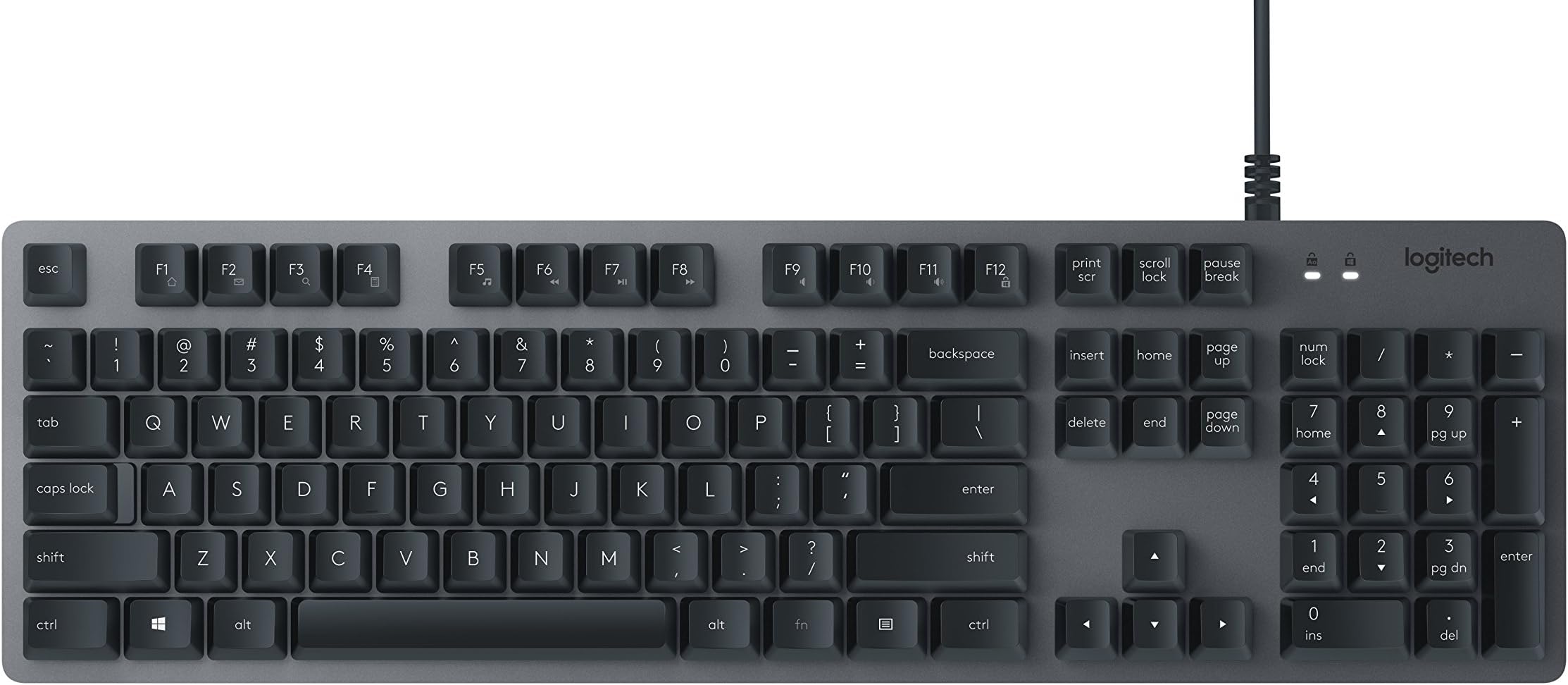
The Logitech K840 Mechanical Keyboard combines Japanese-engineered Romer-G mechanical switches with a durable anodized aluminum frame, delivering a premium, quiet, and tactile typing experience. Featuring programmable keys and integrated media shortcuts, itโs designed for professionals seeking reliable, customizable productivity with a robust wired connection.
| ASIN | B071VHYZ62 |
| Additional Features | Multimedia Keyboard, Programmable keyboard |
| Antenna Location | Office |
| Best Sellers Rank | #8,514 in Computer Keyboards |
| Brand | Logitech |
| Built-In Media | keyboard, user guide |
| Button Quantity | 26 |
| Color | Black/gray |
| Compatible Devices | PC |
| Compatible Operating System Family | Windows |
| Connectivity Technology | Cable |
| Customer Reviews | 4.2 out of 5 stars 701 Reviews |
| Enclosure Material | Aluminum |
| Global Trade Identification Number | 00097855127990 |
| Hand Orientation | Right |
| Item Dimensions L x W x H | 12.01"L x 12.01"W x 11.42"H |
| Item Type Name | Logitech K840 Mechanical Keyboard with Romer G mechanical Switches for PC - 920-008350 |
| Item Weight | 2 pounds |
| Keyboard Description | Mechanical |
| Keyboard Layout | QWERTY |
| Manufacturer | Logitech |
| Mfr Part Number | 920-008350 |
| Minimum Required Operating System Version | Windows 10 |
| Model Name | LOGITECH INC. |
| Model Number | 920-008350 |
| Number of Items | 1 |
| Number of Keys | 26 |
| Number of Packs | 1 |
| Number of Sections | 3 |
| Power Source | Corded Electric |
| Recommended Uses For Product | Office |
| Series Number | 840 |
| Special Feature | Multimedia Keyboard, Programmable keyboard |
| Style Name | Contemporary |
| Switch Type | Romer-G |
| Theme | modern professional |
| UPC | 097855127990 |
| Unit Count | 1 Count |
| Warranty Description | 1 - year limited warranty |
W**D
Brilliant mechanical Switch Keyboard
1 Year Later: Absolutely NO flaws. Getting another one for a second desk at work. Getting the 'gaming' model with RGB lighting for the house. The Romer switches are the perfect balance between feel and sound. O. M. G. Got in my Logitech K840 keyboard today. Absolutely brilliant key feel - anodized brushed aluminum key caps with laser etched letters. New Japanese mechanical switches. Just the right click to know you fired a key press, no louder that a rubber dome Lenovo keyboard. Slightly louder than the $5 Kensington ones they pass out at work. But the finish, the quality of this board is an order of magnitude better than the price point. I have found the grail, antd it's is Logitech! Extraordinary price point - a full half less than even the cheapest 'gaming; keyboards without the LED gauche -- very clean and professional looking! Please keep in mind, for 34 years I have typed exclusively on IBM Model M keyboards. I learned to type on an IBM Selectric. I learned to code on the OG a Apple mechanical keyboards. I have 10 IBM Model M keyboards in storage, just incase I ever break one. Literally a thousand year supply of Model M keyboards. This Logiteck oustrips them all. Works just fine on Macintosh, if you can remember the windows key is the Command key in Mac. All I wish is it had a Kensignton lock slot on it; I guarantee if I leave this out at work while I'm on vacation it will get 'procured'. Now to find a case big enough to carry it back and forth to home.
D**N
Great for typing!
I love this keyboard! This is my first mechanical keyboard and I'm hooked. I've used it just about every day for a month now. I understand that it probably doesn't have the greatest switches. I hear that cherry MX switches are the way to go. But, I went from a cheap, all-plastic Lenovo membrane style keyboard that was mushy to this, and the quality is just amazing. I would not recommend this for gaming though you certainly could use it for that. It's just a bare bone keyboard that is great for typing. I type a ton, and this is a major upgrade from a membrane style keyboard. The deck is sturdy aluminum and there is no flex when typing. The keys on this have a good amount of travel. It's not a super loud keyboard, but it does have a satisfying click when typing. If you do buy one, make sure to get a palm rest. It does sit a little high.
C**D
Great keyboard for first-time mechanical keyboard buyers
Let me preface this review by saying that this is the first mechanical keyboard I have used, so I have nothing to compare it to. That said, this keyboard has made a fantastic first impression. PROS: - This keyboard presents a very professional image. I am not a big fan of backlit keyboards. I prefer a subdued appearance, but I didn't want to sacrifice functionality to get it. - Compared to the AmazonBasics keyboard that I had been using for the last four years, this keyboard is much more comfortable to type on. It requires significantly less pressure to activate each key, and the matte keys feel a lot better than glossy plastic ones. I'm a software development student who works in an office and plays PC games as a way to decompress, so I'm at a computer for roughly 14 hours a day. Every tiny increase in comfort is a big deal for me. - It's nice to have shortcuts assigned to the F-keys. My old keyboard had these same shortcuts as standalone keys, and thus didn't require you to press the "fn" key to activate them. While standalone keys seem like they may be more convenient, it was always a pain to have to close out of Windows Media Player every time I accidentally hit the key. - The keyboard feels like it was built to last. Though I've only had it for a day, I already feel like it's going to outlast my old keyboard. CONS: - This keyboard is pretty loud. Like I said before, I haven't ever used a mechanical keyboard, so I don't have anything to compare it to, but the sound meter app on my phone registers a pretty consistent 43 - 45 db when I place the microphone right next to the keyboard. On top of that, the Romer-G switches will not accept rubber o-rings like other mechanical keyboards, so dampening the sound seems out of reach for now (though I'm looking for workarounds). Additionally, there's a little bit of a "pinging" sound that comes from the springs within the switches. It doesn't bother me, but it might bother you. - If you're used to using a low-profile keyboard, you may experience a bit of wrist pain at first. This keyboard is close to twice as tall as my last keyboard, and it has been a little rough to get used to. That said, this can easily be solved with some kind of wrist rest. - There is only one tilt setting for the keyboard--you either have it completely flat, or at the predetermined tilt angle. To me, the tilt seems very inoffensive, but you may feel differently. Overall, I think this is a great keyboard for the $59.99 sale price. I can say with confidence that this is the best keyboard I have ever used, but keep in mind that my experience is limited to built-in laptop keyboards, AmazonBasics keyboards, and cheap-o government keyboards filled with food crumbs.
B**Y
why did I wait so long to buy this?
got it on sale. This seems to be the same as the G413 but without backlighting, and without the usb passthrough. I bought it to replace my 15 year old "windows 98 keyboard" that was originally $10. WOW. what a difference. I didn't need this keyboard per se, but I was tired of the sticking keys and the general mushiness of my aging keyboard. I first bought a G610 with cherry mx brown keys. I hated the key switches. There was about two millimeters of travel before anything happened. I felt the strokes I had to make to type were much longer than normal, and frankly the tactile bump just felt wrong. So I returned it and my search for a new keyboard continued. I tried out a few other boards at a local blue and yellow electronics store. Cherry reds, blues, browns, some razer boards, and this, the k840 with romer G switches. It's hard to tell how things will feel at your desk by trying to type on the displays, but the romer switches seemed the most familiar. After waiting a while I ordered one because it was on a good sale. Some people say the romer G are between red and brown switches, with a slight tactile bump near the top of the stroke. I agree. The lack of any bump on the red's felt strange. I wanted some 'buckling' point during the keystroke, and the brown's was all wrong. Some people say that romer G switches feel like rubber dome switches. I disagree. The difference is night and day. This thing feels great to type on. The keys are stable, you can tell when you've pressed them, there is no wobble or mush to be found. The only complaint is that there is sometimes a slight ringing sound when certain keys are pressed (mainly the 'i' key and the spacebar). You will only notice this in a quiet environment. I also find it odd there are no num lock or scroll lock lights, but let's be honest, when was the last time anyone actually used one of those keys? The keys are pretty quiet for a mechanical keyboard. Another plus. I think the people that like the super loud clicky boards just like the noise, and that the noise does not do anything useful for the typing. So, if you can get this thing on sale, go for it. If you're looking for something quality, but all the gamery rgb boards and super expensive custom keycap snob boards just don't do it for you, this is likely the keyboard you want. It is a sweet upgrade from ancient rubber dome board. This thing feels well made. It looks nice without shouting. I think logitech has engineered a great key switch that is actually useful for typing and gaming (I've tested both), and not just a gimmick or novelty. It is nice to find it in a not too expensive board.
C**C
Does what it is supposed to do and does it well
When I started working from home I purchased another brand keyboard with back-lighting, a feature I wanted. To my great disappointment the key feel was mushy and worse, it would double type characters and spaces so that I was having to constantly go back and edit. I tried every keyboard setting there is and to no avail. I returned that keyboard and purchased this one. No back-lighting, but I can live with that. This keyboard has a quality feel and functions just as it should. It makes a nice satisfying clack with each keystroke, never misfires and never double types. If you are looking for a very quiet keyboard, this may not be your best choice. But if you are looking for a basic, comfortable, reliable keyboard with a quality feel, I highly recommend this one.
R**T
Decent mechanical keyboard but...
This is a really nice looking keyboard and the overall quality feel is really good. It's simple in features but it's a keyboard and it works perfectly in that regard. My only complaint is the Romer-G switches. A lot of people are comparing these to mushy Cherry MX Browns. The mushy part is kind of right; Romer-G feels like there's a preinstalled o-ring on each of the keys so they aren't as loud when they bottom out but they don't really feel mushy to me; just quieter. I would also compare these to Cherry MX Clears. The actuation force, while on paper is the same (or close) to Browns, is noticeably more resistant than all the Brown switched keyboards I use. It's not by a lot but when you're used to the actuation force of Browns, you notice this keyboard is slightly harder to type on. It might need to be broken in or something, but I drop about 10 WPM in my typing on this keyboard brand new out of the box. Then there's the issue of using uncommon switches: hard to find parts. You can contact Logitech directly I'm sure to get replacements (they'll probably just send you a whole new keyboard) but there are almost zero aftermarket keycaps for the Romer-G switches which is a shame. The ones I did find were for their gaming keyboard that has the odd shaped keys. I do like the sturdier cap mount style (socket with tabs verses Cherry's + peg). Romer-G switches make a lot of sense for the LED lit keyboards (an LED up the center is far better than an offset LED) but for a professional keyboard like this, they don't have any advantages over Cherry MX switches and are far less customizable. Update: after using this for weeks I went back to my Das Keyboard with cherry mx browns. The Logitech switches are just too stiff and arenโt as effortless as browns. I was hoping theyโd break in but they appear to retain their out of box feeling. Ended up giving it away since itโs too late to return.
R**O
Double Polling and Ignores some presses
As an exxample i'm going to write this review without removingg any of the double polling or other screwups that this keyboard decides to do on it's own. Initiially this keyboard was fantastic. The response was phenominal and writingg was so muc bbetter than the onld rubber dome keybboard that i was using bebfore. Howeer for about 8 months now this thingg decides to double poll some keyy presses or iggnore othehrs all together and it's driving me insane. When i'm writing i tend to get in the zone and can knock out a few ages without haing to pause. So when i'm done and am met with imssing letters or letters that are out of place because it decided to reerse mym inputs and you can see the incredible annoyance. Is my typing perfect? No. But i'm willing to admit that my accuracy isn't perfect. However as you can see this is not all accuracy issues. When i press a key i usually go to the bottomm of the stroke and mmy brother can hear the clacks on te other side of the hall if he doesn't have his headphones on. I'e cleaned and taken the board apart to do a full cleaning (As apart as you can go because the switches are soldered and i was not going to desolder them to egt between the case-frame and the pcb) I use canned air to hit eevryy possible crevice on this board and still as sooon as i get the caps back on and type my password in it takes morme than one try because certain characters would register or it's double poll. So instead of just typingg like a normal person who's familair with a keyboard I instead havev to type slowly and make sure that only one dot appears for each keystroke. This happenes on both windows and linuxx so it's not a keybaord settingg that i can just easily change in the system. IIt's the keyboard itself and I'm sick of it. It's better than not haing a keyboard but I will not recommend romer-g's to anyone because this is an absolute rage inducer of a keyboard. I'm willing to admmit my typing isn't perfect but this is somemthing entirely separate fromm that.
S**H
Very good, but noisy keyboard
I've used this keyboard for about a month. It works, looks, and feels fine, but man does it make a lot of racket. Clickety clanging all the time. How much this matters depends on how and how much you type. An experienced typist will raise quite a din with it. Nevertheless, it is solid, heavy, and looks and feels like industrial quality. If you whacked somebody over the head with it, you'd likely get a felony charge. For most people who want a "mechanical" keyboard, you'll do well with this. But there are a *lot* of choices out there, and my new fave is a Redragon 556. For the record, I'm a programmer, so lots of sporadic bursts of typing, lots of doing other stuff. I usually work at home, which is quiet except for the noise I make myself, and I hate wearing headphones. In other environments, the noise level may not matter at all.
H**H
Well built, simple design. Good user experience.
Excellent build quality. Offers a true mechanical experience without the typical obnoxious looks of every other mechanical keyboard out there. Romer-G switches seem to be excellent, they are tactile yet quiet. I have heard that they are similar in feeling to a Cherry MX Brown with O-rings. Although most of the keys are pretty quiet, they are definitely louder than a membrane keyboard and the space bar has a loud, echoing โtwangโ when pressed. The price may seem expensive when just looking at the pictures, however if build quality and feel are more important to you than flashy looks, you will not be dissapointed.
D**N
Broke after 2 months!
Good keyboard, but it simply stopped working after 2 months of average use! Complete power failure, tried it in multiple USB ports and a different laptop. Very disappointing from what should be a high quality manufacturer. Have raised a ticket to get a replacement. To top it off - Logitech support response was 'these things happen' - no apology or explanation!
C**K
Solid keyboard with great build quality
The switches are consistent and exactly as described - somewhere between a cherry red and brown - and the build quality is fantastic. There is basically nothing fancy and zero features to this keyboard; it just works. Some people will like that and some won't. I bought this keyboard because it's one of the least expensive mechanical keyboards from a reputable brand, and I'm happy with the purchase.
B**N
Wonderful substitute for Cherry MX browns
Just received this keyboard, and can't recommend it enough! I've tried various mechanical keyboards in the past. Admittedly, all of my experience is with Cherry MX switches. As I do mostly programming and a bit of gaming, I tended to stray towards blues and browns for the tactile feedback. My daily-driver at home has Cherry MX browns. The lighter tactile feel was preferred over blues, until this keyboard. I bought this to use at work, and I'm sure it will live up to the task. They keys feel great, and the Romer G switches remind me most of the cherry browns, with a slightly different tactile response reminiscent of dampener rings on the keys. I love the simplicity of this keyboard, and the keys being raised from the bed without an edge or bevel will make it super easy to keep clean. The metal surface and subdued color tones make this keyboard look super classy. Pros: - Great key feel - Easy to clean deck - Soft, yet noticable, tactile response on keypress with the Romer G switches - Not super clacky Cons: - No scroll lock or num lock lights
C**A
It's a good keyboard but I don't love it.
Four big gripes with this keyboard: 1) No NUM LOCK light, that's really annoying. 2) No right Windows key, replaced with a FN key. 3) Does NOT work with Logitech's usual keyboard software. 4) The bump feel and the actuation point are noticeably different positions. I want to like this keyboard. The build quality feels very solid. The actuation of the keys is 1.5mm, much higher than all of the Cherry MX switches except their new silver switches, so I can type very fast on this keyboard. The feel of the keys is similar to Cherry MX Brown switches but the actuation point is about 1mm higher than the bump feel which means you can activate a key and release having never hit the bump point. If you always bottom out the keys you won't care about that but if you're a fast touch typist this will probably annoy you. And lastly their website claims there is no software for this keyboard. Not true, "Logitech Options" software works with this keyboard but it's pretty basic in what it does. 150MB of drivers just to show my NumLock status on screen. The software only lets you change some of the F-keys, mostly useless. I never really use the NumLock key but sometimes on boot Windows decides to turn it off and with this keyboard I can't tell until I type something. EDIT: Have been using this for a few months now. Still find the absence of a NumLock light annoying but the build quality is good, feels like new. I have found with the higher actuation point of the keys I end up making a lot more typing mistakes than I did on a Cherry MX red or blue keyboard although the Logitech keys are quieter which is nice. Dropping this to 3 stars, might be great for gaming but I don't love typing on this.
Trustpilot
1 day ago
1 month ago