


Desertcart purchases this item on your behalf and handles shipping, customs, and support to South Korea.
🚗 Upgrade your drive: wireless, wired, and worry-free connectivity!
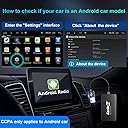
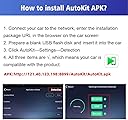
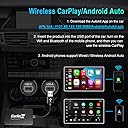
The Carlinkit Wireless CarPlay Android Auto 3-in-1 Dongle is a cutting-edge adapter designed exclusively for aftermarket Android head units (Android 4.4+). It enables wireless CarPlay for iPhones (iOS 10+) and wireless Android Auto for Android phones (11+), while also supporting wired screen mirroring with minimal latency. Installation is straightforward via the AutoKit APK, delivering seamless auto-connect functionality. With handsfree voice assistant support and steering wheel control compatibility, it enhances driving safety and convenience, making it the ultimate upgrade for modern car infotainment systems.






| ASIN | B09ZQF9YS4 |
| Best Sellers Rank | #31,865 in Electronics ( See Top 100 in Electronics ) #56 in Car Stereo Digital Media Receivers |
| Brand | Carlinkit |
| Built-In Media | usb box cable |
| Color | Black |
| Colour | Black |
| Compatible Devices | Android Phones: Requires Android 11.0 or later, Apple iPhone: Requires iOS 10 or later |
| Compatible devices | Android Phones: Requires Android 11.0 or later, Apple iPhone: Requires iOS 10 or later |
| Connector Type | USB |
| Connector type | USB |
| Customer Reviews | 4.0 out of 5 stars 131 Reviews |
| Item Dimensions | 21 x 8 x 2.5 centimeters |
| Item Weight | 34 Grams |
| Item dimensions L x W x H | 21 x 8 x 2.5 centimeters |
| Manufacturer | Carlinkit |
| Mfr Part Number | CPC200-CCPA |
| Model Number | CPC200-CCPA |
| Number of Items | 1 |
| Number of Ports | 1 |
| Power Plug Type | No Plug |
| Specific Uses For Product | Car Audio & Video |
| Specific uses for product | Car Audio & Video |
| Unit Count | 1 Count |
| Warranty Description | 30 Days Returns and 12 Months Product Warranty Support |
S**D
سهل التركيب الاقتران وعملية
بصراحة منتج رائع جدا جدا عندي الشاشة اندرويد وموديلها 4.4 ومتوقفه البرامج من ناحية التحميل من 4 سنوات وخاصة جوجل مابس ويوتيوب والقطعة الحمدلله حلت الازمة واشتغل معي على احلى مايكون واغنتني من شراء شاشة بمبلغ عالي
J**Y
Miracle Device
I recently bought an Android Head unit off Amazon for my 06 Matrix. Yes, a Chinese one. The headunit included S-Play as it's CarPlay/Android Auto bridge. It worked decently for wireless, but wired Android Auto didnt work despite being advertised. So I messaged the seller and they responded by giving me the newest firmware for my head unit. I downloaded the firmware and installed into onto my headunit. The new firmware completely did away with the S-Play application and instead installed a new one. CP Link/Android auto package. While it fixed my issue of Android Auto not working wired (it works wired), now it was completely unusable as it was insanely slow/laggy. I reached back out to the seller and told them I'd like to revert to the previous firmware and I'll just deal with S-Play wireless as it at least wasn't laggy. They beat around the bus, gave me all kinds of other options, and anything they could think of except letting me revert my software. Fearing I installed a headunit and backup camera that wasn't going to work lole intended I began to wonder what I should do. I refused to return it and take the camera and headunit out. I discovered this little guy. At first it too was frustrating me and I almost returned it. I reached out ti support and turns out the Apk version that is listed on here is an older one. I simply downloaded the newest APK and it works like a charm. Seamless auto-connect when i get in the vehicle. Doesn't lose connection. Is very responsive compared to any other apk outside of the actual Android Auto application itself. Its honestly the closest thing to OEM latency wise that I have tried. This thing is great man. I love it. Seriously. If you have an android headunit and you kost your carplay application or it just doesn't work well, invest in this... it comes with autokit APK and it will literally solve all your issues. All your frustrations gone bc of this device. The only thing I will say is that it take around 20 seconds after turning my car on to be fully connected. To me this isn't a big deal at all really as every other APK was still not as fast as OEM Android Auto. && tbh im sure i can find some system setting or APK that might help in opening it faster. Even if I dont I really dont care as the connection tome doesnt bother me. Outside of the connection time the last thing ill mention is the APK version. If you're having issues or cant seem to find the right settings I'd be willing to bet it is due to the bersion of AutoKit you installed. **MY ADVICE IS THIS!!*** - go to the carlinkit website... once you are there go to support at the top and download the latest version of AutoKit, that way you know it is updated. Thank you carlinkit for the beautiful device. I'd give it 10 stars if I could.
A**Z
Car play
Funcionó a la perfección
M**N
مناسب لتطبيق اوتوكيت فقط
يعمل بشكل سلس مع تطبيق اوتوكيت
S**G
Carplay and Android Auto with no wires
This USB adapter allows you to use both wired and wireless Carplay and wired and wireless Android Auto on Android devices. It requires the Autokit app installed. I'm using this with a UGODE PX3 Android 7.1 head unit in a 2011 BMW X5. I plugged it into a USB port on the Android head unit and downloaded and installed the Autokit app off the CarlinKit site. Initially I couldn't get wireless Android Auto working. The Bluetooth connection would keep disconnecting. It would keep trying over and over. It ended up being the firmware on the USB adapter wasn't up to date and the latest app didn't give me the option to update it. I downloaded a version of the app from a CarlinKit store site which I think was a slightly older version. This version let me update the firmware on the adapter and update the app itself to the latest version. After this, wireless Android Auto started working. The adapter and the app are working well now. Wired Carplay and wired Android Auto worked well from the beginning. It's pretty solid and stays connected to my phone. No skips or disconnects and navigating in Carplay and Android Auto is pretty responsive. When I start up the car in the mornings, the Autokit app automatically starts with the Android head unit and automatically connects to my phone and starts playing music. Sometimes the resolution is off with a black bar above the Autokit screen and I have to close and restart the Autokit app. I think this is a quirk of the Android head unit. I'll try to set a Tasker task to kill and restart the Autokit app when I get the chance. My actual Android head unit is set up with minimal data and email syncing and its main purpose is to display Carplay or Android Auto. I use my phone through Android Auto for all my needs while driving. There's an option to output audio through the headunit aux output or through Bluetooth. I think the Bluetooth option actually has little to no delay compared to the aux output. My phone connects to the CarlinKit adapter Bluetooth and the BMW OEM headunit Bluetooth and routes or bridges them. This works very well to bring wireless Carplay and Android Auto to my 2011 BMW. Also no wires means I can control charging of my phone to reduce heat.
Trustpilot
2 months ago
1 month ago