✒️ Elevate your digital canvas—write, sketch, and create without limits!
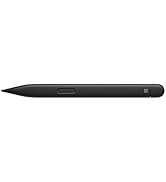
The Microsoft Surface Pen (Model 1776) in Charcoal Black offers 4096 pressure sensitivity levels and ultra-low latency for a natural writing and drawing experience. Designed for seamless integration with a wide range of Surface devices, it magnetically attaches for easy access and features a dual-ended design with a precision tip and eraser. Compatible with major creative and productivity apps, this lightweight, well-crafted pen is the ultimate tool for professionals and creatives seeking precision and speed.


| ASIN | B074GYX6VR |
| Batteries | 1 Lithium Polymer batteries required. (included) |
| Best Sellers Rank | #138 in Digital Pens |
| Brand | Microsoft |
| Color | Black |
| Customer Reviews | 4.6 4.6 out of 5 stars (4,165) |
| Date First Available | June 18, 2015 |
| Department | Male |
| Is Discontinued By Manufacturer | No |
| Item Dimensions LxWxH | 0.93 x 2.01 x 6.97 inches |
| Item Weight | 0.705 ounces |
| Item model number | EYU-00001 |
| Manufacturer | Microsoft Surface Accessories - PC |
| Product Dimensions | 0.93 x 2.01 x 6.97 inches |
| Series | Surface |
S**I
Better than what I am used to.
I bought the Samsung Note 10.1 2014 edition back in 2013. I bought it for the S pen, so that I could take notes at work. I work in colleges' boiler rooms and chiller rooms, and labs, so I need something very portable to take notes. The tablet worked GREAT for me. Fast forward to today, I wanted to replace/upgrade my tablet but Samsung no longer makes a tablet that is as good or better than my Note 10.1, so I looked into others. I found the Surface pro, and decided to give it a try. I had to have the pen (the whole reason I was buying a new tablet). This pen is SOOOO much better than the S pen in almost every way. Armed with this new pen, and being able to use full blown windows apps, I will never go back to Samsung abandonware (though I DO like their hardware when it is new). I don't know how well this pen functions with the older surface products, but with the 2017 Surface Pro it has been almost immaculate in its use. It is VERY comfortable to use (like a real pen), and I have no problems with it having a battery in it. I don't disconnect it from the SP ever, and yet the battery is still going strong (because I use my SP every day). The magnet holds it on the SP VERY well (sometimes I have a hard time pulling it off the side). If I HAD to pick one niggle about the pen it would be with the tip that comes with it. That is not to say it is bad, but I personally need a bit more drag, when writing, to be able to write neat. I don't draw at all, and would think that this might make it better for drawing, but for me, for writing, I need it to have more drag.
N**T
Worth The Purchase!
I ordered the Charcoal Black the 17th and received it yesterday, I've got to say it's working great! I'm OCD about fingerprints on the screen of my Pro 7 so the pen really takes care of that for me. It connected in less than 30 seconds, and it was a simple set up. I'm going to school for Interior Design so the pen has helped me with sketches and moving small things around without my fingers messing up the designs. Let me not forget about the finish, it is light, smooth, and well made. I highly recommend it! I'm definitely going to purchase the rest of the colors and match them with my keyboards and cases.
D**E
Surface Pen is Good For Quick Drawings
I love the burgundy color, but wish Microsoft would do a hot purple. The dull gray that came with my Surface was not a happy color for me, though I wish my cats would leave things that look like pens alone! I will probably find that one again when I move. In the meantime, the new burgundy one has a small diameter paracord tied around it to help me keep track of it, and I keep it in a little pouch so my kitties won't find it :) As for the product itself, it's great for drawing and I do use it for that. It's got a nice weight in the hand. I haven't used it on anything but the Pen and Ink interface on the Surface, and I have done some artwork there. I'll have to try it out in my Clip Studio and see how it performs there. It works fine for my purposes, for quick drawings.
O**N
Great quality
Great quality
S**Q
The necessary-but-trying companion
I wanted to get the pen for my Surface Go for note taking, using it in lectures and presentations and so on and it does get some use (and excels at its job!) but I'm always hesitant to jump to the pen even after using it for a while. The Surface Pen is like a marker, it's very usable in situations where you need to present things with large, bold displays and few words. The pen is highly interoperable with most of the Windows 10 UI and apps. It writes nicely and accurately. The magnetic attachment to the side of the Surface is a great design as it attaches strongly to the Surface and doesn't easily let go, even when strongly shaking the Surface. The eraser part of the pen is a brilliant design as it makes erasing the errors quick and intuitive. The clicky part of the eraser has the potential for lots of future extendable use like controlling slides. But, just like a marker, when it comes to fine details, I cannot depend on the Surface Pen to deliver. I am still more agile on paper with a pen when quickly sketching equations and math. For me, the Surface Pen is a bit bulky and heavy and needs adaptation. However, I still, after several months of use, cannot get the right feel of it. It writes smooth but sometimes the friction just feels weird. I think people who are used to tablet pens should get it and everyone will face a different experience with it. I still enjoy and continue to use mine but it's not something I would jump to. Here's hoping that the next version of Surface Pen will significantly improve on the points I've mentioned.
J**Y
Almost didn't get this...glad I did!
I didn't originally order, or think I'd get much use out of the Surface Pen for my new Surface Pro 6 (in sexy mat black). I originally ordered a Signature Type Cover with fingerprint scanner that arrived as the standard plastic covered fingerprint keyboard. Turns out, all of the sellers I contacted ship that instead, and say they're not aware of the Alcantara keyboard.....I reordered another Signature Type Cover (burgundy), standard, without fingerprint scanner and this pen kept popping up teasing me. I figured that since I was saving money buying the new cover, I might as well get the pen so I ordered a black pen with burgundy Alcantara Type Cover for my new black Surface Pro 6. Once they came in the next day, I started checking out the pen. It paired super easily, then I discovered it's not just a stick with a tip that draws funny little pictures. I won't use it for drawing, I don't draw, but there's a lot of other uses I wasn't aware of. I can annotate, take notes, mark up doc's or even use it as a mouse or just a "clicker" as I call it. It attaches to the side of the Surface Pro 6 like glue. It's priced well and while most may not get the use some might, it's worth having in my opinion. There may be times it comes off and gets put somewhere safe but it;s great to have for use in both laptop and tablet mode's.
A**G
The best stylus which is available in the market. Most expensive too. I tried at least some 10 to 15 other active stylus options ( cheaper ) but so far nothing beat this.
A**D
I wasted time and money on aftermarket styli (2 of them) before buying the real deal. Trust me. This. Is. Worth. It. Suck it up and pay for the real deal. Better line quality and it just plain works.
D**L
La pluma es excelente. Le agrega funciones a la tablet lo cual la hace más dinámica, útil y en algunos casos hasta suficiente. Me ha servido para oscio,dar clases, presetnaciones y hasta trabajar y hacer tarea. El único punto que no me tiene tan emocionado es que use una pila AAAA. No son fáciles de encontrar en tiendas de autoservicio aunque en Amazon están. A pesar de esto la batería dura (Llevo 4 meses y va en 92%)
E**R
Perfeito
H**K
Great pen .
Trustpilot
1 month ago
1 day ago