

Desertcart purchases this item on your behalf and handles shipping, customs, and support to South Korea.
๐ Unlock lightning-fast, massive storage with MAIWO โ where speed meets security!
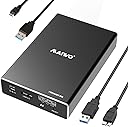
The MAIWO Dual Bay RAID Enclosure is a professional-grade external storage solution supporting two 2.5-inch SATA SSDs or HDDs up to 8TB each, delivering up to 16TB total capacity. Featuring USB 3.0 with UASP for transfer speeds up to 6Gbps, it offers four RAID modes (0, 1, JBOD, PM) for customizable performance and data protection. Its aluminum alloy casing ensures durability and portability, while tool-free installation and hot-swapping enhance user convenience. Ideal for professionals seeking fast, flexible, and reliable external storage.


| ASIN | B0B6PPM8DT |
| Best Sellers Rank | #259 in Enclosures |
| Brand | MAIWO |
| Built-In Media | 1x RAID Enclosure for 2.5 inch SATA Drive, 1x Screwdriver, 1x USB3.0 Type-A to Micro B Data Cable, 1x USB3.0 Type-A to Micro Power Cable, Screws |
| Compatible Devices | Laptop |
| Connectivity Technology | USB |
| Customer Reviews | 4.0 out of 5 stars 124 Reviews |
| Data Transfer Rate | 6 gigabits_per_second |
| Enclosure Material | Aluminum, High-strength Plastic Drawer |
| Global Trade Identification Number | 06921271224015 |
| Hard Disk Form Factor | 2.5 inches |
| Hardware Interface | USB 3.0 |
| Hardware Platform | PC |
| Item Dimensions L x W x H | 5"L x 3"W x 1"H |
| Item Weight | 12 ounces |
| Manufacturer | MAIWO |
| Material | Aluminum, High-strength Plastic Drawer |
| Memory Storage Capacity | 12 TB |
| Mfr Part Number | K25272 |
| Model Number | K25272 |
| Number of Items | 1 |
| Product Dimensions | 5"L x 3"W x 1"H |
| Supported Devices Quantity | 1 |
| Warranty Description | One Year Warranty |
N**E
Perfect for reusing old SATA laptop drives
I don't have a need for another RAID unit per-se. But I've accumulated lots of laptop hard drives over the years. Seemed wasteful to just toss them. So what do I do with them? I use this unit in large drive mode, and use old drives as scratch space. Like temporary quick storage for media files on the go. Large mode means that you get 1 big drive. 1TB + 250GB drives get you a virtual 1.25TB drive with this unit. I just run the drives until one of them finally dies. Figure out which one is bad, get rid of it, reset, reformat and keep going. It just works. And I feel like I'm not wasting old hardware.
D**E
Good Value!
I was hoping to build a work device that was faster than a RAID-0 external hard disk pair. I wanted to set up two SSDs in RAID-0 configuration. I was surprised that it isn't faster than other modes at all. You can see that the listing looking at drive speed tests. I ultimately decided to use "Normal" mode, which is even faster than RAID-0 for reading and writing. Pros: Good price Small size Beautiful case Cons: RAID-0 is a joke speedwise Secondary power cable? I'm running SSDs and tried running from the power from the data cable and that seems to work just fine. So far, I think it's quite a bargain even though the RAID-0 just barely works.
M**P
Avoid the K25272 (jmicron chipset), maybe consider buying K25272C instead.
This is a review of the K25272, not the K25272C (which I have on order). The K25272 has a jmicron chipset which is just absolutely terrible. Even Amazon's Rufus agrees and basically told me to return the enclosure because all the issues I described line up exactly with the jmicron chipset issues. 1. The jmicron chipset's uasp support is absolutely terrible and has to be disabled 2. the chipset overheats and freezes up when you do any relatively heavier test. 3. the chipset reported all my 2.5" hdd's to have badblocks, but which when I re-ran a full badblocks test in a ugreen single enclosure actually report fine! Even Rufus says this is known with the jmicron chipset, and that the K25272C has the more reliable Asmedia chipset, so I have ordered that, hoping it will be the solution I'm looking for. Update: I received the K25272C, and it confirms as having the asmedia chipset. I'm running badblocks test now on my verified healthy hdd's to see if this enclosure will be reliable. Update: After some initial errors, the K25272C has stabilized, no errors with badblocks running for 2-3 days. Active cooling helped. Blowing a fan directly dropped hdd temps by a lot and stabilized it.
T**E
Amazing little disk dynamo - using it in RAID 1
Gave it a 4 instead of 5 in quality of material because I wish it had a cooling fan. THE THING TO KNOW ABOUT RAID is that after you set the DIP switches, press the RESET button for 3-5 seconds - may take multiple times before your RAID setting stays lit. I have a 1.92 TB and 2.0 TB - both SSDs - running off iMac 2015. With the raid connected directly to the computer, I had only 140 or so GB/S throughput. When I connected it to my Thunderbolt 2 dock, I am at 300+ GB/S up and down speed. I checked both disks before I converted to raid. Interesting thing, both hard drives were 400+ GB/S up and down when connected straight to the computer with a SATA cable. Final note - I put three layers of thermal tape to the SSDs to help transfer heat to the case, and I will probably put a couple of heat sinks on the outside just to help. I have transferred more than 100 GB so far and haven't noticed any heating issues.
M**H
So far so good
Initial impressions are good. It has a nice aluminum case, and the entire thing is very compact, yet holds 2 SSD's. It comes with 2 cables: 1 USB3.0 for the data transfers and 1 micro USB for additional power that you probably won't need. It also comes with 4 screws a small screw driver so you can attach the drives to the tray (optional), and secure the tray to the aluminum case. I had a practically identical product with the Vantec Nexstar GX, but I had to return it because it just wouldn't work reliably. Interesting to me is that the Vantec Nexstar has alot more purchases and reviews and even has the Amazon Choice tag, but I had alot of problems with it. Maybe I just got a bad unit. So far this Maiwo unit is working the way I hoped that the Vantec Nexstar GX would work, and has the same (maybe even slightly better) build quality. It was also alittle bit cheaper than the Vantec. This is just an early impressions, and I only have 1 SSD in the unit right now for testing purposes. At this point, the only thing I would change is I would add a power button so I can leave it plugged in to my USB hub but still disconnect it and turn it off when not in use.
T**D
Just what I needed- (Update) Except Not
<update> I've forgotten that these DYI enclosures have lead to tears. I was looking forward to happily using my 4tb drives and forgot the bad of the past. The faster drives with the enclosure had my Mac warning me "Disk Not Ejected Properly" see attached. It ejected itself, and seemed to corrupt the contents, both in "Large" and "Normal" modes. It seemed intent on going to sleep would be my guess. No dashboard, so I'm not sure. Returned. I've ordered an assembled WD 2GB drive and will be using it. Cost the same as these 2 enclosures. </update> Sadly Drobo Inc (or their parent company) has failed me the dashboard hasn't been updated for MacOS Ventura, so I'm moving on, Beyond RAID or Beyond DROBO (hehe). I'm not sure if I need a RAID. I'm moving my User Folder off of the internal drive on one of these units using the 4X1TB drives from the Drobo. in Large mode. And will have 4TB on 2 drives for backups. I have an existing drive. Playing around with the switch settings last night left me with nothing that would mount, the instructions are hard to read and unusable. I went to bed. This morning they both work (after resetting them). RAID 0 doesn't seem to work for me (see screenshots Raid 0 on the left) perhaps I need to buy faster drives. Opened box, nice presentation tray with enclosure wrapped in plastic. Remove plastic and "Sled" falls out of "Tube". Lift plastic tray and there's a lot of stuff, 4 screws (2 long, 2 short), UBS 3 cable (Data) USB 2 cable (data), and 2 screwdrivers. Bagged nicely. Popped drives in "Sled" plugged used long screws to stabilize drives (1 each), into Mac received "disk unreadable" error (good), put "Sled" in "Tube", put screws in, plugged in and formatted. Good: Inexpensive and fits what I want. Solid box when installed, easy assembly. Metal on outside. Bad: "Sled" is plastic, DIP switches seem fragile, be careful. Not quite sure how to reset drives, but I have them in Large Mode, which is what I wanted. LEDs flicker when you eject the disk, but stay on after, so you're not sure if they are unmounted. No feet on drive. I'll add some. LEDs don't tell you drive is sleeping. Bad documentation. YMMV: LEDs are not too bright, but can't seem them on the shelf under my desk(where they will live, vertical). When not sleeping , they run warm. Don't know if my user folder will allow it to sleep. Satisfied.
Y**L
Awesome little raid enclosure.
Raid is something I MUST have and this case does exactly what I need it to do. It's been in play for a couple months now and I use Veeam Agent to backup daily. I actually tested the mirror raid by removing one drive and it worked seamlessly. The all metal casing is sturdy and well made. For this price I think I got a fantastic product.
M**E
Works with 2 x 8TB SSDs
This enclosure is awesome, easy to set up and just works. Even though the description states it supports up to 12TB, I've had no problem using it with 2 x Samsung QVO 870 - 8TB SSDs in Raid 0. So far it's working great, stays cool even though there's no fan. As an added bonus I haven't needed to plug in the second usb port for extra power, works fine with just 1 plugged in.
M**S
Great little SSD raid box.
Includes screws and a few appropriate screwdrivers to install the SSDs. In 'normal' mode it appears as two disks. Under linux I partitioned them, assembled a raid mirror , formatted them then mounted them. Just a few minutes. JMicron JMS551 bridge in the box.
G**S
Easy install
Easy to install & setup using the dip switches - make sure to turn the enclosure off/on after setting the switches to make sure the change takes effect. I installed 2 X 1tb hard drives in RAID 1. The only thing I noticed is that it gets quite hot as there is no active cooling.
Z**R
Cost effective method to gang drives
Excellent method to use laptop drives and provide enough performance to make using them less painful I mounted a pair of 1Tb 7200rpm 2.5" drives and got xfer rates close to 300MB/s. That's only 1/2 of an SSD and a fraction of a m2.nmve rates but plenty of speed for all sorts of everyday tasks. I wish Maiwo would produce a 3 bay model as well locked to RAID 0 for speed and a 4 bay with multiple RAID modes.
J**.
Good Case , Fast .
These work great . I am only useing them in the Normal setting to use small drives. I have hooked up the option power and unhooked it. In normal mode there is no diffrence and get 100+ transfir rate to another usb-3 spinning rust ext drive.Very well thought out case.
N**G
A simple device does Job, easy to configure.
Bought two to expand my old hard drives, very easy to config and high performance.
Trustpilot
3 days ago
2 months ago