Desertcart purchases this item on your behalf and handles shipping, customs, and support to South Korea.
🚀 Elevate your workspace with 8K power and seamless connectivity — don’t get left behind!
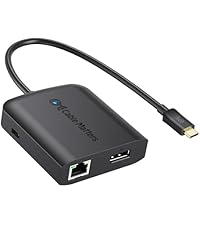
The Cable Matters USB C Multiport Adapter is a versatile, bus-powered hub that delivers 8K DisplayPort output, 60W power delivery charging, two USB 2.0 ports, and fast Ethernet connectivity through a single USB-C connection. Compatible with Thunderbolt 3/4 and USB4 devices, it’s designed for professionals seeking a compact, reliable solution to expand their MacBook Pro or other USB-C laptops’ capabilities on the go.


| ASIN | B06Y5N3YCD |
| Additional Features | Play, Plug |
| Best Sellers Rank | #456 in USB Hubs |
| Brand | Cable Matters |
| Color | Black |
| Compatible Devices | Keyboards, Laptops, Monitors, Mouse, Tablets |
| Customer Reviews | 4.3 out of 5 stars 483 Reviews |
| Data Transfer Rate | 480 megabits_per_second |
| Enclosure Material | Plastic |
| Hardware Interface | Thunderbolt , USB |
| Item Dimensions L x W x H | 3.5"L x 2.3"W x 0.6"H |
| Item Weight | 79.38 g |
| Manufacturer | Cable Matters |
| Mfr Part Number | 201046-BLK |
| Model Number | 201046-BLK |
| Number of Items | 1 |
| Number of Ports | 5 |
| Operating System | macOS 12 Monterey |
| Special Feature | Play, Plug |
| Total USB Ports | 2 |
| Total Usb Ports | 2 |
| UPC | 818707020494 |
| Unit Count | 1 Count |
M**S
Only 4k@60hz dongle under $100! (with a few caveats)
Only dongle in this price range or even close to it with 4k@60hz support. Pros: - Unique and smart implementation in regards to ports in this price range for a single cable USB-C dock. - High response rate on the DP port with 4k 60hz capability. I did a lot of browsing for a dock and this function is not found at this price (not even close). It may be a very good choice for gaming if you run a high refresh display from a gaming laptop with a Thunderbolt port like I do. Cons: - This behavior is very rare but drivers are sometimes are inconsistent; it has a built in ROM with a driver if needed but it only shows up sometimes and the display will behave erratically if you for example have another setup at work with a different dock like I do. - Power delivery is minimal, will only charge light powered laptops at 60W and this includes the USB 2.0 ports, don't expect to run anything but a mouse and keyboard (tried a laptop cooler as a test with usb pass-through but it wouldn't power the mouse connected to the cooler). - Biggest caveat for me is the network speed is only 100mb versus the more common gigabit which limits file sharing on my home network. - You need a separate charger for power delivery to your laptop, but that's normal for most USB C dongles. For reference, I use it with my Lenovo T480 and an MSI gaming laptop (no power delivery on the MSI).
L**R
240hz 4k!!!
10/10 product. I have been through 4 docks all with huge flaws and $200+ price tags. I even got a first party dock for $300 from my laptop’s manufacturer and had zero luck getting full performance. But this $29 dock from a company I hadn’t heard of worked at 100% speed with zero issues. Yes the usb and WiFi is slower but the DisplayPort is easily outputting 240hz 4k!!!
C**3
Best USB-C hub for the money!
This USB-C hub is fantastic! I did a lot of research before purchasing and this seemed like it was easily the best value on the market. Most hubs required Thunderbolt for DisplayPort 1.2/MST support, but this one can do it over USB-C. That means I can drive two 24” (1920x1200) displays from the hub simply by daisy-chaining the displays via DisplayPort cable. The USB PD supplies 60W which is enough to power my Dell laptop (charges a bit slower than the OEM 65W power supply). Also provides 2x USB 2.0 ports and a 100Mbps Ethernet port. I probably won’t ever use the Ethernet port, but the USB 2.0 ports work well. It would be nice to have 3.0 or 3.1 ports, but for the price you can’t complain. The next cheapest product I found which provides USB 3.0/3.1 is the full size Monoprice USB-C dock @ $99. For now, I will just use the ports directly on the laptop for my devices that support it. I can’t praise this hub enough. It provides the convenience and features you actually need at a price point far below the docks that run from $100-300.
S**D
Simple USB-C Hub for work and play
Bought this USB-C Hub so I can get 144 Hz display rate on my larger monitor from my laptop. Worked like a champ. Gave this 4 stars because it does NOT come with a power adapter to charge devices. So if you want to use this to charge your laptop, you need a power source that will support your device. If there were options to get a power source to support charging my specific device, this would easily get 5 stars. One last thing… If you want to keep your set up neat and clean. Get something to hold the hub in place. I chose to use Velcro so I could keep the hub where I wanted to and easily plug / un-plug my device(s).
T**M
Works Perfectly - low cost "Dock" for Laptops at Home
I bought this Cable Matters port adapter / "Dock" for my Dell 7560 laptop. The power delivery never worked even though I was using a genuine Dell USB-C power adapter (the USB-C charger did work when directly plugged in to Laptop) but everything else worked perfectly. Now I get Ethernet, all my USB peripherals, and my second monitor via DisplayPort with only a single USB-C cable plugged in! Would have loved 100W power delivery too, but I just use my second Dell 19V power adapter plugged in to the back Update: I got a new work-issued Lenovo laptop, and the Power Delivery with a 145W power adapter is working with the new laptop - just charged the battery from 90% to 100% while I was working! I've seen other reviews that the Ethernet is only 100, but I have two of these Cable Matters docks and they both test 300Mb+ download which is the same I get on my desktop from my cable modem. I liked this dock so much, I bought another for my kid's laptop. Update: This tiny "dock" has not failed one time to deliver all the connections to my laptop with over 6 months of daily use. I have never had any device or speed issues and this aftermarket item has been more reliable than the Dell dock that came with my PC. The Dell dock has needed constant firmware updates and this Cable Matters dock never even needed updates or drivers installed to work. Best purchase!
D**O
2560x1440 at 144hz with no problems UPDATE: PD failed after a couple of weeks
I have a DELL S2716DG monitor (which is mostly for gaming on my windows pc) that works flawlessly with this adapter. I'm very impressed with the functionality and price. I have the 13" MBP power adapter running the pass-through, keyboard and mouse in both USB ports, and then obviously display port from adapter to monitor. No lag, no hangups, no drivers required, just plug and play. The product is very lightweight, which I suppose is a plus and a minus. It doesn't feel super substantial or durable, so time will tell how it holds up months and years from now. For now, though, it works perfectly. Highly recommended. ** UPDATE: Unfortunately the PD failed after a couple of weeks. If it simply failed to charge it wouldn’t be that big of a deal, but it actually drained my mbp battery twice overnight. From 100% battery, plugged in and sleeping, to a complete drain. Not even sure how it managed to do that. But it’s pretty upsetting, since it’s bad for the battery’s health to drain it completely like that. Not happy. Stay away.
N**S
Great if you have DP or mDP display
This compact hub works well. I needed it for the DisplayPort adapter mostly, which delivered full resolution output without issue. If you have an older DL-DVI display (ACD 30") like I do, you'll also need the (Apple DL-DVI -> Mini DisplayPort adapter) + (mDP -> DP adapter, I used one from Togonn).
M**C
Works great with Apple 30" Cinema Display
I spent a lot of time trying to find the most cost effective and easy way to plug in my old Apple Monitor to my new Macbook and Chromebook. They both have USB-C, but the Pixelbook does not have ThunderBolt 3.0. I'm able to get full 2650x1600 resolution with no artifacts. Pros: Only USB-C to DP adapter that works with the 30" Apple Cinema display and a Pixelbook Has Power Delivery so I can charge and display with one cable. Has an ethernet port Inexpensive compared to a Thunderbolt 3 dock Cons: Cables come out from the adapter in all directions Short USB-C cable which causes a nest of wires hanging off your laptop (can be solved by purchasing a USB-C extension cable) USB ports are only 2.0, but my setup only needs 5v power out of those ports My setup is: Cable Matters USB C Multiport Adapter → Cable Matters DP (male) to Mini DP (female) cable → Official Apple Mini Display Port to DVI-Dual Link Adapter → Apple 30" Cinema Display.
T**Y
Great adapter to run 4K 60 Hz over DisplayPort
Most USB-C dongles use the DisplayPort alt-mode of the USB-C specification to handle the display outputs, but usually use internal converters to HDMI. Unfortunately, they only wire the pins for HDMI 1.4, which can only run 4k displays at 30 Hz. This is due to the limited pins in a USB-C cable. If you want to run DisplayPort or HDMI 2.0, then you can't have USB 3.0 (unless you use thunderbolt). I needed to run this on a Lenovo Thinkpad with only 1 USB-C port, so having USB-PD passthrough was a much so that I could charge while having a monitor plugged in. This is the only dongle I found, with DP, and USB-PD passthrough. The 2 USB 2.0 ports are an added bonus, and work for a mice and keyboard. The Ethernet also runs from the USB bus, and is a 100Mbit one. It is picked up by the RTL Linux Kernel driver (though sometimes it disconnects after you suspend/resume the laptop). Overall, it works for my use!
C**T
Freesync, HDR über USB-C plus Hub
Ein USB-C Port replicator oder Dock zu finden das volle Ausflösung, HDR und Freesync unterstützt ist nicht leicht bis eigentlich unmöglich. Dieser Hub kann es! Da die Übertragungsrate von USB-C neben dem vollen Displayport-Signal nur noch USB 2.0 durchlässt und CableMatters nicht zaubern kann, ist eben nur noch ein USB 2.0 Hub integriert. Für Maus, Tastatur und Webcam reicht das aber aus. Sehr nervig ist die Kabellänge die einfach viel zu kurz ist. Ein abnehmbares Kabel wäre wirklich wünschenswert gewesen - es gibt durchaus USB-C Kabel, die die volle Bandbreite über mehr als 5 cm übertragen können.
B**G
Great hub for high refresh displays
Used on a M4 Macbook Pro connected to a 4k 144hz display with no issues at all. USB 2.0 is fine for pheripherals. Wish the connectors were all on one side to allow easier cable management.
L**.
SAMSUNG ODYSSEY NEO G9 5120X1440P @240HZ
I just wanted to thank Cable Matters customer service for directing me to this product. I've tried All Dell, Lenovo, Pluggable, etc. TB4 and USB4 docks to get my AMD 6800U Laptop to work with the docking station, but none of them worked. The laptop has USB4 and USB3.2 with USB-C. I'm happy to report that this dock or adapter works with Neo G9 monitor at full 240hz without any problems. This means this dock supports 4lane DP with DSC. Also, the Realtek LAN adapter is showing its GBE, not 100mbit. Device Manager shows Realtek 8152 which is GBE. It might be bottlenecked by the USB 2.0 throughput but it has the hardware to saturate the USB 2.0. Lastly, Power Deliver works with 65w charger that Laptop came with. My next purchase was going to be Caldigit to try but this does everything I need. Highly recommend!
C**B
Ideal if you need to use multiple devices at the same desk
Excellent little adapter. Works perfectly with my Pixelbook and windows laptop, making it super easy to switch devices at the desk with a single usb connection. Drops a star as it doesn't extend to my other display with my Pixel Slate, though charging, usb and Ethernet do work. That could be a problem with the slate, but as it states "Works with chromebook" it's a bit disappointing.
Trustpilot
2 weeks ago
2 weeks ago