


ET-3700
Product ID: 47345710
Details
- BrandEpson
- Connectivity TechnologyHi-Speed USB
- Printing TechnologyInkjet
- Special FeatureEthernet
- ColorBlack
- Model NameET-3700
💧2 Years of Ink Included
📄150-sheet Capacity
🖨️All-in-One Functionality
📈 Elevate Your Printing Game!
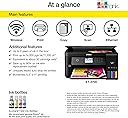
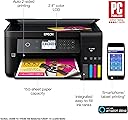
The Epson Expression ET-3700 EcoTank is a versatile all-in-one printer that combines high-quality printing, scanning, and copying capabilities with a cartridge-free design, offering up to 2 years of ink in the box. With a 150-sheet capacity and smart connectivity options, it's perfect for the eco-conscious professional looking to save time and money.


| ASIN | B074V4MQ3M |
| Additional Printer Functions | Scan |
| Best Sellers Rank | #788,676 in Office Products ( See Top 100 in Office Products ) #364 in Ink Tank Printers |
| Brand | Epson |
| Built-In Media | 2x bottles 502 Black (127 mL), 2x bottles each 502 Cyan, Magenta, Yellow (70 mL), CD-ROM for product setup, Expression ET-3700 EcoTank all-in-one, Power Cord, manual |
| Color | Black |
| Color Depth | 48 Bits |
| Compatible Cartridge | 502 Black Ink Bottle, 502 Cyan, Magenta, and Yellow |
| Compatible Devices | Laptops, PC, Smartphones |
| Connectivity Technology | Hi-Speed USB 2.0, Wi-Fi (802.11n only), Wi-Fi direct, Ethernet |
| Control Method | Voice |
| Controller Type | Amazon Alexa, Vera |
| Customer Reviews | 4.2 out of 5 stars 438 Reviews |
| Display Type | LCD |
| Dual-sided printing | Yes |
| Duplex | Yes |
| Global Trade Identification Number | 00010343936294 |
| Hardware Interface | Ethernet |
| Ink Color | Cyan, Magenta, Yellow, Black |
| Item Type Name | Epson Expression ET-3700 EcoTank Wireless Color All-in-One Supertank Printer with Scanner, Copier and Ethernet |
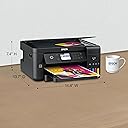
| Item Weight | 12.8 Pounds |
| Manufacturer | Epson |
| Maximum Copies Per Run | 99 |
| Maximum Copy Resolution Black and White | 2400 dpi or less |
| Maximum Copy Resolution Color | 2400 dpi |
| Maximum Media Size | 8.5 x 14 inch |
| Maximum Sheet Capacity | 150 |
| Maximum print Resolution Color | 4800 x 1200 optimized dpi |
| Model Name | ET-3700 |
| Model Number | ET-3700 |
| Model Series | Expression |
| Number of Ethernet Ports | 1 |
| Number of Trays | 1 |
| Other Special Features of the Product | Ethernet,Wireless |
| Paper Size | 8.5 inch x 11 Inches |
| Power Consumption | 12 Watts |
| Print media | Paper (plain) |
| Printer Connectivity Type | Hi-Speed USB 2.0, Wi-Fi (802.11n only), Wi-Fi direct, Ethernet |
| Printer Output Type | Color |
| Printer Type | Inkjet |
| Printing Technology | Inkjet |
| Processor Count | 1 |
| Resolution | 9600 |
| Scanner Type | Sheetfed |
| Special Feature | Ethernet,Wireless |
| Specific Uses For Product | home offices, small businesses, study rooms |
| Total USB 2.0 Ports | 1 |
| Total Usb Ports | 1 |
| UPC | 010343936294 |
| Unit Count | 1.0 Count |
| Warranty Type | Limited Warranty |
| Wattage | 12 watts |
S**A
Great printer/scanner/copier
Let me start by saying that i don't print in high volumes. Perhaps 10 pages a week. More some weeks and less others. But when I want to print, I want to do it now. I have had various HP printers and was getting frustrated with ink cartridges that seemed to dry up quickly. Combine that with the fact that we have 5 printers, a copier, a fax machine (who uses those any more?) and a scanner in the house and not a single one uses the same ink cartridge, the costs were outrageous. I looked into a replacement for my old HP printers and found this Epson EcoTank printer. This printer does everything I could possibly want. I easily print from my computers and phone by wifi. The edge to edge color printing of photos from my phone is very nice (I've only used plain bright white paper for photos and the quality is decent). Scanned documents to computer in PDF form to send via email - no problem. Setup was not difficult. Followed directions to the letter and everything worked. It did take about an hour. I'm still getting used to the menu options and after more use I'm sure it will be much easier. The only thing I'm trying to figure out now is how to set it up to scan to different computers, and I think it can scan directly to email. Did I mention that this thing comes with lots of ink? The box contained enough ink to fill each EcoTank, and an extra set of ink, one full size bottle of each color, Cyan, Magenta, Yellow and Black. A total of 8 bottles of ink. Overall I'm very pleased with this purchase. No need to purchase expensive ink cartridges and comes with lots of ink. Can print via wifi from phone/computer. Can print via direct connection from computer (must have or purchase a separate cable to do this) Can make copies (bye bye copier) Can scan to computer and probably to phone to email once I figure out how to set that up. (good bye scanner and fax machine) Output tray is a little flimsy feeling, but I have it in a location where that's not an issue. Not difficult to set up or operate - but a learning curve for more advanced features.
S**T
Very good printer for the price.
This ET 3700 is plenty good for home, small business, home business. Unless you want professional photos this is what you would need. Color and photos are really decent, but it's not designed to print professional photos. I love the ink bottle fills, no spill at all but I still use a q-tip to clean around the fill areas just incase a drop or 2 gets around the fill area. The ink that comes with this will exactly fill it to your top fill lines after you fill each one, printer will prime for 10 minutes then you can add the little bit of ink that's left in each bottle and it's right on upper fill mark. Because the ink is affordable I will only use Epson 502 to ensure exact ink designed for this printer. In the rating review it ask about touch screen clarity rating, yes it's clear , but it's an LCD screen that you use buttons with that's beside it, not a touch screen.Originally I bought the (Brother INKvestmentTank Inkjet Printer, MFC-J995DW XL) but it shot paper all over and never would finish it's set up after priming with 2 full sets of ink cartridges then the price shot up and they said they were out of stock,(returned).
A**R
Scanning set up is a Bitch
I first bought the 4750 unit that had a touch screen. This model does not and the screen is tiny. However, I have to admit we had a devil of a time to get the 4750 unit to scan. However once we figured it out, the printer is great. This model will print with ease. However, scanning is another matter. We finally gave up on trying to get it to function properly. Support is terrible in this area and we gave up on that as well. With the small screen and keypad on the printer, setting up the scan mode is very clumsy hard to read and not too great options nor clear instructions. Unless you have lots of patience and a computer wizard and scanning to email, etc is very important, I would advise staying away from this model. You would think after years of all in ones and email, Epson could provide some simple apps or programs that are very clear and easy to use to have scanning set up easy! Using the scanner anyway will few features. At least we got a PDF to the desktop. Then drag that into and email manually.
G**G
A Great Bargain since it includes a year's Supply of Ink
I needed a reliable, color printer which could fit under a shelf, with a front load paper option and my Epson ET-3700 Color All-in-1 printer fits the bill. It loads and prints paper from the from, very convenient for me in my limited shelf space. A lot of people think this printer is too pricey, but it supplies most home users (not business) with enough ink to refill all the ink containers twice or about a year's supply. Clearly this is superior to the old ink cartridges. Refilling containers is easy and not messy as I often found with old cartridges. In fact, the refill system has a dispensing system which will not allow ink to flow until the bottle is in place correctly and automatically stops when the container is filled. So, considering the cost of printing ink, I think this printer is a better bargain than most comparable printers. It does a beautiful job with printing and scanning (Don't know about FAX since I don't use that function).
S**T
Fantastic printer, one year in
We've had this printer for a year and it is working great. It is almost always connected to the wifi (and when not, its a router/extender issue). The print quality is great, even for photos. The ink has not yet run dry, and there are no nozzle alignment issues (after the initial alignment). For years we had a Canon PIXMA MX922 (Wireless Color Photo Printer with Scanner, Copier and Fax) and it was never really great. It sometimes didn't connect via the wifi (you couldn't find it on your device), the print quality wasn't great, the ink didn't last too long, and nozzles seem to get un-aligned after awhile. This Epson is totally different. It makes wireless printing easy, and has been reliable for the past year (and I hope for the upcoming several).
C**E
A+ for the huge ink capacity system; C- for much everything else.
REVIEW UPDATE: 24 April 2026 -- NEW SUBSTANTIAL ISSUE -- after buying a box of authentic Epson 502 ink refill bottles, both black and color, all supposedly the correct bottles for the model 3700 that I have, the bottle nipples don't seem to fit the intake keys on the ink tanks on the printer; when the 502 Black ink bottle is inserted into the tank key, it just sits there. No ink goes into the tank and the tank remains EMPTY. The 502 Color ink bottles have keys that don't even allow them to be inserted into the tank nipple -- they have the WRONG KEY!! Trying to print now returns an error message that says in order to print, FILL THE INK TANKS. So far, no amount of jiggling or trying to insert the Black bottle into the tank has worked -- all four tanks show no ink in them. The ink simply will not flow into those tanks. The Color ink bottles won't even fit the key at the top of the tanks. Mind you, the very box the Epson ink bottles come in says, these bottles fit my model 3700, yet the ink will hot go in the tanks. In short, this NEW problem has rendered the printer useless. It won't print, it won't copy. It is now basically a scanner and I must tell you, it was never any grate shakes as a scanner. The software was clunky -- very slow to scan a page and it was very user-unfriendly. When did it decide to die on us -- at TAX TIME! BTW, the box says,"Exclusive EcoFit bottle design...uniquely keyed for easy filling of each color." Yeah, if only that weren't a marketing LIE!! The black color bottle fits the tank keyed nipple, while the color bottles won't even fit -- the key TOTALLY does not fit the slot. REVIEW UPDATE: 17 Oct 2021 -- RESOLVED. You just let the printer "go to sleep'" it is the same as turning it off and it will wake up when a job is sent to it. Too bad it took almost a year to find this out and their worse than awful "tech support" couldn't tell me this. MUCH BIGGER PROBLEM: The red inkjet stopped firing a week ago. No matter how many times I ran the cleaning routine and then the DEEP cleaning routine, the red jet just won't fire even though the tank is full of red ink. In short, if there is no way to get this problem corrected (and it seems like there isn't -- no thing in the instructions that say you can replace the print head) any clogged inkjet renders the printer useless for color printing, of if it is the black nozzle, even worse. This is a pretty expensive investment for a printer that lasted two and a half years. The large tank idea only is a great innovation IF the printer itself lasts long enough to fill the tanks more than one time! Invent a printer where the print heads can be cleaned or easily replaced if they get clogged and they they'd have something. A printer isn't worth sheet if the print head clogs after in a few months. REVIEW UPDATE: 12 Dec 2020 OK -- I've lived with this printer now for over a year and there are a number of issues that have caused me to knock this down from the original 5 stars to 2 and 2 is being generous. 1) This printer goes to sleep after a set time (that you can determine) but incredibly, there is no way to wake it up except by physically walking over to the unit and pressing the ON button. Sending a print job won't wake it up; really? REALLY! So if you have this networked with others in your household or at work, every job that is sent to it, that person needs to get up from their computer/location and walk over to the printer to turn it on. It's absurd. And while I keep telling myself there must me some switch in the software or on the printer setup that will allow it to wake up when a job is sent to it (like every other computer on the planet), nope, there is not. And I have sent requests to Brother and their customer service which turns out to be pretty much non-existent. I haven't even been able to get them to say if it just doesn't have that ability one way or the other. They just ignore the question, which I can understand as it is so embarrassing for that to be left out of the system. 2) Although the display is a nice bright screen, it is NOT a touch screen, which means you need to press a set of 11 (that's right, 11!) mechanical buttons with symbols on them, which is located beside the display screen. You need to look at the display screen and then select the right symbol button to get the printer to do what you need it to do. 4 of the buttons are somewhat intuitive, the others look like hieroglyphic symbols which mean nothing. The entire human/machine interface is simply a mess. NOTHING is intuitive. PLUS, to add insult to injury, the buttons are NOT lit up and unless you have a bright light directly over the panel, the buttons are extremely difficult to see. Why the symbols on the buttons are not illuminate in a machine that has AC power or even why a small pilot light isn't provided on the panel itself to light up those buttons is just poor design. Also, talking about light, why not put a small pilot light in the paper bay so you can actually see the envelop guide device that you need to adjust when switching from paper to envelopes? 3) The computer application for the scanner is also totally user-UNfriendly. I have used many printer/scanners at work over the years, HP, Epson, etc. and the scanner programs to get a document scanned, in all of them was self-explanatory and totally intuitive -- you just needed to look at them and it was immediately apparent how to use them properly. Not so with this scanner application. To this day, I still have to go back and forth between screens trying to figure out how to scan a document and make it land in the folder where I need it on in my computer. They REALLY need to go back to the drawing board or just look at how HP or any other manufacturer does it. 4) Brother CS SUCKS. All I wanted to do was to buy an additional paper tray so I could have one for sheet paper and one for envelopes, so instead of having to remove the sheet paper, set the guides for envelopes, put in envelopes, reinsert the tray, I could just switch trays from the paper tray to the one that I set up with the envelopes already ready to go. No matter how many requests I made to Brother CS, I couldn't get them to give me the part number for the paper tray or a vendor where I could buy it. VERY frustrating and really completely unacceptable for a company supposedly one of the top contenders in the market. While I still are a big fan of the ink tank concept, Brother REALLY needs to step up and deal with these really significant shortcomings. ------------------------------------------------------------ ORIGINAL REVIEW: This is a concept I have always though should be the way printers should be designed, i.e., with refillable ink wells. I was so enamored of the idea that years ago I dove into the various after-market products that were available to, in one way or another, allow you to refill the ink cartridges themselves. One product I used consisted of bottles of color & black ink that sat outside the printer and had tubes that you had to snake into the printer and attach them to the cartridges. Ink would hopefully be syphoned into the cartridges. Unfortunately, none of these after-market ideas worked very well, or at least didn't work consistently, and some not at all. Plus, all of them were disasters waiting to happen; either the ink was just a tip of a bottle away from spilling all over everything or the bottled ink would get contaminated by air contact and the ink viscosity would be wrong and not flow, or in one way or another, ruin the printhead. And the reason I went through all this trouble (and had lots of color-stained fingers to prove how much trouble it was), is because to me, cartridges always seemed like one big corporate scam. They still do. When printers first came on the market, I remember they were priced in the $800 to $1000 plus range. Then it seemed the manufactures all realized they could make MUCH more money if they practically gave the printer itself away ($100 - $200 range) and kept the customer hooked on incredibly overpriced ink. And we all know that the ink is overpriced because we know what bottled ink for fountain pens used to cost...and still does. While Epson isn't free of guilt for partaking in the ink cartridge scam for years, at least this design allows the idea of refills to be back in play if a customer wants it and I was very happy that they have moved in this direction. And what I think the main plus in this design is, aside from the fact that it frees one from the dependency and addiction on having to purchase what at least I perceive to be super overpriced ink cartridges. This Epson design has made the ink refilling process nearly idiot-proof. It couldn't be easier -- break the seal on the ink "tank" as Epson calls the bottles of ink, insert it into a receptacle on the printer which is keyed so you can't accidentally put the wrong color into the wrong receptacle, the printer does the rest and lets you know when to take the bottle out while it does some magic "preparing" the ink for use. The whole process is quite intuitive and with clear instructions on the touch screen. Now as will all printers, the proof is in the printing and with this unit, pictures look spectacular with vibrant colors with even distribution of color without any streaks. But of course this is a new printer. My experienced with MANY printers in my office environment where we have half a dozen printers and of a variety of manufacturers, they all work fine for the first few months, some even for years, but ALL of them eventually stop printing, usually long before any other mechanical part fails. Printing gets blotchy or lines appear or other anomalies specifically related to printing, not to anything mechanical. We have to junk more printers that otherwise were working perfectly well except for print quality which deteriorated to unacceptable levels. Not a great thing for the reputation of this industry or for the landfills. With the dying printer that prompted this purchase, one of the colors just stopped printing, then a second, then nothing would print except black and no amount of "deep cleaning" could bring the colors back. All that to say, sure, this is working now, but let's see how this refilling ink experiment works in a year or two. At least in that year or two, I won't have spent hundreds of dollars in ink cartridges. Fortunately or not, the market is a fickle beast. Will refillable printers such as this Epson line catch on and become a staple in the arecinal of available printing tools? You can never tell about what the public will eventually determine because in the end it is indeed up to them. But for me, I love the idea and I love this printer. PS -- I haven't yet even used the other features (scanner, copier, FAX? -- who uses a FAX any more?) but I assume they scan and copy as well as the color printing.
W**C
Works Great & Economical to Operate
I have spent a lot more on printers over the years for professional looking documents with many of the more expensive ones not doing as good of a job as this one. I use it professionally. No, it's not top of the line for certain types of printing but the difference is negligible to the average observer of the material. It gets five stars for production at this price point comparing to other printers I've owned that cost around the same price or more. I run a lot of prints with at least half being color and this is very economical to run per page of print for a printer of this size and cost. It serves every need of scanning, and printing that I currently have. I am glad I bought it. It's easy to operate and learn the controls as well.
S**E
Some Good, Some Not-So-Good
I have mixed emotions about the printer - some things I love, some things I do not. The Good: - Love the lack of cartridges - the printer is easy and cheap to refill - Easy set up - Compact The Bad: - Has not always printed well over the network. It is often slow or doesn't work at all for no apparent reason (not sure if that is the printer or me, but I am tech savvy enough to know that it SHOULD be working) - Prints slowly, especially double sided. Even if I plug it in directly to avoid network errors, it is simply not fast. If you want doubled sided then it takes even longer. Even just two double sided pages can take about a 1 minute to print. Overall I would be hesitant to repurchase. I love not having to deal with cartridges, but for the price the printer seems to function somewhat poorly.
L**8
No more ink cartridges!
I have only had this printer for a couple of weeks now, so I can't speak to longevity, but at first blush this thing is a miracle. Print speed and quality are both as good as my old Canon, with slightly higher speed, and the Epson is quieter. The big selling point, however, is no more unconscionable waste with ink cartridges. Each colour has its own tank which you fill from ink bottles that are reasonably priced and contain many times the ink of normal cartridges.
G**H
Love this printer !
I've had this printer for a couple of months now. Print quality is very good. The printer is fast and I love the ability to print double sided without having to flip the paper over and feed it in again. The setup was very fast and easy, and now I can print from my iPad and iPhone as well as from laptop. Best of all, the 2 complete sets of ink bottles supplied with the printer will probably last me for years, as I am just a home user. This printer is awesome !
D**W
Starts printing in 3 seconds
1. Am expecting ink tanks to be a great money saver. 2. time to print start is about 3 seconds and a single page job finishes in about 10 seconds 3. Print quality is perfectly good. Very sharp and no smudges so far. 4. Couldn't get Ethernet connection going but it did not matter in the end; the wireless connection was easy and plenty fast.
E**T
MAKE SURE TO NEVER EVER TURN IT ON IT'S SIDE OR UPSIDE DOWN
Was all fine and dandy until I moved. During the move, the movers put the printer on it's side by accident. Not only was ink everywhere, but unfortunately, the ink got everywhere in the printer and was impossible to clean. There was no way to clean it out fully and I ended up having to buy a new printer. I consider this a design flaw as everyone is bound to move their printer around at some point when trying to get a jammed paper out or otherwise. Hidden on page 160 of the 219 page user manual is a page about transporting the printer. This should be written all over the printer given that your printer is absolutely ruined if you ever tilt it on it's side.
F**T
Worth it
I was in the market to upgrade my workforce 3620 as I homeschool and ink was costing me and arm and a leg. Found this baby and read the reviews and was impressed so I decided to give it a try. I am highly satisfied with the print quality and the ink capacity.
Trustpilot
2 weeks ago
1 month ago