Buy anything from 5,000+ international stores. One checkout price. No surprise fees. Join 2M+ shoppers on Desertcart.
Desertcart purchases this item on your behalf and handles shipping, customs, and support to South Korea.
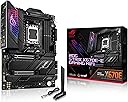
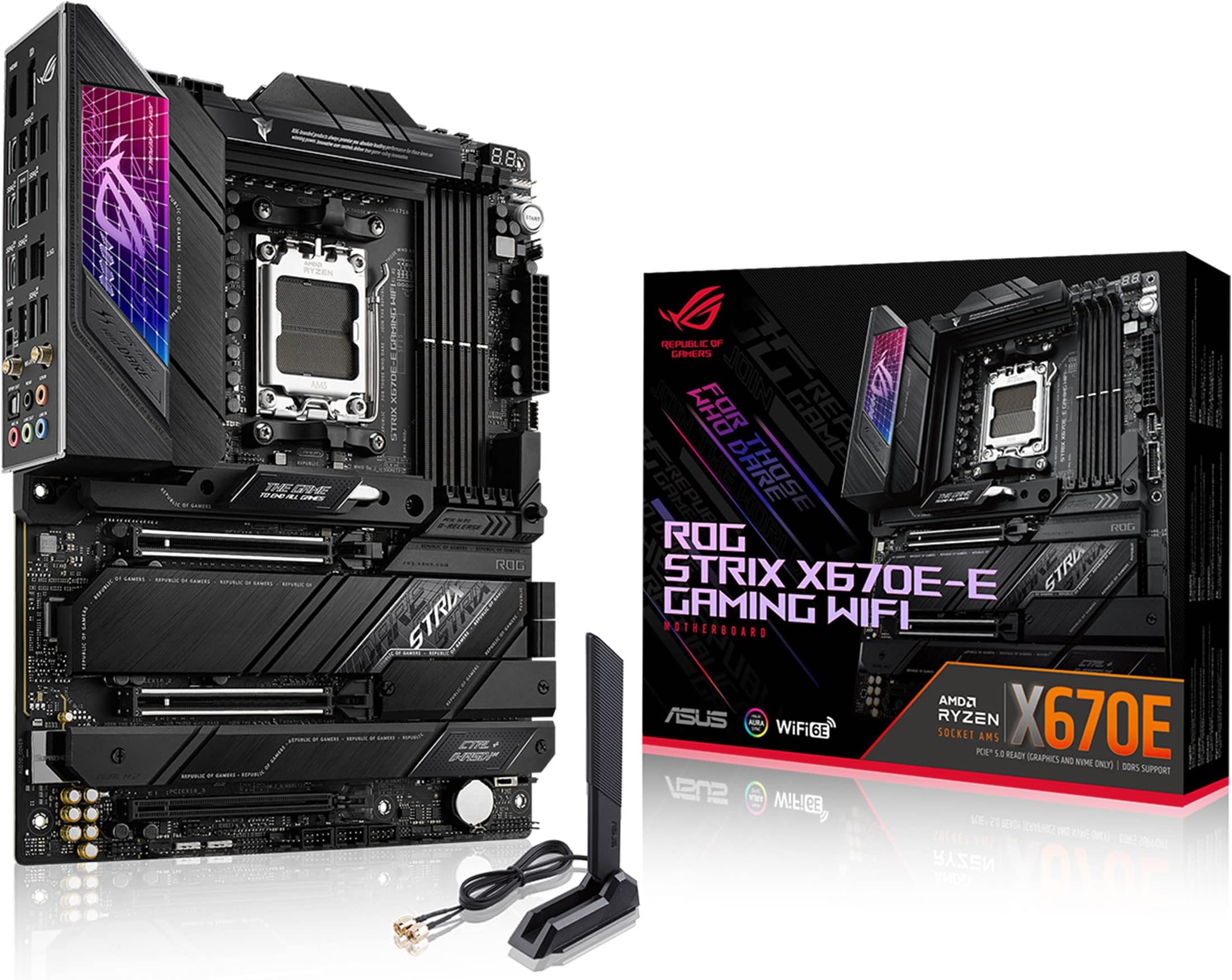
🔥 Dominate your build with ASUS ROG STRIX X670E-E — power, speed, and style in one sleek package!
The ASUS ROG STRIX X670E-E GAMING WIFI motherboard is a premium ATX board designed for AMD Ryzen 7000, 8000, and 9000 series processors. Featuring an 18+2 power stage design, PCIe 5.0 support, four M.2 slots with advanced cooling, WiFi 6E, and Intel 2.5 Gb Ethernet, it delivers top-tier performance and connectivity. Its robust thermal design and DIY-friendly features like Aura Sync RGB and BIOS FlashBack make it ideal for gamers and professionals seeking a future-proof, high-performance platform.


| ASIN | B0BDTHQTJV |
| Best Sellers Rank | #140 in Computer Motherboards |
| Brand | ASUS |
| Built-In Media | Laptop, Accessories |
| CPU Model | Ryzen 7 |
| CPU Socket | Socket AM5 |
| Chipset Type | AMD X670E |
| Compatible Devices | Personal Computer |
| Compatible Processors | AMD 1st Gerenration Ryzen |
| Customer Reviews | 4.2 out of 5 stars 617 Reviews |
| Global Trade Identification Number | 00195553891707 |
| Graphics Card Interface | PCI Express |
| Item Dimensions L x W x H | 10.8"L x 3.1"W x 13.5"H |
| Item Type Name | Computer motherboard |
| Item Weight | 4.3 Pounds |
| Main Power Connector Type | ATX |
| Manufacturer | ASUS |
| Memory Clock Speed | 6400 MHz |
| Memory Slots Available | 1 |
| Memory Storage Capacity | 64 GB |
| Mfr Part Number | ROG STRIX X670E-E GAMING WIFI |
| Model Name | ROG STRIX X670E-E GAMING WIFI |
| Model Number | ROG STRIX X670E-E GAMING WIFI |
| Number of Ethernet Ports | 1 |
| Number of Ports | 9 |
| Platform | Windows 10 |
| Processor Socket | Socket AM5 |
| RAM Memory Technology | DDR5 |
| Ram Memory Maximum Size | 128 GB |
| S/PDIF Connector Type | Optical |
| System Bus Standard Supported | Serial ATA/600 |
| Total Number of HDMI Ports | 1 |
| Total PCIe Ports | 3 |
| Total SATA Ports | 4 |
| Total Usb Ports | 13 |
| UPC | 195553891707 |
| USB 2.0 | 2 |
| Warranty Description | 3 years |
R**Y
Great Mobo at a great price if trying Resale
I have to say considering I went with the "Sold by Amazon Resale and Fulfilled by Amazon" unit at half price, I am blown away. I'm sure some of the returned units aren't always functioning 100% but this one I got is absolutely perfect. No booting issues, got into BIOS pretty easily and Windows installed right after. I would say if you aren't in a rush and want to try the "resale" units absolutely go for it. So for the money it was an absolute steal! The number of USB ports on this Mobo is insane and one of the reasons I went with it. The overall quality is amazing, love the design and patterns on it. One beautiful looking Mobo. So far so good, paired with a 7800X3D, WD SN850X SSD and Kingston 6000mt RAM the computer is incredibly fast. Stability wise: First boot it didn't like both sticks of RAM but after removing one, booting into BIOS and then installing Windows I was able to add the second stick of RAM and stable after that running both sticks. Few of the stand out features have to be the RGB and all the heat sinks placed all over the board. Really a top notch and high end Mobo. I absolute recommend it. And again the Resale board I got was absolutely PERFECT.
M**L
Excellent motherboard with 256GB RAM support
Tested with 7950x3d and 256 GB DDR5 config (64GB x4 Crucial pro sticks). Runs stable at 5200 Mhz using EXPO II. Very easy to flash the latest BIOS, the 7-segment display is very useful while debugging. The power switch is also very handy for my test bench config. Lots of USB ports. Plenty of expansion slots, and hefty heatsinks to keep PICe nvme drives cool. Note on the PCIE x16 slots- if using both slots they will switch to PCIE x8/x4 modes.
S**A
Unleash Your Ryzen Beast: ASUS ROG Strix X670E-E Gaming Motherboard Review
The ASUS ROG Strix X670E-E Gaming motherboard is a powerhouse designed to complement the might of AMD's Ryzen 7000 series CPUs. I paired mine with the Ryzen 9 7950 X3D CPU, and the results were nothing short of spectacular. Firstly, let's talk about ease of setup. Flashing the BIOS was a breeze, thanks to ASUS's user-friendly interface. Even for those unfamiliar with the process, ASUS provides clear instructions, ensuring a smooth experience. This is crucial, especially when new Ryzen CPUs launch, as seamless BIOS updates are essential for optimal performance. The motherboard's Socket AM5(LGA 1718) compatibility ensures future-proofing, making it a wise investment for enthusiasts looking to upgrade down the line. Upgrading the CPU based on AM5 is as simple as swapping out the old for the new, minimizing downtime and maximizing productivity. Performance-wise, the ROG Strix X670E-E Gaming motherboard shines. With robust power delivery and efficient thermal management, it effortlessly handles the demands of high-end gaming and content creation. Features like PCIe 5.0 support and advanced connectivity options further elevate the gaming experience, providing the bandwidth needed for next-gen GPUs and peripherals. The aesthetic design is quintessentially ASUS ROG—sleek, stylish, and attention-grabbing. RGB lighting accents add a touch of flair, customizable to suit any build theme. Additionally, ASUS's Aura Sync technology ensures seamless synchronization with other compatible components, creating a visually stunning gaming rig.
P**K
All the negative reviews on this board are accurate
X670E-E Purchased brand 1 year after launch about 2 weeks after X870 launched. Tried to save $60. I have been building custom PC's and custom loops for 10 years. Lot's of experience & lots of extra parts in my shop for troubleshooting. --This build-- X670E-E 7800X3D G. SKILL 6000mhz CL30 32GB 3090 FE 1200W CORSAIR PLATINUM RATED PSU SAMSUNG SATA SSD 2.5TB T7PRO PCIe 5.0 M.2 SSD 2GB T300 PCIe 4.0 M.2 SSD 2GB PSU, GPU & Samsung SSDs were removed from a perfectly normally operating machine and had been in working order for multiple years prior to this review. Assembled on an open air test bench (cardboard edition) to test components before constructing a new hardline custom water loop. I started off with a Corsair Dominator RAM kit of the same specs. 4800mhz RAM and stock everything else other than disabling Secureboot and making EUFI the windows shell mode. Updated BIOS to 2404 on first boot. Installed Windows 11 with all necessary drivers installed from a USB on first login and disabled Bitlocker. Ran 30 min of Cinebench R23 and 30 min Prime 95 without crashing, albeit there were a few seemingly small problems. Occasional screen flicker through mobo HDMI & system was hanging a little bit here and there but it did not crash. Looking back I think it crashed while installing Windows, but it restarted without me noticing and resumed right where it left off so I thought nothing of it. Set up rest of PC and built loop. After full completion I booted it up, only to get stuck in a boot loop. Had to hard shut down but eventually got back into Windows. This is when it began to BSOD anywhere from 5 min to 1 hour of uptime. I was getting BSOD codes from so many different random reasons I didn't know where to begin looking. It was like a piñata of BSOD codes. Troubleshooting Steps Taken 1. Swapped RAM DIMM Slots 2. Ran off one stick of RAM. Tried both sticks. 3. Changed RAM kit to G. Skill of same specs. Tried single stick operation. 4. Tried new PSU (confirmed 100% operational) 5. Tried new GPU (confirmed 100% operational) 6. Tried installing Windows 11 on 4 different drives. 2 of which are 100% operational. I did not have another AM5 CPU at the time to slot in. Generally CPU would be the least likely item to be deflective so I will not test with another confirmed operational chip until everything else has been ruled out to prevent the possible destruction of a perfectly good AM5 chip due to ASUS having terrible QA. Swapped to an X870E-E board and all problems went away. I had done a Cinebench R23 run on the X670E-E that scored 15,000. Scored just shy of 18,000 on the X870E-E. That is way too much of a gain for it be a mobo generational improvement. Especially when the X670 and X870 are using the same exact chipsets. From my tests and other users similar issues with the same board over the entire lifetime of this boards manufacture I was able to deduce that ASUS X670 boards have inferior RAM engineering and trace setups. This led to instable memory issues, even on board approved kits. The RAM itself was completely fine so it would pass Memtest. Also the Intel LAN and WiFi on this board are absolute trash and should be avoided like the plague. Just spend the extra $60 or w.e. it is right now and get the X870E-E if you want to be fancy or go with a B650 if you want to save money. Don't be like me and try to be slick going somewhere in between. ASUS please get your QA act together. If I had issues with the X870 it was going to be the last thing I ever purchased from your company.
D**L
Excelente compra en 2026 gracias a la plataforma AM5
Es increíble como una board de 2022 ofrezca una calidad impecable entre alto rendimiento, materiales premium y gran estabilidad. Me pasé de Intel a AMD con la plataforma AM5 y tengo u 9800 x3d montado en ella funcionando perfectamente con memorias a 6100 mhz usando AMD EXPO que es el Overclock para las memorias y todo impecable. Solo hay que actualizar para tener montado los ultimos procesadores. En cuanto a conectividad no te puedes quejar: varios puertos usb 3.2 y 3.0 , 4 ranuras para NVME de los cuales 3 con PCI E 5. Lo unico es que tiene wifi 6 en vez de 7 pero yo no tengo un router con wifi 7 y no me hace falta, por lo que lo veo excelente , ademas se usa la conectividad lan a 2.5. Esta board es una excelente compra incluso ahora en 2026.
A**R
Lots of PCIe 5 lanes for the future
The amount of PCIe 5 lanes this board offers is the reason I bought it despite the fact I don’t have and currently don’t plan to get any PCIe 5 devices but I was looking at the next 4 to 6 years with this board and probably 2 processor upgrades during that time. First thing I did was update the bios as Asus did have an issue with 7800x3d that could kill the cpu. I didn’t both to look at what version was on it out of the box I just updated it first thing. Another reason I bought this board is I like to overclock but the 7000 series doesn’t use a lot power so on AMD this is probably over kill in power delivery. One of the things I wasn’t aware of when I upgraded to AM5 is it doesn’t currently support 4 sticks of DDR5 running at there expo settings. At can’t get my 4X16 expo 6000mt sticks to even run at stock 3600mt but that is likely the ram sticks not being matched well even though they are the exact same sticks. I had initially accidentally ordered sticks meant for intel systems. When I had issues running 4 sticks of G.Skill trident x 5 AMD expo sticks (two no problem) I decided to see what would happen if I used the T-Force Delta RGB kit which had the same CL30 latency of the G-skill. They work at there rated XMP speed of 6000mt CL 30 with zero problems. I’m pretty sure that was just luck but I’m very happy with the results. It’s probably not worth the hassle to run 4 sticks simply for duel rank instead of single rank. It is a little faster but not noticeable under normal use but if your pushing the system why not but again this is NOT supported by AMD AM5 at the time of this writing so it may not work without spending money on different sets of memory until you get 4 sticks that will run the overclock setting. I have no complaints about this board and would buy it again if I was building another system.
S**Y
Overall seems great but have to clear CMOS to get it to boot
This board certainly seems to run great once booted. However I have to clear CMOS to get it to boot. If I don't clear CMOS the board immediately reports a blocking 0d QLed Error. Once I clear CMOS I can boot to bios and then to Windows. Asus Support has done nothing but give me the run around and promise to get back to me but then does not. So, seems like a good board once booted. Support people are friendly but overall resolution for this issue is terrible. Fortunately clearing CMOS is not hard with the CMOS button.
T**V
Very nice board. Plenty of USB available and m2 slots.
Great board. Love the bios flash. Had to use it to get it to boot with my AMD ryzen 9800x3d, which scared me. It has a plethora of USB ports which is great for me. The latches on its x4 m2 slots are great and include heat sinks. Be careful of using all 4 unless you don't mind the lane share with the GPU/pcie (one shares a lane so able to use 3 with no issues). The latch release also great for the pcie slot.
X**X
Installation is successful
Bought this board because all of its extra PCIe lane (I have 3 NVME drives and 3 SATA drives), and this model allows multiple slots to run at full speed. * Zen 5 CPU (9000) works right out of the box without any BIOS update. * G.SKILL Trident 6000Mhz 32x2 kit has EXPO enabled without any issue * plenty of USB ports that I don't think I'll run out again The most helpful feature is the BIOS POST code display - when system first boot up or right after I enabled EXPO, nothing come up on the monitors, but I wasn't panicking because the code shows it's just doing memory training
M**I
Works fine with no issues
Works fine with no issues at all My build is Ryzen 9 7950x3d Gskill trident z 32g 6000hrz cl30 Rtx 4090 Just update the BIOS to the latest version
J**A
No compren productos usados
La compré para armar mi pc y recién la armé pero salió defectuosa tarda en encender ya actualice bios y todo probé con las versiones más estables y me sigue generando problemas y lo peor del caso que ya no puedo hacer devolución :(
J**S
Seems good but…..
Very buggy, the board itself is stating that there is a memory error, however the system information and BIOS, seem to say everything is ok. A lot of features on this board, but probably better off going for the MSI equivalent.
M**M
All fine
For Ryzen 9800x3d need to update BIOS using USB stick
Trustpilot
1 month ago
1 day ago